
Proposal: World-space UI and 3D text
Milestone: Gameplay toolkit (G11) · Status: ⬜ planned ·
Depends on: M8 game UI (RmlUi, VulkanUiRenderer), canvas text
(ADR 0118: Font), M6 physics (occlusion and line-of-sight rays) · Related:
Rendering features (G6.3 billboards), Localization,
Haptics and input glyphs (G12: prompt glyphs), Accessibility (G14:
UI scale), Editor (stand-in data)
Problem
Section titled “Problem”Games put UI in the world all the time: shop signs, damage numbers, nameplates and health bars over enemies, “press E” prompts, waypoints that stick to the screen edge, and terminals the player clicks. The engine has text and UI only on the screen:
- No 3D text.
Fontrasterises glyphs into 512 px atlas pages per size and outline (MainframeEngine/Src/Text/Font.cs:24-27,:152-187) and draws only through canvas items (Font.Drawis internal,:104;CanvasItem.DrawString,MainframeEngine/Src/Scene/Canvas/CanvasItem.cs:369). It is single-line with no fallback fonts (Font.cs:19), so CJK text fromTrshows missing glyphs. The only text node isLabel2D(MainframeEngine/Src/Scene/Nodes2D/Label2D.cs:12). - The nearest 3D node is
Sprite3D: a textured quad with no billboard mode and one draw per sprite (MainframeEngine/Src/Scene/Nodes3D/GeometryInstance3D.cs:169-177). Billboards are planned as a material mode in G6.3 (rendering-features.md, “Billboards”). Materials have no depth-test switch and no fixed-screen-size mode:MaterialRenderStateis alpha, cull and double-sided only (MainframeEngine/Src/Rendering/Resources/Material.cs:115-127). - No world → screen call on
Camera3D. It has the inverse,ProjectRay/ProjectRayOrigin/ProjectRayNormal(MainframeEngine/Src/Scene/Nodes3D/Camera3D.cs:90-114), but noUnprojectPosition. The projection exists twice in private code:GizmoProjection.TryProject(MainframeEngine/Src/Rendering/Gizmos/GizmoProjection.cs:8) and the editor’sEditorCamera.Project(MainframeEngine.Editor/Src/Viewport/EditorCamera.cs:234). - UI is screen-only. A
UiLayeris “a screen-space UI layer” sized to the framebuffer or itsRegion(MainframeEngine/Src/UI/UiLayer.cs:31-42;UiServer.cs:553-556). Every visible context renders into one command list (UiServer.cs:689-708), whichVulkanUiRendererreplays into swapchain-sized layers inIOverlayRenderer.RecordOffscreen(MainframeEngine/Src/UI/Rendering/VulkanUiRenderer.Replay.cs:97-131). That hook runs insideBeginOverlayPass, after the scene pass has ended (MainframeEngine/Src/Rendering/Vulkan/IOverlayRenderer.cs:10-15), so the scene cannot sample a UI image in the same frame. M8 lists world-space panels as a non-goal (game-ui.md → Known issues). - Many small documents do not scale. Data model names are unique per layer (
UiDocument.cs:141), so 100 copies of one nameplate document in one layer collide on their model name. The shim cannot create or clone elements (the only structural call isElementSetInnerRml,MainframeEngine/Src/UI/Rml/RmlNative.cs:356; “the binding cannot create elements”, game-ui.md → Tooltips). Moving an existing element is cheap:RmlElement.SetPropertytakes spans (RmlElement.cs:179). - 3D materials cannot show render targets.
Texture2D.FromViewportserves canvas items only (MainframeEngine/Src/Rendering/Resources/Texture2D.cs:249-258).TextureGpu.Updatedecodes CPU pixels (MainframeEngine/Src/Rendering/Meshes/MeshGpuResources.cs:221-246), and a viewport texture throws “has no CPU pixels” (Texture2D.cs:350-351), which is logged as “cannot be uploaded”. ASubViewporton a monitor mesh does not work either, although itsColorImageexists (MainframeEngine/Src/Scene/SubViewport.cs:128). - Input reaches UI only by window position. Mouse events go to layers in window pixels (
UiServer.cs:934-985,:1159-1177) and skip the UI entirely while the mouse is raw or captured (:923-932), which is the normal state of a first-person game. Object-ID picking finishes a few frames later on the GPU (Servers/RenderServer.cs:928-945), which is too late for hover. The physics rayPhysicsDirectSpaceState3D.RayCastis synchronous and allocation-free (MainframeEngine/Src/Physics/3D/PhysicsDirectSpaceState3D.cs:47).
What G11 builds on: frame servers run after the transform flush (MainframeEngine/Src/Scene/SceneTree.cs:366-372), so
the UI server sees final positions. RenderServer.RenderOffscreen runs before the scene pass
(MainframeEngine/Src/Core/Engine.cs:559-562), which is the slot panels need. DrawWorld draws non-batched visuals
around the opaque batch by RenderPriority, then the transparent batch (Servers/RenderServer.cs:890-925). Lit
shaders fog through applyFog (MainframeEngine/Content/Shaders/include/fog.slang:43).
Label3D(Godot’s names and defaults): one or more lines of text in the scene, as a billboard or a fixed quad, with outline, alignment, width and autowrap. Options: fixed screen size, depth test off, fog. All labels of a world are batched (one draw per atlas page and pipeline). Translated throughAtr; fallback fonts for CJK.UiMarker3D: RmlUi on a screen layer, placed at a 3D point every frame, for nameplates, health bars, interaction prompts and waypoints. Distance fade and scale, occlusion, clamp to the screen edge with an angle for arrows. Colours stay exact because markers draw after the tonemap with the HUD. 100 markers cost ≤ 0.3 ms CPU and 0 B per frame.UiPanel3D: a full RmlUi context rendered into a texture before the scene pass and shown on a quad or mesh. Input comes from the mouse ray, a crosshair (raw mouse) or code (VR hands, NPCs). Focus, keyboard and gamepad navigation work inside the panel.Camera3D.UnprojectPosition/IsPositionBehind(Godot’s), and GPU-sourced textures on 3D materials. The second also makesSubViewport.GetTexture()work on meshes.- Editor support (icons, picking, panels previewed with stand-in data) and a Demo
world_uiscene.
Non-goals
Section titled “Non-goals”- Shaping beyond kerning, right-to-left text, ligatures (the same limits as canvas text and RmlUi, M9).
- VR-specific UI (laser pointers, curved cylinders as a primitive). The manual pointer API lets a VR layer drive panels.
- Lit or shadow-casting text. Labels are unshaded and cast no shadows in G11.
- Screen-space reflections or refraction of panels; panels in sub-viewport worlds beyond the first rendering view.
- Replicating markers or panel state over the network. Panels are local UI; games replicate their own data.
Design
Section titled “Design”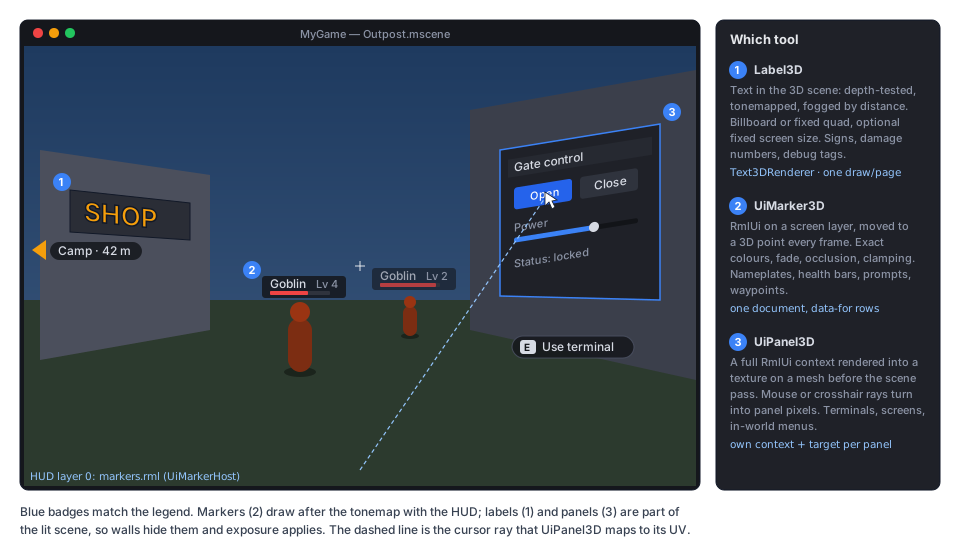
Choosing a tool
Section titled “Choosing a tool”Label3D | UiMarker3D | UiPanel3D | |
|---|---|---|---|
| Drawn | in the scene pass (HDR, tonemapped, fog) | after the tonemap, in a screen UiLayer | in the scene, from a per-panel texture |
| Hidden by walls | depth test (optional) | physics occlusion (optional) | depth test |
| Size | world units, or fixed pixels | dp, optional distance scale | world units |
| Content | plain text | any RML (one host document) | any RML (own context) |
| Input | none | none (prompts only) | mouse, crosshair, code |
| 100 instances | one draw per page | one document, one list binding | not intended (≤ 8 rendered per frame) |
Code layout
Section titled “Code layout”| Type (all new unless noted) | Where | Role |
|---|---|---|
Camera3D.UnprojectPosition, IsPositionBehind, GetFrustumPlanes (new members) | Src/Scene/Nodes3D/ | world → framebuffer pixel, behind test, frustum culling |
Texture2D.FromGpuSource (internal), TextureGpu external path (changed) | Src/Rendering/ | 3D materials sample a GPU image (panels, sub-viewports) |
TextLayout, GlyphQuad, Font.Fallbacks (new member) | Src/Text/ | Multi-line layout into caller spans; fallback faces |
Label3D : VisualInstance3D | Src/Scene/Nodes3D/ | The text node |
Text3DRenderer + Content/Shaders/Text/text3d.slang | Src/Rendering/Text/ | Batching, culling, sorting, glyph atlas uploads, object IDs |
UiMarker3D : Node3D, UiMarkerHost : UiDocument + Content/UI/markers/ | Src/UI/World/ | Screen-anchored markers |
IUiContextHost (internal), UiPanel3D : GeometryInstance3D | Src/UI/, Src/UI/World/ | Context owners; the panel node |
IPreSceneRenderer, IVulkanContext.AddPreSceneRenderer (new member) | Src/Rendering/Vulkan/ | Offscreen work before the scene pass |
Camera3D projection
Section titled “Camera3D projection”public partial class Camera3D{ /// <summary>Framebuffer pixel (top-left origin) of a world point (Godot's unproject_position).</summary> public Vector2 UnprojectPosition(Vector3 worldPoint); public bool IsPositionBehind(Vector3 worldPoint); // behind the near plane public bool IsPositionInFrustum(Vector3 worldPoint); public void GetFrustumPlanes(Span<Plane> planes); // 6 planes, for culling without allocation}They use the same synced PerspectiveCamera as ProjectRay (no TAA jitter) and GizmoProjection.TryProject’s math.
The editor’s EditorCamera.Project keeps its own copy (it has no Camera3D).
Label3D
Section titled “Label3D”[EditorIcon("letter-t", Family = EditorIconFamily.Space3D)]public class Label3D : VisualInstance3D{ [Export(Translatable = true)] public string Text { get; set; } = ""; [Export] public Font? Font { get; set; } // null = the engine's Lato Latin (ContentPaths.Resolve) [Export(Range = "1,256,1")] public int FontSize { get; set; } = 32; // atlas raster size, px [Export(Range = "0.0001,1,0.0001")] public float PixelSize { get; set; } = 0.005f; // world units per px [Export] public Color Modulate { get; set; } = Colors.White; // sRGB [Export(Range = "0,127,1")] public int OutlineSize { get; set; } = 12; // Godot's units [Export] public Color OutlineModulate { get; set; } = Colors.Black; [Export] public LabelBillboard Billboard { get; set; } // Disabled, Enabled, FixedY [Export] public bool FixedSize { get; set; } // constant on-screen size: 1 label px = 1 framebuffer px [Export] public bool NoDepthTest { get; set; } // drawn over the scene (still below the screen UI) [Export] public bool DoubleSided { get; set; } = true; [Export] public bool Fog { get; set; } = true; [Export] public LabelAlphaCut AlphaCut { get; set; } // Disabled (blend, sorted), Discard (depth-writing) [Export] public HorizontalAlignment HorizontalAlignment { get; set; } = HorizontalAlignment.Center; [Export] public VerticalAlignment VerticalAlignment { get; set; } = VerticalAlignment.Center; // new enum [Export] public float Width { get; set; } = 500; // px, used by autowrap and Fill [Export] public bool Autowrap { get; set; } // also Godot's LineSpacing, Uppercase, Offset (px) [Export] public float VisibilityRangeEnd { get; set; } // 0 = always; fades over the last 10 %
public Aabb GetAabb(); // local bounds (editor focus, culling) protected override void OnReady() => ApplyText(); // shows Atr(Text) protected override void OnLocaleChanged() => ApplyText();}-
Layout. A new internal
TextLayout.Layout(Font, ReadOnlySpan<char>, in TextLayoutOptions, Span<GlyphQuad>)splits lines at\n, wraps words inWidthwhenAutowrapis on, aligns, kerns, and writes oneGlyphQuad(atlas page, source rectangle, pixel rectangle) per visible glyph. It returns the number of quads it needs, so a caller retries with a bigger pooled buffer and steady state allocates nothing.Font.DrawandLabel2Dmove onto the same code, so canvas text gains multi-line output at no cost.Label2Dkeeps its single-line behaviour unless\nappears. -
Fallback fonts.
Font.Fallbacks(aFont[]) is searched whenGlyphIndexreturns 0. When a label has no explicit fallbacks, the label loads the faces of the current locale chain from theFontFallbackTablethat RmlUi already uses (Localization). Fallback glyphs go into the primary font’s atlas pages. -
A glyph run is retained per label. It is rebuilt only when the text, font, size, outline, width or locale changes. An outline is a second run drawn first, from the atlas entries with an outline (as
Label2Ddoes). -
Rendering.
Label3Dregisters in a newWorld3D.Labelslist. InPrepareFrame,Text3DRenderer.Prepare:- culls each label against the frustum (bounds are padded for
FixedSize) and itsVisibilityRangeEnd; - sorts blended labels back to front by their origin, using preallocated key and index arrays;
- writes one instance per glyph (position, size, UV, colour, label index) into a grow-only, per-frame-slot host-visible buffer, and one label record per label (model matrix, flags, pixel size).
DrawWorldthen draws the depth-tested labels afterDrawTransparent, and theNoDepthTestlabels after everything else. Each label is drawn with an instanced quad (four vertices fromSV_VulkanVertexID), one draw per atlas page and pipeline. There are eight pipelines (depth test × blend/discard × cull) throughIVulkanContext.Pipelines. - culls each label against the frustum (bounds are padded for
-
Shader (
text3d.slang, compiled and committed like every engine shader). The vertex stage builds the basis from the frame’s inverse view rotation for billboards (FixedYkeeps the label’s up axis). ForFixedSize, it scales bydepth × 2 tan(fov/2) / viewHeight. The fragment stage samples coverage, multiplies by the linearised colour, and appliesapplyFogwhen fog is on.Discardlabels write depth with a 0.5 threshold. -
Atlas uploads. One
GpuTextureper font page; dirty rows go throughIVulkanContext.Uploadsat frame start, so a new glyph never re-creates the texture (Texture2D.SetPixelswould). -
Colour and post. Labels are scene geometry: exposure, tonemap and grading apply, as in Godot. A
#fffffflabel is white only at exposure 1 (open question 2). Labels are drawn after the depth prepass, so they write no motion vectors and behave like other blended surfaces under TAA. -
Object IDs.
Text3DRenderer.DrawObjectIdsdraws the glyph quads with the label’sId, so picking finds labels.
UiMarker3D and UiMarkerHost
Section titled “UiMarker3D and UiMarkerHost”A marker is a 3D point. The host is one document on a screen layer that draws every marker of its viewport as a row
of a data-for list. This avoids per-marker documents, model-name clashes and element creation in the shim.
[EditorIcon("map-pin", Family = EditorIconFamily.Ui)]public class UiMarker3D : Node3D{    [Export] public string Kind { get; set; } = "nameplate";     // the row template: data-if="m.kind == 'nameplate'"    [Export(Translatable = true)] public string Text { get; set; } = "";    [Export(Translatable = true)] public string Subtext { get; set; } = "";    [Export(Range = "0,1,0.01")] public float Value { get; set; } = 1f;   // health, progress    [Export(File = "*.png,*.svg")] public string Icon { get; set; } = "";    [Export] public Vector3 WorldOffset { get; set; } = new(0, 2, 0);    [Export] public Vector2 ScreenOffset { get; set; }           // dp    [Export] public float MaxDistance { get; set; } = 50;        // hidden beyond    [Export] public float FadeDistance { get; set; } = 5;        // fades over the last metres before MaxDistance    [Export] public bool ScaleWithDistance { get; set; }         // between MinScale and 1, reference ReferenceDistance    [Export] public float ReferenceDistance { get; set; } = 10;    [Export(Range = "0.05,1,0.01")] public float MinScale { get; set; } = 0.5f;    [Export] public MarkerOffscreen Offscreen { get; set; }      // Hide, ClampToEdge    [Export] public float EdgeMargin { get; set; } = 32;         // dp    [Export] public MarkerOcclusion Occlusion { get; set; }      // None, Physics    [Export(Flags = true)] public uint OcclusionMask { get; set; } = CollisionLayers.All;    [Export(NodeType = typeof(UiMarkerHost))] public NodePath Host { get; set; }        // empty: the viewport's first host    [Export(NodeType = typeof(UiDocument))] public NodePath TargetDocument { get; set; } // element mode (below)    [Export] public string TargetElementId { get; set; } = "";
    [Signal] public event Action? ScreenEntered;                 // also fired on un-occlusion    [Signal] public event Action? ScreenExited;
    public Vector2 ScreenPosition { get; }                       // layer pixels, after clamping    public bool IsOnScreen { get; }    public bool IsOccluded { get; }    public float Distance { get; }    public float EdgeAngle { get; }                              // degrees, 0 = right; for edge arrows}
[EditorIcon("map-pins", Family = EditorIconFamily.Ui)]public class UiMarkerHost : UiDocument // Source defaults to Content/UI/markers/markers.rml{ [Export(NodeType = typeof(Camera3D))] public NodePath Camera { get; set; } // empty: the layer viewport's active camera [Export] public bool SortByDistance { get; set; } = true; // nearer markers draw on top [Export(Range = "1,256,1")] public int OcclusionRaysPerFrame { get; set; } = 16; [Export] public float OcclusionFadeSeconds { get; set; } = 0.15f; public IReadOnlyList<UiMarker3D> Markers { get; }}-
The
markersmodel. InOnReady, the host bindsBindList("markers", rows, MarkerRowType). The rows are a preallocatedList<MarkerRow>of structs withx,y(layer pixels),scale,opacity,visible,edge,angle,distance,kind,text,subtext,valueandicon. Strings are the markers’ own (translated) references, so filling a row allocates nothing. The default document styles four kinds (nameplate,health,prompt,waypoint) on abody.hud; a game copies it or pointsSourceat its own document:<div class="marker" data-for="m : markers" data-visible="m.visible"data-style-transform="'translate(' + m.x + 'px, ' + m.y + 'px) scale(' + m.scale + ')'"data-style-opacity="m.opacity" data-class-edge="m.edge"><div data-if="m.kind == 'nameplate'" class="nameplate">{{ m.text }}<progress data-attr-value="m.value"/></div><div data-if="m.kind == 'waypoint'" class="waypoint">{{ m.text }} · {{ m.distance | format(0) }} m</div></div> -
Per frame (in
UiDocument.PrepareFrame, which runs just beforecontext.Update,UiServer.cs:674; it becomes an internal virtual thatUiMarkerHostoverrides): for each marker, the host reads the global position plusWorldOffset, projects it withUnprojectPosition, maps it into the layer’s region, then applies distance hide/fade/scale. Off-screen and behind points are clamped to the margin rectangle along the ray from the screen centre (EdgeAngle). Rows are sorted by distance in place with a static comparer, and the host dirtiesmarkersonce. Positions use atranslatetransform, so layout is not redone per frame; G11.4 measures this againstleft/topbefore it is final (open question 3). -
Occlusion (
Physics). Each frame the host casts up toOcclusionRaysPerFramerays from the camera to the markers that need it, round robin, throughGetWorld3D().DirectSpaceState.RayCast. The ray excludes the marker’s nearestCollisionObject3Dancestor. A hit hides the marker by fading its opacity overOcclusionFadeSeconds, so a ray that flickers through foliage does not blink. 100 markers at 16 rays per frame are re-checked every 7 frames. Depth-buffer occlusion is open question 5. -
Element mode. With
TargetDocument+TargetElementIdset, the marker does not take a row. It moves that element directly withSetProperty("transform", …), formatted into a stack buffer. Use it for a single rich widget, such as a boss bar that follows the boss. -
Split screen. Each player’s HUD layer has a
Regionand its own host whoseCamerais that player’s camera. -
Markers translate
Text/SubtextthroughAtrinOnReadyandOnLocaleChanged. The host’s fonts follow the RmlUi locale fallback. Prompt glyphs ([E], gamepad buttons) come from G12’s glyph lookup.
UiPanel3D
Section titled “UiPanel3D”[EditorIcon("device-tv", Family = EditorIconFamily.Ui)]public class UiPanel3D : GeometryInstance3D // holds UiDocument children, like a UiLayer{ [Export] public Vector2I Resolution { get; set; } = new(1024, 640); // context and texture pixels [Export(Range = "0.25,4,0.05")] public float DpScale { get; set; } = 1f; // panel pixels per dp [Export(Range = "0.0001,0.1,0.0001")] public float PixelSize { get; set; } = 0.001f; // m per panel pixel [Export] public Mesh? Mesh { get; set; } // null = that quad; otherwise UV 0–1 maps the panel [Export] public Color Background { get; set; } = new(0.08f, 0.09f, 0.11f); // sRGB, behind the documents [Export] public bool Transparent { get; set; } // straight-alpha blend instead of Background [Export] public bool Shaded { get; set; } // lit like a sign, or unshaded like a screen [Export(Range = "0,16,0.01")] public float Brightness { get; set; } = 1f; [Export] public SubViewportUpdateMode UpdateMode { get; set; } // Always, Disabled, Once [Export] public float MaxUpdateDistance { get; set; } = 30; // beyond: keep the last image [Export] public PanelInputMode InputMode { get; set; } = PanelInputMode.Mouse; // None, Mouse, Crosshair, Manual [Export] public float MaxInteractDistance { get; set; } = 4; [Export] public bool RequireLineOfSight { get; set; } = true; // physics ray must not hit before the panel [Export] public string ClickAction { get; set; } = "ui_accept"; // Crosshair mode: the action that clicks
[Signal] public event Action? PointerEntered; [Signal] public event Action? PointerExited; [Signal] public event Action<bool>? FocusChanged;
public RmlContext? Context { get; } public IReadOnlyList<UiDocument> Documents { get; } public bool HasFocus { get; } public void GrabFocus(); public void ReleaseFocus(); public bool TryRayToPixel(Vector3 origin, Vector3 direction, out Vector2 pixel, out float distance); public void PushPointer(Vector3 origin, Vector3 direction); // Manual mode public void PushButton(MouseButton button, bool pressed); public void PushWheel(Vector2 delta);}Terminal (StaticBody3D)├── CollisionShape3D blocks the line-of-sight ray from behind└── Screen (UiPanel3D) 1024×640 px, 1.024 × 0.64 m └── TerminalUi (UiDocument) Source = "Content/UI/terminal.rml"- Context hosts.
UiLayerandUiPanel3Dimplement an internalIUiContextHost(context, documents, server, inert flag).UiDocument.FindLayerbecomesFindHost, and a newUiDocument.Hostreturns it;UiDocument.Layerstays and is null under a panel. Model names are unique per panel, as they are per layer. - Server.
UiServerkeeps panels in their own list. InProcessit updates a panel’s context atResolutionwith dp ratioDpScalewhen the panel is due:UpdateMode, insideMaxUpdateDistance, and inside the active camera’s frustum (its bounds againstGetFrustumPlanes). At most 8 panels render per frame, nearest first; the others keep their last image. Before each panel’scontext.Render(), the server callsVulkanUiRenderer.BeginTarget(panel), so the command list is split into target segments. The screen layers form the last segment. - Rendering before the scene. A new
IPreSceneRendererhook (IVulkanContext.AddPreSceneRenderer) is called byRenderServer.RenderOffscreenbefore the sub-viewports.VulkanUiRendererreplays the panel segments there. Each panel draws through the existing region path into the top-left of the shared layer stack, whose extent becomes the maximum of the swapchain and the largest panel. A resolve pass then composites the result overBackground, un-premultiplies it (forTransparent), and writes the panel’s own RGBA8 image (_SRGBview). Blits then build its mips, so a panel seen from afar does not shimmer. The screen segment replays later inBeginOverlayPass, as it does today. Filters, clip masks and gradients work unchanged inside panels. - Texture and material. The panel is drawn by the mesh batcher like
Sprite3D(GetRenderMesh, a privateStandardMaterial3D). This gives it shadows, picking and sorting. Its albedo is an internalTexture2D.FromGpuSource(() => image).TextureGpugains a path that wraps an externalGpuImageinstead of decoding pixels, and bumpsGenerationwhen the image is re-created.SubViewport.GetTexture()uses the same path, so a security-camera monitor works on a mesh too. Unshaded panels multiply byBrightness(emission-like, so glow can catch them). - Input (
UiServer.HandleInput, after the screen layers and before game nodes):- Mouse: the cursor ray from the active camera (
ProjectRayOrigin/ProjectRayNormal) is tested against every interactive panel withinMaxInteractDistance(TryRayToPixel: a ray–plane test for the default quad). The nearest hit wins ifRequireLineOfSightfinds no closer physics hit. Its pixel goes toProcessMouseMove, and presses, releases and wheel follow with the same capture rules as layers. Leaving the panel sends a mouse-leave andPointerExited. - Crosshair: the screen-centre ray, also while the mouse is raw.
ClickActionpresses and releases the left button, so a first-person game clicks the button under the crosshair. - Manual: the game pushes rays and buttons (VR controllers, scripted demos, tests).
- Focus: clicking a panel focuses it. Keys, text and gamepad navigation then go to the focused panel’s context (before game nodes, after screen layers). Escape or a click outside releases it. A focused text field takes every key, as on a layer.
- Custom meshes need a triangle test with UV interpolation (
MeshRaycastover the CPU surface arrays), task G11.9.
- Mouse: the cursor ray from the active camera (
- Edit mode. Like layers, panels of an edited scene are inert for input, but they render once
(
UpdateMode.Onceon load and on document changes) with the stand-in data the editor’s UI preview binds (Editor → UI preview), so the terminal shows its layout in the scene view. - Cost. Each panel costs about 3.5 MB of texture at the default resolution with mips, plus its context update and
replay. An idle panel (
UpdateMode.DisabledafterOnce, or out of range) costs nothing.
Frame order
Section titled “Frame order”flowchart LR
T["Tree.Tick → UiServer.Process<br/>markers projected; layer and<br/>panel contexts updated + recorded"] --> P["RenderServer.PrepareFrame<br/>Text3DRenderer.Prepare: cull,<br/>sort, write glyph instances"]
P --> O["RenderOffscreen<br/>pre-scene: panel segments →<br/>panel textures (resolve + mips)"]
O --> M["RenderMain<br/>meshes (panels sample this frame's UI),<br/>transparent, labels, no-depth labels"]
M --> V["BeginOverlayPass<br/>screen segment: HUD + markers"]
Allocation and threads. Everything runs on the main thread. Label runs, glyph instances, marker rows, sort keys
and panel lists are grow-only arrays; projection, RayCast and SetProperty formatting use the stack. Native RmlUi
work (expression strings, layout) is outside the managed heap and is covered by the benchmarks.
Editor
Section titled “Editor”- Icons:
letter-t(Label3D, already inicons.txt);map-pin,map-pins,device-tv(new,just editor-icons-fetch). - Labels render and pick in the scene view (
DrawWorld, object IDs);GetAabbfeeds focus and the selection box. Markers draw a pin icon and a dashed overlay line toWorldOffset. UiPanel3D’s inspector gets an icon button with the tooltip “Open document in UI preview”, which opens its first document’s preview tab at the panel’sResolution.
A world_ui tab (icon device-tv, the next free nav key as in 2D content): a street with
Label3D signs (billboard, fixed quad, a FixedSize + NoDepthTest debug tag, one in Japanese), six walking dummies
with nameplate markers (health drains on click), a waypoint that clamps to the screen edge, and a terminal UiPanel3D
that opens a gate (Tab toggles mouse and crosshair mode). The side panel toggles occlusion, distance scale and fog;
text is translated into Spanish and qps. Demo.Tests clicks the terminal headless through PushPointer.
Testing
Section titled “Testing”- Unit,
Tests/MainframeEngine.Tests/:Camera3DProjectionTests:UnprojectPositioninvertsProjectRayat corners and centre, behind points, frustum planes against known points.TextLayoutTests: glyph positions equal today’sFont.Draw;\n, autowrap, alignment,Uppercase, CJK fallback faces, buffer-too-small retry, 0 B on re-layout into a warm buffer.Label3DTests(headless): run rebuilt only on changes,Atron ready and on locale change, bounds, culling and blended sort order throughText3DRenderer.Prepare’s CPU half.UiMarkerTests(headless,SerialRmlUi): projection into regions, distance hide/fade/scale, edge clamp and angle for points behind the camera, occlusion with a static box (fade, hysteresis, own body excluded), sort order, element mode, signals, model rows read without allocation.UiPanel3DTests(headless): documents attach to panels, model names per panel,TryRayToPixelon rotated and scaled quads, mouse/crosshair/manual routing, capture across the panel edge, focus and keyboard, line of sight, layer-first precedence,UpdateModeand distance gating, at most 8 renders per frame.WorldUiAllocationTests: 0 B over 300 frames after warm-up with 100 labels (20 moving, text changing every 60 frames into warm buffers), 100 markers with occlusion on, and one panel updating every frame.
- Render tests (
Tests/MainframeEngine.RenderTests/WorldUiRenderTests.cs, goldens for MoltenVK and lavapipe):label3d(billboard, fixed quad,FixedSize,NoDepthTestthrough a wall, outline, fog, CJK fallback),ui-markers(nameplates, edge waypoint,#3366ccswatch checked exact after the tonemap),ui-panel3d(a panel at an angle with a gradient, clip mask and blur, and a sub-viewport monitor through the same texture path), and a same-frame check: a panel changed in frame N shows in frame N’s image. No validation warnings; the allocation gate is unchanged. - Benchmarks (
WorldUiBenchmarks, added tobaseline.json): 100 markers per frame (transform vsleft/top, budget 0.3 ms), 1 000 labels prepare, a 1024×640 panel update and record. - QA:
Tests/QA/editor-walkthrough.qaadds aLabel3Dand aUiPanel3D, picks both in the viewport, and opens the panel’s preview.
Acceptance
Section titled “Acceptance”Label3Dmatches Godot’s look for the shared options (billboard, fixed size, outline, no depth test) in the goldens. 1 000 labels prepare in under 1 ms and draw in one call per atlas page.- 100 nameplate markers with occlusion cost ≤ 0.3 ms CPU and 0 B per frame. Edge waypoints clamp with the right angle, and colours stay exact.
- A terminal panel is clicked with the mouse and with a crosshair in raw mouse mode, receives text input when focused,
and shows this frame’s UI in this frame’s scene.
SubViewport.GetTexture()works on a 3D material. - The Demo’s
world_uitab works in English, Spanish and Japanese text on labels. - Docs updated when this ships: new
docs/design/world-space-ui.md(current state);game-ui.md(context hosts, panels in input routing and rendering, the known-issue line),canvas.md(multi-line layout, fallbacks),materials-and-meshes.md(GPU-sourced textures),scene-graph-and-nodes.md(new nodes),editor.md(icons, panel preview),localization.md(Label3D, markers),demo.md,testing.md(goldens, allocation case), and the project structure inCLAUDE.md(Src/UI/World/,Src/Rendering/Text/).
Task list
Section titled “Task list”- G11.1 Projection and GPU textures.
Camera3D.UnprojectPosition/IsPositionBehind/IsPositionInFrustum/GetFrustumPlanes;Texture2D.FromGpuSourceand theTextureGpuexternal path;SubViewport.GetTexture()on 3D materials; tests and asubviewport-monitorgolden. - G11.2 Text layout.
TextLayout/GlyphQuad(multi-line, autowrap, alignment),Font.Fallbacksand locale faces fromFontFallbackTable,Font.Drawon the shared code; tests (positions unchanged for existing canvas goldens). - G11.3
Label3D. Node,World3D.Labels,Text3DRenderer(prepare, cull, sort, page uploads, eight pipelines, object IDs),text3d.slang+.spv+shaders.lock; unit tests,label3dgolden, allocation case, benchmark. - G11.4 Markers.
UiMarker3D,UiMarkerHost, the defaultContent/UI/markers/document (four kinds), occlusion, element mode, split-screen regions; measure transform vsleft/top; unit tests,ui-markersgolden, benchmark. - G11.5 UI render targets.
IUiContextHost, panel contexts inUiServer, command-list segments,IPreSceneRenderer, shared stack sizing, resolve pass + mips; render tests including the same-frame check. - G11.6
UiPanel3D. The node (quad, material,Brightness, update gating), input (mouse, crosshair, manual), focus, keyboard and gamepad routing; unit tests and theui-panel3dgolden. - G11.7 Editor. Icons, label picking and bounds, marker gizmo, panel render-once with stand-in data, “Open document in UI preview”; editor tests; QA step.
- G11.8 Demo and docs. The
world_uitab, translations,Demo.Tests,just demo-screenshots; the docs in Acceptance. - G11.9 Later. Input on custom panel meshes (
MeshRaycast), SDF text (after open question 1), depth-buffer marker occlusion (after open question 5).
Open questions
Section titled “Open questions”- Text technique for
Label3D. G11 ships coverage bitmaps atFontSize, which is Godot’s default for non-MSDF fonts. Bitmaps blur when magnified and need one atlas per size and outline. Alternatives:- Single-channel SDF computed from the TrueType outlines in managed code. This needs no dependency. Corners round off at large sizes, and outlines and soft shadows become free in the shader.
- MSDF (sharp corners at any size, Godot’s
multichannel_signed_distance_field). Either a managed port of msdfgen (MIT, C++) or a native build inNative/next tomfrmlui(natives.md). No NuGet package is assumed; any package would need the dependency discussion first.
- Exposure and tonemapping of labels and panels. Godot tonemaps both. Should labels and unshaded panels offer
IgnoreExposure(divide by the frame’s exposure in the shader) so that UI colours survive auto exposure in scenes like the Forest? ACES would still shift them. - Marker positioning. Is a data-bound
transform(native expression evaluation per row) cheaper thanSetPropertyfrom C# per marker? Does RmlUi 6.3 skip layout for transform changes, as expected? G11.4 measures this and picks one. - Shim ABI 1.1 element creation (
element_append_child,element_clone). With these, markers could clone a per-kind<template>into the host instead of usingdata-ifrows. That allows richer per-marker markup at the cost of a native rebuild on every RID. Is the row model enough? - Depth-buffer occlusion for markers. Copy the scene depth at marker pixels into a host-visible buffer and read it
two frames later (like
ObjectIdPicker). This is exact for geometry without colliders (foliage, terrain detail), but it lags and costs a copy. Should it be offered asMarkerOcclusion.Depth? - Panel input precedence. Should a focused panel see keys before screen layers (a terminal over an open HUD menu),
and how do
InputBeforeUinodes (ADR 0138) interact with panels? - Panels and post effects. Bright panels feed glow, and TAA softens small panel text. Should panels opt out of TAA (draw after the TAA resolve like debug visuals) or apply a sharpen, or is the jitter acceptable at 1024 px?
Related
Section titled “Related”- Game UI (contexts, renderer, input routing), 2D canvas (ADR 0118 text),
Localization (
Atr, font fallback), Materials & meshes (Sprite3D, textures), Physics (queries), Post-processing (TAA, glow), Editor (UI preview, icons), Demo - Gameplay toolkit siblings: Rendering features (G6.3 billboards for
Sprite3D;Label3Dbillboards in its own shader and does not wait for them), Haptics and input glyphs (G12: prompt glyphs in markers), Accessibility (G14: UI scale applies to markers through the layer, not to panels), Save games and settings (G4: the settings menu can live on a panel)