
Proposal: ZzFX sounds and the editor sound designer
Milestone: M7 — Audio follow-up (“Audio preview in the editor”) · Status: ✅ done (2026-10-08) — shipped as Audio (Synthesis) and Editor → Audio previews / Sound designer; ADRs 0143, 0144. Kept as the record · Depends on: Audio, Editor → Inspector, Resource files and custom inspectors · Related: Future: editor (“Editor previews and handles”)
Problem
Section titled “Problem”Prototypes need placeholder sounds (jump, coin, hit, laser, explosion) long before anyone opens a DAW. Today the only
in-engine route is hand-written sample maths fed to AudioStream.FromSamples (the Demo’s ClickToPlay2D.Blip()),
which is slow to iterate on and impossible to tweak by ear. The usual answer, an sfxr-style web tool exporting .wav
files, loses the parameters: changing a sound means redoing it in the tool and re-exporting.
The editor also cannot make a sound at all: EditorApp runs with Audio = new AudioOptions { Enabled = false }
(EditorApp.cs:88-89, “audio previews come later”), so there is no
way to listen to any .wav/.ogg in a project without running the game.
- ZzFX in the engine. A C# port of ZzFX 1.4.0 (MIT, Frank Force) that produces the same samples as the reference for the same parameters.
- A ZzFX sound is an
AudioStream. A resource (.mres, or inline) holding the 21 ZzFX parameters, usable in everyAudioStreamslot (AudioPlayer*.Stream,PlayOneShot, exported fields) with no extra code. Samples are synthesised on first use. - Interop with the web designer. Paste a ZzFX line (
zzfx(...[,,925,.04,.3,.6,1,.3,,6.27,-184,.09,.17])) into a sound, copy a sound out as a line. A pasted sound sounds the same as it did in the browser. - A designer in the editor, the custom inspector of the sound resource: every parameter as a slider, Play, auto-play
on change, presets (pickup, laser, explosion, hit, jump, blip, power-up), Randomize, Mutate, a waveform view and
Export
.wav. Every edit is undoable and saved with the resource. - Editor audio previews everywhere: a Play button for audio files in the FileSystem panel and for
AudioStreamslots in the inspector.
Non-goals
Section titled “Non-goals”- ZzFXM (the music tracker) or any sequencing. Sounds only.
- A general synthesiser or effect graph. ZzFX’s parameter set is the whole model; SoundFlow’s
SoundFlow.Synthesisstays unused (game code never calls SoundFlow, and a music synth is not what placeholders need). - Game-defined generator types. The new override hook is engine-internal (
private protected); games that want their own procedural audio keep usingAudioStream.FromSamples. - Live re-synthesis while a voice plays, or per-frame parameter automation. Changing a parameter re-synthesises on the next play.
- Audio playback from
[Tool]nodes in edit mode (see Edit mode stays silent). - Draggable range handles for audio in the viewport (the other half of the M7 row; separate work).
Overview
Section titled “Overview”flowchart LR
subgraph Engine["MainframeEngine (Src/Audio/Synthesis)"]
P["ZzfxParameters<br/>(21 values, line parse/format)"] --> G["Zzfx.Generate<br/>(port of buildSamples)"]
S["ZzfxStream : AudioStream<br/>[Export] parameters"] -- "first GetSource()" --> G
G --> C["AudioClipData (mono, 44.1 kHz)"]
C --> AS["AudioServer voices<br/>(+ per-play PitchRandomness)"]
W["WavWriter"]
end
subgraph Editor["MainframeEngine.Editor"]
I["ZzfxStreamInspector<br/>(ICustomInspector)"] -- "undoable SetProperty" --> S
I -- "Play / auto-play" --> PV["AudioPreview<br/>(one voice, Master bus)"]
FS["FileSystem panel<br/>Play / Stop"] --> PV
IR["Inspector AudioStream rows<br/>Play icon"] --> PV
I -- "Export .wav" --> W
PV --> AS
end
Engine
Section titled “Engine”The ZzFX port
Section titled “The ZzFX port”MainframeEngine/Src/Audio/Synthesis/Zzfx.cs (new folder), a line-for-line port of ZZFX.buildSamples from ZzFX 1.4.0
with the MIT notice in the file header and a row in THIRD_PARTY_NOTICES.md.
public static class Zzfx{    public const int SampleRate = 44100;       // zzfxR    public const float MasterVolume = 0.3f;    // zzfxV: baked in, so pasted sounds match the browser's loudness    public const float MaxSeconds = 10f;
/// <summary>Mono samples for <paramref name="p"/>, randomness ignored (it is applied per play, like ZZFXSound).</summary> public static float[] Generate(in ZzfxParameters p);}- Randomness is not baked in. ZzFX 1.4’s
ZZFXSoundbuilds the samples withrandomness = 0and varies the playback rate on every play (pitch + pitch * randomness * (random * 2 - 1)). The port does the same:Generateis deterministic (the onlyMath.random()inbuildSamplesmultiplies the start frequency by the randomness, which is 0 here), and the variation moves toPitchRandomness. - Maths in
double, as JavaScript does, stored asfloat. The biquad filter, bit crush, delay line, tremolo, repeat, pitch jump and the six shapes follow the reference exactly, including its quirks (thetanshape, thesin(t³)“noise” shape). - Length is
attack + decay + sustain + release + delayseconds. Anything overMaxSecondsis a load error (LoadError, logged once, silent stream) rather than a surprise multi-megabyte allocation. No clamping of the output: ZzFX does not clamp, and the mixer handles overs the same as for any file.
ZzfxParameters (a record struct in the same folder) holds the 21 values in ZzFX order and handles the line format:
static bool TryParse(string text, out ZzfxParameters p, out string? error)acceptszzfx(...[…]),zzfx(…),[…]or a bare list. Empty slots (,,) and missing trailing values take ZzFX’s defaults; numbers are invariant culture, with or without a leading zero (.3).string ToLine()writes the shortest equivalent line: defaults become empty slots, trailing defaults are dropped, and numbers use the minimal round-trip form without a leading zero, like the web designer (zzfx(...[,,925,.04,.3,.6,1,.3,,6.27,-184,.09,.17])).
ZzfxStream
Section titled “ZzfxStream”ZzfxStream : AudioStream (Src/Audio/Synthesis/ZzfxStream.cs), registered by the generator like every resource and
listed in the editor’s New Resource dialog. One [Export] property per ZzFX parameter, grouped with [ExportGroup] so
the generic inspector, which still shows inline sounds, reads in a sensible order:
| Group | Property (ZzFX name) | Type | Inspector range | ZzFX default |
|---|---|---|---|---|
| Sound | Volume (volume) | float | 0..5 | 1 |
(randomness: the inherited PitchRandomness) | float | 0..1 | 0.05 | |
Frequency (frequency, Hz) | float | 0..20000 | 220 | |
Shape (shape) | ZzfxShape: Sine, Triangle, Saw, Tan, Noise, Square | enum | Sine | |
ShapeCurve (shapeCurve; Square: duty) | float | 0..5 | 1 | |
| Envelope | Attack, Decay, Sustain, Release (seconds) | float | 0..3 | 0, 0, 0, 0.1 |
SustainVolume (sustainVolume) | float | 0..1 | 1 | |
| Pitch | Slide, DeltaSlide | float | −10..10 | 0 |
PitchJump (Hz), PitchJumpTime (s) | float | −1000..1000, 0..1 | 0 | |
RepeatTime (s) | float | 0..1 | 0 | |
| Effects | Noise, Modulation (Hz), BitCrush, Delay (s), Tremolo | float | 0..5, −500..500, 0..1, 0..0.5, 0..1 | 0 |
Filter (Hz; positive = low-pass, negative = high-pass) | float | −10000..10000 | 0 |
Ranges only bound the sliders. The inspector clamps what you type, but loading and pasting never clamp, so a line from the web designer with an out-of-range value plays exactly as it did there.
- Defaults are ZzFX’s defaults, so a new
ZzfxStreamis ZzFX’s default sound, the.mresstores only what differs (the serializer already omits defaults), and the line format round-trips. ZzfxStreamoverrides the defaults it inherits:PitchRandomnessdefaults to 0.05 (ZzFX’s),FileandLoadModeare unused (hidden by the custom inspector; the generic rows of an inline sound show them, harmlessly).Loop/LoopStart/LoopEndwork as for any stream.- Synthesis on first use.
GetSource()callsZzfx.Generateand wraps the result inAudioClipData.FromSampleson the game thread, like aMemorydecode. Players already preload their stream when they enter the tree, so the cost (well under a millisecond for a 1 s sound) lands at load, not on the first play. Every parameter setter drops the cached source. Voices that are playing keep the oldAudioClipData(it is never mutated in place), so an edit while a sound plays cannot glitch it. - Not for per-frame changes. Setting a parameter re-synthesises (and allocates) on the next play. The doc comment says so; the allocation gate is unaffected because nothing synthesises inside the frame loop unless game code changes parameters every frame.
Saved form (only non-default values, standard .mres):
{ "format": 2, "uid": "res_…", "type": "ZzfxStream", "props": { "ResourceName": "Coin", "Frequency": 925, "Attack": 0.04, "Sustain": 0.3, "Release": 0.6, "Shape": "Triangle", … }}Changes to AudioStream
Section titled “Changes to AudioStream”Small and backwards compatible (no scene format change; existing .mscene/.mres files load as before):
GetSource()’s file branch moves intoprivate protected virtual AudioSource? CreateSource(), whichZzfxStreamoverrides.private protectedbecauseAudioSourceis internal; only engine types can be generators.Invalidate()becomesprivate protected, so subclasses can drop their source when a parameter changes.Fail()logsFile ?? ResourceName; aZzfxStreamfailure names the resource.
Per-play pitch randomness
Section titled “Per-play pitch randomness”New on every AudioStream: [Export(Range = "0,1,0.01")] float PitchRandomness (default 0; ZzfxStream: 0.05). On
every voice start (players and PlayOneShot) AudioServer multiplies the voice’s pitch by
1 + PitchRandomness * (2u − 1) for a uniform u in [0, 1). This is ZzFX’s randomness with the meaning it has in
ZZFXSound.play, and it is useful for imported footsteps and impacts too (Godot’s AudioStreamRandomizer pitch).
- The random source is a server-owned xorshift on the game thread: no allocation, no
System.Randomshared state.AudioOptions.RandomSeed(internal, tests) makes it deterministic. - Applied once per voice start, before the existing pitch clamp (0.01–16) and doppler;
PitchScalechanges during playback multiply the varied base as they do today.
WavWriter
Section titled “WavWriter”MainframeEngine/Src/Audio/Decoding/WavWriter.cs (the decoders’ folder, so the format lives in one place): writes
interleaved float samples as 16-bit PCM or 32-bit float WAV. It replaces the test helper
AudioTestUtil.WriteWav (AudioTestUtil.cs:99), which
then calls it. The designer’s Export uses 16-bit PCM, 44.1 kHz mono, which every DAW and tool reads.
Editor
Section titled “Editor”Editor audio
Section titled “Editor audio”EditorApp enables audio: AudioOptions { Enabled = true } with the engine’s default bus layout. The project’s bus
layout is deliberately not applied, so a project that mutes or ducks SFX cannot silence previews. With no device the
server falls back to the null device as it does for games: previews then “play” silently, and editor tests run as
before.
Edit mode stays silent
Section titled “Edit mode stays silent”Lifecycle callbacks run in edit mode (SceneTree.EditMode), so once
the editor has an AudioServer, every Autoplay player in an open scene would start in OnReady. Rule: audio nodes
are inert in edit mode. AudioPlayback (shared by the three players) ignores Play() and Autoplay while
Tree.EditMode is set, and AudioListener3D does not take the listener. The editor plays sounds only through
AudioPreview, so opening a scene never makes noise. (Godot lets [Tool] scripts play audio in the editor; nobody has
asked for that here, and it can be added by exempting tool nodes later.)
AudioPreview
Section titled “AudioPreview”MainframeEngine.Editor/Src/Audio/AudioPreview.cs, owned by EditorWorkspace: one preview voice at a time.
Play(AudioStream stream)stops the current preview and callsAudioServer.PlayOneShot(stream, bus: "Master", processMode: ProcessMode.Always): non-positional, so the edit camera and listener do not matter.Toggle(stream),Stop(),IsPlaying(stream)drive the Play/Stop icon state. The workspace refreshes the icons when the voice ends (polled once per frame throughAudioServer.IsPlaying; no events).- Pressing Play (running the game) stops the preview.
- A stream that cannot load reports
LoadErrorin the Output panel (it is already logged once) and the button stays “Play”. - For audio files,
AudioPreviewloads throughResourceLoader.Load<AudioStream>(import settings applied, shared cache), so previewing a 5-minute.oggstreams it rather than decoding it.
Play everywhere
Section titled “Play everywhere”- FileSystem panel: audio files (
.wav .ogg .mp3 .flac) and.mresfiles whose root type is anAudioStreamget Play / Stop in the right-click menu. Double-clicking an audio file toggles its preview (today it only logs the file’s size). A playing file shows theicon-player-stopbadge in all three views. - Inspector
AudioStreamrows: the resource row’s icon buttons (Edit, Load, New, Clear) gain a Play/Stop icon button when the slot holds anAudioStream, with the tooltip “Play — preview this sound in the editor”. This coversAudioPlayer*.Stream, exportedAudioStreamfields on game nodes and resources, and inlineZzfxStreams, whose generic rows are their (designer-less) editor.
The designer: ZzfxStreamInspector
Section titled “The designer: ZzfxStreamInspector”[CustomInspector(typeof(ZzfxStream))] in MainframeEngine.Editor/Src/Inspector/ZzfxStreamInspector.cs, the same
pattern as AudioBusLayoutInspector. It is used when a ZzfxStream is the inspected target: a .mres opened from
the FileSystem panel (double-click), or Edit on a slot holding a .mres sound. Inline sounds folded inside another
inspector keep the generic rows (custom headers are top-level only today). The header sits above the generated
parameter rows, which stay the slider UI (numbers refer to the mockup):
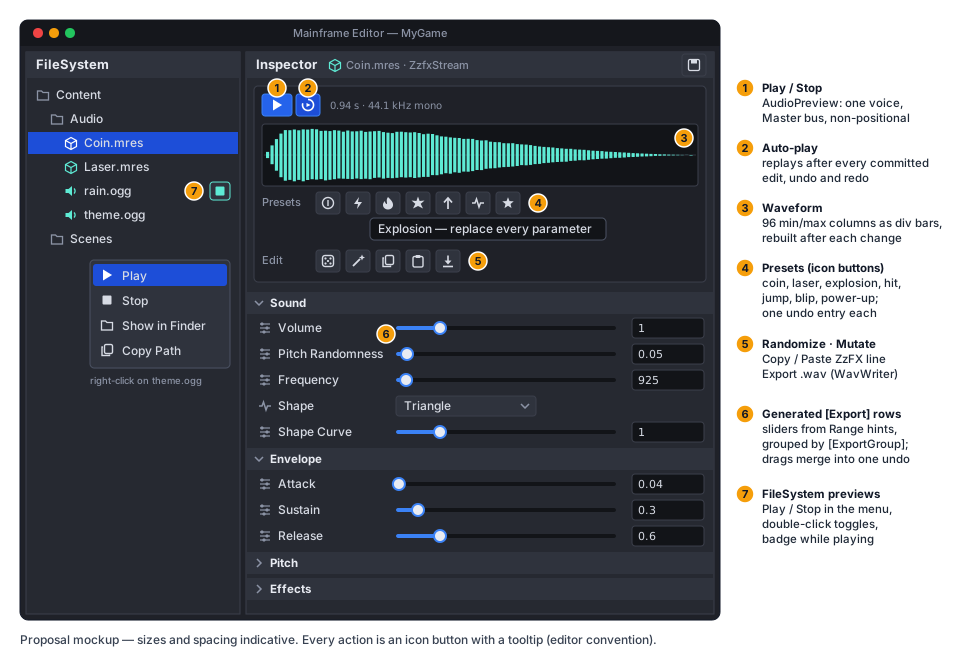
- Play / Stop toggles
AudioPreviewfor the inspected stream. Auto-play (toggle, on by default, remembered ineditor_layout.json) replays the sound after every committed change: a slider release, a field commit, a preset, Randomize, Mutate, Paste, undo or redo. Slider drags do not replay on every tick, only on release. - Waveform: 96 columns of min/max peaks over the generated samples, drawn as
divbars sized indp(no texture, themed by RCSS, cheap to rebuild). It is computed from the cached samples and rebuilt with the header after a change. The info text shows the length and format, or theLoadError(for example “longer than 10 s”) in the notice style. - Presets (
ZzfxPresets, engine side so games and tests can use them): sfxr-style generators for pickup/coin, laser/shoot, explosion, hit/hurt, jump, blip/select and power-up. Each draws from parameter distributions tuned for its category, using aSystem.Randomseeded per click. A preset replaces all parameters (keepsResourceName). - Randomize draws every parameter from a broad “sensible” distribution. Mutate nudges each non-default
continuous parameter by up to ±10 % (
Shapeunchanged), which is the fastest way to explore around a sound you nearly like. - Copy ZzFX puts
ToLine()on the clipboard. Paste ZzFX reads the clipboard throughZzfxParameters.TryParse; invalid text shows the parse error in aMessageDialogand changes nothing. - Export .wav opens
FilePickerDialogin save mode (it already asks before overwriting), defaulting to<sound folder>/<ResourceName>.wav, and writes throughWavWriter. The new file gets its.metaand UID from the asset database like any dropped-in file. - Undo: every action that changes parameters is one history entry: a preset, Randomize, Mutate or Paste sets
all 21 values through
IInspectorContextas a single grouped action. Undo/redo restore the sound and, with Auto-play, replay it.
ICustomInspector.OnPropertyChanged
Section titled “ICustomInspector.OnPropertyChanged”Auto-play needs to hear about edits made by the generated rows, which bypass the custom inspector. A new default interface method:
/// <summary>After a committed change to <paramref name="target"/> (a row edit, undo, redo, or an action). Default: nothing.</summary>void OnPropertyChanged(object target, ExportPropertyInfo? property, IInspectorContext context) { }It is called once per history entry: after a text commit, a checkbox/dropdown change or a merged slider drag ends,
not per drag tick; property is null for grouped actions and undo/redo. Existing custom inspectors are unaffected
(default implementation).
Error handling
Section titled “Error handling”| Situation | Behaviour |
|---|---|
Sound longer than Zzfx.MaxSeconds | LoadError, logged once, silent; the designer shows the error instead of the waveform |
NaN/∞ parameter (hand-edited .mres) | TryParse rejects them; the loader keeps them but Generate treats non-finite as the default and logs a warning once |
| Paste of an invalid line | MessageDialog with the parse error; no change |
| No audio device in the editor | null device; previews are silent, nothing fails |
.wav export I/O error | Workspace.Commands.ReportError, partial file deleted |
Testing
Section titled “Testing”- Reference vectors.
build/zzfx-reference.mjs(committed, Node, run by hand) runs the pinned ZzFX 1.4.0buildSamplesover ~15 parameter sets (defaults, each shape, filter ±, bit crush, delay, repeat, pitch jump, the presets’ corners) and writesTests/Content/Audio/zzfx-reference.json(sample count + every 64th sample).ZzfxTestscompares the port within 1e-5. Node is only needed to regenerate the vectors, not forjust test. - Line format: parse ↔ format round trips, empty slots, trailing defaults, leading-dot numbers, the
zzfx(...[])wrappers, invalid input (error text asserted). ZzfxStream: a parameter change invalidates the source; a voice playing the old source is unaffected;MaxSecondsmakes aLoadError; serialization stores only non-defaults and round-trips.PitchRandomness: with a fixedRandomSeedon the null device, voice pitches fall in[1 − r, 1 + r]and differ between plays; 0 leaves pitch exactly unchanged. Allocation gate: playing aZzfxStreamone-shot per frame allocates nothing after the first synthesis.WavWriter: write →WavDecoderread round trip (16-bit within one LSB, float exact). The existing tests switch to it.- Editor (
Tests/MainframeEngine.Editor.Tests): edit mode keepsAutoplayplayers silent (null device: no voice started);AudioPreviewplays one voice at a time and stops on Play; designer actions (preset, Randomize, Mutate, Paste) are one undo entry each and restore exactly;OnPropertyChangedfires once per merged slider drag. - QA:
Tests/QA/editor-walkthrough.qagains a step: create aZzfxStreamresource, apply a preset, export.wav, preview the file from the FileSystem panel (screenshot of the designer). - Demo:
ClickToPlay2Dswaps its hand-written blip for aZzfxStream(Blippreset), so the Demo shows the feature.
Delivery
Section titled “Delivery”Three PRs, each releasable on its own:
- Engine:
Zzfx,ZzfxParameters,ZzfxShape,ZzfxStream,ZzfxPresets,AudioStream.PitchRandomnessand theCreateSourcehook,WavWriter, tests and reference vectors,THIRD_PARTY_NOTICES.md, the Demo blip. - Editor audio: audio on in
EditorApp, edit-mode silence,AudioPreview, Play in the FileSystem panel and on inspectorAudioStreamrows. - Designer:
ZzfxStreamInspector,ICustomInspector.OnPropertyChanged, editor tests, the QA step.
Docs, with the PRs: audio.md (Synthesis section, key types, PitchRandomness),
editor.md (audio previews, the designer, edit-mode audio rule, OnPropertyChanged), an ADR (next
number) for “ZzFX as the engine’s sound generator; randomness as per-play pitch; edit mode is silent”, the M7 milestone
row and Future: editor (audio preview done), and this proposal’s status.
Open questions
Section titled “Open questions”- Preview level. Previews play at 0 dB on Master. If that proves loud next to a running game, add an Editor Settings “Preview volume” slider.
- Designer for inline sounds. Custom inspector headers only appear for the top-level target. If designing inline sounds matters, a “Save as .mres” action on the slot (already on the future-editor list) turns one into a file the designer opens. Nesting custom headers is not planned.