
Proposal: Music editor (songs, piano roll, VST3)
Milestone: unscheduled (editor tooling, after ZzFX sounds and the sound designer) · Status:
✅ done (2026-10-08): song editor without plugins — song model, engine, render to WAV, AudioStreamGenerator
(ADR 0145) and the song tab (Editor → Song tab);
helper process and Vorbis encoding: mfplughost (--encode, --serve socket protocol),
PluginHostClient, Render to .ogg (ADR 0146,
Natives); VST3 hosting: scan, instruments and
inserts through one shared-memory round trip per block, PDC, crash recovery, state capture, macOS editor windows
(ADR 0147); MIDI input: RtMidi in the helper, device
settings, record-arm, live play, latency-compensated recording with overdub and input quantize
(ADR 0148). Remaining gaps are listed under
Open questions · Depends on: Sound designer (editor audio, AudioPreview,
the ZzFX port), Audio, Editor, Natives · Related:
UI preview tabs, Game UI
Problem
Section titled “Problem”Game music today is made outside the engine: in a DAW (Reaper, GarageBand) with the developer’s plugins, then exported,
converted and copied into Content/, with loop points typed into the file’s .meta by hand. Every change goes round
that loop again. For placeholder and prototype music, and for small games generally, a deliberately simple music tool
inside the editor would remove the round trip, keep the song’s source next to the game, and make music loop correctly
in game without hand-tuned numbers.
A really simple DAW as an editor tab:
- Songs are project files (
.msong, JSON) that open in a tab beside scenes, with undo/redo, save and the usual file operations (move/rename keep references). - Instrument tracks play a VST3 instrument, or the built-in ZzFX instrument when there are no plugins (other machines, CI). Notes live in MIDI clips on an arrangement timeline and are edited in a piano roll.
- Effects and mixer: VST3 effect inserts per track and on the master; volume, pan, mute, solo and meters.
- Audio tracks:
.wav/.ogg/.mp3/.flacfiles andZzfxStreamsounds placed as clips on the timeline. - MIDI keyboard input: play the selected track’s instrument live and record into clips.
- Plugin editors: each plugin’s own GUI opens in its own window (SSD Sampler’s kit pages, Saturation Knob’s knob).
- Render to
.ogg. “Render” writes the song as an.ogginto the project and sets the file’s loop points in its.metafrom the song’s loop region, soAudioPlayer+AudioStreamplay and loop it seamlessly in game with no new runtime code. - Plugins cannot crash the editor. They run in a helper process.
Non-goals
Section titled “Non-goals”- Live song playback in games. Games play the rendered
.ogg; VST plugins only exist on the developer’s machine. Adaptive music (layers, tempo changes at run time) is a separate future design. - Audio Units, VST2, CLAP, LV2. VST3 covers the target plugins (every plugin on the author’s machine ships a
.vst3; the SDK is MIT since 3.8, October 2025). CLAP is the natural second format later. - Audio recording (microphone/line in), time-stretching, warping, comping.
- Tempo or time-signature changes within a song (one tempo, one signature per song in v1).
- Automation lanes, sends/buses beyond the master, sidechain.
- MIDI file import/export, MIDI output to hardware, MPE/note expression.
- Surround output (songs are stereo).
Overview
Section titled “Overview”flowchart TB
subgraph Editor["Editor process (C#)"]
Tab["SongTab (IEditorTab)<br/>transport · arrangement · piano roll · mixer"] -- "undoable edits" --> Model["Song model (.msong)"]
Model --> Engine["SongEngine (render thread)<br/>sequencer · mixer · PDC · built-in instruments · audio clips"]
Engine -- "push frames" --> Gen["AudioStreamGenerator voice<br/>(AudioServer, Master bus)"]
Engine -- "offline render" --> Render["SongRenderer → WAV temp → .ogg + .meta"]
Host["PluginHostClient"]
end
subgraph Helper["mfplughost process (C++, native)"]
Scan["scanner (VST3 SDK hosting)"]
Plug["plugin instances<br/>process · state · latency"]
Win["plugin editor windows"]
Midi["MIDI input (RtMidi)"]
Enc["Vorbis encoder (libvorbisenc)"]
end
Engine -- "per block: events in / audio out<br/>(shared memory + socket)" --> Host
Host <--> Plug
Midi -- "timestamped note events" --> Host
Render -- "encode command" --> Enc
Gen --> Out["Audio device"]
The C# side owns everything musical: the song, sequencing, mixing, latency compensation and rendering. The helper is a thin, native plugin server: it loads plugins, runs them on blocks it is handed, shows their windows, reads MIDI devices and encodes Vorbis. Keeping the logic in C# means it is unit-testable with the built-in instrument and no helper at all, and the native code stays small.
The song model
Section titled “The song model”MainframeEngine.Editor/Src/Music/Song.cs and friends; editor-only types (games never load songs), serialized with
System.Text.Json to .msong. The file is versioned, with migrations like project.mfproj:
{ "format": 1, "uid": "sng_…", "tempo": 120, "timeSignature": [4, 4], "ppq": 960, "loop": { "enabled": true, "start": 0, "end": 61440 }, "render": { "output": "Content/Music/Theme.ogg", "sampleRate": 48000, "quality": 6, "tailSeconds": 2, "seamlessLoop": true }, "master": { "volumeDb": 0, "inserts": [] }, "tracks": [ { "id": "t1", "name": "Drums", "kind": "instrument", "color": "#f59e0b", "volumeDb": -3, "pan": 0, "mute": false, "solo": false, "instrument": { "plugin": { "format": "vst3", "classId": "…", "name": "SSDSampler5", "vendor": "Steven Slate Drums" }, "state": "<base64 VST3 component+controller state>" }, "inserts": [ { "plugin": { "classId": "…", "name": "Saturation Knob" }, "state": "…", "bypass": false } ], "clips": [ { "start": 0, "length": 15360, "notes": [ { "pitch": 36, "start": 0, "length": 240, "velocity": 110 } ] } ] }, { "id": "t2", "name": "Lead", "kind": "instrument", "instrument": { "builtin": "zzfx", "params": "zzfx(...[,,220,,.1,.2,2])" }, "clips": [] }, { "id": "t3", "name": "Rain", "kind": "audio", "clips": [ { "start": 0, "length": 30720, "file": "aud_…", "offset": 0, "gainDb": -6 } ] } ]}- Time is in ticks (960 PPQ) for everything on the timeline; seconds come from the single tempo. Audio clips store their file by UID (the FileSystem panel’s reference fix-ups rewrite them on moves, like scenes).
- Plugin state is the VST3 component state followed by the controller state, base64 in the file. Songs stay one JSON file (no binary sidecars, in the spirit of ADR 0011). Large sampler states make a large file; that is acceptable.
- Plugin identity is the VST3 class ID. A song that names a plugin the machine does not have still opens: the track shows “missing plugin: SSDSampler5 (Steven Slate Drums)”, plays silence, and keeps its saved state for when the song goes back to a machine that has it.
- Undo: every edit is an action on the song’s own
UndoRedohistory (likeEditedResource). Note drags merge into one entry, the same as inspector slider drags. Plugin parameter changes made in a plugin’s own window are not undoable in v1; the state is captured on save, on window close and before render.
SongEngine
Section titled “SongEngine”MainframeEngine.Editor/Src/Music/Engine/. A dedicated render thread produces audio in blocks of 256 frames at the
device’s mix rate.
- Sequencer: for each block it collects the note-on/off events of every unmuted clip that overlaps it, sample-accurately, with loop wrap (notes that cross the loop end get their note-off at the wrap). Stopping or seeking sends all-notes-off. Note events go to the track’s instrument with their sample offsets.
- Instruments: a VST3 instrument (via the helper), the built-in ZzFX instrument (a pool of 16 voices, each one
Zzfx.Generateat the note’s frequency, cached per pitch, velocity as gain; one ZzFX line per track), or nothing. - Audio clips are decoded once through the engine’s decoders (
AudioStream.Load+Preload, resampled to the mix rate) and mixed at their offsets. - Mixer: per track: instrument or clip audio → inserts (helper) → volume/pan (equal-power,
AudioMath’s pan law) → mute/solo → master inserts → master volume. Peak meters per track are published to the UI thread once per frame. - Plugin delay compensation: each plugin reports its latency. Every track is delayed so all tracks line up with the slowest chain, and the transport position shown is what is being heard.
- No allocation on the render thread after a song is prepared: buffers are pooled per track, events go in preallocated arrays, and model edits arrive as immutable snapshots swapped in at block boundaries.
Playback through the AudioServer
Section titled “Playback through the AudioServer”Live playback goes through the editor’s AudioServer (enabled by the sound-designer work). It uses a new engine
resource that mirrors Godot’s AudioStreamGenerator: an AudioStream whose voice reads from a lock-free ring that
a producer fills (AudioStreamGenerator.BufferSeconds; AudioServer.GetGeneratorPlayback(handle) returns a playback
object with FramesAvailable and PushFrames(ReadOnlySpan<float>)). It reuses the SPSC ring and streaming-voice
machinery that already exist (SpscRing, AudioStreamChannel). The render thread keeps it two blocks ahead. It is
public engine API, so games get Godot’s procedural-audio path too, and it is documented in audio.md.
Latency: two 256-frame blocks plus the device buffer, about 20 ms at 48 kHz. Fine for arranging and acceptable for playing a keyboard in v1. Recording compensates for it (below).
Plugin host: mfplughost
Section titled “Plugin host: mfplughost”A small native executable in Native/PluginHost/ (C++20), built for each platform by natives.yml like mfrmlui,
with binaries committed under MainframeEngine.Editor/runtimes/<rid>/native/ (editor-only; games never ship it) and
pinned in Native/natives.lock. Vendored sources, all permissively licensed:
| Library | Version | License | Used for |
|---|---|---|---|
VST 3 SDK (vst3sdk: pluginterfaces, base, public.sdk hosting) | 3.8.x | MIT | loading, processing, state, editor views |
| RtMidi | 6.x | MIT | MIDI input devices |
| libogg + libvorbis/libvorbisenc | 1.3.x | BSD-3-Clause | Vorbis encoding for Render |
These are new third-party native dependencies; per CLAUDE.md they are listed here for discussion before any
implementation, and they get THIRD_PARTY_NOTICES.md rows when they land. No new NuGet packages.
Process and protocol
Section titled “Process and protocol”- The editor starts one helper per open song on first need (a song with only built-in instruments and audio clips never starts one). The editor connects over a Unix domain socket (Windows: a named pipe) for control messages, which are length-prefixed binary messages: load plugin, set state, get state, latency, open/close editor, MIDI device list/open, encode.
- Audio crosses through a file-backed memory map (in
$TMPDIR, or/dev/shmon Linux; .NET supports file-backed maps on every OS, unlike named maps). It holds one input and one output region per plugin instance per block. Per block the render thread writes inputs and events, sendsprocess(block, instances)on the socket and waits fordone(block). One round trip per block, not per plugin: the helper runs each track’s chain in order. Plugins run in VST3 realtime mode during playback andkOfflinemode during Render. - Timeouts: a block not answered within 4× its duration plays silence (the transport keeps going) and counts an xrun shown in the transport bar. During Render there is no timeout per block, only a 10 s watchdog.
- Crash recovery: if the helper exits or the socket drops, the editor shows “Plugin host stopped (while processing Saturation Knob on Drums)”, restarts the helper, and reloads every plugin from its last captured state. A plugin that crashes the host twice in a minute is disabled for the session (track shows it, bypassed). Unsaved song edits are never at risk; they live in the editor.
- Plugin windows are the helper’s own native windows (Cocoa
NSWindow+ the plugin’sNSView;HWNDon Windows; X11 with the VST3 run loop on Linux, best-effort in v1), titled “Plugin — Track — Song”. The helper is a regular GUI process (on macOS it runs anNSApplicationmain loop; audio processing happens on a separate thread). Closing a window captures the plugin’s state into the song (one undo entry: “Edit Plugin settings”).
Plugin scanning
Section titled “Plugin scanning”mfplughost --scan <bundle> runs once per plugin bundle in its own process (so a plugin that crashes on load only
fails its own scan) and reports class ID, name, vendor, category (instrument/effect), I/O and version. Results are cached
in ~/.mainframe/plugins.json, keyed by bundle path + modification time. Folders are the VST3 defaults:
/Library/Audio/Plug-Ins/VST3 + ~/Library/Audio/Plug-Ins/VST3 (macOS), %CommonProgramFiles%\VST3 (Windows),
~/.vst3, /usr/lib/vst3, /usr/local/lib/vst3 (Linux), plus extra folders in Editor Settings. “Rescan plugins”
in Editor Settings clears the cache.
macOS signing
Section titled “macOS signing”Third-party plugins are signed by their vendors, so a hardened-runtime host must not enforce library validation. The
packaged editor ships mfplughost with the com.apple.security.cs.disable-library-validation entitlement (the editor
itself keeps its own entitlements). build/package-editor.sh gains that step; dev builds are unsigned and unaffected.
MIDI input and recording
Section titled “MIDI input and recording”- Editor Settings › MIDI lists input devices (from the helper) with a toggle each; enabled devices stay open while any song tab is open. Without a helper running, enabling a device starts one.
- Incoming notes go to the armed track (one at a time; the record-arm button on its header), else the selected track, and play its instrument immediately (monitoring). The helper stamps each event with a monotonic clock; the engine maps it to the transport position the player was hearing (event time minus output latency) so recordings land where they were played.
- Record (transport) with an armed track writes notes into a new clip spanning the recorded range. With the loop on, each pass adds to the same clip (overdub). Optional input quantize (off, 1/16, 1/8) in the transport bar. Record is a single undo entry.
- Sustain pedal (CC64) is passed to the instrument and recorded as held note lengths. Other CCs are passed through live but not recorded in v1.
The song tab (UI)
Section titled “The song tab (UI)”Double-clicking a .msong opens a SongTab (IEditorTab, like UiPreview). File › New › Song, or the FileSystem
panel’s New menu, creates one with a single built-in-instrument track. The scene tree and inspector rest while it is
active. The layout:
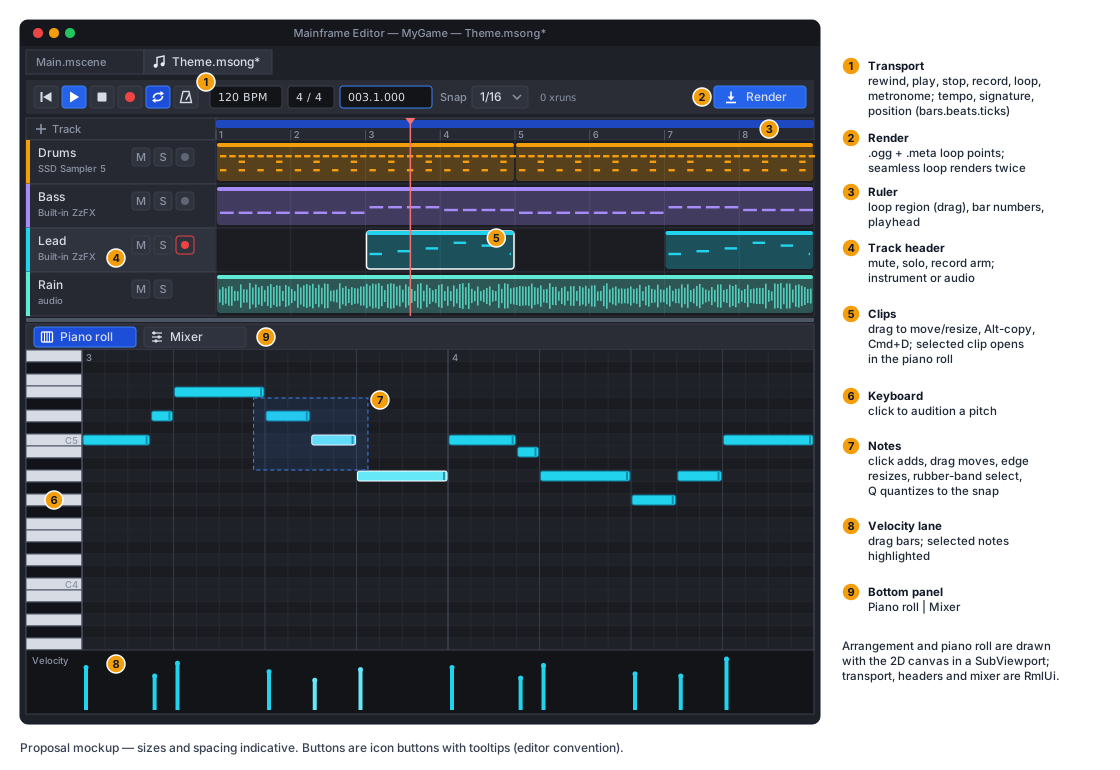
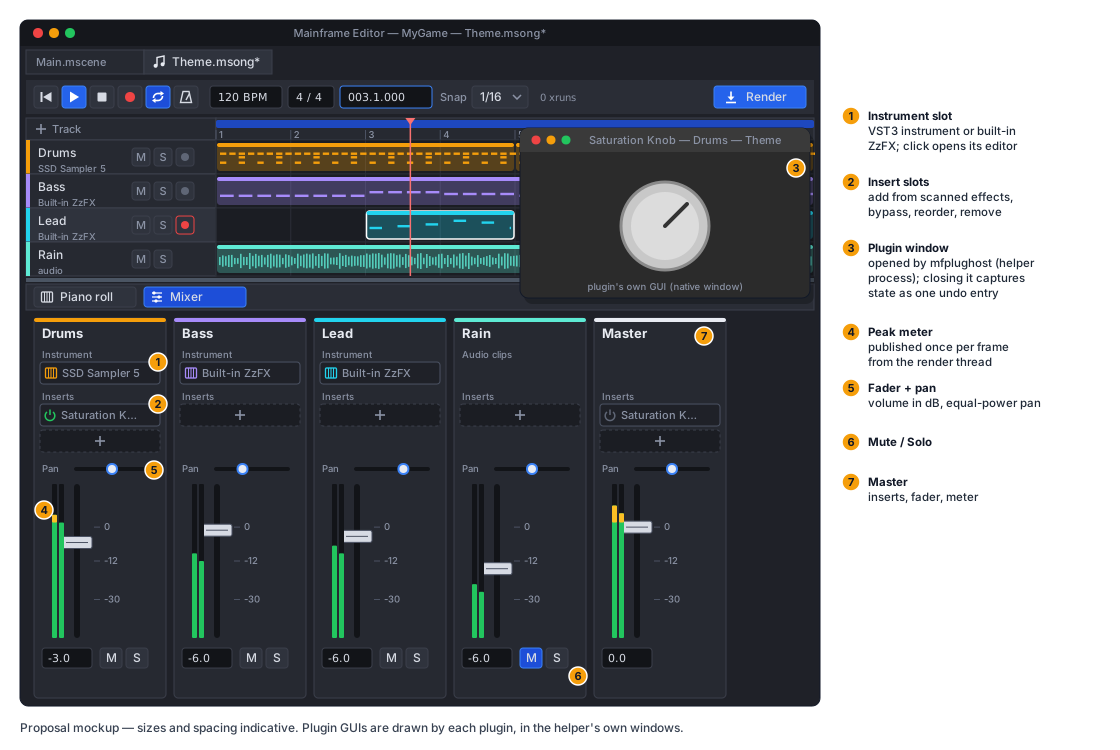
- Chrome in RmlUi (
Content/Editor/song.rml): the transport, track headers, the bottom panel switcher and the mixer strips, with icon buttons and tooltips (editor convention). - Arrangement and piano roll are drawn with the engine’s 2D canvas (
CanvasItem.DrawRect/DrawLine/DrawString) in aSubViewportpublished to the UI as a texture, the wayViewportPanelshows the 3D view. Thousands of notes, smooth zoom and scroll, and a playhead every frame would be too many RmlUi elements. Input in that area goes to aSongCanvasController(hit testing in ticks/pitches). - Arrangement: clips per track; drag to move (snaps), drag edges to resize, Alt-drag to copy, Cmd+D duplicates after, double-click an empty lane to create a one-bar clip, select a clip to show it in the piano roll, and drag the loop region in the ruler. Audio clips show their waveform (min/max peaks, cached).
- Piano roll: a keyboard on the left (click to audition); click to add a note of the last length, drag to move, drag the right edge to resize, select with a rubber band; Del deletes; Cmd+C/V/D; arrow keys nudge by the snap (Shift: an octave); Q quantizes the selection to the snap; a velocity lane below (drag bars). Adding or moving a note auditions it. Snap: off, 1/4 … 1/32, triplets.
- Mixer panel: one strip per track plus master: insert slots (add from the scanned effects list, open editor, bypass, remove, drag to reorder), pan, volume fader (dB), mute/solo, and a peak meter. The instrument slot sits at the top of instrument strips (choose a plugin, built-in ZzFX, open editor). The built-in instrument’s ZzFX line is edited with the sound-designer controls in a popup.
- Keyboard: Space play/stop, R record, L loop, Home to start. These shortcuts apply only while the song tab is active and do not collide with the Play keys (F5–F8).
Render
Section titled “Render”Render (transport button, also the FileSystem menu on a .msong):
- Captures every plugin state, prepares a fresh engine instance in offline mode (no AudioServer, no timeouts,
faster than real time where plugins allow), and renders the song from 0 to the end of the last clip plus
tailSeconds, or the loop region when loop is enabled. - Seamless loop (default when looping): renders the loop region twice and keeps the second pass, so reverb and delay tails from the end of the loop are already present at its start, then cuts exactly at the loop length.
- Writes a temporary 32-bit float WAV (
WavWriterfrom the sound-designer work) and asks the helper to encode it (encode <wav> <ogg> quality); with no helper binary available it keeps the.wavas the output instead and says so. Output defaults toContent/Music/<SongName>.ogg. - Writes the output file’s
.metaimport settings:loopfrom the song’s loop toggle,loopStart0 andloopEnd0 for a seamless render (the whole file is the loop), or the region in seconds otherwise;loadModeStream. - Reports progress in a splash (“Rendering Theme… 63 %”, cancellable) and the result in the Output panel.
The FileSystem panel badges a .msong whose output is older than the song (“render out of date”). Rendering is explicit;
saving never renders.
Error handling
Section titled “Error handling”| Situation | Behaviour |
|---|---|
| Plugin missing on this machine | track opens with “missing plugin”, plays silence, keeps state |
| Plugin fails to load or set state | message on the track; the plugin is bypassed; state kept |
| Helper crash | restart + reload from captured states; repeat offender disabled for the session |
| Helper binary missing (unsupported platform) | built-in instruments and audio clips still work; VST features disabled with a notice; Render writes .wav |
| Block deadline missed | silence for that block, xrun counter |
| MIDI device unplugged | device marked offline in settings; reopened when it returns |
| Song file from a newer format | opens read-only with a notice (same rule as scenes) |
| Render I/O or encode failure | error in Output; partial files deleted; the previous render is left intact (written to a temp name, then moved) |
Testing
Section titled “Testing”- Model: JSON round trip, migrations, UID references rewritten on file moves, missing-plugin tracks preserved byte for byte.
- Sequencer and mixer (no helper; built-in instrument and audio clips): note on/off at exact sample offsets across block boundaries and loop wraps, all-notes-off on stop and seek, mute/solo rules, pan law, PDC alignment with a fake plugin of known latency, and a deterministic offline render whose sample hash is pinned.
- Helper protocol: a C#
FakePluginHostbehindIPluginHostfor unit tests (timeouts, crash during process, restart, state reload). Integration tests run the real helper with the VST3 SDK’s example plugins (againeffect, a test instrument), built with the helper as test fixtures, on all three CI OSes. These cover load, process, state round trip, latency, offline mode and encode. Acrashertest plugin covers recovery. - Recording: synthetic timestamped MIDI events through the fake host land at latency-compensated positions; overdub merges into one clip; one undo entry.
- Render: seamless-loop output has its tail folded in (energy at the start of the file); the
.metaloop settings are written; the file plays and loops throughAudioStreamon the null device. - Allocation: the render thread allocates nothing in steady-state playback (allocation counter around 1 000 blocks).
- QA:
Tests/QA/editor-walkthrough.qagains a song step: new song, a few notes with the built-in instrument, render, then preview the.oggfrom the FileSystem panel.
Delivery
Section titled “Delivery”Four PRs, each usable on its own:
- Songs without plugins:
.msongmodel, SongTab with arrangement, piano roll and mixer, SongEngine with the built-in ZzFX instrument and audio clips,AudioStreamGeneratorin the engine, Render to.wav+.meta. - Plugin host:
Native/PluginHost(VST3 SDK), scanning, instruments and effects, plugin windows, PDC, crash recovery, signing step, CI natives build. - Encoding: libvorbisenc in the helper, Render to
.ogg. - MIDI input: RtMidi in the helper, device settings, live play, recording.
Docs with the PRs: a new docs/design/music-editor.md (this proposal, rewritten as the as-built design),
audio.md (AudioStreamGenerator), editor.md (song tabs), natives.md
(mfplughost), THIRD_PARTY_NOTICES.md, ADRs for “out-of-process VST3 host, logic in C#” and “songs render to
files; games never host plugins”, and the milestone table.
Open questions
Section titled “Open questions”-
Gaps left after the four deliveries (2026-10-08): plugin editor windows on Windows/Linux; the win-x64 and linux-x64
mfplughostbinaries (VST3 + MIDI) come from the nextnatives.ymlrun and have not run yet; live MIDI is read once per editor frame (monitoring gains up to a frame of latency; recorded positions use the helper’s timestamps and are unaffected); the device buffer in the heard-position estimate is a 10 ms constant (the audio layer does not report it); controllers other than the sustain pedal are not passed to plugin instruments (no controller path inIInstrumentor the shared-memory events) nor recorded; Windows has no virtual MIDI port, so its MIDI path is only unit-tested; the as-builtdocs/design/music-editor.mdrewrite of this proposal is not written yet. -
Which tempo/signature features come next? Tempo maps are the most likely v2 request; ticks were chosen so they can be added without changing stored positions.
-
CLAP support. The helper’s protocol is format-neutral (
formatfield on plugins), so CLAP is additive. -
Per-song or shared helper? One helper per song keeps crashes contained to a song. If many open songs make that heavy, a shared helper with per-song instance groups is the fallback.
-
Linux plugin GUIs depend on each plugin’s X11 support; v1 treats them as best-effort and documents which of the CI test plugins open there.