
Proposal: Accessibility (UI scale, colour vision, captions, comfort, input assists)
Milestone: Gameplay toolkit (G14) · Status: ⬜ planned ·
Depends on: M8 game UI (RmlUi layers, widget library, ADR 0181 scaling), M7 audio
(voices, listener), Post-processing (ADR 0163 stages), M9 localization ·
Related: Save games and settings (G4: UserSettings, settings menu, rebinding),
Haptics and input glyphs (G12), Video playback (G16: captions for
video), Forest (ADR 0180 pause menu), Consoles (platform requirements)
Problem
Section titled “Problem”Players with low vision, colour-vision deficiency, hearing loss, motion sensitivity or limited mobility need options
that every game would otherwise build by hand. The engine has some of the pieces, but no accessibility feature: a search
of MainframeEngine/Src, MainframeEngine/Content and the example games for accessibility, subtitle, caption,
colour-blind and daltonize finds nothing relevant.
- UI scale follows the screen, not the player. ADR 0181 gives every
UiScaleMode.Projectlayer one dp ratio fromUiServer.Scaling(MainframeEngine/Src/UI/UiServer.cs:257), computed byUiScaling.ComputeDpRatio(MainframeEngine/Src/UI/UiScaling.cs:95-105).MinScaleexists to keep text readable in small windows (UiScaling.cs:67-77), but there is no player multiplier. G4 plans one (UiServer.UserScale, see save-and-settings.md → UserSettings); it is not built. - Text cannot grow on its own. The widget library sets text in fixed
dp(body { font-size: 14dp },h122dp,MainframeEngine/Content/UI/widgets/widgets.rcss:16,:22), and rows have a fixedheight: 28dp; line-height: 28dp(widgets.rcss:52-56). Larger text would be clipped. Nothing checks that a game’s smallest text is readable. - RmlUi themes are bound but unused.
RmlContext.ActivateTheme(name, activate)wraps RmlUi’s@media (theme: name)(MainframeEngine/Src/UI/Rml/RmlContext.cs:86). No engine code calls it, andwidgets.rcsshas no theme blocks. A high-contrast or reduced-motion style has nowhere to go. Focus rings are a 1dp border colour change (widgets.rcss:85,:160,:191). - UI animations cannot be turned off. The loading screen breathes and sweeps forever
(
MainframeEngine/Content/UI/loading/loading.rcss:37,:93). - No colour filter. Post effects run in three stages (
MainframeEngine/Src/Rendering/Post/PostEffect.cs:7-29).AfterTonemapruns on the display-encoded LDR image, with FXAA at order 100 and the colour grade at 150 (PostEffect.cs:75-83). The renderer tonemaps into an LDR image only when anAfterTonemapeffect is enabled (MainframeEngine/Src/Rendering/Vulkan/VulkanRenderer.Presentation.cs:871). The overlay renderers (canvas, gizmos, UI, dev overlay) draw into the swapchain after that stage (VulkanRenderer.Presentation.cs:929-940), so no current hook can filter the whole frame. - No captions.
AudioPlayer.PlayandGetPlaybackPositionexist (MainframeEngine/Src/Audio/Nodes/AudioPlayer.cs:66,:74). The position comes from the voice’s frame counter, as of the last audio block (MainframeEngine/Src/Audio/AudioServer.cs:520-528). Every voice starts in one privateAudioServer.Play(AudioServer.cs:901) and ends inRelease(AudioServer.cs:1061-1085). But nothing knows what a sound means:AudioStreamhas file, load mode, loop and pitch fields only (MainframeEngine/Src/Audio/AudioStream.cs:33-88). - Comfort options are per game. The Forest has a horizontal FOV, head bob and look settings in its own
ForestSettings(Examples/Forest/Forest/Src/Player/ForestSettings.cs:17-28), applied byFirstPersonController.ApplySettings(Examples/Forest/Forest/Src/Player/FirstPersonController.cs:210-218). Depth of field, film grain, vignette and chromatic aberration are world settings (MainframeEngine/Src/Rendering/Post/PostProcessSettings.cs:178-220). They reach the renderer throughRenderServer.RootPostProcess(MainframeEngine/Src/Servers/RenderServer.cs:695-701), so a player switch means editing the world’s profile, which the Forest does row by row (Examples/Forest/Forest/Src/Menu/ForestOptions.cs:243,:269-286). The engine has no camera shake and no motion blur. - Input timing is fixed. Actions are hold-only:
InputStatetracksPressedand edge frames per action (MainframeEngine/Src/Scene/Input/InputState.cs:57-66,:95-110). There is no toggle mode. The UI’s gamepad navigation repeat is two constants, 0.4 s and 0.1 s (UiServer.cs:114-115). Only the tooltip delay is settable (UiServer.cs:154). The axis deadzone is per action (MainframeEngine/Src/Scene/Input/InputMap.cs:174-178). - Strings are not always localized. The Forest’s menu labels are literals with no
Tr(ForestOptions.cs:74), so an accessibility page copied from it would not translate.
- One
AccessibilitySettingsobject with standard keys that the engine applies itself where it can (UI, renderer, audio, input). Games read the rest (FOV, head bob). It persists through G4’sUserSettingsand works without it. - Vision: a player UI scale (G4’s), text size steps that reflow the widget library, a high-contrast theme, a reduced-motion theme and stronger focus rings. Plus a colour-vision filter that can simulate (for developers) or correct (daltonize, for players) protanopia, deuteranopia and tritanopia, with a strength slider.
- Hearing: subtitles and closed captions tied to audio playback. That means timed dialogue cues with speaker names
and colours, sound-effect captions from a caption key on the
AudioStream, direction arrows for positional sounds, all localized throughTr. A drop-in caption layer with size, background and speaker options. Mono audio. - Motion and comfort: standard keys for camera shake, head bob, field of view, depth of field, film effects and reduced UI motion. A small camera-shake node that honours them.
- Input: hold-or-toggle per action, adjustable UI repeat timings, a timing-window scale for games. Rebinding is G4.
- An Accessibility tab for G4’s settings menu (standalone before G4), used by the Forest and the Demo.
- A design that maps onto the Xbox Accessibility Guidelines (XAG 101 text display, 102 contrast, 103 additional channels for visual and audio cues, 104 subtitles and captions, 105 audio accessibility, 107 input, and the motion and photosensitivity guidelines) and the “basic” tier of the Game Accessibility Guidelines.
Non-goals
Section titled “Non-goals”- Difficulty and assist modes (aim assist, slow-motion, skip puzzle, invincibility). These are game design. The engine provides the settings store, not the rules.
- Screen narration in this milestone. UI narration and screen-reader support are a later phase (Screen narration). They need a platform choice and possibly a native dependency.
- Audio description, sign-language video, haptic captions. Haptics belong to G12.
- A photosensitivity analyser (automated flash detection on captured frames). There is a
reduceFlashingkey for games to honour; analysing frames is a QA tool for later. - Text and voice chat accessibility (speech-to-text, text-to-speech for chat). The engine has no chat.
- The editor’s own accessibility. The editor is a desktop tool on
ConstantPixelSize(ADR 0181). This proposal is about shipped games. - Console platform APIs (system caption styles, system text-to-speech). They go into the private console ports (consoles.md), behind the same settings.
Design
Section titled “Design”Overview
Section titled “Overview”| Type (all new unless noted) | Where | Role |
|---|---|---|
AccessibilitySettings | Src/Accessibility/ | Standard keys, defaults from project.mfproj, live apply, JSON read/write |
UiServer.TextScale, .HighContrast, .ReduceMotion, .NavigationRepeatDelay/Interval (new members) | Src/UI/ | RmlUi themes on game layers; settable repeat |
ColorVisionSettings, ColorVisionMode, ColorVisionFilter | Src/Rendering/Post/ | The filter’s settings and its 3×3 matrix |
ColorVisionEffect (internal) + Post/ColorVision.vk.frag.slang | Src/Rendering/Post/ | AfterTonemap pass |
ComfortOverrides, RenderServer.Comfort (new member) | Src/Servers/ | Player switches applied over the world’s post settings |
CameraShake3D, CameraShake2D | Src/Scene/Nodes3D/, Nodes2D/ | Trauma-based shake scaled by the setting |
SubtitleTrack, SubtitleCue, SpeakerTable, SpeakerInfo, CaptionKind | Src/Accessibility/Captions/ | Caption resources |
AudioStream.Caption, .CaptionKind, .Subtitles (new members) | Src/Audio/ | What a sound means |
CaptionServer : IFrameServer | Src/Accessibility/Captions/ | Active cues from playing voices and manual calls |
CaptionLayer : UiLayer + Content/UI/captions/ | Src/Accessibility/Captions/ | The drop-in caption UI |
SubtitleImporter | Src/Resources/Import/ | .vtt / .srt → SubtitleTrack |
AudioServer.MonoOutput (new member) | Src/Audio/ | Mono downmix in AudioMixRoot |
InputActionMode, InputAction.Mode, InputState.SetActionMode (new) | Src/Scene/Input/ | Hold or toggle |
AccessibilityPanel : UiDocument + Content/UI/settings/accessibility.rml | Src/UI/Settings/ | The settings tab |
Settings
Section titled “Settings”AccessibilitySettings is a plain object with typed properties. Every setter applies at once (where the engine owns
the behaviour) and raises Changed. It never touches disk itself:
// new — MainframeEngine/Src/Accessibility/AccessibilitySettings.cs; one property per key in the table belowpublic sealed class AccessibilitySettings{    /// <summary>The running game's settings; GameHost creates it from project.mfproj before the first frame.</summary>    public static AccessibilitySettings Current { get; internal set; } = new();
    // Vision: also HighContrast, ReduceMotion, ColorVisionSettings ColorVision    public float TextScale { get; set; } = 1f;    // Hearing: also Captions, CaptionSize, CaptionBackground, SpeakerNames, SpeakerColors, CaptionDirections, MonoAudio    public bool Subtitles { get; set; } = true;    // Comfort: also HeadBob, float? FieldOfView, DepthOfField, FilmEffects, MotionBlur (reserved), ReduceFlashing    public float CameraShake { get; set; } = 1f;    // Input: also NavigationRepeatDelay, NavigationRepeatInterval, IReadOnlySet<string> ToggleActions    public float TimingScale { get; set; } = 1f;    public void SetToggle(string action, bool toggle);
    [Signal] public event Action<AccessibilitySection>? Changed;   // Vision, Hearing, Comfort, Input    public void Apply(SceneTree tree);                              // everything (startup, after loading)    public void Reset(AccessibilitySection section);                // back to project.mfproj defaults    public void ReadFrom(JsonObject section);                       // missing keys keep defaults; wrong types warn once    public void WriteTo(JsonObject section);                        // only keys that differ from the defaults}
With G4. UserSettings gains Accessibility and stores it as the accessibility section of settings.json
(G4’s ConfigFile sections are top-level JSON objects). UserSettings.Apply calls
AccessibilitySettings.Apply in GameSession.Start, before autoloads (MainframeEngine/Src/Project/GameSession.cs:88).
The player UI scale stays G4’s display.uiScale → UiServer.UserScale. This proposal does not duplicate it.
Without G4. GameHost still creates Current from the project defaults and applies it. Games persist it in their
own file through ReadFrom/WriteTo. The Forest does this into its settings.json until G4 lands. If G14 ships first,
G14.1 adds UiServer.UserScale exactly as G4 specifies it, and G4 then only adds persistence.
Standard keys (accessibility section; every key optional, a missing key means the project default):
| Key | Type | Default | Applied by |
|---|---|---|---|
textScale | number | 1 | UiServer.TextScale |
highContrast, reduceMotion | bool | false | UiServer themes |
colorVision | { "mode": "Deuteranopia", "filter": "Correct", "strength": 0.8 } | none | RenderServer.ColorVision |
subtitles, captions | bool | project | CaptionServer |
captionSize, captionBackground | name, number | Medium, 0.75 | CaptionLayer |
speakerNames, speakerColors, captionDirections | bool | true | CaptionLayer |
monoAudio | bool | false | AudioServer.MonoOutput |
cameraShake | number 0..1 | 1 | CameraShake3D/2D |
depthOfField, filmEffects, motionBlur | bool | true | RenderServer.Comfort |
headBob, fieldOfView, reduceFlashing | bool, number, bool | true, null, false | the game |
timingScale | number 1..3 | 1 | the game (InputState.ScaleWindow) |
navRepeatDelay, navRepeatInterval | seconds | 0.4, 0.1 | UiServer |
toggleActions | string array | [] | InputState |
project.mfproj gains an optional accessibility section with the game’s defaults (subtitles, captions, a
fieldOfView range) and caption setup (speakers: a SpeakerTable path; captionDocument; promptOnFirstLaunch,
which offers subtitles and text size on first run, before any dialogue, as both guideline sets recommend). It is
additive, like G4’s userDataName, so it needs no format bump.
Vision: text size, contrast, reduced motion
Section titled “Vision: text size, contrast, reduced motion”All three are RmlUi themes activated on game contexts through the existing RmlContext.ActivateTheme:
| Setting | Themes |
|---|---|
TextScale 1.25 / 1.5 / 2 | text-125, text-150, text-200 (one at a time) |
HighContrast | high-contrast |
ReduceMotion | reduce-motion |
-
UiServeractivates them on every layer’s context when it is created and again when a value changes. A newUiLayer.AccessibilityThemes([Export], default true) opts a layer out. The dev overlay and the editor’s layers set it to false: developer tools keep their look. -
Text size reflows.
widgets.rcssmoves font sizes torem: the document body is the root element, soh1becomes1.571remagainst the 14dp body. Fixedheight/line-heightrows becomemin-heightwithemline height, so a row grows with its text. Theme blocks set the base size:body { font-size: 14dp; }@media (theme: text-150) { body { font-size: 21dp; } }@media (theme: high-contrast) {.panel { background-color: #000000; border: 2dp #ffffff; }button:focus-visible, select:focus-visible { border: 3dp #ffd400; }.muted { color: #d0d6e2; }}@media (theme: reduce-motion) { * { transition: none; animation: none; } }Game documents that size text in
remfollow automatically. The authoring rule ingame-ui.mdbecomes “sizes indp, text inrem”. TheUiScalefrom G4 still scales everything, and the two multiply. -
High contrast also raises focus rings to 3dp in a colour that differs from the selection colour, and uses an accent palette that stays distinguishable under all three deficiencies (Okabe–Ito). The colours are documented in
game-ui.mdfor games that style their own widgets. -
Reduced motion also stops the loading screen’s breathing and sweep (
loading.rcss), andLoadingScreenskips its fade. -
Minimum text size audit. A dev-overlay command and a QA-script step (
ui-text-audit) walk every visible document. They report text whose rendered size is below a threshold at the current window size (default per project:accessibility.minTextPx, see Open questions). This needs one shim export,mfrmlui_element_get_font_size(the computed value; the binding has setters but no computed-style getter), built throughnatives.yml(natives.md).
Colour vision filter
Section titled “Colour vision filter”// new — publicpublic enum ColorVisionMode { None, Protanopia, Deuteranopia, Tritanopia, Achromatopsia }public enum ColorVisionFilter { Correct, Simulate }
public readonly record struct ColorVisionSettings(ColorVisionMode Mode, ColorVisionFilter Filter = ColorVisionFilter.Correct, float Strength = 1f){ public bool IsActive => Mode != ColorVisionMode.None && Strength > 0f; /// <summary>The linear-RGB 3×3 matrix (in a Matrix4x4) the shader applies. Pure arithmetic, no allocation.</summary> public Matrix4x4 ComputeMatrix();}
public sealed class RenderServer{ public ColorVisionSettings ColorVision { get; set; } // forwarded to IVulkanContext.ColorVision each frame}The maths is one matrix. Both filters are linear in linear RGB, so the shader multiplies by one precomputed 3×3 matrix:
- Simulate: Machado, Oliveira and Fernandes (2009) publish protan, deutan and tritan matrices at severities
0.0–1.0 in 0.1 steps.
Strengthis the severity, interpolated between the two nearest table rows. Achromatopsia is Rec. 709 luminance. - Correct (daltonize): the error a viewer loses is
c − S·c. It is redistributed into channels they can see with an error-shift matrixE(Fidaner, Lin and Ozguven 2005), givingC = I + E·(I − S).Strengthblends from the identity:M = I + k·(C − I). Achromatopsia has no correction (the mode only simulates).
The matrix is recomputed only when the settings change.
The effect. ColorVisionEffect is an AfterTonemap effect at a new PostEffectOrder.ColorVision = 200: after the
colour grade (150), so the grade is filtered too, and before the debug views (1000).
PostEffectSettingsgainsColorVision(an init member, likeContactShadows).IsEnabledreturnssettings.ColorVision.IsActive.Post/ColorVision.vk.frag.slangdecodes the display-encoded LDR texel, multiplies, saturates and encodes. The matrix is threefloat4push constants. It follows theLdrInputSetsandPassPipelinespatterns ofColorGradeEffect.- Enabling it while no other
AfterTonemapeffect runs switches the tonemap to the LDR path (VulkanRenderer.Presentation.cs:871). That costs one extra fullscreen pass while the filter is on, and nothing when it is off. Zero allocation per frame. - The effect is also registered on
SubViewportPoststacks. The editor viewport gets a toolbar icon button (an eye, tooltip “Simulate colour vision”) with a menu of the four modes. It is an editor-session setting and never saved into the project.
Scope: the 3D scene, not the UI. The overlay renderers draw after the AfterTonemap stage
(VulkanRenderer.Presentation.cs:929-940), so the canvas and RmlUi are not filtered. For correction this is
deliberate: UI colours are authored, and the high-contrast theme plus shape cues fix them better than a filter. For
simulation a developer wants the whole frame. A later ColorVisionScope.FullFrame would render the overlay into an
LDR image and apply the same matrix in a final pass to the swapchain. That needs every overlay renderer to build
pipelines for a second output pass, which is why it is an open question and not part of G14.3.
Subtitles and captions
Section titled “Subtitles and captions”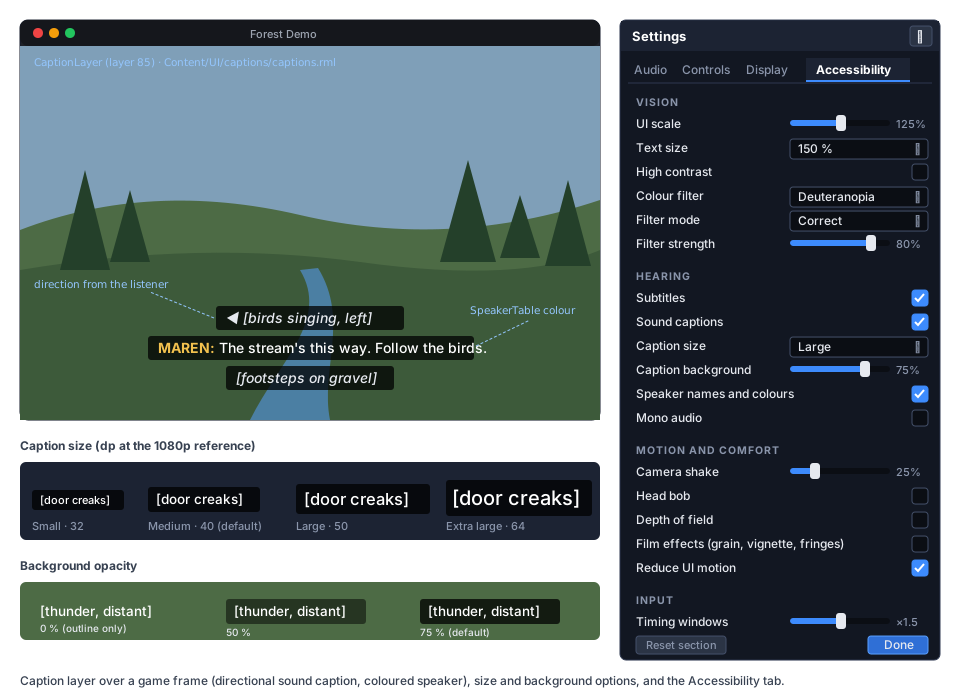
Resources
Section titled “Resources”public enum CaptionKind { Dialogue, SoundEffect, Music, Ambience }
public sealed class SubtitleCue : Resource{ [Export(Range = "0,3600,0.001")] public float Start { get; set; } // seconds into the audio [Export(Range = "0,3600,0.001")] public float End { get; set; } [Export] public string Speaker { get; set; } = ""; // SpeakerTable id; empty = no name [Export(Translatable = true, Multiline = true)] public string Text { get; set; } = "";}
public sealed class SubtitleTrack : Resource{ [Export] public List<SubtitleCue> Cues { get; set; } = []; // sorted by Start when loaded}
public sealed class SpeakerInfo : Resource{ [Export] public string Id { get; set; } = ""; [Export(Translatable = true)] public string Name { get; set; } = ""; [Export] public System.Drawing.Color Color { get; set; } = System.Drawing.Color.White; // sRGB}
public sealed class SpeakerTable : Resource{ [Export] public List<SpeakerInfo> Speakers { get; set; } = [];}
// AudioStream additions[ExportGroup("Captions")][Export(Translatable = true)] public string? Caption { get; set; } // "[door creaks]"[Export] public CaptionKind CaptionKind { get; set; } = CaptionKind.SoundEffect;[Export] public SubtitleTrack? Subtitles { get; set; } // timed dialogue for this file- All the types are exportable as they are:
Resourcesubclasses and lists of them, translatable strings andSystem.Drawing.Color(scene-serialization.md).mf-l10n extract --scenesalready reads.mresand inline resources (localization.md → Scene strings). Stored text is the source string, and the caption server translates it at display time withTr._(text). A locale change refreshes the visible lines. - Imported audio files take the same three values from their
.metaimport settings:"caption","captionKind"and"subtitles"(a path or UID).AudioImportersets them on the stream.mf-l10n extractlearns to readcaptionfrom.metafiles. .vttand.srtfiles import asSubtitleTracks through a newSubtitleImporter. WebVTT voice spans (<v maren>) becomeSpeakerids, SRT has no speakers.mf-l10n extractlearns both formats, with#:references to the cue’s line.AudioPlayer,AudioPlayer2DandAudioPlayer3Dgain[Export(Translatable = true)] string? Caption, an override for one player (the same creak can be “[door creaks]” or “[gate creaks]”).
Triggering and timing
Section titled “Triggering and timing”flowchart LR
P["AudioPlayer*.Play / AudioServer.PlayOneShot"] --> S["AudioServer.Play (main thread)<br/>slot remembers its AudioStream"]
S -->|"VoiceStarted(handle, stream, owner)"| C["CaptionServer"]
C -->|"each frame: GetPlaybackPosition(handle)"| Q["cue index per voice"]
Q -->|"lines changed"| L["captions data model → CaptionLayer"]
R["AudioServer.Release"] -->|"VoiceEnded(handle)"| C
M["CaptionServer.Show(text, speaker, seconds)"] --> L
- The voice slot keeps a reference to its
AudioStream, set byAudioPlayback.PlayandPlayOneShot, which both have it.AudioServercalls an internalICaptionListenerfromPlay(AudioServer.cs:901) andRelease(AudioServer.cs:1061). Both run on the main thread, so no new cross-thread state is needed. - Dialogue. For a voice whose stream has
Subtitles, the server keeps a cursor into the cues.ProcessreadsAudioServer.GetPlaybackPosition(handle)for each tracked voice (at most 32, a fixed array) and moves the cursor. Seeking, pausing and pitch all work, because the position is the voice’s own frame count. The position lags by one audio block (10 ms by default), which nobody can see. A cue is shown for at leastMinCueSeconds(1 s), and long cues wrap to at most two lines at the layer. - Sound captions. For a stream with a
Caption(or a player override), the server shows the line while the voice plays, for at least 1.5 s and at most 4 s for a one-shot. Looped streams (ambience) show while they loop. An identical line that is already visible is extended, not repeated, so ten footsteps make one “[footsteps on gravel]”. - Audibility. A positional voice is captioned only while its last computed gain is above −40 dB, so distant sounds do not flood the screen. A voice on a muted bus is never captioned.
- Direction. For 3D voices the server compares the source position with
AudioServer.Listener3D(AudioServer.cs:242) and picks one of four arrows (◀ ▶ ▲ ahead ▼ behind). For 2D voices it uses the listener’s x offset. The line updates only when the arrow changes. - Categories.
SubtitlesgatesDialogue.Captionsgates the other three kinds. - Manual and video.
CaptionServer.Show(string text, string speaker = "", float seconds = 3f, CaptionKind kind = CaptionKind.Dialogue)covers games with text-only dialogue and code-driven events. G16 feeds video subtitle tracks through the same server, using its own clock. - Allocation. Lines live in a fixed pool of eight
CaptionLinestructs. Strings are created only when a cue starts or the locale changes, never per frame.Processwith no tracked voices, or with cues that do not change, allocates 0 B, and it joins the allocation gate.
// new — registered in Engine.OnLoad next to the AudioServer (Engine.cs:426-431); works without audio for Show()public sealed class CaptionServer : IFrameServer{    public SpeakerTable? Speakers { get; set; }    public IReadOnlyList<CaptionLine> Lines { get; }             // oldest first    public CaptionLine Show(string text, string speaker = "", float seconds = 3f,        CaptionKind kind = CaptionKind.Dialogue);    public void Clear();    [Signal] public event Action? LinesChanged;}
public readonly record struct CaptionLine(int Id, CaptionKind Kind, string Text, string SpeakerName,    System.Drawing.Color SpeakerColor, CaptionDirection Direction, double ShownAt);
The caption layer
Section titled “The caption layer”CaptionLayer : UiLayer is added under the root by GameHost when the project has an accessibility section, or by
the game with CaptionLayer.Ensure(tree).
- Layer 85. That is above HUDs, below G4’s settings menu (90) and below the loading screen (10 000). It uses
ProcessMode.Always, so paused dialogue stays on screen. - Scaling.
UiLayer.Scalingis set toScaleWithScreenSizeat 1920×1080 (the per-layer override exists,MainframeEngine/Src/UI/UiLayer.cs:104). Caption sizes therefore mean the same fraction of the screen in every project, whatever its own UI scale mode. - Document.
Content/UI/captions/captions.rml, oraccessibility.captionDocumentinproject.mfproj, binds acaptionsdata model: a struct list (BindList) ofkind,speaker,color,text,arrow, plus scalarssize,background,showNames,showColors. - Layout. Bottom centre,
max-width: 60%, at most two lines per cue and at most three cues (the oldest drops). Each line has its own background box, atbackgroundopacity. At 0 % the text gets a 2dp outline instead. - Sizes.
Small32,Medium40,Large50,ExtraLarge64 dp at the 1080p reference. Sound captions are italic, and speaker names are bold in the speaker’s colour (white whenspeakerColorsis off, hidden whenspeakerNamesis off). - Games restyle the layer by copying
captions.rml. The data-model contract is documented ingame-ui.md.
Editor
Section titled “Editor”- The inspector edits
SubtitleTrack.Cuesas a list (start, end, speaker, text). A cue row has an icon button (▶, tooltip “Play from this cue”) that plays the owning stream fromStart. - Audio import settings (the
.metasidecar) gain the three caption keys wherever the editor edits import settings. - Project Settings gets an Accessibility section for the
project.mfprojkeys.
Mono audio
Section titled “Mono audio”AudioServer.MonoOutput (a new property) sends one command to the audio thread. After it mixes the
graph, AudioMixRoot (MainframeEngine/Src/Audio/Graph/AudioMixRoot.cs:19) averages the channels in place,
allocation-free and lock-free like the rest of the block. Players who hear with one ear then get every panned sound.
Motion and comfort
Section titled “Motion and comfort”- Post overrides.
RenderServer.Comfortis a small struct (DepthOfField,FilmEffects,MotionBlur).RootPostProcess(RenderServer.cs:695-701) applies it after the camera attributes, as awithon thePostProcessSettingsstruct: no DoF blur, and zero grain, vignette and chromatic aberration. The world’s profile is untouched, so the Forest no longer needs to edit its profile for these rows, and editor previews stay as authored. Struct copies do not allocate. - Camera shake.
CameraShake3D(child of aCamera3D) andCameraShake2Dimplement trauma-based shake:AddTrauma(0..1),Decay,MaxOffset,MaxRoll,Frequency, and seeded value noise (repeatable under--fixed-fps). The offset is multiplied byAccessibilitySettings.Current.CameraShake, so at 0 there is no shake, and games with their own shake read the same value. - Field of view.
Camera3D.Fovis vertical (MainframeEngine/Src/Scene/Nodes3D/Camera3D.cs:37). A static helperCamera3D.HorizontalToVerticalFov(degrees, aspect)moves the Forest’s formula into the engine (FirstPersonController.VerticalFov,Examples/Forest/Forest/Src/Player/FirstPersonController.cs:188). The setting is horizontal degrees, clamped to the project’sfieldOfViewrange, and applied by the game’s controller. - Head bob, flashing. These are game behaviour. The keys are standard, so every game’s menu shows them the same way,
and the Forest’s
HeadBobreads the shared key. - TAA and blur. Anti-aliasing stays a display setting (G4, and the Forest’s
aarow). The Accessibility tab links to it with the note “TAA can look soft in motion”.
Input assists
Section titled “Input assists”- Hold or toggle.
InputAction.Mode(Holddefault,Toggle) comes fromproject.mfproj("mode": "toggle", additive). The player’stoggleActionsoverrides it throughInputState.SetActionMode. In toggle mode,ActionState(InputState.cs:57) latches: a press edge flipsPressed, and releases are ignored.JustPressedandJustReleasedfollow the latched state, so game code is unchanged. Events from the router still report the physical input (InputEvent.IsActionPressed,MainframeEngine/Src/Scene/Input/InputEvent.cs:27). That difference is documented, and an open question. - Timing windows.
InputState.ScaleWindow(seconds)returnsseconds · TimingScale, a one-line helper so QTEs, double-taps and parry windows use one setting.InputState.GetActionHeldTime(action)supports “hold to confirm” without per-game timers. - UI repeat.
UiServer.NavigationRepeatDelayandNavigationRepeatIntervalreplace the constants (UiServer.cs:114-115).TooltipDelaySecondsis already settable and joins the keys. - Rebinding, one-handed layouts, deadzones are G4’s Key rebinding. Glyphs and vibration strength are G12. This proposal adds no second rebinding path.
Settings UI and consumers
Section titled “Settings UI and consumers”AccessibilityPanel : UiDocument(Content/UI/settings/accessibility.rml) shows the four groups in the mockup above. It uses only widget-library controls and translates every label throughTr/ RML text. A live sample caption (“[door creaks]”) previews size and background as the player drags. With G4 it is the menu’sSettingsTabs.Accessibilitytab. Without G4, games open it as a modal document.- Forest. Its pause menu (ADR 0180) gets an Accessibility page. Rows are added to the
ForestOptionstable and callAccessibilitySettings. Its synthesized birds, footsteps and stream get caption keys, with directions (”◀ [birds singing]”). ItsHeadBoband FOV move to the shared keys, soForestSettingskeeps only what is Forest-specific. Labels on the new page go throughTr. - Demo. The Audio 3D and Audio 2D scenes get caption keys and one dialogue line with a
.vtttrack. The UI scene gets toggles for text size, high contrast and colour filter, sojust demo-screenshotscan show them.
Screen narration (later phase)
Section titled “Screen narration (later phase)”UI narration reads the focused element aloud as focus moves. The hooks exist: RmlContext.FocusElement
(RmlContext.cs:98) and UiElement.Focused events. A UiNarrator would read an element’s aria-label, title or
text. The open part is the output:
| Option | Platforms | Dependency | Trade-offs |
|---|---|---|---|
Platform TTS through P/Invoke: SAPI (COM), AVSpeechSynthesizer (Objective-C runtime), speech-dispatcher (libspeechd) | all three | none new | Speaks, but is not a screen reader: no braille, ignores the player’s screen-reader settings |
System.Speech NuGet | Windows | new package | Easy on Windows only |
| AccessKit (native, C API) exposing the RmlUi tree through UIA, NSAccessibility and AT-SPI | all three | new native library under Native/ | Real screen-reader support (Godot 4.5 adopted it), but a tree adapter and a native build |
The choice needs a dependency discussion (Open questions), so it is task G14.10 after the rest.
Testing
Section titled “Testing”- Unit (
Tests/MainframeEngine.Tests/Accessibility/):AccessibilitySettings: defaults fromproject.mfproj,ReadFrom/WriteToround trip, only changed keys written, wrong types warn once,Changedsections,Reset.ColorVisionSettings.ComputeMatrix: identity at strength 0 and forNone; Machado severity 1 rows match the published values; interpolation at 0.55; daltonize keeps neutral greys neutral; the achromatopsia rows sum to 1.CaptionServerover the null device (AudioServer.RenderNullDevice,AudioServer.cs:626), with deterministic positions: cues advance with playback, seek and pause; minimum duration; dedupe and extension; the −40 dB gate; muted bus; direction buckets from the listener;Subtitles/Captionsgating; locale change refreshes lines;.metacaption keys; player overrides.SubtitleImporter: VTT voices, SRT, timestamps, malformed cues reported with line numbers.- Input: toggle latching, edges in process and physics frames,
ScaleWindow, held time. AudioServer.MonoOutput: hard-panned input comes out equal on both channels.RenderServer.Comforton aPostProcessSettingswith DoF, grain, vignette and aberration.- Allocation gate:
CaptionServer.Process(idle, with stable cues),ColorVisionEffectrecord, toggle-mode input, the caption layer with unchanged lines, theme switches after the first.
- UI (
SerialRmlUi): themes activate on game layers and not on the dev overlay;widgets.rcssattext-200has no clipped rows;qpspseudo-locale captions fit; the accessibility panel is reachable by gamepad (nav: auto). - Render tests (both drivers,
just golden-update):post-color-vision-deutan-correct,-protan-simulateand-tritan-simulateon a colour-chart scene;ui-captions(three lines, speaker colour, arrow);ui-widgets-high-contrast;ui-widgets-text-200. - Extraction:
mf-l10nfixtures for caption keys in.meta,.vttand.srt. - QA (
Tests/QA/accessibility.qa): open the Accessibility tab, set Large captions and the deuteranopia filter, play the Demo’s dialogue line, capture, restart and check the values were restored (with G4). Forest: a capture with bird captions and arrows.
Acceptance
Section titled “Acceptance”- A game with an
accessibilitysection shows translated subtitles for a dialogue file with a.vtttrack, and sound captions for streams with a caption key, with no code. Positional sounds show their direction, and repeated sounds collapse into one line. - Caption size, background, speaker names and speaker colours change live, and keep their screen fraction at 720p, 1080p and 4K.
- Text at 150 % and 200 % reflows the widget library with no clipping. High contrast and reduced motion apply to game layers and not to the dev overlay.
- The colour filter simulates and corrects three deficiencies with a strength slider, costs nothing when off, and previews in the editor viewport.
- Depth of field and film effects switch off without editing the world, camera shake scales to zero, and mono audio works.
- Toggle mode works for any action without game code changes. UI repeat timings are settable.
- Settings persist through G4’s
settings.jsonwhen G4 exists, and throughReadFrom/WriteTobefore it. - The Forest and the Demo use the shared keys. The Accessibility tab is translated into Spanish and
qps. - Allocation gate, render tests,
just build,just test,just test-render,just format-checkandjust shaders-checkpass. - Docs updated when it ships:
game-ui.md(themes,remrule, caption layer contract),post-processing.md(ColorVisionEffect, comfort overrides),audio.md(caption keys, mono),localization.md(.vtt/.srt/.metaextraction),cameras-and-input.md(toggle mode, timing helpers),project-and-gamehost.md(accessibilitysection),forest.md,demo.md, and a newdocs/design/accessibility.mdwith the XAG mapping.
Task list
Section titled “Task list”- G14.1 Settings core:
AccessibilitySettings, the standard keys, theproject.mfprojaccessibilitysection,GameHostcreation andApply,ReadFrom/WriteTo,UiServer.UserScaleif G4 has not added it; tests. - G14.2 UI themes:
UiServer.TextScale/HighContrast/ReduceMotionthroughActivateTheme,UiLayer.AccessibilityThemes,widgets.rcssinremwith reflowing rows and theme blocks, loading-screen motion, settable navigation repeat; the shim’s font-size getter and the text audit; UI tests and the two widget goldens. - G14.3 Colour vision filter:
ColorVisionSettingsand the matrices, theColorVision.vk.frag.slangshader (with.spvandshaders.lock),ColorVisionEffecton the main and sub-viewport stacks,RenderServer.ColorVision, the editor viewport toggle; tests and three goldens. - G14.4 Comfort and audio:
RenderServer.ComfortinRootPostProcess,CameraShake3D/CameraShake2D,Camera3D.HorizontalToVerticalFov,AudioServer.MonoOutput; tests. - G14.5 Caption runtime:
SubtitleTrack/SubtitleCue/SpeakerTable/SpeakerInfo, theAudioStreamand player members and.metakeys, the voice-start and voice-end hooks,CaptionServerwith timing, dedupe, the gain gate and directions,Show; tests and the allocation gate. - G14.6 Caption layer:
CaptionLayer,captions.rml/.rcss, sizes, background, speaker options, arrows, the data-model contract; theui-captionsgolden. - G14.7 Import, localization and editor:
SubtitleImporter(.vtt,.srt),mf-l10nextraction of.vtt,.srtand.metacaptions, the inspector cue list with preview, caption import settings, the Project Settings section. - G14.8 Input assists:
InputActionModeand toggle latching,toggleActions,ScaleWindow,GetActionHeldTime, the"mode"action key inproject.mfproj; tests. - G14.9 Settings UI and consumers:
AccessibilityPanel(a G4 tab or standalone), the first-launch prompt, Forest Accessibility page and caption keys, Demo captions and toggles, Spanish andqpsstrings,accessibility.qa, docs. - G14.10 Screen narration (later): a spike on the three output options, the dependency decision, then
UiNarratorover RmlUi focus.
Open questions
Section titled “Open questions”- Full-frame colour filter. Should simulation also cover the canvas and UI (
ColorVisionScope.FullFrame)? It needs the overlay to render into an LDR image and every overlay renderer to build pipelines for that pass. That is one more fullscreen pass and an extra render-pass switch, which tilers (MoltenVK) feel most. Default: scene only, and revisit when the editor needs a full-frame preview. - Which daltonization. Machado simulation plus Fidaner error shift is simple and is one matrix. Brettel (1997) is more accurate for tritanopia but needs two half-planes (a branch in the shader). Should the “correct” mode ship at all, or only simulation plus palette guidance? Studies on daltonization’s benefit are mixed, but many games offer it.
- Caption defaults. Are 40 dp Medium and 75 % background right for TV distance? Guidance from caption research suggests larger defaults for the living room. Should subtitles default to on in the template?
- Code-set captions. The C# extractor only sees literals in
Tr._/Tr.Pcalls. A caption key set from code (the Forest’s synthesized birds) is not extracted. Options: a no-op marker method mapped as an extractor alias, or requiring such keys in.mresfiles. - Screen narration backend. Platform TTS (no dependency, not a real screen reader), the
System.Speechpackage (Windows only), or AccessKit (a new native library, real screen-reader integration). A new package or native shim needs discussion before G14.10. - Minimum text threshold. XAG 101 recommends a minimum text size at 1080p. Which default should the audit use, and should it be per platform (desktop vs TV and handheld)?
- Toggle mode and events. Should
InputEvent.IsActionPressedreport the latched state too, for event-driven code, or stay physical? Latching events means synthesizing release events. - Text scale mechanism. The
remthemes need game documents to author text inrem. The alternative is a font size multiplier in the native shim’s font engine, which scales every document with no authoring rule, at the cost of a native change and layouts that were not designed for it.
Related
Section titled “Related”- Save games and settings (G4):
UserSettings,ConfigFile, settings menu, rebinding,UiServer.UserScale - Game UI: scaling (ADR 0181), widget library, data binding, loading screen (ADR 0183)
- Post-processing:
AfterTonemapstage,ColorGradeEffect, sub-viewport stacks - Audio: voices, streams, listener, bus mute
- Localization:
Tr, translatable exports,mf-l10n - Cameras and input:
InputMap,InputState - Haptics and input glyphs (G12), Video playback (G16)
- Forest: the ADR 0180 option table that gets the Accessibility page
- Natives: the shim export for the text audit