
Proposal: Paths (Path3D/PathFollow3D, Path2D/PathFollow2D)
Milestone: Gameplay toolkit (G13) · Status: ⬜ planned ·
Depends on: Water (G8c.2: Curve3D, shipped), M6 physics (kinematic bodies,
CharacterBody*), M10 editor, Terrain (G8a.2: IEditorViewportTool) ·
Related: Editor viewport tools (G7.3 handles),
Keyframe animation (G1a: value tracks on Progress), Navigation (G3: patrol
routes), Forest showcase (G8d: camera rails), Networking
Problem
Section titled “Problem”The engine can describe a 3D curve but has nothing that follows one. Every moving-along-a-line feature (camera rails, patrols, platforms, conveyor props, projectiles on arcs) is hand-written today:
Curve3Dexists and is river-shaped.MainframeEngine/Src/Resources/Curve3D.cs:23is a Bézier resource with Godot’s API subset plus per-point width and depth (12 floats per point,:26), a lazy, deterministic bake to equal arc length (Bake,:289-351), O(1) offset lookup (Locate,:401-408),SampleBakedwith optional Catmull-Rom (:211-226),SampleBakedWithRotation(:233-254) and closest-point queries (:266-277). Its users are all water:River3D.Curve(MainframeEngine/Src/Scene/Nodes3D/Water/River3D.cs:51-66),RiverBuilder.Build(RiverBuilder.cs:150, sampling at:240-251), the Forest’s stream (Examples/Forest/Forest/Src/World/ValleyGenerator.cs:356-380) and its stream audio.- No path nodes and no 2D curve. A search of
MainframeEngine/,MainframeEngine.Editor/andExamples/forPath3D,PathFollow,Path2DandCurve2Dfinds only proposal text. 2D code hasCanvasItem.DrawPolyline(MainframeEngine/Src/Scene/Canvas/CanvasItem.cs:300) and nothing to sample. - Games re-implement rails. The Forest has two:
ForestCamerasbuilds its own closed Catmull-Rom loop and a 32-samples-per-segment arc-length table to fly at constant speed (Examples/Forest/Forest/Src/Menu/ForestCameras.cs:26-33,:220-275), andForestBenchmarksamples a second Catmull-Rom by parameter, so its speed varies with point spacing (Examples/Forest/Forest/Src/Dev/ForestBenchmark.cs:21,:90-91,:286-296). Neither can be edited in the editor. - Rotation along the curve is not good enough for a rail.
SampleBakedWithRotationtakes the direction of the baked segment (Curve3D.cs:238-242), so the rotation steps everyBakeInterval, which shows on a camera. It builds the basis from world up (Transform3D.BasisLookingAlong,MainframeEngine/Src/Scene/Transform3D.cs:164-179), so on a vertical segment it falls back to an arbitrary axis and a loop-the-loop flips. Up vectors were deferred until a road or path node needs them (water decision 8). - No closed curves. The bake walks
count − 1segments (Curve3D.cs:318); a loop needs a duplicated end point, which leaves a tangent kink at the seam. - Closest-point queries scan every baked segment (
ClosestOnBaked,Curve3D.cs:421-447).StreamAudiocallsGetClosestOffsetevery frame (Examples/Forest/Forest/Src/Audio/StreamAudio.cs:114); a 2 km rail at 0.2 m is 10 000 segments per call. - Tweening progress boxes.
Tween.TweenPropertyreaches properties by reflection and boxes every step (MainframeEngine/Src/Scene/Tween.cs:103,:898,:960returnsobject);TweenMethod(Action<float>, …)(Tween.cs:127) does not. - Moving platforms carry nothing. Moving a kinematic body’s node already reaches the new pose in one step with a
velocity, so it pushes dynamic bodies (
MainframeEngine/Src/Physics/3D/PhysicsSpace3D.cs:551-555,:727-733; Box2Db2Body_SetTargetTransform,Physics/2D/PhysicsSpace2D.cs:782). But that velocity only goes to Jitter’s body;BodyRecord3D.GetLinearVelocityreturns the separateKinematicVelocity(PhysicsSpace3D.cs:44-49), andCharacterBody3D/2Dhave no platform velocity at all (no platform members inPhysics/3D/CharacterBody3D.csorPhysics/2D/CharacterBody2D.cs), so a player on a lift is left behind. There is noAnimatableBody*; the only code-moved body isRigidBody*withMode = Kinematic. - No curve editing in the editor.
MainframeEngine.Editor/Src/Viewport/holds onlyTransformGizmo(2D),EditorCameraandViewportController. The river editor (River3DTool, water.md, G8c.4) and the viewport-tool API it builds on (IEditorViewportTool, G8a.2) are still proposals, as is G7.3’s handle API (editor-viewport-tools.md). Terrain snapping exists only in code:River3D.FitToTerrain(River3D.cs:397-416) overTerrain3D.HeightAt(MainframeEngine/Src/Scene/Nodes3D/Terrain/Terrain3D.cs:928);Terrain3D.Raycast(:1014) can hit-test a cursor.
Path3DandPathFollow3Dwith Godot’s behaviour (progress in metres or as a ratio, loop, cubic interpolation, h/v offsets, rotation modes None/Y/XY/XYZ/Oriented with tilt), built on the existingCurve3D.Curve3Dgrows what paths need:Closed, baked tangents and rotation-minimising up vectors, smooth rotation between baked points, accelerated and hinted closest-point queries, smooth-point helpers. Existing bakes stay bit-identical.Curve2D,Path2DandPathFollow2D(pixels), sharingCurve3D’s baker rather than copying it.- No allocation per frame: following, sampling, closest-point queries, tweens of progress and editor idle drawing.
- Moving platforms that carry characters:
AnimatableBody3D/2DandCharacterBody*platform velocity. - A curve editing tool for 3D and 2D views: add, insert, delete, tangents, tilt, close, snap to terrain, undo. It is
shared with
River3DToolso rivers and paths edit the same way. - The Forest’s two rails and the Demo use the new nodes.
Non-goals
Section titled “Non-goals”- Road or rail mesh generation along a path (Godot’s
CSGPolygon3Dpath mode).River3Dis the one ribbon generator; a generalPathMesh3Dis a later proposal. - 1D
Curve(value over 0..1) for easing or particle size. G6.3 plans it. - Spline types other than cubic Bézier (B-splines, NURBS). Catmull-Rom input is converted to Bézier on entry.
- Navigation on paths (A* along a road network). G3’s
AStar3Dcovers waypoint graphs. - Network prediction of followers beyond replicating
Progress.
Design
Section titled “Design”Overview
Section titled “Overview”| Type (new unless noted) | Where | Role |
|---|---|---|
Curve3D (extended) | Src/Resources/Curve3D.cs | Closed, UpVectorEnabled, baked tangents/up vectors, closest-point grid, helpers |
CurveBaker (internal, extracted) | Src/Resources/CurveBaker.cs | Adaptive subdivision + equal-arc resampling shared by Curve3D and Curve2D |
Curve2D | Src/Resources/Curve2D.cs | 2D Bézier resource (pixels): position, in, out per point |
Path3D, PathFollow3D | Src/Scene/Nodes3D/Paths/ | Curve holder; follower that places itself (and its children) on the curve |
Path2D, PathFollow2D | Src/Scene/Nodes2D/Paths/ | The same in 2D |
PathRotationMode, PathProcessCallback | Src/Scene/Nodes3D/Paths/ | Enums |
AnimatableBody3D/2D; CharacterBody* platform members | Src/Physics/3D, Src/Physics/2D | Kinematic body moved by nodes; characters ride it |
CurveEditTool (shared), Path3DTool, Path2DTool | MainframeEngine.Editor/Src/Viewport/Curves/ | Viewport tool for any curve; River3DTool reuses it |
Curve3D additions
Section titled “Curve3D additions”public sealed class Curve3D : Resource{ // New exports (old scenes load with the defaults, so rivers and their bake hash are unchanged). [Export] public bool Closed { get; set; } // adds the segment last → first (Touch on set) [Export] public bool UpVectorEnabled { get; set; } // bake up vectors (Godot's up_vector_enabled)
public Vector3 SampleBakedTangent(float offset); // unit, interpolated between baked tangents public Vector3 SampleBakedUpVector(float offset, bool applyTilt = false); // needs UpVectorEnabled // Existing; now uses interpolated tangents, and the baked up vector when UpVectorEnabled. public Transform3D SampleBakedWithRotation(float offset, bool cubic = false, bool applyTilt = false);
public float GetClosestOffset(Vector3 toPoint); // existing; grid-accelerated public float GetClosestOffset(Vector3 toPoint, float hintOffset, float window); // searches hint ± window only public float WrapOffset(float offset); // Closed: offset mod length; open: clamp
// Helpers (extension): smooth Bézier through points, as Catmull-Rom with the given tension, open or closed. public void SetSmoothPoints(ReadOnlySpan<Vector3> points, bool closed, float tension = 0.5f); public void SetPointSmooth(int index, float tension = 0.5f); // the editor's "smooth this point" public void Reverse(); // swaps in/out, reverses order, negates tilt}- Closed. The bake appends the segment from the last point (its
out) to the first (itsin);Locateand the scalar tracks treat the seam like any segment.Sample(index, t)acceptsindex == count − 1when closed. Width and depth smoothstep across the seam too, so a closed river is possible, thoughRiver3Dwarns and ignoresClosedfor now. - Tangents are baked per point with central differences of the dense polyline (one-sided at open ends, wrapped
when closed), stored in a new
_bakedTangentsarray, and interpolated (normalised lerp) bySampleBakedTangent.SampleBakedWithRotationuses them instead of the segment direction, which removes the per-BakeIntervalsteps. - Up vectors use the double-reflection rotation-minimising frame (Wang et al. 2008): start from the first
tangent’s world-up-projected normal, reflect it point to point, so a vertical climb or a loop never flips. For a
closed curve the leftover twist at the seam is spread linearly over the length, so the frame matches at the seam.
Tilt rolls around the tangent after that. Only
+ − × ÷andMathF.Sqrtin a fixed order, like the rest of the bake (Curve3D.cs:16-19), so up vectors are bit-identical on x64 and arm64. - Closest-point grid. On the first closest query after a bake, the baked segments are bucketed into a uniform grid
(cell =
max(4 × BakeInterval, length / 256), at most 64 k cells, oneint[]of cell starts and one of segment ids, kept and reused). A query walks rings of cells outward until the best distance is inside the ring. Results are identical to today’s scan (ties go to the lower offset, as now). The hinted overload scans[hint − window, hint + window]only (wrapping when closed); followers that track a moving point use it. - Shared baker.
Bake,SubdivideandAppendDense(Curve3D.cs:289-383) move to an internalCurveBakerstruct that works onVector3(2D curves passz = 0). Both resources own one baker and its scratch, so a bake allocates only when the point count grows, as today. The committed bake hash inCurve3DTestsproves the move changed nothing.
Curve2D
Section titled “Curve2D”Godot’s Curve2D API (AddPoint, Get/SetPointPosition/In/Out, RemovePoint, ClearPoints, Sample,
SampleBaked, SampleBakedWithRotation → Transform2D, GetBakedLength, GetBakedPoints, GetClosestOffset,
GetClosestPoint) plus the same Closed, SampleBakedTangent, hinted closest query, SetSmoothPoints and Reverse.
BakeInterval defaults to 5 px (Godot). Storage is one exported float[] Points, 6 floats per point (position,
in, out). No tilt, width or depth. Icon: vector-bezier (resource family).
Path3D and Path2D
Section titled “Path3D and Path2D”[EditorIcon("route-2")]public class Path3D : Node3D{ [Export] public Curve3D? Curve { get; set; } // ResourceSubscription while in the tree [Export] public Color DebugColor { get; set; } = new(0.38f, 0.65f, 0.98f); // sRGB, editor drawing only [Signal] public event Action? CurveChanged; // the curve was replaced or raised Changed}Path2D : Node2D is the same with Curve2D. Both subscribe through ResourceSubscription<T>
(MainframeEngine/Src/Physics/PhysicsMaterial.cs:7) so swapping the curve or leaving the tree never leaks a handler.
Neither draws in games. In the editor every Path3D in the scene draws its baked polyline into
SceneViewport.DebugLines (depth-tested), and the selected one into OverlayLines, from the existing
DrawEditorVisuals loops (MainframeEngine.Editor/Src/Viewport/ViewportController.cs:766,
ViewportController.2D.cs:249).
PathFollow3D and PathFollow2D
Section titled “PathFollow3D and PathFollow2D”public enum PathRotationMode : byte { None, Y, XY, XYZ, Oriented }public enum PathProcessCallback : byte { Idle, Physics }
[EditorIcon("map-pin")]public class PathFollow3D : Node3D // must be a direct child of a Path3D (Godot){ [Export(Range = "0,100000,0.01")] public float Progress { get; set; } // metres along the curve [Export(Range = "0,1,0.0001")] public float ProgressRatio { get; set; } // Progress / length [Export] public float HOffset { get; set; } // along the follower's local X [Export] public float VOffset { get; set; } // along the follower's local Y [Export] public PathRotationMode RotationMode { get; set; } = PathRotationMode.XYZ; [Export] public bool CubicInterp { get; set; } = true; [Export] public bool Loop { get; set; } = true; // wrap Progress (Godot); else clamp [Export] public bool TiltEnabled { get; set; } = true; // Extensions: move without code. [Export(Range = "-1000,1000,0.01")] public float Speed { get; set; } // m/s, 0 = only when Progress is set [Export] public bool PingPong { get; set; } // with Speed and !Loop: reverse at the ends [Export] public PathProcessCallback ProcessCallback { get; set; } [Signal] public event Action? Looped; // wrapped past the end (or start) [Signal] public event Action? EndReached; // clamped at an end, or turned (PingPong)}| Mode | Rotation written to the follower |
|---|---|
None | Unchanged (position only). |
Y | Yaw only: −Z along the tangent projected on XZ. |
XY | Yaw and pitch: −Z along the tangent, +Y toward world up, no roll. |
XYZ | XY plus the curve’s tilt (when TiltEnabled) as roll around the tangent. |
Oriented | The baked rotation-minimising frame (needs UpVectorEnabled, else falls back to XYZ with a one-time warning) plus tilt. Loops and vertical climbs are smooth. |
- Forward is −Z, the engine’s forward and what
SampleBakedWithRotationalready uses (ADR 0155). Godot’suse_model_frontis therefore not needed and not added.PathFollow2DhasRotates(bool) instead of a mode, and turns +X along the tangent, as in Godot. - Updates. The follower writes its local transform when
Progress, an offset or a mode changes, when it enters the tree and on its parent’sCurveChanged. It does not process otherwise. WithSpeed ≠ 0it advances inOnProcess(Idle) orOnPhysicsProcess(Physics) and enables only that callback. The pose is a handful ofSampleBaked*calls with no allocation. - Physics callback for bodies. A kinematic body under a follower must move in the fixed step: the follower’s
write in
OnPhysicsProcessbecomes the body’s target before the step (physics.md, “user moves”), and the engine interpolates the body’s render pose. Visuals belong under the body. A follower inIdlemode with a body child logs one warning. - Progress setters.
Loopwraps withCurve3D.WrapOffsetsemantics (a closed curve always wraps). SettingProgressRatioon an empty curve keepsProgressat 0.
Tweens and animation
Section titled “Tweens and animation”-
Tween.
TweenProperty(follow, "ProgressRatio", 1f, 8)works but boxes each step. The documented pattern is the boxing-freeTweenMethod(Tween.cs:127) with a cached delegate:[Export] public PathFollow3D? Rail { get; set; }private Action<float>? _setRatio;public void FlyRail(){_setRatio ??= r => Rail!.ProgressRatio = r;CreateTween().TweenMethod(_setRatio, 0f, 1f, 8).SetTrans(Tween.TransitionType.Sine).SetEase(Tween.EaseType.InOut);}No
Tweenchange is needed. When G1.7 movesTweenonto the generated bindings,TweenPropertyonProgressstops boxing too. -
Keyframe animation (G1a).
ProgressandProgressRatioare plain[Export] floats, so G1a’s value tracks bind them throughExportPropertyInfo<PathFollow3D, float>without boxing (binding). A cutscene camera is aCamera3Dunder aPathFollow3Dwith one value track onProgressRatio; nothing path-specific is added to G1.
- Camera rails.
Path3D(closed,UpVectorEnabled) →PathFollow3D(Oriented,Speed7) →Camera3D. This replacesForestCameras’ fly-over and its arc-length table.ForestBenchmarkkeeps its numbered points and runs them throughSetSmoothPoints, so frame n still shows the same pose on every machine (the bake is deterministic). - Patrol routes. A guard is a
CharacterBody*steered toward a “carrot”: aPathFollowwhoseProgressis the body’s closest offset (hinted query) plus a look-ahead. With G3’s agent, the carrot becomesNavigationAgent2D.TargetPosition, so the guard walks the route around obstacles and resumes from the closest point after a chase. This is a documented recipe and a Demo script, not an engine node:PathFollow*already provides it. - Moving platforms.
Path3D→PathFollow3D(Speed,PingPong,ProcessCallback = Physics) →AnimatableBody3D→ mesh andCollisionShape3D. See below.
Moving platforms: AnimatableBody* and platform velocity
Section titled “Moving platforms: AnimatableBody* and platform velocity”[EditorIcon("elevator")]public class AnimatableBody3D : StaticBody3D // Godot's AnimatableBody3D; also AnimatableBody2D{ internal override PhysicsBodyKind Kind => PhysicsBodyKind.Kinematic; // moved by its node, pushes bodies public Vector3 GetStepVelocity(); // the velocity of the last step's move}
// Additions to CharacterBody3D (and CharacterBody2D with Vector2):public class CharacterBody3D{ [Export] public PlatformOnLeave PlatformOnLeave { get; set; } = PlatformOnLeave.AddVelocity; // Godot's names [Export(Flags = true)] public uint PlatformFloorLayers { get; set; } = uint.MaxValue; public Vector3 GetPlatformVelocity();}BodyRecord3Dkeeps the velocity it computes for a target move (PhysicsSpace3D.cs:732) andGetLinearVelocity/GetAngularVelocityreturn it for kinematic bodies, soRigidBody3Din kinematic mode reports its real speed as well. 2D reads Box2D’s body velocity afterb2Body_SetTargetTransform.MoveAndSlideremembers the floor collider. On the next call it first moves the character by the floor’s velocity at the contact point (v + ω × r), then slides with its ownVelocity. On leaving the floor,PlatformOnLeaveadds the platform’s velocity (or only its upward part, or nothing) toVelocity. Walls do not carry (Godot’splatform_wall_layersis left out).- All Jitter2 and Box2D calls stay inside
Src/Physics. No allocation: the floor collider is a record reference.
Editor: the curve tool
Section titled “Editor: the curve tool”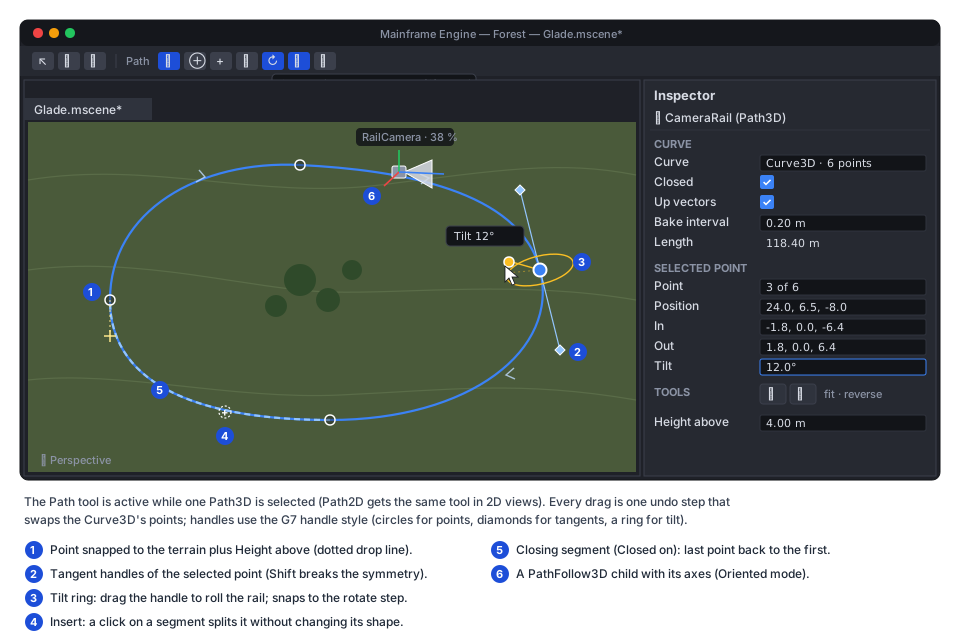
CurveEditTool (MainframeEngine.Editor/Src/Viewport/Curves/) is one implementation of G8a.2’s
IEditorViewportTool over an ICurveTarget adapter (points, tangents, optional tilt, optional width/depth handles,
the node’s global transform). Path3DTool and Path2DTool are thin [EditorViewportTool] classes. G8c.4’s
River3DTool becomes a third adapter that adds its width/depth handles and Carve buttons. Whichever of G13.6 and
G8c.4 lands first builds CurveEditTool, and the other adopts it.
- Toolbar (icon buttons with
data-tooltips, the editor’s icon lint): Select points (pointer), Add (circle-plus, or Ctrl+click), Insert (plus: splits the hovered segment at the clicked offset with de Casteljau, so the shape is unchanged), Delete (trash, or the Delete key), Close (repeat), Snap to ground (mountain), Tilt handles (rotate). The Path3D inspector gets Fit to ground and Reverse icon buttons and aHeight abovevalue. - Handles. Points drag in the camera-facing plane through the point. Alt+drag moves vertically. Tangent
diamonds are mirrored unless Shift is held; Ctrl-dragging out of a point pulls new handles. The tilt ring is drawn
around the tangent with a handle at the rolled up vector, labelled “Tilt 12°”, and snaps to
GizmoSnap.RotateDegrees(MainframeEngine.Editor/Src/Viewport/TransformGizmo.cs:27). Moves snap toGizmoSnap.Translatewhen Snap is on. The handles use G7.3’s style and grab distance if it has landed, else the tool draws its own. - Snapping to the ground. With Snap to ground on, a dragged or added point goes to
Terrain3D.Raycast(Terrain3D.cs:1014) under the cursor plusHeight above; Fit to ground moves every point the same way withHeightAt. That isRiver3D.FitToTerrain’s loop (River3D.cs:397-416), extracted to a staticCurveTerrainFit.Fit(Curve3D, in Transform3D, Terrain3D, float heightAbove)that the river calls too. The terrain is the firstTerrain3Din the edited scene, or none (the button is disabled with a tooltip saying why). - Undo. A drag applies live and commits once on release: a
SetPropertyAction(MainframeEngine.Editor/Src/Undo/Actions.cs:7) on the curve’sPointsexport with the before and after arrays, throughUndoRedo.Commit(action, alreadyApplied: true)(Undo/UndoRedo.cs:94). Add, insert, delete, close, reverse and fit are one step each. Actions reference the curve, never the tool. - 2D.
Path2DToolis the same tool in 2D tabs: the ray becomes the canvas point, no tilt, no ground snap; points snap to the 2D grid step when Snap is on. - Creating. Adding a
Path3Dfrom the Add Node dialog gives it a new inlineCurve3DwithUpVectorEnabledon; the first click in the view adds the first point. - Allocation. Idle frames draw from the baked spans into the reused line buffers; drags allocate the before and after arrays once per gesture.
Networking and determinism
Section titled “Networking and determinism”Followers are a pure function of the curve and Progress. Mark Progress [Replicated] on a game node (or the
follower when G13 adds it to the generator’s list) and clients reproduce the pose exactly; curves are scene data and
bake identically on every CPU. Speed-driven followers in Physics mode advance on the fixed tick, so a server and
its clients agree after the same number of steps.
Testing
Section titled “Testing”- Unit,
Tests/MainframeEngine.Tests/Paths/(and the existingWater/Curve3DTests.cs):Curve3DTests: the committed bake hash unchanged after theCurveBakermove;Closedadds the seam segment (length of a closed square = 4 sides) and tangents match across it;SampleBakedTangentis continuous (max angle between neighbouring samples below a bound); up vectors stay perpendicular to tangents, never flip on a vertical loop, and close at the seam; a second hash covers tangents and up vectors; the grid closest query equals the linear scan on 1 000 seeded random curves and points; the hinted query finds the same offset within its window;SetSmoothPointspasses through every point;Reversetwice is the identity; all queries allocate nothing.Curve2DTests: the same set in 2D, plusTransform2Drotation along +X.PathFollow3DTests(headless tree): each rotation mode’s basis on hand-made curves; offsets;Loop, clamp andPingPongwithLooped/EndReachedonce per event;ProgressRatioround trip; curve change re-places the follower;SpeedinIdlevsPhysicsadvances on the right callback; a follower outside aPath3Ddoes nothing and warns once. The same forPathFollow2DTests.MovingPlatformTests(3D and 2D): aCharacterBodystanding on anAnimatableBodyon a path rides it within 1 cm over 10 s, including a rotating platform;PlatformOnLeavevariants on jumping off; a dynamic box is pushed;RigidBody3Dkinematic reports its target velocity.PathAllocationTests: 0 bytes over 300 ticks after warm-up with 64 followers in every mode, 16 platforms carrying characters, and per-frame hinted closest queries (AllocationGate.SmallestWindow).
- Editor,
Tests/MainframeEngine.Editor.Tests/:CurveEditTooladd/insert/delete/close/reverse/fit each undo and redo to the samePoints; a drag is one step; insert keeps the baked shape (max deviation below 1 mm); ground snap against a test terrain; 2D tool with grid snap. - Benchmarks:
PathBenchmarks(closest query on a 10 km curve: scan vs grid vs hinted; 1 000 followers per tick), added tobaseline.json. - Render tests: none. Paths draw only in the editor through the existing line renderers.
- QA:
Tests/QA/editor-walkthrough.qaadds aPath3D, clicks four points, closes it, drags a tilt handle, undoes, and screenshots the viewport. - Demo (
Examples/Demo): apaths_3dscene (iconroute-2): a closed camera rail with a toggle to ride it, two lifts and a turntable (AnimatableBody3Don followers) the player capsule can ride, and a guard patrolling with the carrot recipe. It is added toDemoScenes.All. The number keys are full at nine scenes (Examples/Demo/Demo/Src/Nav/DemoNav.cs:102-103), so it takes the next key of the 1–9-then-0 scheme in 2D content, or none.Demo.Testschecks that the guard completes a lap headless.
Acceptance
Section titled “Acceptance”PathFollow3D/2Dmatch Godot’s placement for every mode on the test curves (with −Z forward in 3D), never flip on a vertical loop inOrientedmode, and allocate nothing per frame.- Existing
Curve3Dbakes, rivers and their tests are unchanged. - A character rides a path-driven lift and turntable in the Demo, and jumping off keeps the platform’s velocity.
- In the editor, a Path3D and a Path2D can be drawn, edited, closed, tilted, snapped to terrain and undone; the river tool uses the same code (once G8c.4 lands).
- The Forest’s fly-over and benchmark use
Path3D/Curve3D, and its hand-written arc-length code is gone. - Docs updated when this ships: new
docs/design/paths.md(current state);docs/design/water.md(Curve3Dadditions, shared tool),docs/design/physics.md(AnimatableBody*, platform velocity),docs/design/editor.md(curve tool, icons),docs/design/scene-graph-and-nodes.md(new nodes),docs/design/demo.md(new scene),docs/design/forest.md(rails),docs/design/testing.md(allocation gate row), and the project structure inCLAUDE.md.
Task list
Section titled “Task list”- G13.1
Curve3Dfor paths. ExtractCurveBaker(hash unchanged);Closed; baked tangents and smoothSampleBakedWithRotation;UpVectorEnabledwith the rotation-minimising frame; closest-point grid and hinted query;WrapOffset,SetSmoothPoints,SetPointSmooth,Reverse; tests; benchmark. - G13.2
Curve2D. Resource onCurveBaker, the same queries and helpers in 2D; tests. - G13.3
Path3DandPathFollow3D. Nodes, rotation modes,Speed/PingPong/ProcessCallback, signals, editor drawing of paths, icons (route-2,map-pin,vector-bezier,elevatoradded to the vendored Tabler set, 201 icons today inMainframeEngine.Editor/Icons/tabler/outline); tests; allocation gate. - G13.4
Path2DandPathFollow2D. Nodes and 2D drawing; tests. - G13.5 Moving platforms.
AnimatableBody3D/2D, step velocity in the body records,CharacterBody*platform velocity andPlatformOnLeave; tests in 3D and 2D;physics.md. - G13.6 3D curve tool.
CurveEditTool+ICurveTarget(or adopt G8c.4’s if it landed first),Path3DTool, toolbar, tangent and tilt handles, insert by de Casteljau, ground snap andCurveTerrainFit(River3D switches to it), undo; editor tests; QA step. Needs G8a.2. - G13.7 2D curve tool.
Path2DToolwith grid snap; editor tests. - G13.8 Demo, Forest and docs.
paths_3dDemo scene andDemo.Tests; Forest fly-over and benchmark onPath3D;just demo-screenshots;docs/design/paths.mdand the list in Acceptance; the ADR.
G13.1–G13.5 need nothing unbuilt and can ship before the editor tool; scenes can author paths in code until G13.6.
Open questions
Section titled “Open questions”UpVectorEnableddefault. Godot defaults to on. Off keeps today’sSampleBakedWithRotationresult for existing curves (one test,WaterQueriesTests.cs:130, samples it) and the bake cheaper for rivers. Proposed: off on the resource, on for curves the editor creates under aPath3D.- Follower speed extensions.
Speed,PingPong,ProcessCallbackand the two signals are not in Godot. Keep them (platforms and patrols with no code), or stay strictly Godot-shaped and put them on a separatePathMover3Dnode? - Interpolating
Physics-mode followers. Bodies under a follower are interpolated by physics; plain visuals under the follower itself would step at 60 Hz. Is “put visuals under the body” enough, or should followers interpolate their own transform between steps (SceneTree.PhysicsInterpolationFraction,SceneTree.cs:122)? - Ground snap targets beyond
Terrain3D. Snap to any collider needs physics queries in edit mode or a depth read-back from the object-ID pick pass. Which one, or terrain only for now? Closedrivers. Allow a closedRiver3D(a moat), or keep rejectingClosedthere?- Up-vector seam correction. Spreading the twist evenly is simple and deterministic; a closed rail whose tilt is authored by hand may prefer no correction and an explicit seam tilt. Expose a choice?
Related
Section titled “Related”- Water (G8c:
Curve3D,River3D,River3DTool), Terrain (G8a: viewport-tool API,Terrain3D), Editor viewport tools (G7: handles), Keyframe animation (G1), Navigation (G3), Forest showcase (G8d) - Physics, Scene graph and nodes, Editor,
Demo, Networking,
ADR 0155 (
Curve3D’s storage and determinism)