
Proposal: Game export from the editor
Milestone: Gameplay toolkit (G5) · Status: ⬜ planned ·
Depends on: M10 editor (Play pipeline, Output panel, Project Settings),
Release → Games (build/package-game.sh, which this replaces) · Related:
Mobile core (M12.7 extends the same export presets), Steamworks,
Project and GameHost → demo builds,
Distribution via NuGet
Problem
Section titled “Problem”A game can be packaged for players today, but only from a shell with an engine checkout:
build/package-game.sh(just package-game csproj rid out,justfile:115-117) runs a self-contained, untrimmed Releasedotnet publishfor one RID (package-game.sh:56). It renames the apphost (:58-61) and deletes the engine natives of other platforms (:63-69). Then it builds a macOS.app(Info.plist,.icnsthroughsips/iconutil, ad-hoc or Developer IDcodesign, optional notarization,:73-141), a Windows zip (exe icon through ImageMagickmagick→ApplicationIcon,:51-55,:142-146) or a Linux.tar.gz(:147-152).- It reads
project.mfprojwithsed(json(),:21; the icon at a fixed 4-space indent,:25), so any other layout of the file breaks it. It needs bash,zip, and macOS or ImageMagick for icons. It is not used by CI. - Nothing in the editor exports. The editor already builds and runs games:
DotnetGameBuilderrunsdotnet buildthroughProcessRunner(MainframeEngine.Editor/Src/Play/GameBuilder.cs:37,Src/Tools/ProcessRunner.cs:27),DotnetSdkfinds the SDK (Src/Projects/DotnetSdk.cs:23,DetectAsync:86) andPlayControllerwrites build diagnostics to the Output panel with click-to-source (Src/Play/PlayController.cs:317). The File menu ends at Save / Close Tab / Quit (Src/EditorCommands.cs:587-601). - Demo builds exist but must be chosen by hand.
isDemo(MainframeEngine/Src/Project/ProjectSettings.cs:55) is read bybuild/MainframeGame.props(regex on the file) and overridden per build with-p:MainframeDemo=true|false.GameHost.Runreplaces it with the flag the game was built with (GameHost.BuiltAsDemo,GameHost.cs:192-193;GameHost.IsDemo,:79). Shipping the full game and its Steam demo means two publishes with different flags. - Shipped builds scan
Content/on the first UID lookup:AssetDatabase.RefreshloadsContent/assets.index.jsonwhen it exists (MainframeEngine/Src/Resources/AssetDatabase.cs:97-104), but nothing callsWriteIndex(:152) except tests. - Steam cannot work in any export yet: no
steam_apinatives ship (docs/design/steamworks.md#natives,memory/context/current-state.md:58), and Steamworks.NET 2024.8.0 is x64-only, soosx-arm64never starts Steam. The script does not warn about either. - Mobile (M12.7) already plans a
project.mfprojexportarray and an Export dialog. There is no desktop half for it to extend.
- File › Export… opens a dialog of export presets stored in
project.mfproj(export). One click exports a preset; Export All exports every preset in turn. - One C#
ExportRunnerthat the editor,just package-game, a headless CLI and CI all use, so they produce the same output.package-game.shgoes away. - Per preset: platform + RID, output folder, configuration, demo flag, Steam on/off, version, icon, publish options (self-contained, ReadyToRun, single file, trimming) and content include/exclude globs.
- Validation before anything runs: missing SDK, desktop project or main scene, unsupported RID or host, missing Steam natives, excluded files that scenes still reference.
- Progress, cancel and the full log in the dialog and in the Output panel; build errors open in the code editor.
- Packaging works from any host where the platform allows it, and no external tools are needed for icons or archives.
- The
exportschema is the one M12.7 extends with Android and iOS fields.
Non-goals
Section titled “Non-goals”- Uploading to stores: SteamPipe/
steamcmddepots, itch.iobutler. The output is a folder or archive that those tools take. - Windows Authenticode signing, Linux packages (
.deb, AppImage, Flatpak) and installers. - Cooked content and packs. Desktop keeps shipping source files (ADR 0011);
the cook step is M12.5
mf-cook, used by mobile presets only. - Godot’s “export selected scenes and dependencies” mode. v1 filters by globs and warns about broken references.
- Bundling the .NET SDK with the editor. Exporting needs the SDK, as Play does.
- New credentials storage. macOS signing keeps using the keychain identity and
notarytoolprofile names, as the script does. Mobile secrets are M12.7 (mobile.md).
Design
Section titled “Design”flowchart LR
D["Editor: File › Export…<br/>ExportDialog + ExportService"] --> R
C["mf-export CLI<br/>just package-game · CI"] --> R
E["Editor --export-release / --export-all<br/>(no window, SDL or engine)"] --> R
R["ExportRunner<br/>(Tools/MainframeEngine.Export)"] --> V["validate"] --> P["dotnet publish<br/>-r RID -p:MainframeDemo"]
P --> S["stage: rename apphost · prune natives<br/>filter Content · asset index · project.mfproj"]
S --> B["bundle: .app + Info.plist + .icns · sign"]
B --> A["archive: .zip / .tar.gz / folder"]
Preset schema (project.mfproj → export)
Section titled “Preset schema (project.mfproj → export)”export is an array of presets. Keys common to every platform sit next to platform-specific ones, flat, as in the
mobile draft (mobile.md:669-683). Default values are not written, like every other
section (ProjectSettingsFormat.Write, ProjectSettingsFormat.cs:106).
"export": [ { "name": "Windows (Steam)", "platform": "windows", "rid": "win-x64", "output": "export/windows", "steam": true }, { "name": "Windows (Steam demo)", "platform": "windows", "rid": "win-x64", "output": "export/windows-demo", "demo": true, "steam": true }, { "name": "macOS", "platform": "macos", "rid": "osx-arm64", "output": "export/macos", "bundleId": "com.example.mygame", "copyright": "© 2026 Example", "sign": "Developer ID Application: Example (ABCDE12345)", "notaryProfile": "example-notary" }, { "name": "Linux", "platform": "linux", "rid": "linux-x64", "output": "export/linux" }, { "name": "Linux server (headless)", "platform": "linux", "rid": "linux-x64", "output": "export/server", "archive": false, "exclude": ["Content/Audio/**"] }]| Key | Platforms | Default | Meaning |
|---|---|---|---|
name | all | required, unique | Shown in the dialog; the CLI selects presets by it. |
platform | all | required | windows, macos, linux; M12.7 adds android, ios. Selects the known keys. |
rid | desktop | the platform’s first supported RID | win-x64, linux-x64, osx-arm64, osx-x64: the RIDs with engine natives under MainframeEngine/runtimes/. |
output | all | export/<name as a slug> | Output folder, project-relative or absolute. Must not be inside Content/. |
configuration | all | Release | Debug exports are development runs (see Steam). |
demo | all | false | Passed as -p:MainframeDemo=true|false, so one project ships both builds. The top-level isDemo stays the editor and Play setting. |
steam | desktop | false | Off: the exported project.mfproj gets app ids 0 (Steam stays inert). On: validated, see Steam. |
version | all | "" = project version, else 0.0.0 | Names the archive and fills the macOS CFBundleShortVersionString. Mobile maps it to versionName. |
icon | all | "" = window.icon | A PNG; becomes .ico (Windows) and .icns (macOS). |
exe | desktop | the name without spaces | The player-facing executable name (the script’s --exe). |
selfContained | desktop | true | false makes players install .NET 10. Meant for servers that already have it. |
readyToRun | desktop | true | -p:PublishReadyToRun: faster start-up and a larger output. The editor’s own release uses it (justfile:124-125). |
singleFile | desktop | false | -p:PublishSingleFile + IncludeNativeLibrariesForSelfExtract. Content/ and project.mfproj stay next to the exe. |
trim | desktop | false | -p:PublishTrimmed. Experimental: warns until the engine is trim-clean (M12.6). |
archive | all | true | Zip (Windows, macOS) or .tar.gz (Linux). false leaves a folder, e.g. a Steam depot’s content root. |
include | all | ["Content/**"] | Globs, project-relative with /. Only matching Content/ files ship. |
exclude | all | ["Content/**/*.po", "Content/**/*.pot"] | Applied after include. .mo catalogs are compiled at build time, so the sources need not ship. |
bundleId | macos (iOS in M12.7) | com.mainframegames.<exe lowercased> | CFBundleIdentifier (the script’s default). |
copyright | macos | "" | NSHumanReadableCopyright. |
sign | macos | "" = ad-hoc | A Developer ID identity name (not a secret). It can be overridden by MF_SIGN_IDENTITY. |
notaryProfile | macos | "" = no notarization | A notarytool keychain profile name. It can be overridden by MF_NOTARY_PROFILE. |
Glob syntax is * (within one folder), ** (any depth) and ?, matched case-sensitively on project-relative paths.
A small matcher in the export library handles it. Microsoft.Extensions.FileSystemGlobbing would be a new package,
and FileSystemName.MatchesSimpleExpression has no **.
Format 3 and migration
Section titled “Format 3 and migration”ProjectSettingsFormat.Current goes from 2 to 3 (ProjectSettingsFormat.cs:20). The step 2 → 3 does not change the
tree. The bump matters because an older editor would drop the section: its reader only warns about unknown keys
(Known(...), :394), and Write writes only the sections it models. So an older editor would silently delete every
preset on its next save. With format 3, it rejects the file instead (“Update the engine.”, :72). The template’s
project.mfproj moves to "format": 3 and has no presets. The dialog offers to add one for the host’s RID.
C# model (new, MainframeEngine/Src/Project/ExportPreset.cs). It lives in core, next to ProjectSettings, because
the reader and writer must round-trip it. Games parse the section and never use it.
public sealed class ProjectSettings{    // …    /// <summary>The <c>export</c> section: presets for File › Export, mf-export and M12.7 mobile exports.</summary>    public List<ExportPreset> ExportPresets { get; } = [];   // new}
/// <summary>One export preset (new). Common keys here; platform keys in <see cref="Options"/>.</summary>public sealed class ExportPreset{    public required string Name { get; set; }    public required ExportPlatform Platform { get; set; }          // Windows, MacOS, Linux (Android, Ios: M12.7)    public string? Output { get; set; }    public string Configuration { get; set; } = "Release";    public bool Demo { get; set; }    public string Version { get; set; } = "";    public string Icon { get; set; } = "";    public bool Archive { get; set; } = true;    public List<string> Include { get; } = ["Content/**"];    public List<string> Exclude { get; } = ["Content/**/*.po", "Content/**/*.pot"];    public required IExportPlatformOptions Options { get; set; }   // DesktopExportOptions now}
public sealed class DesktopExportOptions : IExportPlatformOptions{    public string Rid { get; set; } = "";    public bool Steam { get; set; }    public string Exe { get; set; } = "";    public bool SelfContained { get; set; } = true;    public bool ReadyToRun { get; set; } = true;    public bool SingleFile { get; set; }    public bool Trim { get; set; }    public MacOsExportOptions? MacOs { get; set; }                 // bundleId, copyright, sign, notaryProfile}
The reader checks known keys per platform (common keys plus that platform’s). An Android key on a Windows preset
warns like any unknown key. Names must be unique, and a duplicate throws InvalidDataException with the key path,
like other wrong values. Serialization stays hand-written Utf8JsonWriter/JsonObject code, as in the rest of
ProjectSettingsFormat. There is no reflection, so it is AOT-safe.
The export library and ExportRunner
Section titled “The export library and ExportRunner”A new project, Tools/MainframeEngine.Export (class library, namespace MainframeEngine.Export, references
MainframeEngine), holds the pipeline. A thin Tools/MainframeEngine.Export.Cli (assembly mf-export, like
mf-l10n) wraps it. The editor references the library. Tool code moves out of the editor into it, unchanged
except for namespaces:
ProcessRunner(Src/Tools/ProcessRunner.cs). Its one editor dependency,EditorCommands.IsRecoverable, becomes a local check.DotnetSdk(Src/Projects/DotnetSdk.cs).GameProjectLayout(Src/Projects/GameProjectLayout.cs;DesktopProjectOf,:119).MsBuildOutputParserandBuildDiagnostic(Src/Play/BuildDiagnostics.cs).ThumbnailCache.Downscale(Src/FileSystem/ThumbnailCache.cs:158), which moves toMainframeEngine/Src/Imagingnext toPngfor icon sizes.
namespace MainframeEngine.Export;
public sealed record ExportRequest(string ProjectDirectory, ExportPreset Preset, string? OutputOverride = null);
public enum ExportPhase { Validate, Publish, Stage, Icon, Bundle, Sign, Notarize, Archive }
/// <summary>Progress: the phase, a 0–1 fraction when known (null: indeterminate), and a short status line.</summary>public readonly record struct ExportProgress(int PresetIndex, int PresetCount, ExportPhase Phase, float? Fraction, string Status);
public enum ExportIssueSeverity { Warning, Error }public sealed record ExportIssue(ExportIssueSeverity Severity, string Code, string Message, string? Fix = null);
public sealed record ExportResult(    bool Succeeded, bool Cancelled, string? ArtifactPath, TimeSpan Duration,    IReadOnlyList<ExportIssue> Issues, IReadOnlyList<BuildDiagnostic> Diagnostics, string? Error);
public sealed class ExportRunner(ExportEnvironment environment)   // dotnet path, host OS/RID, engine checkout, clock{    /// <summary>Checks a preset without running anything slow (no build). Thread-safe.</summary>    public IReadOnlyList<ExportIssue> Validate(ProjectSettings project, ExportPreset preset);
    /// <summary>Validates, then exports. Never throws for export failures: they are in the result.</summary>    public Task<ExportResult> RunAsync(ExportRequest request, IProgress<ExportProgress>? progress,        Action<string>? onLine, CancellationToken cancellationToken);
    /// <summary>Runs presets one after another; a failed or invalid preset does not stop the rest.</summary>    public Task<IReadOnlyList<ExportResult>> RunAllAsync(string projectDirectory, IReadOnlyList<ExportPreset> presets,        IProgress<ExportProgress>? progress, Action<string>? onLine, CancellationToken cancellationToken);}
ExportPlan (new, pure) turns a preset into paths and arguments, so the decisions are unit-testable without
running dotnet. The steps:
-
Validate (see Validation). Errors stop this preset.
-
Publish. It runs
dotnet publish <Desktop.csproj> -c <cfg> -r <rid> --self-contained <bool> -p:MainframeDemo=<demo> -p:PublishReadyToRun=<bool> -p:PublishSingleFile=<bool> -p:PublishTrimmed=<bool> [-p:ApplicationIcon=<ico>] --artifacts-path <project>/.mainframe/export/obj/<rid>-<full|demo> -o <stage>/publish -nologo -v:minimal -clp:NoSummary -p:GenerateFullPaths=truethroughProcessRunner. Output lines stream toonLine, and diagnostics are parsed withMsBuildOutputParser.ParseAllas Play does.--artifacts-pathkeeps export intermediates (other RIDs, demo defines, Release) away from thebin//obj/the editor’s Play and code reload use. A change ofDefineConstantsbetween the full and demo exports then never rebuilds or races the editor’s Debug output. (E5.1 confirms that--artifacts-pathalso moves the referenced game library and the engine projects.) The stage is<project>/.mainframe/export/stage/<preset slug>, emptied first. -
Stage.
- Rename the apphost to
exe(.exeon Windows;chmod +xelsewhere), as the script does. - Delete engine natives of other platforms. The list is every file under
MainframeEngine/runtimes/<other rid>/nativethat the publish copied, not the script’s hard-codedenet mfrmlui mfsvg, so new natives are pruned too. - Filter
Content/withinclude/exclude..metasidecars of kept files stay: importers read their settings (TextureImportSettings.FromMeta,ModelImportSettings.FromMeta). - Write
Content/assets.index.jsonwithnew AssetDatabase(stage).Scan()+WriteIndex(), so shipped builds skip the start-up scan. - Write the exported
project.mfprojwithProjectSettings.Save(see Exported project file). - Fail if a
steam_appid.txtis in the stage.
- Rename the apphost to
-
Icon.
IconWriter(new) decodes the PNG (StbImageSharp, already a core dependency), downsizes it and encodes PNGs withPng.EncodeRgba8(MainframeEngine/Src/Imaging/Png.cs:60). It then writes:.icowith PNG entries at 16, 32, 48, 64, 128 and 256 px (valid since Windows Vista), written before step 2 and passed asApplicationIcon;.icnswith PNG chunksicp4/icp5/icp6/ic07/ic08/ic09/ic10(16 to 1024 px).
No
sips,iconutilor ImageMagick is needed. -
Bundle (macOS).
<Name>.app/Contents/{MacOS,Resources}and the same Info.plist keys as the script (name, bundle id, executable, icon, version, copyright,LSMinimumSystemVersion11.0,NSHighResolutionCapable, games category).AppBundleWriterwrites it as an XML plist, with no template file. -
Sign / Notarize (macOS host only). Same behaviour as the script. With no
sign, the bundle gets an ad-hoccodesign --force --deep --sign -, because Apple Silicon refuses unsigned code. Withsign, every Mach-O and then the bundle get the hardened runtime, a timestamp and the .NET entitlements (JIT, unsigned executable memory, library validation off). WithnotaryProfile,xcrun notarytool submit --wait, thenstapler staple, then a re-zip. Each tool runs throughProcessRunner, and its output goes to the log. -
Archive.
<output>/<exe>-<version>-<rid>.zip(Windows, macOS) or.tar.gz(Linux), as today. Windows and Linux archives are written in C#:System.IO.Compression.ZipArchive, andSystem.Formats.Tar+GZipStreamwith explicit Unix modes, so the executable bit survives an export from Windows. macOS usesditto -c -k --norsrc --noextattr --keepParent(the script’s fix for extended attributes in the zip). The archive is written as<name>.partialand renamed over the old one at the end, so a cancelled or failed export leaves the previous artifact intact. Witharchive: false, the stage folder (or.app) is moved to<output>/<exe>-<version>-<rid>/. -
Clean. The stage is deleted. The artifacts cache under
.mainframe/export/objis kept for incremental exports. The template’s.gitignoregainsexport/and.mainframe/.
Cancel cancels the token. ProcessRunner kills dotnet with its process tree (or codesign/notarytool), the
runner deletes the stage and the .partial file, and the result has Cancelled = true.
Exported project file
Section titled “Exported project file”The runner never copies project.mfproj as-is (the desktop project copies it into publish/,
MyGame.Desktop.csproj:14). It loads the project’s settings, changes a copy and writes it with ProjectSettings.Save
over the published one:
ExportPresetscleared, because output paths and signing identities are not the player’s business;IsDemoset to the preset’sdemo(GameHosttakes the built flag anyway; this keeps the file honest);steam: false→Steam.AppId = Steam.DemoAppId = 0,RestartThroughSteam = false;Versionset to the effective version.
App ids stay in the steam section (SteamProjectSettings, ProjectSettings.cs:340). The preset only has
steam: true|false. ProjectSettings.SteamAppId already picks demoAppId or appId from the built demo flag
(:81), so per-preset ids could only disagree with it. The dialog shows the effective id read-only, with an icon
button to Project Settings › Steamworks. This differs from Godot, whose export presets carry platform options only.
For steam: true, validation checks:
| Check | Severity | Why |
|---|---|---|
| effective app id (full or demo) ≠ 0 | error | an id of 0 leaves Steam off (steamworks.md) |
steam_api64.dll / libsteam_api.so / libsteam_api.dylib present for the RID in MainframeEngine/runtimes/<rid>/native | error | no natives ship today (Natives); without them Steam.TryInitialize reports NativeLibraryMissing |
RID is not osx-arm64 | error | Steamworks.NET 2024.8.0 is x64-only → UnsupportedPlatform. The fix says to use osx-x64 (Rosetta) |
configuration is Release | warning | a Debug build is a development run (GameHost.IsDevelopmentRun, GameHost.cs:107): it writes steam_appid.txt on players’ machines and never relaunches through Steam |
The Steam errors are deliberate. A preset that says Steam is on must not ship a build where Steam silently never starts. The fix text names both ways out: install the redistributables (steamworks.md → enabling Steam), or turn Steam off for this preset.
Hosts and platforms
Section titled “Hosts and platforms”| Target | From macOS | From Windows | From Linux |
|---|---|---|---|
win-x64 | ✅ (exe icon: warning, see below) | ✅ | ✅ (exe icon: warning) |
linux-x64 | ✅ | ✅ (modes set in the tar) | ✅ |
osx-arm64, osx-x64 | ✅ ad-hoc, Developer ID, notarization | ❌ error | ❌ error |
- Self-contained cross-publishing works from any host (
release.md#games). - Windows exe icon. The SDK only writes Win32 resources into the apphost on a Windows host. Elsewhere it warns NETSDK1074, and the exe keeps the default icon. Validation turns that into a warning in advance. E5.1 checks it on .NET 10.
- macOS needs a macOS host. Apple Silicon refuses unsigned native code, and
codesignexists only on macOS. Ad-hoc signing from other hosts (a managed signer) is an open question. - ReadyToRun across OSes. Crossgen2 targets other OSes from the runtime packs. E5.1 checks each row. If a cell
fails, validation turns
readyToRuninto a warning and publishes without it. - Other RIDs (
linux-arm64,win-arm64) appear only whenMainframeEngine/runtimes/<rid>/nativeexists. Today onlylinux-x64,osx-arm64,osx-x64andwin-x64do.
Validation
Section titled “Validation”ExportRunner.Validate is cheap: no process is started, except DotnetSdk.DetectAsync, which is cached per
session. The dialog re-runs it on every edit, and the CLI runs it before each preset.
| Code | Severity | Condition |
|---|---|---|
sdk-missing | error | no .NET SDK ≥ 10 (DotnetSdk.DetectAsync; the message ends with the download URL) |
no-desktop-project | error | GameProjectLayout.DesktopProjectOf is null |
main-scene | error | mainScene empty or not resolvable through the project’s AssetDatabase (UID or Content/ path) |
main-scene-excluded | error | the main scene, an autoload scene or the bus layout is filtered out |
rid-unsupported | error | no engine natives for the RID |
host-unsupported | error | macOS target from a non-macOS host |
output-in-content | error | output is inside Content/ (the next export would ship the last one) |
duplicate-name | error | two presets share a name (also rejected on load) |
steam-* | error/warning | see Steam |
notarize-needs-sign | error | notaryProfile without sign (the script’s rule) |
broken-reference | warning | a kept .mscene/.mres references an excluded file. The scan is the read-only part of ReferenceFixer’s walk ({"ref"|"instance": uid, "path"} objects and exact Content/ path strings), moved to the library |
meta-excluded | warning | an exclude drops .meta sidecars of kept files |
icon | warning | the icon is missing or not a PNG, or is smaller than 256 px (512 recommended for .icns) |
win-icon-host | warning | Windows exe icon from a non-Windows host |
trim / single-file | warning | experimental options |
version | warning | version is not MAJOR.MINOR.PATCH[-suffix] (macOS rejects other CFBundleShortVersionStrings) |
unsaved | — | the editor saves every scene first (EditorCommands.SaveAll, as Play does, PlayController.cs:208), and the export does not start if a save is cancelled |
Editor: File › Export…
Section titled “Editor: File › Export…”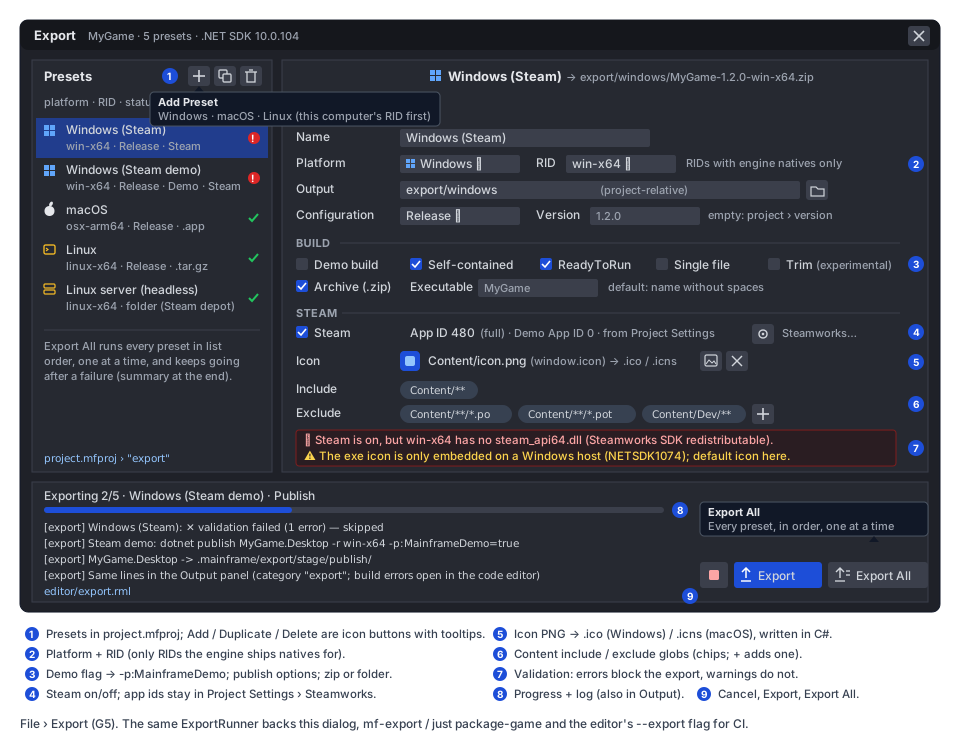
- Menu. The File menu gains
Export…(file.export, Ctrl+Shift+E, iconpackage-export) after Save As, enabled when a project with a desktop project is open. Project › Project Settings gets no export page, because the dialog is the editor for the section. - Dialog (new
MainframeEngine.Editor/Src/UI/ExportDialog.cs,Content/Editor/export.rml, anEditorDocumentlikeProjectSettingsDialog):- The left list has a platform glyph and a status badge (✕ errors, ⚠ warnings, ✓) per preset. The header holds icon buttons with tooltips: Add Preset (a popup of platforms, the host’s RID first; Android/iOS appear disabled until M12.7), Duplicate and Delete (confirmed).
- The right side shows the options in the order of the schema table, grouped as general, Build, Steam, Icon and Content. Include and exclude globs are chips with an add icon button.
- Validation sits under the options. Each issue has its fix text, and some fixes have an icon button (open Project Settings › Steamworks, pick an icon file).
- Edits go to the project’s
ProjectSettingswith undo/redo inside the dialog and are saved with the file, as in Project Settings. Primary actions keep text labels with icons (Export, Export All), and Cancel is an icon button (player-stop), following the editor’s icons-over-text rule.
- Progress. A bar (determinate for Stage and Archive, indeterminate during Publish, Sign and Notarize), a status
line
Exporting 2/5 · <preset> · <phase>, and the last 200 log lines in a monospace list. The dialog may be closed during an export, which keeps running. The Output panel shows the same lines and a toolbar chip shows progress. - Output panel. Lines are added as
[export] …. A newexportcategory with thepackage-exporticon is added toOutputCategories.IconOf(Src/Output/OutputLog.cs:76). Publish diagnostics are added like build diagnostics (file and line, so errors open in the code editor). The result line for each preset links the artifact (“Show in Finder/Explorer”). ExportService(newSrc/Export/ExportService.cs) followsPlayService’s threading (Src/Play/PlayService.cs:29-34):- Runner progress and lines arrive on background threads and are only queued.
Update()(main thread, once per editor frame) drains them and raisesChanged/Line/Finished.- An idle
Updateallocates nothing. - One export pipeline runs at a time. While it runs, Play, Build & Reload and Export are disabled with a tooltip saying why. While the editor is building, Export waits for that build first.
- Export All runs
ExportRunner.RunAllAsyncover the list in order, one preset at a time (paralleldotnet publishruns fight over the same projects). It ends with a summary:3 exported, 1 failed, 1 skipped (invalid). - Icons.
package-export,file-zip,brand-windows,brand-appleandbrand-ubuntuare not in the atlas yet. They are added toMainframeEngine.Editor/Content/icons/icons.txt(just editor-icons-fetch,just editor-icons).
Headless export: CLI, just, CI
Section titled “Headless export: CLI, just, CI”mf-export(new):dotnet run --project Tools/MainframeEngine.Export.Cli -c Release ----project <dir> --preset "<name>" [--output <dir>]--project <dir> --all--project <dir> --list, which prints the presets and their validation.- The ad-hoc form
<Desktop.csproj> <rid> <out> [--name] [--exe] [--version] [--bundle-id] [--copyright] [--icon] [--sign] [--notarize] [--demo] [--steam]keeps the script’s arguments, mapped onto an unsaved preset, so existing commands keep working. - Exit codes: 0 = success, 1 = a preset failed, 2 = usage or validation error. Errors go to stderr in MSBuild format so CI annotates them.
just package-gamecallsmf-exportwith the same arguments, andbuild/package-game.shis deleted.release.md#gamesis rewritten around presets.- Editor flags (Godot’s names).
MainframeEngine.Editor --project <dir> --export-release "<preset>" [<output>],--export-debug "<preset>"(configurationDebug) and--export-allrun the library fromProgram.csbefore anEditorAppexists, like--validate-demo-zip(Program.cs:14-15): no window, SDL or engine. Users with only the released editor (no checkout) can then export from scripts, provided their game builds. - CI. The
templatejob (.github/workflows/ci.yml:279) gains a step after the smoke run.mf-exportruns alinux-x64preset of the generated game, unpacks the.tar.gzand runs it with--headless --max-frames 30(HeadlessHost). That proves the content,project.mfprojand the asset index are in place. A game’s own CI does the same with its preset names.
Mobile (M12.7) extends the same schema
Section titled “Mobile (M12.7) extends the same schema”-
Kept: the M12.7 presets from mobile.md live in the same
exportarray, with the common keys:name,platform,output,configuration,demo,version,icon,archive,include,exclude. -
New platform values:
platform: "android" | "ios"selectAndroidExportOptions/IosExportOptions(IExportPlatformOptions). They hold the mobile keys as drafted:applicationId,versionCode,orientation,tier,packs,signing,bundleId,teamandcapabilities.bundleIdis the same key as on macOS. -
Version name: the mobile draft’s
versionNamebecomes the commonversion. This is the one change to the draft, so that a desktop and an Android preset of one game do not need two version keys.versionCode: "auto"stays Android-only. -
Content filters:
include/excludedecide which files enter the export. Mobilepacksthen assigns the included files to install-time, fast-follow and on-demand packs. -
Pipeline:
ExportRunnergains platform steps behind anIExportPlatform(new) interface, one per platform:- Desktop: publish → stage → bundle → archive.
- Android: cook → build/publish of
MyGame.Android→ APK/AAB signing. - iOS: cook → build of
MyGame.iOS→ archive.
The common parts (validation framework, progress, Output, cancel, the CLI and
--export-*flags) are shared. -
Steam: stays desktop-only (
DesktopExportOptions.Steam). -
Format: M12.7 needs no format bump for the new platform values. An older editor rejects an unknown
platformwith a clear error, instead of dropping the preset.
Threading and allocation
Section titled “Threading and allocation”Export is editor and tool code. Nothing runs per game frame, so the allocation gate is unaffected. In the editor:
- the runner works on the thread pool;
ExportService.Updatedrains queues on the main thread and allocates only when there is something to report;- RmlUi data model updates happen on the main thread, through
Model.Dirty.
The runner never touches RmlUi, the scene tree or the editor’s AssetDatabase.Current. It builds its own
AssetDatabase over the stage.
Testing
Section titled “Testing”- Unit, settings (
Tests/MainframeEngine.Tests/Project/): preset parse/write round trip; defaults omitted; per-platform known keys (an Android key on a Windows preset warns); duplicate names throw; migrations 1 → 3 and 2 → 3 keep everything else unchanged; a format-3 file read withcurrentFormat: 2is rejected (the old-editor guard); the Demo’s format-1project.mfprojupgrades. - Unit, export library (new
Tests/MainframeEngine.Export.Tests, or a folder in the editor tests, which already hostProcessRunnerTestsandDotnetSdkTests):ExportPlanarguments for each option and platform (demo, R2R, single file, trim, icon,--artifacts-path).- Glob matcher (
*,**,?, case-sensitivity,/only). - Content filter over a fixture tree.
- Natives pruning from a fake
runtimes/tree. - Exported
project.mfprojtransform (Steam off zeroes ids and restart; presets stripped; demo and version set). .ico/.icnswriters (parse headers back, decode each embedded PNG and check the sizes).- Tar and zip Unix modes (the apphost is executable after an export from a simulated Windows host).
- Every validation code, positive and negative.
.partialcleanup on cancel.mf-exportargument parsing, including the legacypackage-gameform.
- Integration (needs the SDK, alongside
ProjectCreationIntegrationTests): create a game from the template, export alinux-x64(Linux/macOS hosts) orwin-x64preset, and check the artifact layout. Check the renamed exe,project.mfproj(no presets),Content/assets.index.json, no foreign natives and no.po. A second export withdemo: trueproduces an assembly whoseMainframeDemometadata istrue(GameHost.BuiltAsDemo). - Editor unit (
Tests/MainframeEngine.Editor.Tests):ExportServicequeueing and draining with a fake runner (events only on the main thread, idleUpdateallocates 0 bytes); menu enablement; Export disabled while Play builds. - QA (
Tests/QA/export.qa, new): open File › Export, add a Linux preset, toggle Demo, add an exclude chip, capture the dialog, export, wait for the result line, capture the Output panel. Add a dialog capture toreadme-screenshots.qa. - CI: the
templatejob’s export-and-run step (above). No render tests or goldens change: nothing renders differently. - Demo:
Examples/Demo/project.mfprojgets presets (Windows, macOS, Linux, Linux server), sojust demousers and the README can show the dialog.
Acceptance
Section titled “Acceptance”- In the editor, File › Export… on a template game exports a working build for the host platform with one click. The build runs on a clean machine without the .NET SDK or an engine checkout.
- Export All on the Demo produces Windows, macOS (on a Mac), Linux and server artifacts. Invalid presets are reported and skipped, and the rest still export.
- Full and Steam demo builds come from one project with no manual
isDemoedit, and#if DEMOcode differs between them. - A Steam preset reports the missing
steam_apinatives (andosx-arm64) before building. - Cancel stops
dotnet publishwithin a second or two and leaves the previous artifact in place. just package-gameandmf-export --presetproduce byte-identical archive contents to the editor for the same preset (timestamps excluded).build/package-game.shis gone.- An older editor (format 2) refuses a format-3 project instead of deleting its presets.
- CI’s
templatejob exports and runs the template game. - Docs updated when this ships:
docs/design/release.md(Games: presets,mf-export, hosts table),docs/design/editor.md(new “Export” section: dialog, service, flags),docs/design/project-and-gamehost.md(project.mfprojformat 3,exportsection, demo builds via presets),docs/design/steamworks.md(export-time Steam checks) anddocs/design/testing.md(export tests, CI step). mobile.md usesversioninstead ofversionName.
Task list
Section titled “Task list”-
G5.1 Spikes. Confirm on .NET 10:
--artifacts-pathisolates the game, its library and engine intermediates from the editor’sbin//obj/;- NETSDK1074 when the exe icon is set from a non-Windows host;
- ReadyToRun for every RID from each host;
- single-file start-up with RmlUi/SDL natives self-extracted;
- an
.icnswith PNG chunks shows in Finder and the Dock.
Record the outcomes in an ADR (runner in C#, export library, format 3).
-
G5.2 Schema.
ExportPreset,DesktopExportOptions,MacOsExportOptions; the reader and writer;ProjectSettingsFormat.Current = 3+ migration; tests.- Template
project.mfprojformat 3; template.gitignore(export/,.mainframe/).
-
G5.3 Library.
Tools/MainframeEngine.Export+ tests project; moveProcessRunner,DotnetSdk,GameProjectLayout,MsBuildOutputParser,Downscale; the editor references the library.ExportPlan, glob matcher, content filter, natives pruning, exported project file, asset index,IconWriter,AppBundleWriter, macOS signing/notarization, archivers,ExportRunner.Validate/RunAsync/RunAllAsync.
-
G5.4 CLI and CI.
mf-export(preset,--all,--listand the legacy form);just package-game→mf-export; deletebuild/package-game.sh.- Editor
--export-release/--export-debug/--export-allinProgram.cs. - The CI
templateexport-and-run step.
-
G5.5 Editor.
ExportService,ExportDialog+export.rml, File › Export…, Output category and icon, toolbar progress chip, mutual exclusion with Play and Build & Reload, new atlas icons.- Editor tests;
Tests/QA/export.qa; Demo presets.
-
G5.6 Docs. The current-state docs listed under Acceptance; move this proposal’s content into them.
Open questions
Section titled “Open questions”- macOS signing from Windows/Linux. Should the runner gain a managed ad-hoc Mach-O signer, so
osx-*exports work from any host? This is code-signature format work, the same in spirit as the SDK’s apphost signing, and no package. Or should “macOS needs a Mac” stay? - Single-file default. Should it ever become the default for Windows? It needs the self-extract of natives, and it slows the first start.
- Version stamping. Pass
-p:Version=<version>so the game’s assemblies carry the version? As a global property, it would stamp the engine assemblies too. Should there be a game-only property inMainframeGame.propsinstead? - Presets in
project.mfprojor a separate file? Godot keepsexport_presets.cfgapart fromproject.godot. This proposal follows mobile.md (one file, fewer moving parts). A separateexport.mfexportwould keep team-specific paths out of the main file. - Per-preset Steam app id override (e.g. a playtest app): add it later if someone needs it, or never?
- Content packs for desktop (
.mfpak). Should desktop exports later use M12.1’s pack format to hide source files? Not before M12.1 exists.
Related
Section titled “Related”- Release → Games, the behaviour this keeps
- Mobile core → Editor integration, the M12.7 presets that extend the schema
- Steamworks → Natives and Project settings
- Project and GameHost → Demo builds
- Editor → Play, the build, Output and threading pattern reused here
- Distribution via NuGet, for exports of games that use engine packages instead of a checkout
- Sibling Gameplay toolkit proposals: Save games and settings (G4) adds no export needs, because saves live in the user-data folder, not in the export.