
Proposal: Editor viewport tools
Milestone: Gameplay toolkit (G7) · Status: ⬜ planned ·
Depends on: Editor (M10, shipped: viewport, gizmos, picking, inspector, undo, Play) ·
Related: Future: editor (rows “Simulate mode”, “Box selection”, “Multi-node gizmo”, “Editor previews
and handles”) · Keyframe animation (G1) · 2D content (G2) ·
Rendering features (G6) · sound designer (docs/design/future/sound-designer.md on the
unmerged local branch feature/sound-designer)
Problem
Section titled “Problem”The M10 editor edits one node at a time in the viewport and has no way to tune ranges by hand or to try physics without launching the game. Five gaps, all from the future editor backlog:
- No range handles. A selected
OmniLight3Dshows its range as a sphere, aSpotLight3Dits cone and anAudioPlayer3Dits max-distance sphere (MainframeEngine.Editor/Src/Viewport/ViewportController.cs:782-783,:787-797,:804-805). They are drawn only. The values (OmniLight3D.Range,SpotLight3D.Range,InnerConeAngle,OuterConeAngle,MainframeEngine/Src/Scene/Nodes3D/Light3D.cs:190-228;AudioPlayer3D.UnitSizeandMaxDistance,MainframeEngine/Src/Audio/Nodes/AudioPlayer3D.cs:64-69) can only be typed in the inspector. The 2D view draws no audio range at all (ViewportController.2D.cs:245-281), althoughAudioPlayer2D.MaxDistanceexists (AudioPlayer2D.cs:58-59). There is no way for a node type or a plugin to declare its own handles. - Inline resources are stuck in the scene. The inspector’s resource row has Edit, Load, New and Clear
(
MainframeEngine.Editor/Src/UI/InspectorPanel.cs:424-440). An inline resource cannot be saved to a.mres, and a shared or external resource cannot be made unique, although the engine has both halves:ResourceSaver.Savemakes a resource external (MainframeEngine/Src/Resources/ResourceSaver.cs:48-70) andResource.Duplicate(deep)copies one (MainframeEngine/Src/Resources/Resource.cs:80-93). The sound designer proposal (unmerged branchfeature/sound-designer,docs/design/future/sound-designer.md, Open questions) depends on this action. It says: “a ‘Save as .mres’ action on the slot (already on the future-editor list) turns one into a file the designer opens”. Custom inspector headers only appear for the top-level target, so inline sounds get no designer today. - No box selection. A left drag on empty space does nothing: a
Clickdrag is swallowed (ViewportController.cs:412-413), and a release picks only when the mouse moved less than 4 points (:382-383). GPU picking reads back one pixel per request (MainframeEngine/Src/Rendering/Meshes/ObjectIdPicker.cs:103-140, oneuintper request in a 64-entry readback buffer,:31,:54-55). 2D picking is a CPU point test (ViewportController.2D.cs:159-185). - The gizmo moves one node.
GizmoTargetisSelection.Primaryonly (ViewportController.cs:571-574; 2DViewportController.2D.cs:75-78), so with three crates selected the gizmo moves the last one. This is listed under Known issues in Editor. The inspector already edits several nodes as one undo entry (EditedScene.SetProperties,MainframeEngine.Editor/Src/Session/EditedScene.cs:112-138). - No in-process simulation.
SceneTree.EditMode(MainframeEngine/Src/Scene/SceneTree.cs:84) runs only[Tool]nodes’ process callbacks (:395,:419) and never steps the fixed-step servers (:324). Game code’s lifecycle callbacks are skipped too (EditModeScripts,:91;Node.SkipsScriptCallbacks,MainframeEngine/Src/Scene/Node.EditMode.cs:27-40). To see a stack of crates fall, the user must Play: save,dotnet build, launch a process (Editor → Play).
There is also no node lock. Godot’s lock (_edit_lock_) keeps a node out of viewport picking. Box selection makes
it worth having, so this proposal adds a minimal one.
- Drag handles for light and audio ranges in 3D and 2D, with one undo entry per drag, and a small API so engine nodes, game nodes and editor plugins can declare handles.
- Inline resource actions in the inspector: Save as .mres, Make Unique (shallow and deep), Open a file resource on its own, Show in FileSystem. Load, New and Clear stay. Every slot change is undoable and UIDs stay correct.
- Box selection in 3D (visible objects, from the object-ID target) and 2D (node bounds), with add and toggle modifiers, skipping locked and hidden nodes.
- A gizmo that moves, rotates and scales every selected node around a shared pivot (median, active, individual origins), in local or global space, as one undo entry.
- Simulate: run physics and game scripts in the open scene inside the editor, then stop and get the authored scene back untouched.
Non-goals
Section titled “Non-goals”- Collision shape handles, camera FOV handles and “create collision from mesh”. The handle API covers them; they stay on the future editor “Editor previews and handles” row.
- Audio preview (the sound designer branch has it).
- Player input, audio, networking, Steam or autoloads inside Simulate. Play does all of that, out of process.
- Editing the scene while it simulates. Edits wait until Stop.
- A general node metadata system. The lock uses a reserved persistent group.
- Lasso or paint selection.
Design
Section titled “Design”Order of work
Section titled “Order of work”| Phase | Feature | Value | Cost | Why this order |
|---|---|---|---|---|
| G7.1 | Multi-node gizmo | high | low | Fixes a known issue. The gizmo math already returns a pose, so this is a delta applied to many nodes. |
| G7.2 | Inline resource actions | high | low | Uses ResourceSaver.Save and Resource.Duplicate, which exist. Unblocks the sound designer’s inline sounds. |
| G7.3 | Range handles + handle API | high | medium | New hit-test and drag code, but the same commit pattern as the gizmo. |
| G7.4 | Box selection + lock | medium | medium | 2D is CPU only. 3D needs a region readback in ObjectIdPicker (engine, GPU). |
| G7.5 | Simulate mode | high | high | Engine changes in SceneTree, the physics servers and node callbacks; new failure modes (game exceptions in the editor process). |
G7.1 Multi-node gizmo
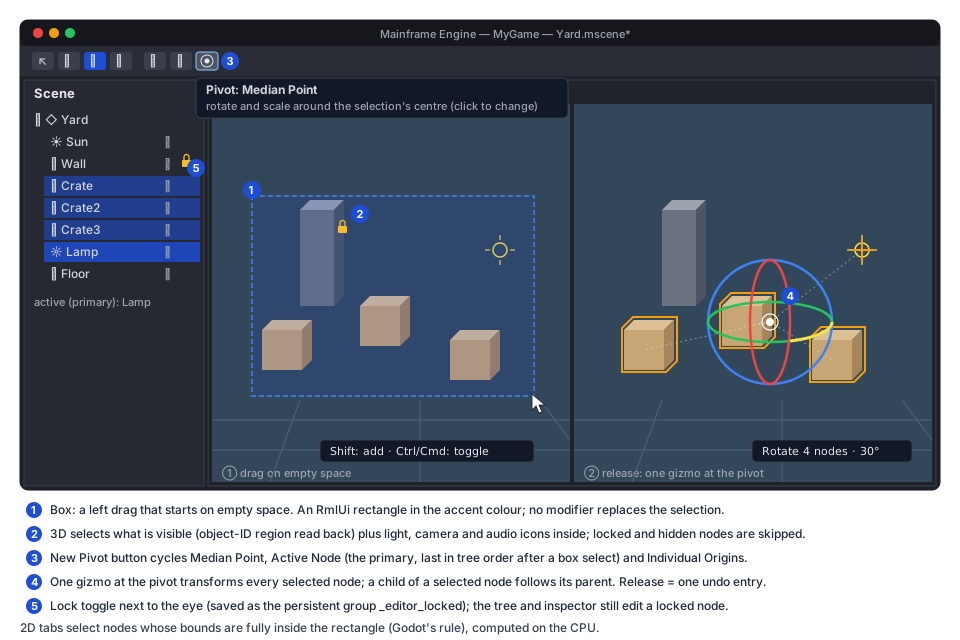
Section titled “G7.1 Multi-node gizmo”Targets. GizmoTargets(scene) (new, replaces GizmoTarget) returns the selected nodes that are Node3D (or
Node2D in a 2D tab), editable (EditedScene.IsEditable), inside the tree, visible and not locked. A node whose
ancestor is also selected is dropped: it follows its parent, as in Godot and Blender. The list is rebuilt when the
selection or the scene version changes, never per frame.
Pivot. A new toolbar icon button cycles three modes (Blender’s pivot point; Godot has median only):
| Mode | Gizmo origin | Rotate / scale around |
|---|---|---|
| Median Point (default) | average of the targets’ global positions | that point |
| Active Node | Selection.Primary | the primary’s origin |
| Individual Origins | median point (for the handles) | each node’s own origin |
Icons: point (median), target (active), circles (individual; a new entry in
MainframeEngine.Editor/Content/icons/icons.txt, vendored from Tabler like the others). Tooltip:
“Pivot: Median Point — rotate and scale around the selection’s centre (click to change)”. Like the gizmo mode,
space and snap, it lasts for the session.
Space. Global uses the world axes. Local uses the primary node’s axes for the drawn handles. With Local, a
translate drag moves each node the same distance along its own corresponding local axis, as Godot does. Scale stays
local per node, as today (TransformGizmo.Axes, MainframeEngine.Editor/Src/Viewport/TransformGizmo.cs:83-89).
Math. TransformGizmo stays a single-pose tool. The controller feeds it the pivot pose
(position = pivot, rotation = axes, scale = One) and turns its result into a delta:
// New, in ViewportController (3D). start[i] = each target's global pose captured at drag start.var (p, r, s) = gizmo.Drag(camera, viewPixels, mouse);var move = p - pivot; // translatevar turn = r * Quaternion.Inverse(axes); // rotateforeach (ref readonly var t in starts) // pooled list, no per-move allocation{ var origin = mode == Pivot.Individual ? t.Position : pivot; t.Node.GlobalPosition = origin + Vector3.Transform(t.Position - origin, turn) + move; // + scale term below t.Node.Rotation = ParentInverse(t.Node) * turn * t.Rotation; t.Node.Scale = t.Scale * s; // factor per local axis}For scale, positions are scaled about the pivot in gizmo space; each node’s own Scale gets the same factor per
local axis (exact for uniform scale; non-uniform scale on rotated nodes cannot shear, as in Godot). Translate snapping
snaps the pivot’s delta, not each node’s absolute position, so relative offsets survive. TransformGizmo2D already
takes a separate gizmo origin and node position (TransformGizmo2D.cs:107), so 2D needs only the loop.
Undo. Drag start records Position, RotationDegrees and Scale per target (as TryBeginGizmo does for one,
ViewportController.cs:576-592). Release commits one CompositeAction named “Move 3 nodes” with
alreadyApplied: true, the pattern of EndGizmo (:617-643). Cancel restores every node. The inspector refreshes
live as it does now.
Drawing. The gizmo is drawn at the pivot. Each target keeps its selection box; in Individual Origins mode a small cross marks each origin. Idle frames reuse the cached target list and allocate nothing.
G7.2 Inline resource actions
Section titled “G7.2 Inline resource actions”Row buttons. The resource row keeps its icon buttons (Edit, Load, New, Clear) and gains one: More
(dots-vertical, new atlas entry, tooltip “More — save, make unique, show the file”). It opens the existing popup
menu (MenuItem, MainframeEngine.Editor/Src/UI/PopupMenu.cs:10) with icons, the same widget as the FileSystem
context menu. The label shows where the value lives: a link icon and the file name for an external resource;
“inline” for an inline one; “inline ×3” when the same inline resource fills three slots in the scene.
| Item | Icon | Enabled when | What it does |
|---|---|---|---|
| Save as .mres… | device-floppy | inline, type can be saved (not PackedScene) | file picker (FilePickerMode.Save, *.mres), then see below |
| Make Unique | copy | external .mres, or inline used by more than one slot | Duplicate(deep: false); the slot gets the copy |
| Make Unique (Deep) | copy | as above, and the resource has inline sub-resources | Duplicate(deep: true) |
| Open | pencil | external .mres | InspectorPanel.InspectResourceFile (InspectorPanel.Resource.cs:18): its own history, Save and custom inspector |
| Show in FileSystem | folder | external | FileSystemPanel.Select(path) (FileSystemPanel.cs:294) and focus the panel |
Imported assets (a Texture2D from a .png, a model, a sound file) are external but their data lives in the source
file, so Make Unique is disabled for them, with the reason in the tooltip.
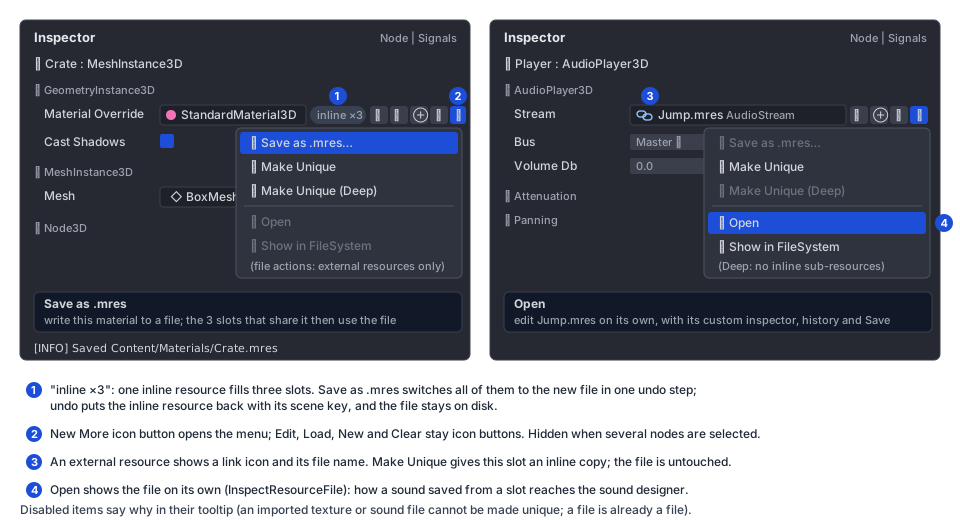
Save as .mres. ResourceSaver.Save turns the object it is given into an external resource by setting
ResourcePath and Uid (ResourceSaver.cs:64-67). Doing that to the slot’s object would make undo impossible,
because those setters are internal to the engine. Instead:
copy = original.Duplicate(deep: true). Inline sub-resources go into the new file, not shared with the scene.ResourceSaver.Save(copy, path). The copy gets a newres_UID and is registered with the asset database and the loader cache.- Every slot in the edited scene that holds
originalgetscopy. That is oneCompositeActionofSetPropertyActions (“Save Material as Crate.mres”). Slots are found by walking the nodes the scene owns and the inline resources they reach, the same setSceneWriterwrites. Godot changes every reference because it changes the object itself; replacing every slot keeps that behaviour. - Output logs
Saved Content/Materials/Crate.mres.
Undo puts the inline original back in every slot. It keeps its SceneLocalId, so the next scene save writes the
same bytes as before. The file stays on disk, as in Godot. Redo puts copy back. If the chosen path is an existing
.mres whose UID is loaded (ResourceLoader.IsCached), the save is refused (“Crate.mres is in use; choose another
name or open it”). Otherwise ResourceSaver.Save would register a second object under that UID. An existing file
that is not loaded is overwritten after a confirm, and its UID is kept (ResourceSaver.ExistingUid), so other scenes
that reference it keep working.
The scene’s resource table changes from an inline entry to a reference (format 2, Scene serialization):
// before"StandardMaterial3D_7b21a": { "type": "StandardMaterial3D", "props": { "AlbedoColor": [0.8, 0.3, 0.2, 1] } }// after Save as .mres (the key is re-hashed from the UID on save)"StandardMaterial3D_4e0c2": { "ref": "res_5f3a9c01d2e4", "path": "Content/Materials/Crate.mres" }Make Unique works the same way on one slot: the slot gets an inline copy. The copy has no SceneLocalId, so its
table key is hashed from where it is first used. The file and other users of the shared resource are not touched.
With several nodes selected the More menu is hidden, as nested resource editing is single-node today
(Multi-select editing).
Sound designer. With this in place, an inline ZzfxStream (a type on the feature/sound-designer branch) on an
AudioPlayer3D is one Save as .mres and one Open away from its designer. This answers the sound-designer open
question without nesting custom headers.
G7.3 Range handles and the handle API
Section titled “G7.3 Range handles and the handle API”Built-in handles (editor, MainframeEngine.Editor/Src/Viewport/Handles/BuiltInHandles.cs, new). Distances are
world units in 3D and pixels in 2D:
| Node | Handle | Position | Drag | Writes |
|---|---|---|---|---|
OmniLight3D | Range | centre + camera right × Range, on a view-facing circle drawn at the range | along camera right (fixed at drag start) | Range |
SpotLight3D | Range | cone tip, centre + forward × Range | along forward | Range |
| Outer angle | rim of the end circle | along the rim direction; angle = atan(offset / Range) | OuterConeAngle (pushes InnerConeAngle down with it) | |
| Inner angle | rim of a dimmer inner circle | as above | InnerConeAngle, clamped to ≤ OuterConeAngle | |
AudioPlayer3D | Unit size | on a new inner sphere at UnitSize | along camera right | UnitSize |
| Max distance | on the existing sphere; hollow at 2 × UnitSize when MaxDistance is 0 (tooltip “Max Distance: unlimited — drag to set”) | along camera right | MaxDistance | |
AudioPlayer2D | Max distance | on a new circle at MaxDistance | along +X | MaxDistance |
PointLight2D | Texture scale | right edge of the texture rectangle (only with a Texture) | along the node’s +X | TextureScale |
Values clamp to the property’s [Export(Range)] hint (for example Range = "0,4096,0.01"). With Snap on, distances
snap to the move step and angles to the rotate step (GizmoSnap, TransformGizmo.cs:27).
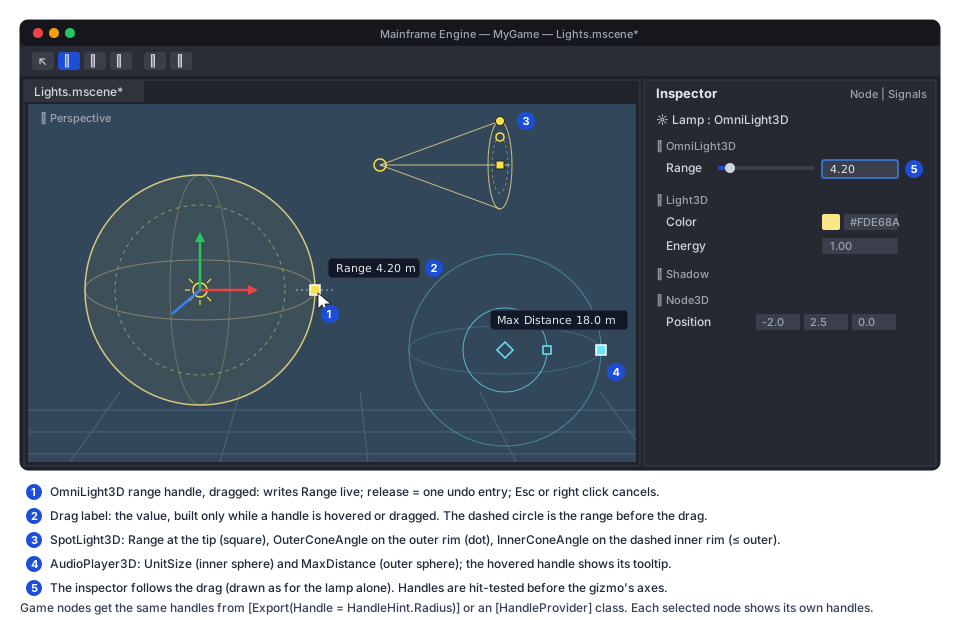
Interaction. Every selected node with a provider shows its handles (Godot shows each selected node’s gizmo), as
8-point squares in OverlayLines (no depth test), highlighted on hover and while dragged. A drag edits the one node
whose handle was grabbed. Handles are hit-tested before the transform gizmo, because they are small and placed on
purpose. The grab distance is the gizmo’s GrabPixels. A new DragKind.Handle follows the gizmo’s life cycle:
- press: capture the boxed
beforevalue of each property the handle may write (ExportPropertyInfo.GetValue, once); - move: the provider sets the property live through the typed CLR property (
omni.Range = r), no boxing; the inspector refreshes; a small RmlUi label next to the mouse shows “Range 4.20 m”; - release: one
CompositeAction(“Set Range on Lamp”) withalreadyApplied: true, the same asEndGizmo. That is one history entry per drag. A merge key per mouse move would create and drop an action per event instead. - Esc or right click while dragging: restore the
beforevalues (new; the gizmo gets the same cancel).
Idle frames (handles drawn, nothing hovered) allocate nothing. The handle list is a reused List<EditorHandle> of
structs, and the label string is built only while hovering or dragging.
API (new, MainframeEngine.Editor/Src/Viewport/Handles/). It mirrors the handle half of Godot’s
EditorNode3DGizmoPlugin (_get_handle_name, _get_handle_value, _set_handle, _commit_handle); commit and
cancel are done by the editor:
/// <summary>One draggable point of a selected node (world space; 2D: x, y in pixels, z = 0).</summary>public readonly record struct EditorHandle(int Id, Vector3 Position, Vector3 DragAxis, HandleStyle Style = HandleStyle.Square);
/// <summary>What a drag tells the provider: the handle's start, the mouse ray, and the point on the drag axis.</summary>public readonly struct HandleDrag{    public Vector3 NodeOrigin { get; init; }     // the node's global position at drag start    public Vector3 Axis { get; init; }           // the handle's DragAxis (unit)    public float Along { get; init; }            // signed distance from NodeOrigin along Axis (closest point to the ray)    public bool Snap { get; init; }    public float SnapStep { get; init; }         // move step or rotate step, by handle kind    public EditorCamera Camera { get; init; }}
/// <summary>Declares a node type's handles. Register with [HandleProvider(typeof(TNode))].</summary>public interface IHandleProvider{    /// <summary>Adds the handles for <paramref name="node"/> in this view. Called each frame per selected node; must not allocate.</summary>    void GetHandles(Node node, EditorCamera camera, Vector2 viewPixels, List<EditorHandle> handles);
    /// <summary>The exported properties a drag of <paramref name="id"/> may change (captured for undo).</summary>    ReadOnlySpan<string> Properties(Node node, int id);
    /// <summary>Tooltip text, e.g. "Range 4.20 m" (only called while hovered or dragged).</summary>    string Describe(Node node, int id);
    /// <summary>Applies a drag live (typed setters; the editor commits or cancels).</summary>    void Drag(Node node, int id, in HandleDrag drag);}
[AttributeUsage(AttributeTargets.Class, Inherited = false)]public sealed class HandleProviderAttribute(Type nodeType) : Attribute { public Type NodeType { get; } = nodeType; }
Providers are found the way CustomInspectors finds inspectors: assemblies that reference the editor, game
assemblies included (MainframeEngine.Editor/Src/Inspector/InspectorModel.cs:194-246). The scan is shared and reset
on code reload. The nearest base type’s provider wins.
Declarative hint for game nodes. Game projects do not reference the editor. A float export can ask for a stock handle instead:
[Export(Range = "0,50,0.1", Handle = HandleHint.Radius)] // new ExportAttribute.Handle, recorded in ExportHintspublic float AggroRadius { get; set; } = 8f;HandleHint (new, engine, MainframeEngine/Src/Serialization/Attributes.cs): Radius (sphere/circle around the
origin) and Length (along the node’s forward, −Z in 3D and +X in 2D). The generator records it like Range. The
editor’s HintHandleProvider draws and drags it through ExportPropertyInfo.SetValue, which boxes one float per
mouse move while dragging only. Explicit providers win over hints.
G7.4 Box selection and lock
Section titled “G7.4 Box selection and lock”Gesture. A left press on empty space (no handle, no gizmo axis) starts DragKind.Click as today. Once the mouse
moves past ClickPixels (4 points) it becomes DragKind.Box, in every gizmo mode. The rectangle is an RmlUi element
over the view image (#box-select in viewport.rml: accent border, 15% accent fill). It needs no GPU work and uses
the theme’s accent colour.
| Modifier at release | Result |
|---|---|
| none | replace the selection |
| Shift | add |
| Ctrl / Cmd | toggle each node |
Alt stays orbit. A click keeps its rule (Cmd/Ctrl or Shift toggles, ViewportController.cs:383); for a box, Shift
adds, as in Godot and Blender. The new selection is in tree order, so Selection.Primary (the active node for the
pivot) is the last of them in the tree. Selection gets Set(IReadOnlyList<Node>), AddRange and ToggleRange,
each raising Changed once.
3D: visible objects from the object-ID target. New engine API:
// SubViewport (new), next to RequestPick (MainframeEngine/Src/Scene/SubViewport.cs:135)public PickHandle RequestPickRegion(int x, int y, int width, int height);public bool TryGetPickRegionResult(PickHandle handle, List<Node> nodes); // distinct nodes, filled by the caller's listObjectIdPicker gets region requests next to the 1×1 ones. The rectangle (clamped to the target) is copied with one
vkCmdCopyImageToBuffer into a transient host-visible GpuBuffer sized w × h × 4 bytes. The buffer comes from
IVulkanContext.Allocator and is released through Deletions once read. Like a point pick, it is read once the
frame’s fence has signalled (two frames later) and the frame never waits. The CPU scans the ids into a reused
HashSet<uint> and resolves them with SceneTree.Find(NodeId). A full 2560×1440 view is about 14.7 MB for one frame
and a millisecond-scale scan. That is a one-off on mouse release, not per-frame work, so the allocation gate is
unaffected. Only what is visible gets selected, like Blender with X-ray off. Godot selects by bounds through walls;
see Open questions.
Then, on the CPU:
- icon nodes (lights, cameras, audio players, listeners; the
_iconNodeslist,ViewportController.cs:699-715) whose projected origin is inside the rectangle are added; - every hit goes through
EditedScene.SelectableFor, so a mesh inside an instanced sub-scene selects the instance, as a click does (EditedScene.cs:80-92); - duplicates, locked nodes and nodes that are not
IsVisibleInTree()are dropped.
2D: bounds. CPU only, over the cached _nodes2D list (ViewportController.2D.cs:198-214). A node is selected
when its world bounds are fully inside the rectangle (Godot’s 2D rule): CollisionShape2D rectangles and circles,
Sprite2D.GetRect() transformed, Camera2D frames. Nodes without bounds are selected when their origin is inside.
Hidden and locked nodes are skipped. G2’s AnimatedSprite2D and TileMapLayer add their bounds the same way
(2D content).
Lock. A lock toggle (icon lock, new atlas entry) sits next to the eye in each Scene panel row. Tooltip:
“Lock — the node cannot be picked, box-selected or moved in the viewport; select it here”. A locked node is in the
reserved persistent group _editor_locked (Node.AddToGroup(name, persistent: true),
MainframeEngine/Src/Scene/Node.Groups.cs:17). Persistent groups are already saved in .mscene node entries, so
locks need no format change, are shared through version control as Godot’s _edit_lock_ is, and survive
instancing. Toggling the lock is an undoable SetGroupAction (new). Click picking, box selection, the gizmo and
handles skip locked nodes. The tree and the inspector still edit them.
G7.5 Simulate mode
Section titled “G7.5 Simulate mode”What it is. Simulate (toolbar icon atom, Alt+F6) runs the active scene’s physics and game scripts inside the
editor’s viewport. Stop (Alt+F6 again, or the Stop button that replaces it) brings back the authored scene exactly as
it was. Pause freezes the simulation; the camera still moves.
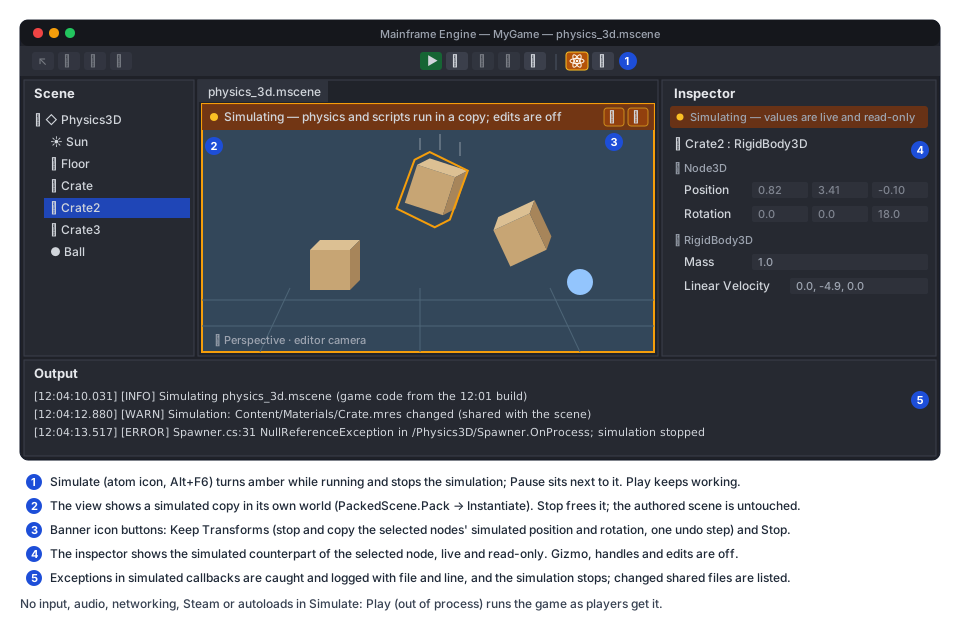
A copy, not the edited world. The backlog row says “in the edited world”. This design simulates a copy in a twin world instead, and freeing the copy is the restore:
PackedScene.Pack(scene.Root)(MainframeEngine/Src/Resources/PackedScene.cs:71) packs the scene in memory, unsaved edits included. Untitled scenes work too.- A new
SubViewportwith its ownWorld3D(its own physics space, lights and sky) is added next to the tab’s viewport, withSimulation = ViewportSimulation.Running(new, below). It renders through the tab’s editor camera (CameraOverride). Instantiate()andAddChild: game code’sOnEnterTree/OnReadyrun for real.- The edited tab’s viewport stops updating (
UpdateMode = Disabled), and the simulated viewport’s target is published asengine://editor-viewport. - Stop frees the simulated subtree and viewport and publishes the edited view again.
Simulating the edited nodes in place and restoring a snapshot afterwards was rejected:
- game
OnReadynever ran on the edited nodes, because edit mode skips it, and running it mid-life is wrong; - side effects (spawned children, connected signals, changed values) would all have to be found and reverted;
- restoring by re-instantiating gives new node objects, which breaks the undo history, the selection and the inspector, all of which hold node references.
With a copy, the edited tree and its history are never touched.
Engine changes (MainframeEngine/Src/Scene, MainframeEngine/Src/Physics):
/// <summary>How a sub-viewport's subtree behaves while the tree is in <see cref="SceneTree.EditMode"/> (new).</summary>public enum ViewportSimulation { None, Running, Paused }
public class SubViewport{ /// <summary> /// Running: the subtree runs as in a game although the tree is in EditMode. Every process and lifecycle callback /// runs, game scripts included, and its physics spaces step. Paused: as a paused tree, for this subtree only. /// Set before adding children. Input is never dispatched to the subtree. (New.) /// </summary> public ViewportSimulation Simulation { get; set; }}Noderesolves a_simulatedflag on enter tree from its viewport, as it resolves its process mode. The checks(!editMode || node.IsTool)in the physics and process loops (SceneTree.cs:395,:419) become(!editMode || node.RunsInEditMode), whereRunsInEditMode = _isTool || _simulated. The input loops (:464,:484,:492) keepIsTool, so simulated nodes get no input.SkipsScriptCallbacksreturns false for simulated nodes.CanProcesstreatsPausedlike the tree’s pause for that subtree.SceneTree.Ticksteps the fixed-step servers in edit mode when at least one sub-viewport is simulating (:324).PhysicsServer3DandPhysicsServer2Dthen step, and interpolate, only the spaces whose viewport isRunning(PhysicsServer3D.cs:83-100,PhysicsServer2D.cs:132-150). All physics calls stay inSrc/Physics.- Exceptions. Today an exception in a callback escapes
SceneTree.Tick. For simulated nodes only, the dispatch loops wrap the call intry/catch; the non-throwing path costs nothing in .NET. An exception is logged with the node path and the game file and line (clickable in Output, like game logs). It setsSceneTree.SimulationFault, and the editor stops the simulation next frame. Games are unaffected: their callbacks are not wrapped. UiLayer.IsInertInEditor(MainframeEngine/Src/UI/UiLayer.cs:117) stays true inside a simulation. HUDs and menus do not draw over the editor view; the UI preview tab shows documents.
What runs and what does not:
| Runs | Does not run |
|---|---|
OnEnterTree/OnReady/OnProcess/OnPhysicsProcess/OnExitTree of every node in the copy, game scripts with or without [Tool] | OnInput/OnUnhandledInput; the project’s input map is not installed in the editor, so Input.IsActionPressed reads false |
3D and 2D physics: bodies, areas and their signals, CharacterBody*.MoveAndSlide | Audio: the editor process has no audio device (MainframeEngine.Editor/Src/EditorApp.cs:88-89); players advance silently |
Timers, tweens, deferred calls, QueueFree; Spine, particles, G1 AnimationPlayer | Networking: MultiplayerApi (registered by Engine) refuses Host/Connect while a simulation runs and logs a warning; no socket opens |
| Physics debug draw, the editor’s icons and selection boxes (mapped by path) | Steam, project autoloads (game code that needs them faults and stops the simulation), the game’s own cameras (the editor camera is used) |
Editor behaviour while simulating.
- The Scene panel and the viewport keep selection. A click picks a simulated node and selects the edited node at the same path; the selection boxes draw on the simulated counterparts.
- The inspector shows the simulated counterpart’s values live (refreshed at 10 Hz), read-only, under a banner “Simulating — values are live and read-only”. Gizmos, handles, box selection and every edit command are disabled. Undo and redo wait.
- Keep Transforms (banner icon button
device-floppy, tooltip “Keep Transforms — copy the selected nodes’ simulated positions and rotations into the scene, as one undo step”) is Unreal’s “Keep Simulation Changes” for transforms. Use it to settle props with physics: drop rocks, keep where they land. A click reads the selected counterparts’PositionandRotationDegrees, stops the simulation and applies them to the edited nodes as oneCompositeAction. It is the only way simulated state reaches the scene. - Saving the scene and Play leave the simulation running (Play is its own process). Only the active tab simulates, so switching or closing the tab, closing the project and a code reload stop it.
- Before starting, if
ProjectService.NeedsRebuildis set, the editor asks “Game code changed since the last reload: Build & Reload first?” (Simulate uses the loaded game assembly).
Code reload. ProjectService.ReloadGameAssembly (MainframeEngine.Editor/Src/Projects/ProjectService.cs:259-283)
stops a running simulation first, before ReleaseEditorReferences. Freeing the copy drops every game object it
created; the GC-verified unload then works as today. Output says “Simulation stopped for code reload.”
Safety. Game code runs in the editor’s process. Exceptions are caught, but an infinite loop, a stack overflow or a native crash would take the editor down. So:
- Simulate writes recovery copies of dirty scenes first (
EditorWorkspace.WriteRecoveryCopies,MainframeEngine.Editor/Src/EditorWorkspace.cs:688) when the scene contains game types; - the toolbar tooltip says what Simulate does not isolate: “Simulate (Alt+F6) — run physics and scripts in this view; Stop restores the scene. Game code runs inside the editor: use Play for full games”.
Play stays the way to run the game as players get it.
Shared external resources. The copy shares external resources (.mres, textures) through the loader cache. A
script that changes an external material changes the editor’s copy too. During a simulation the editor listens to
Resource.Changed on loaded external resources and, on Stop, lists the ones that changed in Output as a warning.
Restoring them is an open question.
Threading and allocation
Section titled “Threading and allocation”Everything runs on the main thread. Idle frames (nothing dragged, nothing simulating) allocate nothing: target lists, handle lists and icon lists are cached by scene version. Drags allocate what they do today (inspector refresh strings, one composite action on release). The region readback allocates one transient GPU buffer per box selection. Simulate allocates what the game allocates; the allocation gate covers only idle editor frames (Editor → Performance).
UI strings
Section titled “UI strings”The editor’s own UI does not go through Tr today (no Tr._ call in MainframeEngine.Editor/Src), so these strings
are plain literals, like the rest of the editor. Player-facing strings are not involved.
Testing
Section titled “Testing”- Unit (
Tests/MainframeEngine.Editor.Tests):ViewportMathTests: multi-node pivot math. Median, active and individual origins; local translate along each node’s own axis; rotate about the pivot; uniform scale about the pivot; snapped pivot delta keeps relative offsets; nested selection drops children.MultiSelectAndSignalsTests: a multi-node gizmo drag is one undo entry; undo and redo restore every node; cancel restores.- New
HandleTests: built-in providers (omni range on camera right, spot angle from rim offset, inner ≤ outer, unit size ≤ max distance,[Export(Range)]clamping, snapping); hint provider on aTestNodestype; one history entry per drag; cancel; hit priority over the gizmo. - New
ResourceActionTests: Save as .mres writes a file with a new UID, swaps every slot holding the inline resource, undo restores the inline object with itsSceneLocalId, the re-saved scene is byte-identical after undo, refusal when the target UID is cached; Make Unique (shallow shares sub-resources, deep does not); disabled states for imported assets andPackedScene. Viewport2DTests: 2D box selection (enclosed bounds, origins, hidden, locked, modifiers).SceneOperationsTests: lock toggle is undoable and saved as the persistent group.
- Unit (
Tests/MainframeEngine.Tests):SceneTreewith aRunningsub-viewport inEditMode: game-script callbacks run inside it and are skipped outside; physics steps only its space; input is not dispatched to it;Pausedstops it; an exception in a simulated callback setsSimulationFaultand does not escapeTick; a non-simulated exception still escapes.ExportHints.Handleis recorded by the generator. - Render tests (
Tests/MainframeEngine.RenderTests):SceneTests.ObjectIdPickingAndSubViewportsWorkgains a region pick (three meshes, one occluded, one outside the rectangle).EditorRenderTests’ smoke run gains a box selection, a handle drag, and a simulate start/stop that checks the edited scene is unchanged and idle frames still allocate nothing afterwards. Range handles and the pivot draw into the editor’s overlay lines; one new golden of the editor view with handles (moltenvk and lavapipe). - QA (
Tests/QA/editor-walkthrough.qa): new script commandsbox-select x0 y0 x1 y1 [shift|cmd],handle-drag <id> dx dy,simulate start|pause|stop,res-menu <row> <item>. Steps: box-select three crates, rotate them around the median, undo; drag a lamp’s range; Save as .mres on an inline material; simulate the physics scene for 120 frames, capture, stop, capture (crates back in place). - Demo: no new scene.
Examples/Demo/Content/Scenes/physics_3d.msceneandphysics_2d.msceneare the simulate QA scenes;audio_3d.mscenecovers the audio handles.
Acceptance
Section titled “Acceptance”- Selecting an omni or spot light or a 3D audio player shows handles; dragging one changes the value live and Undo
reverts it in one step. Game nodes get handles from
[Export(Handle = …)]or an[HandleProvider]. - An inline resource can be saved as a
.mres(every slot follows; undo restores it) and an external or shared one made unique. The ZzFX designer opens on a sound saved from a slot. - Dragging on empty space box-selects visible meshes and icon nodes in 3D and enclosed nodes in 2D, with Shift and Ctrl/Cmd; locked and hidden nodes are skipped.
- With several nodes selected the gizmo moves, rotates and scales all of them around the chosen pivot, as one undo entry. The Known issue “The gizmo moves the last selected node only; there is no box selection” is gone.
- Simulate runs
physics_3d.mscenein the editor; Stop shows the authored scene unchanged (byte-identicalSceneSaver.ToJson); Keep Transforms copies selected transforms as one undo entry; a game exception stops the simulation with a clickable error; a code reload during a simulation stops it and unloads cleanly. - The editor’s idle frames still allocate nothing.
- When it ships, update Editor (Viewport, Inspector, Undo / redo, Multi-select editing, Play, Known
issues), Scene graph & nodes (
SubViewport.Simulation, edit-mode rules), Physics (spaces stepping in edit mode), Scene serialization (Handlehint, the_editor_lockedgroup) and remove the rows from Future: editor.
Task list
Section titled “Task list”- G7.1 Multi-node gizmo.
GizmoTargets(3D and 2D), pivot modes and toolbar button, delta application, one composite undo entry, cancel; tests;editor.md. - G7.2 Inline resource actions. More button and menu, slot scan and the “inline ×N” label, Save as .mres (copy, save, swap all slots, refusal rules), Make Unique (shallow and deep), Open, Show in FileSystem; tests; docs. Tell the sound-designer branch its open question is answered.
- G7.3 Range handles.
EditorHandle/IHandleProvider/[HandleProvider]with the shared plugin scan,DragKind.Handle, hit priority, Esc and right-click cancel (gizmo too), drag label; built-in providers (omni, spot, audio 3D, audio 2D, point light 2D);ExportAttribute.Handle+ generator +HintHandleProvider; tests, golden, QA. - G7.4 Box selection and lock.
Selectionrange methods,DragKind.Box, RmlUi rectangle, 2D bounds selection;ObjectIdPickerregion requests +SubViewport.RequestPickRegion; icon-node rectangle test; lock toggle,_editor_lockedgroup,SetGroupAction, picking and gizmo filters; tests, render test, QA. - G7.5 Simulate mode.
- Engine:
ViewportSimulation, resolved_simulatedflag, process and physics loop rules, fixed-step servers stepping only running spaces, guarded callbacks +SimulationFault,MultiplayerApirefusal; engine tests. - Editor: start (pack, twin viewport, publish), stop, pause, toolbar and Alt+F6, read-only live inspector, selection mapping, edit lock-out, recovery copies, stop on tab switch and code reload, external-resource change warning; tests, QA.
- Keep Transforms.
- Engine:
Open questions
Section titled “Open questions”- Select through. Should 3D box selection also offer Godot’s behaviour (bounds in the frustum, occluded objects included) as a View-menu toggle? It is CPU only (mesh bounds against the rectangle’s frustum) and cheap to add.
- Large region readback. If 15 MB transient buffers prove a problem on mobile-class GPUs (editor-on-tablet is not planned), a compute pass could write the distinct ids into a small buffer instead.
- Restoring external resources after Simulate. Re-reading changed
.mresvalues into the same instances needs aResourceLoader“reload in place”, which does not exist. Until then the editor only warns. - Simulation audio. Once the editor has an audio device (the sound designer branch adds previews), should simulated players be audible behind a toolbar toggle? Default: muted.
- Step one physics frame while Simulate is paused: useful for debugging contacts; cheap. Add it in G7.5 or later?
- Lock storage. A persistent group is shared through version control, as in Godot. If teams want per-user locks,
they could move to
<project>/.mainframe/(the project-local cache folder the thumbnail cache uses).
Related
Section titled “Related”Editor · Future: editor · Scene serialization · Physics · Audio · Keyframe animation · 2D content · Rendering features · Milestones