
Proposal: 2D content (animated sprites and tile maps)
Milestone: Gameplay toolkit (G2) · Status: ⬜ planned · Depends on: 2D canvas, Physics (Box2D), Editor → 2D view · Related: Keyframe animation (G1), Navigation (G3), Editor viewport tools (G7), Asset pipeline, Scene serialization
Problem
Section titled “Problem”The 2D canvas is a faithful port of Godot 4.7’s canvas: culling, z and y-sort, batching, materials, lights, text. What it lacks is content: flipbook animation and tile maps. Every 2D game needs one or both.
What exists today (checked against the code):
Sprite2D(MainframeEngine/Src/Scene/Nodes2D/Sprite2D.cs:11) draws a texture or a region of it. It can split the texture into a uniform grid (Hframes/Vframes/Frame,Sprite2D.cs:92-111) and draws one cell throughCanvasPrimitives.TextureRectRegioninDrawBuiltin(Sprite2D.cs:137-142). Nothing advancesFrame, and frames have no timing.- Other 2D nodes:
GpuParticles2D(Nodes2D/GpuParticles2D.cs:78, which despite its name simulates on the CPU,GpuParticles2D.cs:71),Camera2D(Nodes2D/Camera2D.cs:29) andPointLight2D(Nodes2D/PointLight2D.cs:21).PointLight2Dis the only 2D light. There is noDirectionalLight2Dand there are no 2D shadows (canvas → known issues). - Canvas pipeline.
CanvasCuller(Rendering/Canvas/CanvasCuller.cs:33) culls and orders nodes: it walksCanvasItem.ChildListand attaches one entry per item whose draw-list bounds meet the clip rect (CanvasCuller.cs:223-231). Y-sort flattens a subtree and orders the entries by origin Y (CanvasCuller.cs:130-163).CanvasFramepre-transforms every visible vertex on the CPU each frame and merges runs that share a texture, sampler, material and blend into one batch (CanvasFrame.cs:143-228). An item’s whole draw list is rebuilt when it redraws (CanvasItem.RunDraw,CanvasItem.cs:234-256). - Texture import.
.metasettings cover colour space, mipmaps, filter, wrap, anisotropy,svgScaleandfixAlphaBorder(asset pipeline → textures). They say nothing about frames or regions. The canvas samples with the item’sTextureFilter/TextureRepeat(CanvasItem.cs:142-146), not the.metafilter. - 2D physics. Bodies are nodes with
CollisionShape2Dchildren (Physics/2D/CollisionObject2D.cs:79-92). EveryBodyRecord2Dbelongs to aCollisionObject2D(Physics/2D/PhysicsSpace2D.cs:23-25).ConvexPolygonShape2Dtakes at most 8 points, which is Box2D’s limit (Shapes2D.cs:231-234). Query and slide results carry aCollisionObject2Dcollider (PhysicsServer2D.cs:8-11,CharacterBody2D.cs:9), but the body signals already pass aNode2D(CollisionObject2D.cs:381,:452). - Editor 2D view. 2D tabs are
Disable3Dsub-viewports drawn by the canvas renderer, with the editor camera as the canvas transform (MainframeEngine.Editor/Src/Viewport/ViewportController.cs:163-175, ADRs 0126 and 0127). SoSprite2Ds already show in the editor. Picking hits collision shapes first, then node origins (ViewportController.2D.cs:159-185). Sprites are not picked by their drawn rect. - Serialization.
int[]/string[]exports work. Arrays of up to 16 scalars stay on one line, and longer ones get one element per line (scene serialization → file format). That layout does not suit tens of thousands of cells. - Geometry.
CanvasPrimitives.Triangulatedoes ear clipping (Scene/Canvas/CanvasPrimitives.cs:610). - No type named
SpriteFrames,AnimatedSprite2D,AtlasTexture,TileSet,TileMaporTileMapLayerexists.
Stale docs found while checking. At
HEAD, the “2D content” row of future/editor.md says “the engine has no sprite renderer yet”. That is false:Sprite2Dand the canvas renderer exist (ADR 0111), and since ADR 0127 the editor’s 2D tabs render canvas items. The same claim is stale in editor.md (§2D view, “There is no sprite rendering yet”, and Known issues, “2D scenes have no sprites to show yet”) and in canvas.md Known issues (“The editor’s 2D view does not draw canvas items yet (E18)”). The coordinator should correct these when wiring this proposal in. This proposal does not edit them.
- G2a, animated sprites. A
SpriteFramesresource (named animations, frames, fps, loop) and anAnimatedSprite2Dnode with Godot 4’s API and signals. No allocation per frame. - Sprite sheets. Slice an image into frames by cell count or cell size, with margins and separation. The same grid maths serves tile set atlases.
- G2b, tile maps. A
TileSetresource (atlas sources, tile size, per-tile collision polygons, custom data layers) and aTileMapLayernode with chunked storage, chunked rendering through the existing canvas batcher, y-sort, one static Box2D body per chunk, and a compact cell format in.mscene. - Editor. Paint tools in the 2D view (paint, line, rect, bucket fill, erase, picker, random scatter), a TileSet palette, a TileSet editor, a SpriteFrames panel and a sheet slicer. All tools are icon buttons with tooltips, and every edit can be undone.
- Demo. A “Tiles 2D” scene with placeholder art generated in code, in keeping with the placeholder-first approach.
Non-goals
Section titled “Non-goals”- Isometric, half-offset and hexagonal tile shapes.
TileSet.TileShapeis reserved, and onlySquareships in G2. - Scene tiles (Godot’s
TileSetScenesCollectionSource), tile patterns, occlusion layers and 2D light occluders. 2D shadows do not exist yet. - Moving tile maps with kinematic bodies (Godot’s
use_kinematic_bodies). Moving a layer moves its static bodies (teleport). - One-way tile collision. It arrives together with one-way
CollisionShape2D, which does not exist either. - Runtime tile data overrides (Godot’s
_use_tile_data_runtime_update). AtlasTextureas aTexture2Dsubclass. See open questions.- Navigation polygons on tiles. G2 reserves the hook and Navigation (G3) defines it.
- Importing Godot
.tres/.tscntile sets and maps. The cell format below keeps that possible later.
Design
Section titled “Design”New types
Section titled “New types”| Type | Kind | Where |
|---|---|---|
SpriteSheetGrid | value type: grid slicing maths | MainframeEngine/Src/Scene/Nodes2D/Sprites/ |
SpriteFrames, SpriteAnimation | resources (.mres) | same |
SpriteFrame | [SerializableValue] struct with a built-in codec | same |
AnimatedSprite2D | node | same |
TileSet, TileSetAtlasSource, TileData, TileSetPhysicsLayer, TileSetCustomDataLayer, TileCollisionPolygon | resources | MainframeEngine/Src/Scene/Nodes2D/Tiles/ |
TileMapLayer | node | same |
TileCell | value type: one cell | same |
TileShape, TileCellNeighbor, DebugVisibilityMode, CustomDataType | enums (Godot’s names) | same |
CanvasSubItem | internal class: a draw list a canvas item owns besides its own | MainframeEngine/Src/Scene/Canvas/ |
TileBodies2D | internal: a layer’s static bodies per chunk | MainframeEngine/Src/Physics/2D/ (Box2D calls stay in Src/Physics) |
Godot 4 names, defaults and behaviour are used everywhere unless a deviation is called out.
Sprite sheets: SpriteSheetGrid, and where slicing lives
Section titled “Sprite sheets: SpriteSheetGrid, and where slicing lives”/// <summary>A uniform grid over an image (Godot's "Select Frames" dialog and TileSetAtlasSource layout). New.</summary>public readonly record struct SpriteSheetGrid(Vector2I CellSize, Vector2I Margins, Vector2I Separation){ public static SpriteSheetGrid FromCounts(Vector2I imageSize, int columns, int rows, Vector2I margins = default, Vector2I separation = default); public Vector2I GridSize(Vector2I imageSize); // whole cells that fit public Rect2I CellRect(Vector2I cell); // texture pixels public Vector2I CellAt(Vector2 texturePixel); // (-1,-1) outside / in a gap}Decision: slicing is data in the resource that uses it, not an import setting. A SpriteAnimation frame stores
its texture and region. A TileSetAtlasSource stores its texture, Margins, Separation and
TextureRegionSize. The texture stays one Texture2D with one .meta. Reasons:
- One sheet often feeds several animations, and sometimes a tile set too. Per-use data avoids one global slicing that fits nobody.
- Import products such as sub-textures or generated
.mresfiles would need cache invalidation and UID fix-ups when a sheet changes. Regions in resources need neither. - It is Godot’s model (SpriteFrames regions, atlas source layout). Unity’s per-texture “sprite mode: multiple” is the alternative, and it ties every user of the sheet to one grid.
The sheet slicer dialog remembers the last grid per texture in <project>/.mainframe/cache/sheet_grids.json. This
editor state lives next to the thumbnail cache (MainframeEngine.Editor/Src/FileSystem/ThumbnailCache.cs:11) and is
not committed. Pixel-art sheets should set filter: nearest, and linear-filtered sheets with transparent gutters
should set fixAlphaBorder: true in their .meta. The canvas uses the node’s TextureFilter, so pixel-art games set
TextureFilter = Nearest on their root Node2D, and children inherit it via ParentNode.
SpriteFrames (G2a)
Section titled “SpriteFrames (G2a)”[EditorIcon("library-photo")]public sealed class SpriteFrames : Resource // new{ [Export] public List<SpriteAnimation> Animations { get; set; } = []; // "default" created by the editor
public SpriteAnimation? GetAnimation(string name); // ordinal lookup, cached name → index, no allocation public bool HasAnimation(string name); public SpriteAnimation AddAnimation(string name); // editor and tools; Godot's add_animation public void RemoveAnimation(string name); public void RenameAnimation(string from, string to);}
public sealed class SpriteAnimation : Resource // new, inline sub-resource{ [Export] public string Name { get; set; } = "default"; [Export(Range = "0,120,0.01")] public float Speed { get; set; } = 5f; // frames per second (Godot's default) [Export] public bool Loop { get; set; } = true; [Export] public Texture2D?[] Textures { get; set; } = []; // the sheets/images the frames use [Export] public SpriteFrame[] Frames { get; set; } = [];}
[SerializableValue]public readonly record struct SpriteFrame(int Texture, Rect2 Region, float Duration = 1f); // new// Texture: index into Textures. Region: texture pixels (zero size = whole texture). Duration: relative (Godot).SpriteFrame gets a built-in FloatArray codec registered in Codecs (six numbers:
[texture, x, y, w, h, duration]). Each frame therefore takes one line in the file, and the 16-scalar layout rule
already applies. Godot stores one Texture2D per frame, usually an AtlasTexture. A texture table plus a region
keeps frames value-typed: there is no inline resource per frame, no AtlasTexture and no boxing.
A SpriteFrames saved as .mres
(ResourceSaver format: format, uid, type, resources, props):
{ "format": 2, "uid": "res_51c0aa7e3d19", "type": "SpriteFrames", "resources": { "Texture2D_0h3k1": { "ref": "tex_9b2e40c7a1f3", "path": "Content/Sprites/hero.png" }, "SpriteAnimation_4f2qz": { "type": "SpriteAnimation", "props": { "Name": "run", "Speed": 10, "Textures": [{ "res": "Texture2D_0h3k1" }], "Frames": [ [0, 0, 32, 32, 32, 1], [0, 32, 32, 32, 32, 1], [0, 64, 32, 32, 32, 1], [0, 96, 32, 32, 32, 2] ] } } }, "props": { "Animations": [{ "res": "SpriteAnimation_4f2qz" }] }}AnimatedSprite2D (G2a)
Section titled “AnimatedSprite2D (G2a)”Godot 4’s node. It draws like Sprite2D (centred, offset, flips) and reuses its rect maths through a shared
internal helper. It does not subclass Sprite2D (Godot keeps them separate, and Hframes/Region would make no
sense on it).
[EditorIcon("slideshow", Family = EditorIconFamily.Space2D)]public class AnimatedSprite2D : Node2D                      // new{    [Export] public SpriteFrames? SpriteFrames { get; set; }    [Export] public string Animation { get; set; } = "default";    [Export] public string Autoplay { get; set; } = "";     // played on ready (not in edit mode)    [Export] public int Frame { get; set; }    [Export(Range = "0,1")] public float FrameProgress { get; set; }    [Export(Range = "-8,8,0.01")] public float SpeedScale { get; set; } = 1f;    [Export] public bool Centered { get; set; } = true;    [Export] public Vector2 Offset { get; set; }    [Export] public bool FlipH { get; set; }    [Export] public bool FlipV { get; set; }
    public void Play(string? name = null, float customSpeed = 1f, bool fromEnd = false);    public void PlayBackwards(string? name = null);    public void Pause();    public void Stop();                                       // frame 0, progress 0    public bool IsPlaying();    public void SetFrameAndProgress(int frame, float progress);    public float GetPlayingSpeed();                           // SpeedScale × customSpeed, signed    public Rect2 GetRect();                                   // local drawn rect (editor picking)
[Signal] public event Action? AnimationChanged; [Signal] public event Action? AnimationFinished; // non-looping animation reached its end [Signal] public event Action? AnimationLooped; [Signal] public event Action? FrameChanged; [Signal] public event Action? SpriteFramesChanged;}- Timing follows Godot’s
AnimatedSprite2D::_notification(INTERNAL_PROCESS). Each frame lastsDuration / (Speed × |playing speed|)seconds.OnProcesscarries the remainder across frames, so a long delta skips frames and emitsFrameChangedonce per frame step (several per tick on a hitch) andAnimationLooped/AnimationFinishedat the boundary, in Godot’s order. - No allocation per frame.
Play("run")resolves the name through the resource’s cachedDictionary<string, int>(TryGetValueon the caller’s literal) and stores theSpriteAnimationreference. Each tick does float arithmetic, thenQueueRedraw()when the frame index changed (an add to the tree’s existing redraw list,SceneTree.Canvas.cs:11). It invokes parameterlessActionsignals with no boxing, and the redraw adds one quad throughCanvasPrimitives.TextureRectRegion. The resource’sChangedevent (Resource.cs:45) is subscribed whenSpriteFramesis set, not per frame. - Edit mode. The node is not
[Tool], so it does not process in the editor (ADR 0080). The editor showsAnimation/Framestatically. The SpriteFrames panel’s play button previews by settingFrameon the selected node from an editor ticker, and restores the frame on stop with no undo entry and without dirtying the scene. - Constructor is empty. The name→index cache lives on
SpriteFramesand is rebuilt lazily afterChanged.
Interplay with keyframe animation (G1)
Section titled “Interplay with keyframe animation (G1)”AnimatedSprite2D is a self-timed flipbook: walk cycles, idle loops and effects. Keyframe animation
(G1) choreographs properties over time. The two combine the way they do in Godot:
- An
AnimationPlayercan keyAnimatedSprite2D.Animation(string discrete track),Frame(int) andFlipH, or callPlay/Stopthrough a method track. G1’s typed property tracks write throughExportPropertyInfo<TOwner,TValue>setters, so this needs nothing from G2. - The other Godot pattern,
Sprite2D+Hframes/Vframes+ anAnimationPlayerkeyingFrame, works as soon as G1 lands. - G2 adds no timeline integration. A frame strip is not a G1 track type.
TileSet (G2b)
Section titled “TileSet (G2b)”[EditorIcon("layout-grid")]public sealed class TileSet : Resource // new{ [Export] public TileShape TileShape { get; set; } = TileShape.Square; // only Square in G2 [Export] public Vector2I TileSize { get; set; } = new(16, 16); [Export] public bool UvClipping { get; set; } // inset sampling half a texel (Godot) [Export] public List<TileSetPhysicsLayer> PhysicsLayers { get; set; } = []; [Export] public List<TileSetCustomDataLayer> CustomDataLayers { get; set; } = []; [Export] public List<TileSetAtlasSource> Sources { get; set; } = [];
public TileSetAtlasSource? GetSource(int sourceId); // id → source, cached, no allocation public int GetCustomDataLayerByName(string name); // -1 if missing}
public sealed class TileSetAtlasSource : Resource // new{ [Export] public int Id { get; set; } // the source id cells store (Godot's source_id) [Export] public Texture2D? Texture { get; set; } [Export] public Vector2I Margins { get; set; } [Export] public Vector2I Separation { get; set; } [Export] public Vector2I TextureRegionSize { get; set; } = new(16, 16); [Export] public bool UseTexturePadding { get; set; } = true; [Export] public Vector2I[] Tiles { get; set; } = []; // atlas coords of created tiles [Export] public List<TileData> TileOverrides { get; set; } = []; // only tiles with non-default data
public SpriteSheetGrid Grid { get; } // from Margins/Separation/TextureRegionSize public bool HasTile(Vector2I atlasCoords); public TileData GetTileData(Vector2I atlasCoords, int alternative = 0); // shared default instance if none public void CreateTilesFromOpaqueRegions(); // editor: Godot's "create tiles in non-transparent regions"}
public sealed class TileData : Resource // new{ [Export] public Vector2I AtlasCoords { get; set; } [Export] public int AlternativeId { get; set; } // 0 = base tile [Export] public Vector2I TextureOrigin { get; set; } [Export] public Vector4 Modulate { get; set; } = Vector4.One; [Export(Range = "-4096,4096,1")] public int ZIndex { get; set; } [Export] public int YSortOrigin { get; set; } [Export(Range = "0,1000,0.01")] public float Probability { get; set; } = 1f; // random scatter weight [Export] public List<TileCollisionPolygon> Collision { get; set; } = []; [Export] public string[] CustomData { get; set; } = []; // invariant text per custom data layer, see below
public bool GetCustomBool(int layer); public long GetCustomInt(int layer); public double GetCustomFloat(int layer); public string GetCustomString(int layer); // parsed once, cached}
public sealed class TileCollisionPolygon : Resource // new{ [Export] public int PhysicsLayer { get; set; } [Export] public Vector2[] Points { get; set; } = []; // tile-local pixels, origin at the tile centre (Godot)}- Tiles are created explicitly, as in Godot. A cell may only reference a created tile.
Tileslists coordinates andTileOverridesholdsTileDataonly for tiles with non-default values. A 16×16 atlas with collision on a dozen tiles writes about a dozenTileDataentries, not 256. Big tiles (size_in_atlas) and atlas tile animation are later work (see the task list). - Alternatives and flips. As in Godot 4.2+, the alternative id’s high bits are transform flags
(
TransformFlipH = 4096,TransformFlipV = 8192,TransformTranspose = 16384). The paint tools’ flip and rotate buttons set those bits, the renderer mirrors or transposes the quad’s UVs, and collision polygons are transformed the same way. User alternatives (AlternativeId1…4095) let a tile carry differentTileData, such as another modulate or no collision. - Texture padding. With
UseTexturePadding, the source builds a padded copy of the atlas at load. Every tile is surrounded by a 1 px copy of its own edge pixels (Godot’s behaviour). The copy usesTexture2D.FromPixelsonce per load or texture change, so linear filtering and fractional zoom do not bleed neighbouring tiles. - Physics layers.
TileSetPhysicsLayerholdsCollisionLayer,CollisionMaskand aPhysicsMaterial. A polygon belongs to one physics layer. - Custom data layers.
TileSetCustomDataLayerholds aNameand aType(Bool,Int,Float,String,Vector2,Color). Values are stored as invariant text, aligned to the layers, and parsed into a typed table when the tile set loads or changes. The typed getters never parse or box. This deviates from Godot, which storesVariants. The engine has noVariant, and anobjectexport would box and break AOT-friendly generated serialization. Typical uses are"damage"(int),"surface"(string, for footstep sounds) and"solid"(bool, for G3’s grid). - Navigation hook (G3). G3a’s grid A* reads a
TileMapLayerthrough public API:GetUsedCells,GetCellTileData, collision on a chosen physics layer, or a custom data bool layer. Godot-style navigation polygons per tile (TileSetNavigationLayer) are defined by Navigation. G2 reserves the names and adds no fields. - Terrains (later, G2b.5). Godot 4 terrain sets (match corners and sides, match corners, match sides), peering
bits on
TileData, andSetCellsTerrainConnect/SetCellsTerrainPath. They would be ported from Godot’sTileMapLayerterrain solver (MIT, like the canvas culler port). They are a later phase because the solver is the largest single piece of this proposal and tile maps are useful without it.
TileMapLayer (G2b): the naming decision
Section titled “TileMapLayer (G2b): the naming decision”Decision: ship TileMapLayer only, with no multi-layer TileMap node. Godot 4.3 deprecated TileMap in favour
of one TileMapLayer node per layer. That is the right model for this engine:
- Each layer is an ordinary
CanvasItem. It gets z-index, modulate, material, visibility, light mask and y-sort fromCanvasItem, so per-layer duplicates of those settings are not needed. - Layers are ordered and grouped by the tree. Parallax or y-sorted object layers are just siblings or children.
- Projects ported from Godot 4.3+ map one to one, and current Godot documentation applies.
- The milestone row already names a “tile map layer node”.
The editor’s paint bar includes a layer switcher that cycles sibling layers, so editing several layers stays quick.
[EditorIcon("grid-pattern", Family = EditorIconFamily.Space2D)]public class TileMapLayer : Node2D                           // new{    [Export] public bool Enabled { get; set; } = true;    [Export] public TileSet? TileSet { get; set; }    [Export] public int YSortOrigin { get; set; }    [Export] public bool XDrawOrderReversed { get; set; }    [Export(Range = "1,64,1")] public int RenderingQuadrantSize { get; set; } = 16;   // chunk edge in cells (Godot)    [Export] public bool CollisionEnabled { get; set; } = true;    [Export] public DebugVisibilityMode CollisionVisibilityMode { get; set; }        // Default / ForceShow / ForceHide    [Export(Storage = true)] internal string[] TileMapData { get; set; }             // see Serialization
    public void SetCell(Vector2I coords, int sourceId = -1, Vector2I? atlasCoords = null, int alternative = 0);    public void EraseCell(Vector2I coords);    public void Clear();    public int GetCellSourceId(Vector2I coords);             // -1 when empty    public Vector2I GetCellAtlasCoords(Vector2I coords);    public int GetCellAlternativeTile(Vector2I coords);    public TileData? GetCellTileData(Vector2I coords);    public bool IsCellFlippedH(Vector2I coords); public bool IsCellFlippedV(Vector2I coords); public bool IsCellTransposed(Vector2I coords);    public int GetUsedCells(List<Vector2I> results);          // fills the caller's list (no allocation once sized)    public int GetUsedCellsById(List<Vector2I> results, int sourceId = -1, Vector2I? atlasCoords = null, int alternative = -1);    public Rect2I GetUsedRect();    public Vector2I LocalToMap(Vector2 localPosition);    public Vector2 MapToLocal(Vector2I mapPosition);          // cell centre    public Vector2I GetNeighborCell(Vector2I coords, TileCellNeighbor neighbor);    public bool GetCoordsForCollision(Vector2 globalPosition, Vector2 normal, out Vector2I coords);   // see Physics    public void UpdateInternals();                            // apply pending chunk rebuilds now (Godot)
    [Signal] public event Action? Changed;}
public readonly record struct TileCell(short SourceId, ushort AtlasX, ushort AtlasY, ushort Alternative)   // new{    public static readonly TileCell Empty = new(-1, 0xFFFF, 0xFFFF, 0);}
ExportAttribute.Storage is a new hint, Godot’s PROPERTY_USAGE_STORAGE without EDITOR. The member is
serialized but has no inspector row. Node2D.ToLocal/ToGlobal (Godot’s names) are added too, because the usual
“which cell is under the mouse” call needs them: layer.LocalToMap(layer.ToLocal(GetGlobalMousePosition())).
Cell storage: chunks
Section titled “Cell storage: chunks”- Cells live in
Dictionary<Vector2I, TileChunk>, keyed by chunk coordinates (floor(cell / RenderingQuadrantSize)). ATileChunkholds a flatTileCell[size × size], a used count, a dirty flag for rendering and one for physics, itsCanvasSubItemand its body handle. A chunk whose used count drops to 0 is removed. SetCellwrites the cell, marks the chunk dirty, adds it to the layer’s pending list and queues one rebuild for the end of the frame. Painting 1 000 cells in one frame rebuilds each touched chunk once.- Lookups are a dictionary probe plus an index and do not allocate. A new chunk allocates its arrays on the first write only, which is a load-time or edit-time cost.
Rendering: canvas sub-items through the existing batcher
Section titled “Rendering: canvas sub-items through the existing batcher”The culler only knows nodes, and a chunk should not be a node: it would show in GetChildren, be saved, and appear
in the editor tree. Godot’s TileMapLayer uses rendering quadrants, which are canvas items that are not nodes. The
engine gets the same thing:
CanvasSubItem(new, internal): aCanvasDrawList, a local transform and a y-sort origin, owned by aCanvasItem(CanvasItem.SubItems, empty for every existing type).CanvasCullertreats an item’s sub-items as children that draw right after the item’s own list and before its node children. Each one is attached and culled on its own bounds, so off-screen chunks cost a bounds test. Under y-sort,CollectYSortChildrenadds sub-items as entries with their own Y.CulledCanvasItemgains theCanvasDrawListto draw (the item’s own or a sub-item’s), andCanvasFrame.Appendreads that instead ofculled.Item.DrawList(CanvasFrame.cs:149). Modulate, material, light mask and filter still come from the owning item.- Chunk draw.
TileMapLayeroverridesDrawBuiltin(private protected,CanvasItem.cs:229) and rebuilds only the dirty chunks’ lists, not its own empty list. Each chunk records one textured quad per cell (TextureRectRegion, flips and transposes from the alternative bits,TileData.Modulate,TextureOrigin), in Godot’s order: rows top to bottom, and x reversed withXDrawOrderReversed. Tiles with a non-zeroTileData.ZIndexgo to a separate sub-item per z, as in Godot. - Batching comes for free. Consecutive quads with the same atlas texture and state merge into one batch
(
CanvasFrame.cs:201), so a layer that uses one atlas draws in about one batch however many chunks are visible. - Cost.
CanvasFramepre-transforms vertices on the CPU every frame. A 1920×1080 view of 16 px tiles at zoom 1 is about 8 200 tiles, or 33 000 vertices per layer per frame. A benchmark (see Testing) guards this. If it becomes the bottleneck, chunks could keep static GPU vertex buffers and draw through the existingLocalVerticesbatch path (CanvasFrame.cs:33), which is a later optimisation that needs no API change.
Y-sort
Section titled “Y-sort”With YSortEnabled on the layer, Godot’s rule applies. Chunks become rows: a sub-item per (chunk x, cell row, tile
y-sort origin), whose sort Y is the row’s origin plus TileData.YSortOrigin plus the layer’s YSortOrigin. They
are y-sorted together with the layer’s node children. A character that is a child of the layer, or a sibling under
a y-sorted parent together with the layer, therefore walks behind a tree tile’s top row and in front of its trunk
row. Without y-sort a chunk is one sub-item.
Physics: one static body per chunk
Section titled “Physics: one static body per chunk”TileBodies2D(new, internal,Src/Physics/2D) manages one Box2D static body per chunk per physics layer that has shapes. No Box2D call lives outsideSrc/Physics. The layer hands it the chunk’s cells and the tile set, and gets a handle back.- Shapes. Each tile polygon is transformed by the cell’s flips and position. A convex polygon with at most 8
points becomes one Box2D polygon. Anything else is triangulated with
CanvasPrimitives.Triangulateand merged greedily into convex pieces of at most 8 points (Hertel–Mehlhorn). Full-cell square polygons in a row are merged into one rectangle per run. That cuts shape counts by an order of magnitude on solid ground and removes most of the internal seams that make bodies snag between neighbouring boxes. - Owner.
BodyRecord2Dtoday requires aCollisionObject2D. It gainsNode2D Owner(theTileMapLayer) withCollisionObject2D? Nodenull for tile bodies. Queries and slides then report the layer:RayHit2D.Collider,ShapeCastHit2D.Collider,KinematicCollision2D.Colliderand theIntersectPoint/IntersectShaperesult lists widen fromCollisionObject2DtoNode2D. This matches Godot, whereget_collider()returnsObject(aTileMapLayerfor tiles), and matches the engine’s ownBodyEntered(Node2D).- This is a breaking change. Code that used a
CollisionObject2Dmember onColliderneeds a cast and fails to compile until it gets one, whileis Playerchecks keep compiling. The repository has a handful of uses inSrc/Physicsand the physics tests. TileMapLayer.GetCoordsForCollision(position, normal, out coords)returns the hit cell, using the point pushed half a pixel into the surface, which is the usual Godot idiom. A shape → cell map kept in the chunk’s body makes this exact for slide collisions.
- Transform. Bodies follow the layer’s global transform. A moved layer teleports its bodies (
Teleport). This path is for edit and setup, not animation. - Debug. Physics debug draw includes tile shapes.
CollisionVisibilityMode.ForceShowdraws them at run time. The editor draws the selected layer’s collision outlines likeCollisionShape2Ds. - Rebuilds happen in the physics server’s pre-step (
BeforeFixedSteps), never inside a step. Engine-side rebuild code reuses scratch lists. Box2D’s own allocations on shape creation are allowed by the physics rules.
Serialization: one base64 line per chunk
Section titled “Serialization: one base64 line per chunk”TileMapData is a string[], one entry per non-empty chunk, sorted by chunk (y, then x). Each entry is base64 of a
little-endian u16 format (1) followed by 12-byte cell records: i16 x, i16 y, u16 sourceId, u16 atlasX, u16 atlasY, u16 alternative. That is the record of Godot 4.3’s tile_map_data, so a future Godot importer only has to split by
chunk.
{ "name": "Ground", "parent": ".", "type": "TileMapLayer", "props": { "TileSet": { "res": "TileSet_7u1pe" }, "TileMapData": [ "AQAAAAAAAAAAAAEAAAAAAAEAAAAAAAEAAAAAAAIAAAAAAAEA…", "AQAQAAAAAAAAAAMAAQAAABEAAAAAAAMAAQAAABIAAAAAAAMA…" ] }}- Why chunked base64. A JSON array per cell would be about 10× larger and unreadable. One blob for the whole map turns every paint stroke into a whole-file diff. One line per chunk keeps files compact (a full 16×16 chunk is about 4 KB of text) and makes a diff show which areas changed. Merge conflicts become per-chunk, which is coarse but tractable.
- Layout fix.
SceneJsonLayoutkeeps arrays of up to 16 scalars on one line, which would put a small map’s chunks on one line. It gains one rule: an array containing a string longer than 64 characters is laid out one element per line. - Determinism: same cells, same bytes. Chunks are sorted and the records inside a chunk follow cell order.
SceneSaverwrites the same file twice. - Loading decodes with
Convert.FromBase64Stringand fills chunks. That is load-time allocation, AOT-safe, with no reflection.
Editor
Section titled “Editor”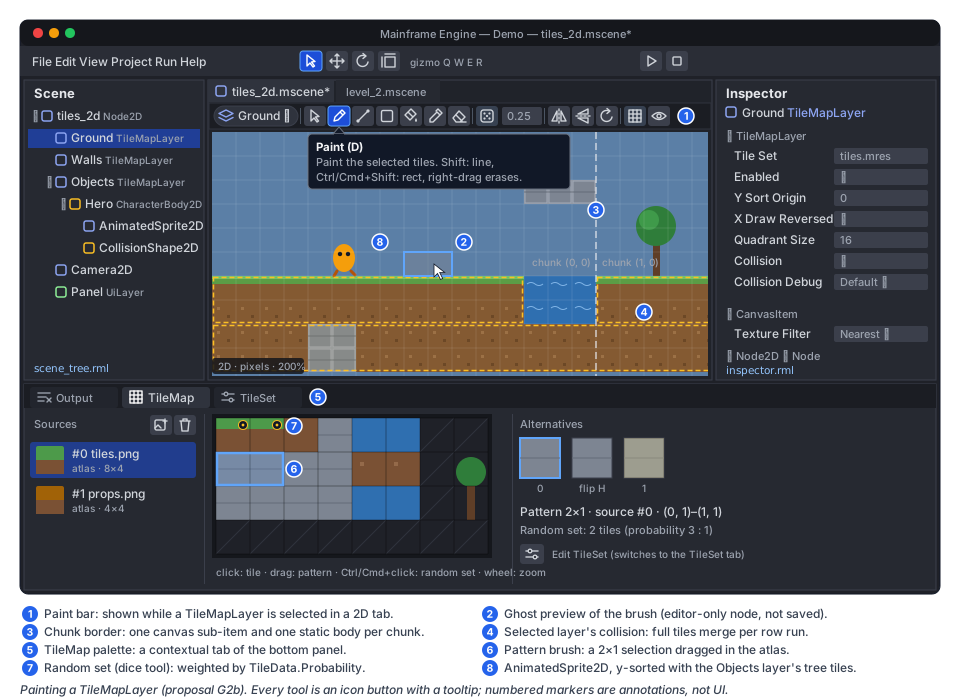
Paint bar (2D view)
Section titled “Paint bar (2D view)”When a TileMapLayer with a TileSet is selected in a 2D tab, a bar appears under the scene tabs. It is built like
the existing #preview-bar in viewport.rml. Every control is an icon button with a tooltip (“Title (Shortcut):
what it does”).
| Icon (Tabler) | Tool | Shortcut | Behaviour |
|---|---|---|---|
pointer | Select | S | Select cells (drag a rectangle); Cut/Copy/Paste/Delete act on them; Esc deselects |
pencil | Paint | D | Paint the palette selection (a single tile or a pattern) under the cursor; Shift+drag draws a line and Ctrl/Cmd+Shift+drag a rect, as in Godot |
line | Line | L | Drag a line of cells (Bresenham) |
square | Rect | R | Drag a filled rectangle |
bucket-droplet | Bucket | B | Flood fill; with Contiguous off, replace every matching cell in the used rect; bounded by the used rect grown by one chunk when filling empty space |
color-picker | Picker | P | Click a cell to select its tile in the palette; Ctrl/Cmd+click does this from any tool |
eraser | Eraser | E | Erase with the current tool’s shape; right-drag erases from any tool (Godot) |
dice-5 | Random tile | — | Paint picks among the selected tiles by Probability; Scattering (0–1) leaves that fraction empty |
flip-horizontal, flip-vertical, rotate-clockwise | Transform | C, V, X (Z counter-clockwise) | Set the alternative’s flip/transpose bits for the next strokes |
stack-2 | Layer | — | Switch to the previous or next sibling TileMapLayer (a chip shows the layer’s name); Highlight dims other layers |
grid-3x3 | Grid | — | Show the cell grid and chunk borders |
- Preview. A ghost of the brush follows the cursor at 50 % alpha. It is drawn by an editor-only, unowned
TilePaintPreview2Dnode ([Tool], not saved, hidden from the scene tree because it is not owned, seeEditedScene.IsEditable,EditedScene.cs:73). Line, rect and bucket strokes preview the whole affected region before mouse-up. - Shortcuts. E and R are also the Rotate/Scale gizmo keys. While the paint bar is shown and a paint tool other than Select is active, Godot’s tile shortcuts win, as they do in Godot’s editor. Q (gizmo Select) leaves painting. See open questions.
- Picking. In Select mode a click on painted cells selects the layer.
Pick2Dgains drawn-rect picking forSprite2D,AnimatedSprite2Dand tile layers (the cell under the cursor is non-empty). Today it only hits shapes and origins. The same bounds (AnimatedSprite2D.GetRect(), andGetUsedRect()mapped to local pixels for a layer) feed G7’s box selection (Editor viewport tools, which calls the layerTileMapand should readTileMapLayer).
TileMap palette (bottom panel)
Section titled “TileMap palette (bottom panel)”The bottom region becomes tabbed: Output, plus contextual TileMap, TileSet and SpriteFrames tabs that
appear when the selection or opened resource needs them. This follows Godot’s bottom panel. EditorLayout already
owns the bottom rectangle (Layout/EditorLayout.cs:257-264). The TileMap tab shows:
- a source list with a thumbnail, id and texture name per atlas source;
- an atlas view showing the source’s texture with the grid, created tiles bright and others dimmed. Click selects a tile, drag selects a rectangle (a pattern brush), and Ctrl/Cmd+click toggles tiles in the random set. Wheel zooms and middle-drag pans;
- an alternatives strip for the selected tile’s alternatives;
- an Edit TileSet button (icon
adjustments) that switches to the TileSet tab.
TileSet editor
Section titled “TileSet editor”The TileSet tab edits the selected layer’s TileSet, or a TileSet .mres opened from the FileSystem panel
(EditedResource, with its own undo history, MainframeEngine.Editor/Src/Session/EditedResource.cs:21).
- Sources: add an atlas from a texture (
photo-plus, which opens the file picker), remove, and set the id. Adding asks “Create tiles in non-transparent regions?”, as Godot does. - Setup mode:
Margins,SeparationandTextureRegionSizewith a live grid overlay. Click toggles a tile created or erased. - Select mode: the selected tile’s
TileDatashows in the inspector, where every property, including custom data rows typed by the layer, is undoable as usual. - Collision: a zoomed tile view with polygon handles per physics layer. Toolbar: Full tile (
square), Add polygon (polygon), Clear (trash) and Snap to ½/¼ tile (magnet). Drag moves points, a double-click on an edge inserts a point, and Delete removes one.
SpriteFrames panel and sheet slicer
Section titled “SpriteFrames panel and sheet slicer”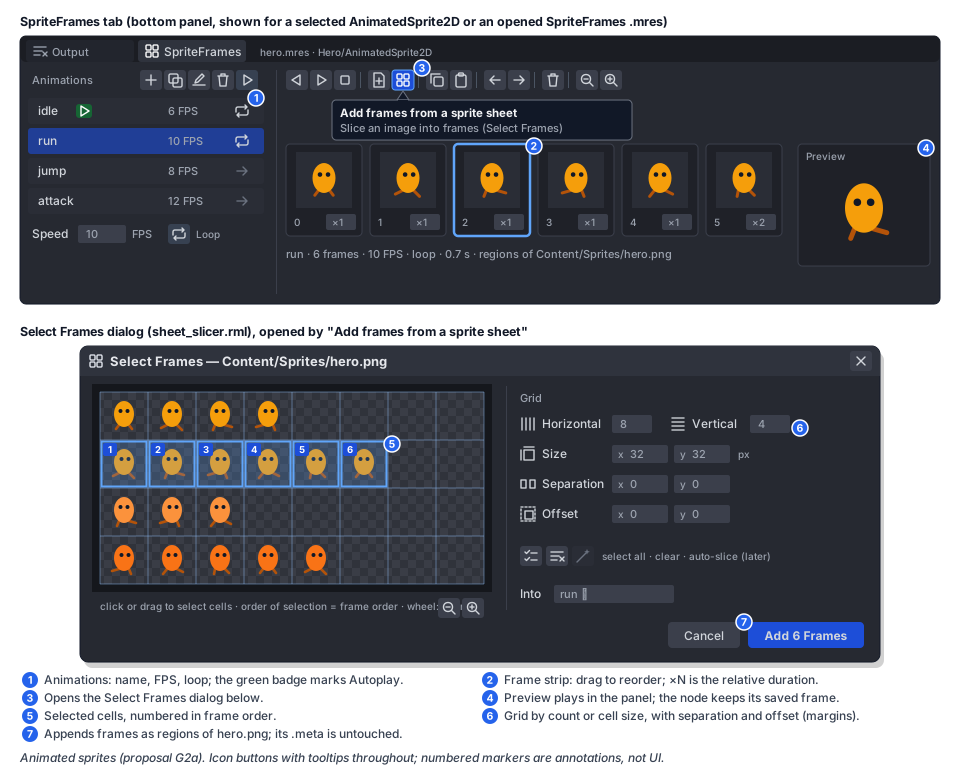
- SpriteFrames tab (when an
AnimatedSprite2Dis selected or aSpriteFrames.mresis opened):- the animation list with name, FPS and Loop toggle. Toolbar: Add, Duplicate, Rename, Delete, and Autoplay on
load (
player-playbadge on the row); - the frame strip with thumbnails, index and relative duration (editable). Toolbar: Play backwards, Play, Stop,
Add frames from files (
file-plus), Add frames from a sprite sheet (layout-grid), Copy, Paste, Move left/right, Delete and Zoom. Drag reorders.
- the animation list with name, FPS and Loop toggle. Toolbar: Add, Duplicate, Rename, Delete, and Autoplay on
load (
- Select Frames dialog (
sheet_slicer.rml, new): the sheet with the grid overlay. Horizontal/Vertical (counts) or Size (cell size), Separation and Offset (margins) set the grid. Click or drag selects cells, numbered in selection order. Buttons: Select all, Clear, Auto-slice by opaque bounds (later, see open questions). The primary action “Add N Frames” uses text, per the icons rule (dialog primary actions keep text). - The same dialog serves “New SpriteFrames from sheet…” in the FileSystem context menu of an image. That creates a
.mreswith one animation per selected row, which is the fastest path from a downloaded sheet to a playing character.
PaintTilesAction : IEditorAction(new,MainframeEngine.Editor/Src/Undo/TileActions.cs) records(Vector2I coords, TileCell before, TileCell after)entries. A stroke applies cells live and commits withalreadyApplied: trueand a per-stroke merge key (UndoRedo.Commit,UndoRedo.cs:94). Mouse-up callsEndMerge, so one stroke is one entry: “Paint Tiles”, “Erase Tiles”, “Fill Tiles” or “Paste Tiles”. Undo writesbeforeback throughSetCell, which marks the chunks dirty as usual.- SpriteFrames and TileSet edits go through
SetPropertyAction, with typed setters on the resource and history in the scene or theEditedResource.
Threading and allocation
Section titled “Threading and allocation”- Everything runs on the main thread: node processing, chunk rebuilds in the canvas redraw flush, and body rebuilds in the physics pre-step.
- Steady state allocates nothing.
AnimatedSprite2Dplayback, an unchangedTileMapLayer, culling of sub-items and frame building reuse lists and arrays. Painting at run time (SetCell) allocates only when a chunk is created or a draw list grows past its capacity. Both are amortised and excluded from the steady-state gate, asCanvasDrawListgrowth is today. - AOT and trimming: there is no reflection. Codecs are registered statically (
SpriteFrame) or are built-in (the string array).
Demo scene
Section titled “Demo scene”tiles_2d (“Tiles 2D”) is added to DemoScenes.All and built in code like the others (Demo):
- Placeholder art first. The builder generates
Content/Tiles2D/tiles.png(a 16 px atlas: grass, dirt, stone, water, a two-tile tree with a y-sort origin) andContent/Tiles2D/hero.png(a 4×4 sheet of a blob with idle/run/jump frames, numbered) withPng.WriteRgba8(MainframeEngine/Src/Imaging/Png.cs:68). It is all MIT and replaceable by real art without code changes. tiles.mres(TileSet: one physics layer with full-tile collision on stone, and custom datasurface) andhero.mres(SpriteFrames: idle, run and jump).- Scene:
GroundandWallsTileMapLayers, filled from a small ASCII level in the builder, and a y-sortedObjectslayer with trees. ACharacterBody2Dhero with anAnimatedSprite2Dswitches idle/run/jump from its velocity and walks behind or in front of the trees. ACamera2Dfollows. - Panel controls: show collision, y-sort on/off, click to toggle a wall cell at run time (live chunk and body rebuild), and play speed.
- The nav bar’s number keys stop at 8 (
Examples/Demo/Demo/Src/Nav/DemoNav.cs:102). Extend them to 1–9 then 0 (keyboard-row order) in tab order; the Gameplay toolkit’s Demo tabs (animation_3dfrom Keyframe animation,tiles_2d,navigation_2dfrom Navigation) take the next free key in the order they land. Tabs past the tenth are reached with the nav bar or thescene_next/scene_prevactions from Save games and settings.
Testing
Section titled “Testing”- Unit (
Tests/MainframeEngine.Tests/Canvas/, new files):SpriteSheetGridTests: counts ↔ sizes, margins and separation,CellAtin gaps.AnimatedSprite2DTests: frame timing against Godot’s rule (durations, negative speed,PlayBackwards,fromEnd), signal order on loop and finish, several frame steps in one long tick,SetFrameAndProgress, the autoplay rule in edit mode, and redraws only on frame change.SpriteFramesSerializationTests:.mresround trip, one line per frame,SpriteFramecodec.TileMapLayerTests:SetCell/EraseCell/getters, chunk creation and removal, negative coordinates,LocalToMap/MapToLocal,GetUsedRect, alternative flip bits, invalid source ids (cell kept, not drawn, a warning as in Godot’sfix_invalid_tiles).TileMapSerializationTests: base64 chunk round trip, deterministic bytes, Godot-record compatibility (a knowntile_map_databyte array decodes to the expected cells),SceneJsonLayoutlong-string rule,Storagehint hidden fromNodeTypeInfo’s inspector list.CanvasSubItemTests(culler): sub-items cull on their own bounds, order after the owner and before node children, y-sort rows interleave with sibling nodes, owner modulate and material apply.
- Physics (
Tests/MainframeEngine.Tests/Physics/):TileBodies2DTests. One body per chunk, merged rectangles, concave polygon decomposition at ≤ 8 points, a ray hitting a tile reporting the layer andGetCoordsForCollision, aCharacterBody2Dsliding along a 20-tile floor without snagging, and an erased cell removing its shape. - Allocation gates:
Canvas2DContentAllocationTests. 0 bytes over 300 ticks of tree tick +CanvasServerframe build with 1 000 playingAnimatedSprite2Ds and a 256×256-cell layer (scrolling camera, y-sorted objects layer). The existingPhysics2DAllocationTestsgains a tile layer. - Benchmark:
TileMapLayerFrameBuildinTests/MainframeEngine.Benchmarks(a full-screen 16 px layer, 3 layers), added tobaseline.json. - Render tests (
Tests/MainframeEngine.RenderTests/CanvasRenderTests.cs): atileshost scene with a tile layer, flips and transposes, y-sorted rows with a sprite between them, and anAnimatedSprite2Dcaptured at frames 1 and 12. Goldens formoltenvkandlavapipe, the validation gate, and a seam check: no neighbouring-tile colour along tile edges at zoom 1.37 with linear filtering and padding on. - Editor (
Tests/MainframeEngine.Editor.Tests): each tool’s cell set (paint, line, rect, bucket contiguous and global, eraser, picker, random scatter with a seeded RNG). One undo entry per stroke, and undo/redo restoring exact cells. Sheet slicer grid maths and “Add N Frames”. Shortcut routing between the paint bar and the gizmo. - QA (
Tests/QA/editor-walkthrough.qa): new steps: add aTileMapLayer, create aTileSetfrom the Demo atlas, paint a rect, bucket-fill, undo, save, reopen, then createSpriteFramesfrom a sheet and preview. Screenshots go toartifacts/qa-editor. - Demo:
SceneFilesTests.CommittedScenesMatchTheBuilderscoverstiles_2d. The headless run of every scene covers it too, andjust demo-screenshotsadds its README image.
Acceptance
Section titled “Acceptance”AnimatedSprite2Dplays aSpriteFramesanimation with Godot’s timing and signals, in game and in the SpriteFrames panel preview, with 0 bytes allocated in steady state.- A sprite sheet can be sliced by count or size with margins and separation into a new or existing animation in
under a minute, without touching
.metafiles. - A
TileSetwith an atlas source, full-tile and polygon collision and a custom data layer can be built in the TileSet tab and saved as.mres. - In a 2D tab, all seven tools plus random scatter and flips paint a
TileMapLayerwith a live preview. Each stroke is one undo entry, and the scene saves with one base64 line per chunk. - A 256×256-cell layer renders at 60 fps on CI hardware with visible chunks batched (about one batch per atlas per layer), y-sorts with characters, and collides through one static body per chunk.
- The
tiles_2dDemo scene runs headless in CI and appears in the README gallery. - Gates:
just build, Release build,just test,just test-render(new goldens on both drivers),just format-check. No new NuGet or native dependency. - Docs to update when this ships: canvas.md (new sections for animated sprites and tile maps;
sub-items in Model and Frame; remove the stale E18 known issue), editor.md (§2D view: paint bar,
bottom panel tabs, sheet slicer; remove the stale “no sprites” lines), physics.md (tile bodies,
Colliderwidened toNode2D), scene-serialization.md (Storagehint, long-string layout rule,SpriteFramecodec), demo.md (thetiles_2drow), plusdocs/milestones.md(G2a/G2b status) and the “2D content” row in future/editor.md.
Task list
Section titled “Task list”G2a: animated sprites
- G2a.1
SpriteSheetGrid,SpriteFrames,SpriteAnimation,SpriteFrame+ codec;.mresround trip; unit tests. - G2a.2
AnimatedSprite2D(timing, signals, drawing via the sharedSprite2Drect helper,GetRect); allocation gate; render test frames. - G2a.3 Editor: bottom panel tabs (Output + contextual), SpriteFrames tab (animation list, frame strip, preview
ticker), Select Frames dialog, FileSystem “New SpriteFrames from sheet…”; icons added to
icons.txt(slideshow,library-photo, …); editor tests; drawn-rect picking for sprites.
G2b: tile maps
- G2b.1
CanvasSubIteminCanvasItem/CanvasCuller/CanvasFrame(no behaviour change for existing items;canvas_frame0005golden unchanged);ExportAttribute.Storage;SceneJsonLayoutlong-string rule;Node2D.ToLocal/ToGlobal. - G2b.2
TileSet,TileSetAtlasSource(texture padding, opaque-region tile creation),TileData, custom data layers;TileMapLayerstorage, chunk rendering, y-sort rows, serialization; unit, render and allocation tests; benchmark. - G2b.3 Physics:
BodyRecord2Downer generalisation,Collider→Node2D(breaking, noted in the release notes),TileBodies2D(merging, convex decomposition),GetCoordsForCollision, debug draw; physics tests. - G2b.4 Editor: paint bar and tools,
TilePaintPreview2D, TileMap palette, TileSet tab (setup, select, collision editor),PaintTilesAction, shortcut routing; editor tests; QA script steps. - G2b.5 Demo
tiles_2dscene with generated placeholder art; README screenshot. - G2b.6 (later) Terrains (Godot terrain sets and solver, Terrain paint tab), atlas tile animation (columns,
per-frame durations, chunk redraw on frame change), big tiles (
size_in_atlas), isometric/hex shapes.
Open questions
Section titled “Open questions”AtlasTexture? Godot’s frames and UI textures are oftenAtlasTextures. A subclass of the engine’s concreteTexture2D(file, pixels, GPU upload, viewport and clip-group variants,Texture2D.cs:158-170) would need everyTexture2Dconsumer, from canvas primitives to 3D materials to UI registration, to resolve the region. G2 avoids it with region data inSpriteFrame. Should a later Godot-import effort add it, and with which consumers supported?- Collider type. Widening
CollidertoNode2Dis Godot-like but breaking. The alternative is keepingCollisionObject2D? Colliderand adding aNode2D ColliderObject. Which does the user prefer? Should hits also expose a shape tag so game code can map any hit to a cell without the half-pixel idiom? - Shortcut conflict. Keep Godot’s tile letters (E eraser, R rect) while painting, or remap to avoid the gizmo’s Q/W/E/R entirely?
- Default canvas texture filter. Godot has
rendering/textures/canvas_textures/default_texture_filter. Add arendering.defaultCanvasTextureFiltertoproject.mfprojso pixel-art projects do not setNeareston every root? That is small, but outside G2’s core. - Auto-slice by opaque bounds (packed, non-grid sheets): in G2a.3, or later? It needs a connected-components pass over the pixels, which is cheap but extra UI (editable rects).
- Custom data types. Is the invariant-text storage acceptable, or should
TileDatahold typed parallel arrays (long[],double[],string[]) for a cleaner file? - Chunk size. Rendering and physics share
RenderingQuadrantSize(16). Godot exposes separate quadrant sizes. Is one knob enough?
Related
Section titled “Related”2D canvas · Physics · Editor · Asset pipeline · Scene serialization · Demo · Keyframe animation (G1) · Navigation (G3) · Editor viewport tools (G7, box selection shares the rectangle-select gesture with the paint bar’s Select tool) · Future: editor · Milestones