
Proposal: Save games and settings
Milestone: Gameplay toolkit (G4) · Status: ✅ shipped (see
As built) ·
Depends on: M10 projects (GameHost, project.mfproj), M8 game UI
(widget library, data binding), M7 audio (buses), M9 localization ·
Related: M13 mobile services (cloud saves build on
this), M12 mobile core (lifecycle saves, app-private storage), Editor → Shared widgets,
Game export (G5)
Problem
Section titled “Problem”Every game needs to save progress and remember the player’s options. The engine has the pieces but no API:
- A folder, no files.
GameHost.UserDataDirectoryis the game’s writable per-user folder, created on use, andGameHost.UserDataPath("saves/run-1.json")builds paths in it (MainframeEngine/Src/Project/GameHost.cs:133-153). It comes fromUserDataPaths(%APPDATA%,~/Library/Application Support,$XDG_DATA_HOME;MAINFRAME_USER_DATAoverrides the base,MainframeEngine/Src/Core/UserDataPaths.cs:3-15). Nothing in the engine writes saves or settings there; only logs live there today. The folder is named afterProjectSettings.Name(GameHost.cs:142), so renaming a project silently moves every player’s data. - Versioned JSON exists for one file.
project.mfprojcarries aformatnumber. On load, older documents run throughProjectSettingsFormat.Migrations, oneProjectMigration(From, Action<JsonObject>)step at a time, editing the JSON tree; newer documents are rejected (MainframeEngine/Src/Project/ProjectSettingsFormat.cs:10,20-35,56-103). The loop is generic but lives in the project settings class, and its errors say “project format”. Editor settings use a second, ad-hoc scheme: aFormat = 1field in a source-generated JSON context (MainframeEngine.Editor/Src/Settings/EditorSettings.cs:182-194). - Writes are atomic but not durable.
ResourceSaver.WriteAtomicallywritespath.tmpand renames it over the target (MainframeEngine/Src/Resources/ResourceSaver.cs:74-80). There is no flush to disk before the rename, no backup and no corruption check. That is fine for project files under version control. It is not enough for a save the player cannot recreate. - JSON for game types. The engine’s own JSON code is reflection-free: hand-written
Utf8JsonWriter/JsonNodecode forproject.mfproj, and source-generatedJsonSerializerContexts elsewhere (AssetJsonContext,MainframeEngine/Src/Resources/AssetDatabase.cs:32-38). A save API must take the game’s own context (JsonTypeInfo<T>) to stay AOT-safe for mobile. - Input can change at run time, but cannot be rebound.
InputMap.Bind/Unbindedit an action’s bindings and bumpVersion, so input states refresh (MainframeEngine/Src/Scene/Input/InputMap.cs:206-269), andClonemakes a deep copy (InputMap.cs:278-289). There is no conflict detection, no reset to defaults, no “press a key” capture, no display name for a binding and no way to say an action is not rebindable.GameSession.Startinstalls the project’s ownInputMapinstance as the tree’s map (MainframeEngine/Src/Project/GameSession.cs:94), so the defaults are lost as soon as anything rebinds. - Audio volume has one fader per bus.
AudioBus.VolumeDb(clamped to −80…+24 dB) andMuteare the designer’s mix from the bus layout (MainframeEngine/Src/Audio/AudioBus.cs:39-62). The gain is computed from them inAudioServer.ComputeBusGains(MainframeEngine/Src/Audio/AudioServer.cs:444). A player volume written there would overwrite the mix, andGetBusLayout(AudioServer.cs:302-320) would bake it into the project if the editor saved it. - Display options are scattered.
IWindowControlexposesTitle,Fullscreen,Size,PositionandScreenBounds(MainframeEngine/Src/Scene/SceneTree.Window.cs:9-21).Fullscreenmaps to Silk.NET’sWindowState.Fullscreen(MainframeEngine/Src/Core/SilkWindowControl.cs:16-20), with no choice between borderless and exclusive. VSync isIRenderer.VSync(a swapchain rebuild,MainframeEngine/Src/Rendering/IRenderer.cs:14-15), reachable throughTree.Servers.Render.Renderer.Engine.MaxFPS(MainframeEngine/Src/Core/Engine.cs:233-241) is not reachable from nodes at all.RenderServer.ShadowQualitychanges live between Low, Medium and High, but switching to or from Off throws once visuals exist (MainframeEngine/Src/Servers/RenderServer.cs:118-129). There is no player-facing UI scale: the dp ratio follows the display only (UiLayer.ScaleMode,MainframeEngine/Src/UI/UiLayer.cs:82). - No settings UI. The widget library has sliders, checkboxes, dropdowns and buttons,
but no tabs and no settings screen. The Demo’s nav bar has a language picker and nothing else
(
Examples/Demo/Content/Nav/nav.rml). - Mobile plans assume this exists. Mobile core says games save in
OnApplicationPauseand that “themfgametemplate shows aSaveGameautoload” (mobile.md:229-233). Mobile services plans aCloudSaveServerwith slots of bytes,SaveMeta { Slot, Description, PlayedTime, ModifiedUtc, DeviceName, ProgressValue }and conflict policies (mobile-services.md:102-107,349-357). Neither has a local save layer to build on.
- A small save API: named slots, a metadata header readable without loading the payload, a typed payload through a
game-provided
JsonTypeInfo<T>, and payload migrations registered per version, in the same style asproject.mfproj. - Saves that survive crashes and power loss: temp file + flush to disk + rename, rolling backups, a checksum, and automatic recovery from the newest valid copy.
- No hitch: the snapshot is taken on the main thread and the disk work runs on a worker. Completion is reported on the main thread.
- A Godot-like
ConfigFilefor key/value data, and a typedUserSettingslayer on top of it.UserSettingsapplies audio, input, display and language at startup (before the window opens where possible) and whenever a value changes. - Key rebinding in
InputMap: per-device slots, conflict policies, reset to defaults, gamepad support and a capture node. - A drop-in settings menu: an RmlUi document and controller that games can open with one call or restyle. It is
localized through
Tr. - A storage seam (
ISaveStorage) and a cloud hook, so the M13 backends (Steam Cloud, iCloud, Play Saved Games) plug in with conflict resolution and no change to the file format. - The Demo gets a settings menu from the nav bar and a save/load example.
Non-goals
Section titled “Non-goals”- Encryption or anti-tamper. Save files are plain JSON on the player’s machine. The checksum detects corruption, not cheating. Games that need trusted progress need a server.
- Automatic scene serialization. The engine does not save the scene tree for the game. A save is the game’s own data
type. Godot does not do this either;
PackedSceneis for authoring, not for run-time state. - Cloud backends. G4 defines the interfaces and a fake backend for tests. Steam Cloud, iCloud and Play Saved Games are M13.3. Steam Auto-Cloud needs no code (see Cloud saves).
- Syncing settings across devices. Display settings are per device. Cloud sync of the portable parts (audio, input) is an M13 question.
- Render-resolution scale, quality presets beyond shadows, per-monitor selection. These come with Rendering features (G6) or later.
- Gamepad glyph images. Bindings show text labels (
A,LB,RT). Platform glyph sets are an open question.
Design
Section titled “Design”Overview
Section titled “Overview”| Type (all new unless noted) | Where | Role |
|---|---|---|
JsonMigration, JsonMigrations | Src/Serialization/ | The format/version upgrade loop shared by project.mfproj, saves and settings |
DurableFile | Src/Serialization/ | Temp file → flush to disk → replace with backups; also used by ResourceSaver.WriteAtomically |
SaveServer : IFrameServer | Src/Saves/ | Slots, header listing, async save/load, play time, recovery, cloud hook |
SaveSchema<T>, SaveInfo, SaveSlotInfo, SaveResult, SaveLoad<T> | Src/Saves/ | Typed payload description, metadata, results |
ISaveStorage, LocalSaveStorage, ICloudSaveBackend | Src/Saves/ | Storage seam; local files; M13 cloud backends |
ConfigFile | Src/Serialization/ | Godot’s ConfigFile: sections and keys, JSON on disk, versioned |
UserSettings | Src/Project/ | Typed audio/input/display/language settings over a ConfigFile; startup and live apply |
InputMap additions, InputRebinder | Src/Scene/Input/ | Rebinding, conflicts, defaults, capture |
AudioBus.UserVolume (new member) | Src/Audio/ | Player volume, multiplied on top of the designer’s fader |
IWindowControl.Mode/VSync/MaxFps (new members), WindowMode | Src/Scene/, Src/Core/ | Display settings reachable from nodes |
UiServer.UserScale (new member) | Src/UI/ | Player UI scale |
SettingsMenu : UiDocument + Content/UI/settings/ | Src/UI/Settings/ | The drop-in menu |
Files in user data
Section titled “Files in user data”{user data}/ GameHost.UserDataDirectory├── settings.json UserSettings (a ConfigFile)├── saves/│ ├── slot1.msave header line + payload│ ├── slot1.msave.bak1 previous save (rolling, saves.backups copies)│ ├── slot1.png optional thumbnail│ └── autosave.msave└── logs/ as today- Slot names are file-name safe:
[a-z0-9_-]{1,64}. Anything else throwsArgumentException. Games show their own labels fromSaveInfo.Description. - Stable folder name.
project.mfprojgains an optional"userDataName"(Godot’sconfig/custom_user_dir_name). When it is set,GameHost.UserDataDirectoryuses it instead ofName, so renaming a project or its window title never orphans player saves. The template sets it to the project name at creation. Adding an optional key needs no format bump: older engines warn about unknown keys and ignore them (ProjectSettingsFormat.cs:386,608).
Versioned JSON: one migration loop
Section titled “Versioned JSON: one migration loop”ProjectSettingsFormat.Upgrade becomes a thin wrapper over a shared helper. Its public signature and ProjectMigration
stay the same.
// new — MainframeEngine/Src/Serialization/JsonMigration.cs/// <summary>One upgrade step: rewrites a version-From document into version From+1 by editing the JSON tree.</summary>public readonly record struct JsonMigration(int From, Action<JsonObject> Upgrade);
public static class JsonMigrations{    /// <summary>    /// Runs the steps from <paramref name="version"/> to <paramref name="current"/>. Throws InvalidDataException naming    /// <paramref name="source"/> and <paramref name="what"/> ("save version", "settings format") when a step is missing.    /// </summary>    public static void Upgrade(JsonObject root, int version, int current, IReadOnlyList<JsonMigration> migrations,        string source, string what);}
The rules are the same as for project.mfproj (ProjectSettingsFormat.cs:56-103):
- A missing version means 1.
- A version newer than
currentis rejected and the file is left untouched. - Each step edits the JSON tree, and only then is the tree deserialized into the typed object.
- Saving always writes the current version.
Steps are static lambdas over JsonObject (no reflection), so they are trim- and AOT-safe.
Saves and settings carry two numbers: format, the engine’s container layout (engine migrations), and version,
the game’s payload (the game’s migrations). Engine and game evolve separately.
Save games
Section titled “Save games”Payload schema
Section titled “Payload schema”The game describes its payload once:
// newpublic sealed class SaveSchema<T>{ public SaveSchema(JsonTypeInfo<T> typeInfo, int version, params ReadOnlySpan<JsonMigration> migrations); public JsonTypeInfo<T> TypeInfo { get; } public int Version { get; } // the payload version this build writes public IReadOnlyList<JsonMigration> Migrations { get; }}// game code (the Demo's crate example)public sealed record CrateState(Vector3 Position, Quaternion Rotation, Vector3 Velocity, int Color);public sealed record CrateSave(List<CrateState> Crates, int Spawned);
[JsonSourceGenerationOptions(PropertyNamingPolicy = JsonKnownNamingPolicy.CamelCase, IncludeFields = true)] // Vector3 has fields[JsonSerializable(typeof(CrateSave))]internal sealed partial class DemoSaveJson : JsonSerializerContext;
static readonly SaveSchema<CrateSave> Schema = new(DemoSaveJson.Default.CrateSave, version: 2, new JsonMigration(1, static root => root["spawned"] ??= root["crates"]!.AsArray().Count)); // v1 had no counterThere is no reflection-based fallback. An API that takes T without a JsonTypeInfo<T> would not work under trimming
or iOS AOT (mobile plumbing checklist).
Metadata header and file format
Section titled “Metadata header and file format”A .msave file is UTF-8 text in two parts:
- Line 1: a compact JSON header object, at most 64 KiB, ending with
\n. - The rest: the payload JSON, optionally gzip-compressed.
{"kind":"mainframe-save","format":1,"slot":"slot1","version":2,"savedUtc":"2026-10-08T10:15:00Z", "playTimeSeconds":5423.5,"description":"Physics 3D — 14 crates","progress":0.4,"device":"brogan-mbp", "game":"Mainframe Demo","gameVersion":"1.2.0","engine":"0.9.3","compression":"none", "payloadBytes":18234,"sha256":"9f2c…","thumbnail":"slot1.png"}(The header is shown wrapped here. On disk it is one line.)
Why not one JSON object: listing slots must read only headers. A first line can be read with one small buffered read and
Utf8JsonReader, never touching a 10 MB payload. The checksum also covers exact payload bytes without re-serializing.
Both parts are still plain JSON, readable in any editor.
The header fields are a superset of M13’s SaveMeta (mobile-services.md:349-350): slot, description,
playTimeSeconds (PlayedTime), savedUtc (ModifiedUtc), device (DeviceName) and progress (ProgressValue). So
cloud backends map them one to one. gameVersion is ProjectSettings.Version (ProjectSettings.cs:31-32). device is
Environment.MachineName on desktop, and a model name supplied by the platform layer on mobile.
// new — registered by GameHost and HeadlessHost; Tree.Servers.Get<SaveServer>()public sealed class SaveServer : IFrameServer{    public SaveServer(ISaveStorage storage, SaveOptions options);
    public ISaveStorage Storage { get; }    public ICloudSaveBackend? Cloud { get; set; }            // M13; null = local only
    /// <summary>Unpaused time played, advanced in Process; set from the header by Load, written by Save.</summary>    public TimeSpan PlayTime { get; set; }
    public IReadOnlyList<SaveSlotInfo> ListSlots();           // headers only, newest first; cached until the next write    public bool Exists(string slot);
    public Task<SaveResult> SaveAsync<T>(string slot, T data, SaveSchema<T> schema, SaveInfo info = default);    public SaveResult Save<T>(string slot, T data, SaveSchema<T> schema, SaveInfo info = default); // blocking: quit/pause paths
    public SaveLoad<T> Load<T>(string slot, SaveSchema<T> schema);    public Task<SaveLoad<T>> LoadAsync<T>(string slot, SaveSchema<T> schema);
    public bool Delete(string slot);                          // the slot, its backups and its thumbnail
    /// <summary>Requests a thumbnail now (e.g. as the pause menu opens, before it covers the game); the next save uses it.</summary>    public void CaptureThumbnail();
    /// <summary>Blocks until queued writes finish (at most <paramref name="timeout"/>); OnApplicationPause and quit call it.</summary>    public bool Flush(TimeSpan timeout);
    [Signal] public event Action<SaveResult>? Saved;          // main thread}
public readonly record struct SaveInfo(string? Description = null, double Progress = 0, bool Thumbnail = false);
public enum SaveStatus { Ok, TooLarge, IoError, Cancelled }public enum LoadStatus { Ok, RecoveredFromBackup, NotFound, Corrupt, TooNew, IoError }
public sealed record SaveSlotInfo(string Slot, int Format, int Version, DateTimeOffset SavedUtc, TimeSpan PlayTime,    string? Description, double Progress, string? Device, string? GameVersion, string? ThumbnailPath, long SizeBytes,    bool IsReadable);
public readonly record struct SaveLoad<T>(LoadStatus Status, T? Data, SaveSlotInfo? Info, string? Error);
Godot has no save class: Godot games use FileAccess with JSON or ResourceSaver. The names here follow the engine’s
server pattern (AudioServer, UiServer). SaveServer is a server, not a static class, so tests and dedicated
servers can own several instances with different storage.
Write path
Section titled “Write path”-
Snapshot (main thread).
SaveAsyncserializesdatawithschema.TypeInfointo a pooledArrayBufferWriterright away. The bytes are the snapshot: the game may change its state on the next line. Serializing a few MB takes milliseconds. Saves are rare, so this is acceptable, and it avoids the aliasing bugs that a deferred serializer would have on mutable game objects. -
Size check. A payload over
SaveOptions.MaxBytes(default 16 MiB, fromproject.mfprojsaves.maxBytes) returnsTooLargeand writes nothing. -
Worker. One worker per
SaveServer: a single-readerChannel<SaveJob>. It hashes the payload (SHA-256, inboxSystem.Security.Cryptography), optionally gzips it (saves.compression, inboxSystem.IO.Compression) and builds the header. Jobs for the same slot that have not started yet are coalesced, so the newest save wins. -
Durable replace (
DurableFile.Write, new):- Write
slot1.png.tmpand rename it (only if there is a thumbnail; a lost thumbnail is cosmetic). - Write
slot1.msave.tmpwith aFileStream, thenFlush(flushToDisk: true)(fsync/FlushFileBuffers). - Rotate backups:
.bak{N-1}→.bak{N}… thenFile.Replace(tmp, slot1.msave, slot1.msave.bak1). If no main file exists yet, useFile.Move.
On Windows
File.ReplaceisReplaceFileW. On Unix it is not a single atomic step. The gap is covered by load recovery below: at every moment at least one ofslot1.msave,.bak1or a fully flushed.tmpis valid. .NET has no API tofsynca directory, so a rename can still be lost on power failure on some file systems. Recovery then finds the.tmpor the backup. - Write
-
Completion. The result goes into a
ConcurrentQueue.SaveServer.Process(main thread) drains it, completes theTaskand raisesSaved. The engine has noSynchronizationContext, so the task is completed fromProcess. Anawaitin game code therefore continues on the main thread.
ResourceSaver.WriteAtomically (ResourceSaver.cs:74-80) switches to DurableFile.Write with zero backups, so
project.mfproj, .mscene and .mres writes also get the flush.
Load path and recovery
Section titled “Load path and recovery”- Read the header line. Check
kind, thenformat(newer →TooNew, file untouched), thenversion(newer thanschema.Version→TooNew). - Read the payload. Check
payloadBytesandsha256, decompress,JsonNode.Parse, thenJsonMigrations.Upgrade(payload, version, schema.Version, schema.Migrations, …), thenpayload.Deserialize(schema.TypeInfo). - On any failure (truncated, bad checksum, bad JSON, failed migration):
- Rename the bad file to
slot1.msave.corrupt-<utc>. It is never deleted, so a player can send it to support. - Try
.tmp(when complete and valid), then.bak1….bakN. The first good copy is restored as the main file and returned withRecoveredFromBackupand its ownSaveSlotInfo. The game can then tell the player “Restored the save from 10:02”. - If no copy is valid, return
Corruptwith the error.
- Rename the bad file to
LoadAsyncdoes steps 1-3 on the worker and completes on the main thread.Loadis synchronous: loading usually happens behind a loading screen, where blocking is simpler.
A successful load sets PlayTime from the header.
Threading and allocation
Section titled “Threading and allocation”- Saving and loading are not per-frame work and allocate freely.
SaveServer.Processruns every frame. It checks a volatile pending count and a play-time accumulator (PlayTime += deltawhile!Tree.Paused), so it allocates 0 B when idle. It joins the allocation gate.ISaveStorageis called only from the worker, or from the calling thread for the synchronous methods, never both at once. A lock around the storage enforces this.Dispose(engineOnClose, afterSceneTree.CloseRequested,SceneTree.Window.cs:28-32) callsFlush(5 s). A quit right afterSaveAsyncstill writes the save.
Thumbnails
Section titled “Thumbnails”SaveInfo.Thumbnail = true, or an earlier CaptureThumbnail(), uses SceneTree.CaptureFrame
(MainframeEngine/Src/Scene/SceneTree.Host.cs:24-35). The worker downsizes the RGBA pixels (box filter, default 320×180,
saves.thumbnail) and encodes them with Png.EncodeRgba8 (MainframeEngine/Src/Imaging/Png.cs:60). Frame capture is
opt-in because it slows some drivers (EngineOptions.EnableFrameCapture, Engine.cs:50-53). GameHost turns it on only
when saves.thumbnails is true in project.mfproj. Otherwise the thumbnail request is ignored with a one-time warning.
ConfigFile
Section titled “ConfigFile”This is Godot’s ConfigFile: named sections holding keys. Godot stores Variants in an INI-like text format. This engine
deviates in two ways:
- The file is JSON (one parser, the same migrations, readable by every tool).
- Values are typed through overloads instead of a Variant, so reading a
floatnever boxes.
// new — MainframeEngine/Src/Serialization/ConfigFile.cspublic sealed class ConfigFile{    public const int CurrentFormat = 1;    public int Version { get; set; }                                   // the game's version of its own sections
    public bool HasSection(string section);    public bool HasSectionKey(string section, string key);    public IReadOnlyList<string> GetSections();    public IReadOnlyList<string> GetSectionKeys(string section);
    public bool GetBool(string section, string key, bool @default = false);    public int GetInt(string section, string key, int @default = 0);    public double GetDouble(string section, string key, double @default = 0);    public string? GetString(string section, string key, string? @default = null);    public bool GetStrings(string section, string key, List<string> into);    public T? Get<T>(string section, string key, JsonTypeInfo<T> typeInfo);   // structured values, AOT-safe
    public void SetValue(string section, string key, bool value);              // + int, double, string, IEnumerable<string>    public void Set<T>(string section, string key, T value, JsonTypeInfo<T> typeInfo);    public bool EraseSectionKey(string section, string key);    public bool EraseSection(string section);    public void Clear();
/// <summary>Missing file → empty config. Older game versions run <paramref name="migrations"/>.</summary> public static ConfigFile Load(string path, int currentVersion = 0, IReadOnlyList<JsonMigration>? migrations = null); public static ConfigFile Parse(ReadOnlySpan<byte> json, string source, int currentVersion = 0, IReadOnlyList<JsonMigration>? migrations = null); public void Save(string path); // DurableFile, 1 backup public byte[] ToJson();}- On disk, each section is a top-level JSON object. The keys
formatandversionat the top level are reserved. - Wrong types return the default and log one warning per key. A player who hand-edits the file must not crash the game.
- A file that cannot be parsed is renamed to
.corrupt-<utc>, the backup is tried, and failing that the game starts with defaults. ConfigFileholds aJsonObjecttree. It is meant for options, not for per-frame reads: callers cache values.
UserSettings
Section titled “UserSettings”The decision is both: an untyped ConfigFile for game-specific keys, and a typed UserSettings for what the engine
applies itself. They share one file:
{ "format": 1, "version": 1, "audio": { "volume": { "Master": 1.0, "Music": 0.7, "SFX": 0.85 }, "mute": ["Voice"] }, "input": { "interact": ["key:F", "pad:X"] }, "display": { "mode": "fullscreen", "size": [1600, 900], "vsync": true, "maxFps": 0, "uiScale": 1.25, "shadows": "High" }, "locale": { "language": "es" }, "game": { "subtitles": true, "fov": 80 }}inputstores only the actions whose bindings differ fromproject.mfproj, as their full binding list in the existing text form (InputMap.cs:28-33). An action added in a game update keeps its defaults. An action that no longer exists is dropped with a warning.audio.volumeis keyed by bus name. Buses missing from the layout are ignored.- Every key is optional. A missing key means “project default”, so a settings file never pins values the player did not change.
// new — MainframeEngine/Src/Project/UserSettings.cspublic sealed class UserSettings{    public const string FileName = "settings.json";    public static UserSettings? Current { get; internal set; }      // set by GameHost, like GameHost.Project
    public ConfigFile Config { get; }                                 // game sections live here too    public InputMap DefaultInput { get; }                             // clone of project.mfproj's map, taken before overrides
    public float GetBusVolume(string bus);                            // 0..1, default 1    public void SetBusVolume(string bus, float volume);    public bool IsBusMuted(string bus);    public void SetBusMuted(string bus, bool muted);
    public WindowMode WindowMode { get; set; }    public Vector2I? WindowSize { get; set; }                         // windowed size in points; null = project default    public bool VSync { get; set; }    public int MaxFps { get; set; }    public float UiScale { get; set; }                                // 0.75..2    public ShadowQuality Shadows { get; set; }    public string? Language { get; set; }
    public event Action<UserSettingsSection>? Changed;                // Audio, Input, Display, Language, Game    public void Apply(SceneTree tree);                                // everything (startup)    public void Reset(UserSettingsSection section);    public void Save();                                               // {user data}/settings.json}
When values are applied:
- Before the window exists.
GameHost.RunloadsUserSettingsright afterProjectSettings(GameHost.cs:177-189), fromUserDataPaths.GetDirectory(userDataName ?? Name). It patches theEngineOptionsthatToEngineOptionsbuilds (ProjectSettings.cs:139-159):VSync,WindowSize(windowed only) andLocale. The window opens at the right size and the first frame is already in the player’s language. - In
GameSession.Start, before autoloads (GameSession.cs:94-104), so autoloads already see the player’s settings:- The project map is cloned into
DefaultInput, then the input overrides are applied. - Bus volumes and mutes.
- The window mode (fullscreen needs the window).
MaxFps.UiScale.- Shadows. This runs before the main scene loads, so even Off works here.
- The project map is cloned into
- Live: every setter applies at once and raises
Changed. Saving is explicit (Save()); the menu saves when it closes. Settings writes are small and synchronous, throughDurableFile.
HeadlessHost loads the file for Config only. It has no window, audio device or input.
Audio. A new AudioBus.UserVolume (a linear slider position from 0 to 1, default 1) multiplies the bus gain in
ComputeBusGains: gain = DbToLinear(VolumeDb) · UserVolume². The squared curve is perceptual: 50 % ≈ −12 dB and
0 % is silent. Its setter marks the buses dirty exactly like VolumeDb (AudioBus.cs:39-51), so it costs no allocation
and goes through the same command. GetBusLayout does not include it, so the editor never saves a player’s volume into
the project. Muting through settings sets AudioBus.Mute. Godot also stores linear volume
(AudioServer.set_bus_volume_linear); the second gain stage is a deviation that keeps the designer’s mix.
Display.
- New
WindowMode { Windowed, Maximized, Fullscreen, ExclusiveFullscreen }andIWindowControl.Mode.Fullscreenmeans borderless desktop fullscreen, as in Godot’sWINDOW_MODE_FULLSCREEN. The existingIWindowControl.Fullscreenstays as a shortcut. - New
IWindowControl.VSyncforwards toIRenderer.VSync. NewIWindowControl.MaxFpsforwards toEngine.MaxFPS. - A change of mode or size shows a 15 s revert prompt in the menu (“Keep this display mode?”). The prompt reverts if the player cannot see the screen.
- Window sizes offered are common 16:9/16:10 sizes that fit
ScreenBounds. ExclusiveFullscreenlists the display’s modes (see Open questions).MaxFpsis enabled only when VSync is off. This matchesWindowSettings.MaxFps(ProjectSettings.cs:193-203).- On mobile, the window mode and size rows are hidden (
IWindowControl.ModereportsFullscreenand ignores sets).
UI scale. A new UiServer.UserScale (default 1) multiplies the dp ratio of Dpi and ReferenceResolution layers.
The dev overlay ignores it.
Shadows. RenderServer.ShadowQuality changes live between Low, Medium and High. A switch to or from Off is saved
and labelled “applies after restart”, because the render server throws when shadows are toggled once visuals exist
(RenderServer.cs:125).
Language. Tr.SetLocale (MainframeEngine/Src/Localization/Tr.cs:106) with Tr.GetAvailableLocales()
(Tr.cs:160). Each language is shown in its own name.
Key rebinding
Section titled “Key rebinding”Additions to InputMap, InputAction and InputBinding (all new members):
public enum InputDeviceClass : byte { KeyboardMouse, Gamepad }
public readonly record struct InputBinding{    public InputDeviceClass DeviceClass { get; }                   // Key/MouseButton → KeyboardMouse; pad/axis → Gamepad    public string DisplayName();                                   // "Space", "Left Shift", "Mouse Left", "LB", "LS ↑"}
public sealed class InputAction{    public string? Label { get; set; }       // translatable display text ("Interact"); null shows Name    public string Group { get; set; } = "";  // conflict scope: actions in different groups may share a key    public bool Rebindable { get; set; } = true;}
public sealed class InputMap{    public void SetBindings(string action, ReadOnlySpan<InputBinding> bindings);        // Version++    public InputBinding GetBinding(string action, InputDeviceClass deviceClass, int slot); // the slot-th of that class    public RebindResult Rebind(string action, InputDeviceClass deviceClass, int slot, InputBinding binding,        RebindConflictPolicy policy = RebindConflictPolicy.Swap);    public int FindConflicts(string action, InputBinding binding, List<InputAction> results); // same group, same input    public void ResetAction(string action, InputMap defaults);    public void ResetAll(InputMap defaults);    public bool DiffersFrom(string action, InputMap defaults);}
public enum RebindConflictPolicy { Swap, Unbind, Allow, Reject }public readonly record struct RebindResult(bool Applied, InputAction? ConflictWith, InputBinding Previous);- Slots. The menu shows two keyboard/mouse slots and one gamepad slot per action. A slot is the n-th binding of
that device class, in list order. This needs no new storage: the list order already exists (
InputMap.cs:180-181). - Conflicts. Two bindings conflict when they have the same kind and code, the same axis direction, overlapping
devices (
Device = -1overlaps every pad) and the sameGroup.Swap(default): the other action gets this slot’s previous binding, or loses the binding when the slot was empty.Unbind: remove the binding from the other action.Allow: keep both.Reject: do nothing.
- Locked actions. A non-
Rebindableaction never loses a binding. A conflict with it is always rejected, and the menu says “Esc is used by Pause”. project.mfproj. Input actions gain optional"label","group"and"rebindable"keys. They are additive and need no format bump. The editor’s input map page shows them (a lock icon toggle with a tooltip, per the editor icon-button rule).- Capture.
InputRebinderis a node withInputBeforeUi = true(ADR 0138,MainframeEngine/Src/Scene/Node.Processing.cs:130-136). It sees keys before RmlUi takes them, and handles every event it captures, so neither the UI nor the game reacts.
// new — MainframeEngine/Src/Scene/Input/InputRebinder.cspublic sealed class InputRebinder : Node{ public InputRebinder() => InputBeforeUi = true; // cheap, side-effect free public bool IsCapturing { get; } public float TimeoutSeconds { get; set; } = 5f; public void Begin(InputDeviceClass deviceClass); public void Cancel(); [Signal] public event Action<InputBinding>? Captured; [Signal] public event Action? Cleared; // Backspace / Delete [Signal] public event Action? Cancelled; // Escape, gamepad Back, timeout}Capture rules:
- Capture starts on the next frame and ignores the release of the button that opened it. Clicking “Interact” with the mouse does not bind “Mouse Left”.
- Key repeats are ignored.
- Keyboard capture takes keys and mouse buttons. Gamepad capture takes pad buttons and axes past 0.6, the UI’s own
press threshold (game UI → input). Triggers become
axis:RightTrigger+. - Reserved inputs never bind: Escape (cancel), Backspace/Delete (clear), F8 (RmlUi debugger), F12 (dev overlay) and gamepad Back (cancel). Games can extend the list.
OnInputallocates nothing. The captured event is already allocated by the router.
Display names. DisplayName() uses a small table for key names (“Left Shift”, not ShiftLeft), translated through
Tr.P("input", "…"). Gamepad names follow the Xbox layout (A/B/X/Y, LB/RB, LT/RT, LS/RS, LS ↑).
Settings menu
Section titled “Settings menu”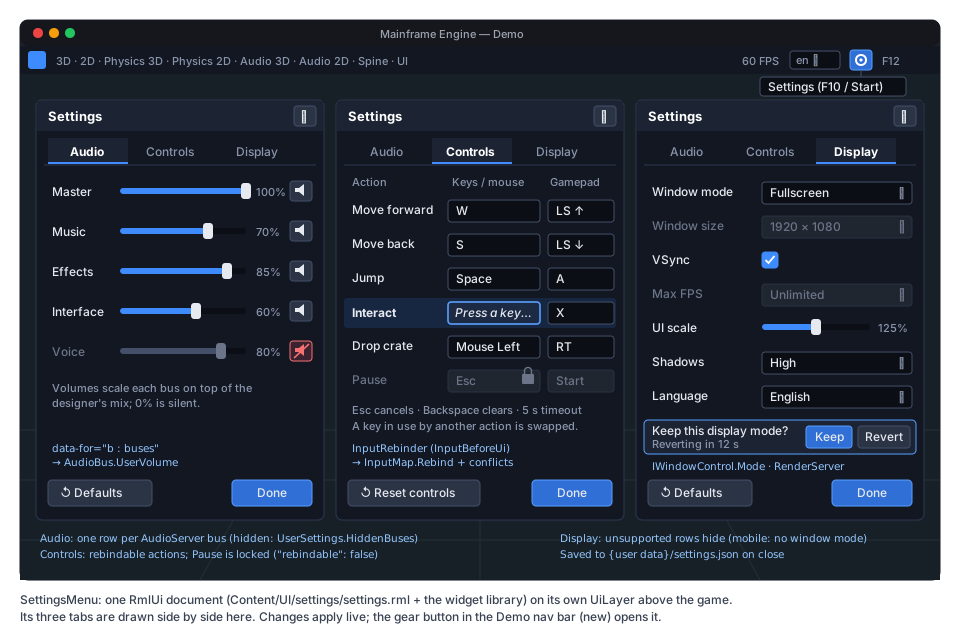
-
Content:
MainframeEngine/Content/UI/settings/settings.rml+settings.rcss. It links/Content/UI/widgets/widgets.rcssand uses only widget-library controls:input type="range", checkbox,select,button,.panel. -
Tabs are a data-bound button strip with
data-ifpanels, the pattern the Demo nav bar already uses (Examples/Demo/Content/Nav/nav.rml:10-13). LB/RB switch tabs on a gamepad. The.tabsstyle is added towidgets.rcss, which starts the “Shared widgets” work of the editor roadmap. -
Controller:
SettingsMenu : UiDocument(new,MainframeEngine/Src/UI/Settings/), withModal = true. It creates one data modelsettings:buses: a struct list of name, label, volume and muted;actions: a struct list of label, key1, key2, pad, capturing and locked;- the display scalars;
locales;- events
tab,rebind(action, class, slot),reset(section),keep,revertandclose.
All bindings use the
Bind(name, owner, static getter, static setter)overloads (game UI → data binding), so there are no closures, and a slider drag allocates nothing. -
Opening it:
SettingsMenu.Open(Tree, new SettingsMenuOptions{PauseTree = true, // sets Tree.Paused while open; the menu's layer uses ProcessMode.AlwaysTabs = SettingsTabs.All, // or Audio | ControlsHiddenBuses = ["Voice"],BusLabels = { ["SFX"] = "Effects" }, // display text, translated});Openadds aUiLayer(layer 90, under the dev overlay) with the menu below the root, unless one is already open. It returns the menu so the game can subscribe toClosed. -
Restyling: a game can copy
settings.rmlinto its ownContent/and setSource. The data-model contract above is documented and versioned with the engine. -
Localization. Every string in the RML is a text node or a translated attribute, so it goes through
UiServer.Translator(localization). Labels set from C# useTr.P("settings", …). Games have one catalog domain (LocalizationOptions.Domain,MainframeEngine/Src/Localization/LocalizationOptions.cs:24-25). So the engine shipsContent/UI/settings/settings.pot, andmf-l10n update --templatemerges it into the game’s.pofiles. The Demo’s Spanish andqpscatalogs prove it. -
Saving.
DoneorClosecallsUserSettings.Save(), but only when something changed.
Storage and cloud saves
Section titled “Storage and cloud saves”// new — called on the save worker onlypublic interface ISaveStorage{ string Name { get; } // "local", "fake", … IReadOnlyList<string> List(string folder); // "saves" → ["slot1.msave", …] Stream? OpenRead(string path); void WriteDurable(string path, ReadOnlySpan<byte> bytes, int backups); bool Delete(string path); DateTimeOffset? GetModifiedUtc(string path);}
// new — implemented in M13 (iCloud/CloudKit, Play Saved Games, Steam Cloud) and by FakeCloudSaveBackend in testspublic interface ICloudSaveBackend{ string Name { get; } long MaxBytes { get; } // per slot Task<IReadOnlyList<CloudSaveMeta>> ListAsync(CancellationToken ct); Task UploadAsync(string slot, ReadOnlyMemory<byte> file, ReadOnlyMemory<byte> thumbnail, CancellationToken ct); Task<CloudSaveFile?> DownloadAsync(string slot, CancellationToken ct);}
public enum SaveConflictPolicy { MostRecent, HighestProgress, Manual }-
Local first, always.
LocalSaveStorage(files under{user data}/saves) is the source of truth. After a local write, the server queues an upload of the same bytes. The upload is best effort and retried, as mobile services requires. A save larger than the backend’sMaxBytesstays local, andSaveResultsays so. -
Conflicts.
SaveServer.SyncAsync()runs at start-up, on resume and from the game’s “cloud” button. It compares the remote headers with the local ones. Two copies conflict when both changed since the last sync; asaves/.sync.jsonfile records the last synced hash per slot.SaveConflictPolicythen decides:MostRecentusessavedUtc;HighestProgressusesprogress;ManualraisesConflictDetected(SaveSlotInfo local, SaveSlotInfo remote), and the game callsResolveConflict(slot, keepLocal).
The losing copy is kept as
slot.msave.conflict-<utc>. These are M13’s policies (mobile-services.md:351-355). M13’sCloudSaveServerbecomes these backends plus its conflict dialog, not a second save system. -
Steam Cloud with no code. Steam Auto-Cloud can sync
{user data}/saves/*.msaveandsettings.jsononce it is configured on the Steamworks partner site. The engine has noISteamRemoteStoragewrapper today (MainframeEngine/Src/Steamworks/). The M13 Steam backend adds one for conflict handling. -
Lifecycle. M12’s
OnApplicationPause(mobile, “the last guaranteed callback”) callsSaveServer.Flush. Themfgametemplate’sSaveGameautoload, promised inmobile.md:229-233, is a 30-line example over this API: autosave on pause and onSceneTree.CloseRequested.
Paths per OS and on mobile
Section titled “Paths per OS and on mobile”| Platform | {user data} | Backed up by |
|---|---|---|
| Windows | %APPDATA%\{game} (roaming) | the OS user profile |
| macOS | ~/Library/Application Support/{game} | Time Machine |
| Linux / Steam Deck | $XDG_DATA_HOME/{game} (~/.local/share) | — (Steam Cloud if configured) |
| Android (M12) | Context.FilesDir/{game} (app-private, no storage permission) | Android Auto Backup |
| iOS (M12) | Library/Application Support/{game} | iCloud device backup |
The mobile rows come from mobile core (mobile.md:136, plumbing checklist item 14). G4 adds nothing
platform-specific: saves and settings use GameHost.UserDataPath, never the working directory.
Security non-goals
Section titled “Security non-goals”- No encryption, obfuscation or signing. A determined player can edit any save. The SHA-256 detects truncation and bit rot; it does not prove who wrote the file.
- Payloads are parsed with
JsonTypeInfo<T>and size limits (the header is at most 64 KiB, the payload at mostsaves.maxBytes, decompressed size included). A crafted file cannot allocate without bound or instantiate arbitrary types. There is no polymorphic type-name handling. - Thumbnails are decoded only by RmlUi’s image loader, through the engine’s PNG reader, with the same size cap.
project.mfproj additions
Section titled “project.mfproj additions”{ "userDataName": "MainframeDemo", "saves": { "maxBytes": 16777216, "backups": 2, "compression": "none", "thumbnails": true, "thumbnail": { "width": 320, "height": 180 } }, "input": { "interact": { "bindings": ["key:E", "pad:X"], "label": "Interact", "group": "gameplay" }, "pause": { "bindings": ["key:Escape", "pad:Start"], "rebindable": false } }}All keys are optional and have defaults, so no format bump is needed. The editor’s Project Settings dialog
(MainframeEngine.Editor/Src/Projects/ProjectSettingsModel.cs) gains a Saves page. The editor also gains
Project › Open User Data Folder (Godot has the same item), as an icon button with a tooltip in the project toolbar.
- Nav bar: a gear icon button with the tooltip “Settings (F10 / Start)” opens
SettingsMenuwith all three tabs. - Input actions in
Examples/Demo/project.mfproj(today"input": {}):scene_next/scene_prev(Page Down/Up, RB/LB). They replace the nav bar’s hard-coded number keys, which stay as a fallback.drop(Mouse Left, RT) andrain(R, Y) in Physics 3D.settings(F10, Start).quit(Escape, not rebindable).
- Save/load example: the Physics 3D panel (
Examples/Demo/Demo/Src/Physics/Physics3DPanel.cs) gets Save, Load and a three-slot list with thumbnails, description (“14 crates”) and play time. It saves the crates’ positions, rotations, velocities and colours (Dropper3D) with theCrateSaveschema above (version 2 with one migration, to show the pattern). Loading rebuilds the crates. - The bus labels show the
BusLabelsmapping (SFX → “Effects”, UI → “Interface”).
Testing
Section titled “Testing”- Unit (
Tests/MainframeEngine.Tests/Saves/):JsonMigrations: missing version = 1, chain order, a missing step, newer rejected,project.mfprojbehaviour unchanged (the existingProjectSettingsFormattests keep passing).DurableFile: crash simulation at each step through an injectable file-system shim (tmp written / rotated / renamed), then recovery picks the right copy; backup rotation count.SaveServerover a temporaryMAINFRAME_USER_DATA:- round trip;
- header-only listing (the payload is never read: a 50 MB payload lists in < 5 ms);
- truncated file, flipped byte (checksum), bad JSON and failed migration →
RecoveredFromBackupwith.corrupt-*kept; TooNewleaves the file untouched;TooLarge;- same-slot coalescing;
Flushon dispose;- completion on the thread that calls
Process; - play time accumulates only while unpaused;
- gzip round trip;
- slot-name validation.
- A trimming test project (
PublishTrimmed+IsAotCompatibleanalyzers) compiles the save API with no IL2026 or IL3050 warnings. ConfigFile: sections and keys, typed getters with wrong types (default + one warning), structured values, version migration, corrupt file → backup → defaults.UserSettings:- only changed keys are written;
- input overrides store full lists only for changed actions;
- unknown actions and buses are dropped;
EngineOptionspatching (VSync, size, locale) before the engine starts;- live apply raises
Changed.
InputMaprebinding: slots per device class, every conflict policy, groups, a locked action rejects,Device = -1overlaps a pad index,ResetAction/ResetAll, andVersionbumps.InputRebinderwith synthetic events: the opening click is ignored, repeats are ignored, reserved keys, the axis threshold, timeout, captured events are handled (the UI does not see them).AudioBus.UserVolume: gain math, 0 → silent, not inGetBusLayout, 0 B per change.- Allocation gate:
SaveServer.Processidle, slider drags inSettingsMenu,InputRebinder.OnInput.
- UI (
SerialRmlUicollection):SettingsMenuloads, every tab binds, Tr strings are translated inqps, a gamepad can reach every control (nav: auto), LB/RB switch tabs. - Render test: golden
ui-settings-menu(Controls tab in the capture state) for both drivers, recorded withjust golden-update. - Demo (
Examples/Demo/Demo.Tests): a headless test saves the Physics 3D crates, reloads the scene, loads and compares the transforms. A version-1 fixture file migrates.just demo-screenshotsaddssettings.png. - QA script (
Tests/QA/demo-settings.qa):- open settings, change the Music volume, rebind Interact (press F), switch to fullscreen and Keep, quit;
- restart and assert the values were restored from
settings.json; - save in Physics 3D, kill the process mid-write through the QA hook, restart and load (recovered).
Acceptance
Section titled “Acceptance”- A game saves and loads a typed payload in one call each, under AOT/trimming analyzers with no warnings, and a version-1 save loads in a version-2 build through a registered migration.
- Killing the process at any point during a save never loses the previous save. A corrupted file is recovered from a
backup and kept as
.corrupt-*. ListSlots()reads headers only. The main-thread cost ofSaveAsyncis serialization alone.- Volumes, mutes, bindings, window mode and size, VSync, max FPS, UI scale, shadows and language persist across restarts. Window size, VSync and language are applied before the first frame.
- Rebinding handles conflicts per the policy, refuses to steal a locked action’s key, works for keyboard, mouse and gamepad, and resets per action or for everything.
- The Demo opens the settings menu from the nav bar and saves and loads crates in Physics 3D with thumbnails. The menu
is translated into Spanish and
qps. ICloudSaveBackendwith the fake backend passes all three conflict policies. M13 needs no change to the file format.- Allocation gate and render tests are green.
just build,just testandjust format-checkpass. - Docs updated when it ships:
docs/design/project-and-gamehost.md(user data,userDataName,saves,UserSettings,SaveServer);docs/design/cameras-and-input.md(rebinding,InputRebinder, action labels, groups, lock);docs/design/audio.md(UserVolume);docs/design/game-ui.md(tabs style,SettingsMenu,UserScale);docs/design/localization.md(settings.potmerge);docs/design/scene-serialization.md(ConfigFile,JsonMigrations,DurableFile);docs/design/demo.md(settings and save example);docs/design/future/mobile-services.md(CloudSaveServer→ICloudSaveBackend).
Task list
Section titled “Task list”- G4.1 Foundations:
JsonMigration/JsonMigrations(withProjectSettingsFormatdelegating),DurableFile(withResourceSaver.WriteAtomicallyswitching to it),userDataName; tests. - G4.2 SaveServer: schema, header format, worker, durable replace + backups, recovery,
TooNew/TooLarge, play time, thumbnails (capture + downscale + PNG),savesproject section,GameHost/HeadlessHostregistration; tests- trimming check.
- G4.3 ConfigFile + UserSettings:
ConfigFile;UserSettingswith pre-windowEngineOptionspatching andGameSession.Startapply;AudioBus.UserVolume;IWindowControl.Mode/VSync/MaxFps+WindowMode;UiServer.UserScale; tests. - G4.4 Rebinding:
InputMap/InputAction/InputBindingadditions,project.mfprojaction keys,InputRebinder, display-name table; editor input-map page (label/group/lock); tests. - G4.5 Settings menu:
.tabsstyle inwidgets.rcss,settings.rml/.rcss,SettingsMenu+ options, revert prompt,settings.pot+mf-l10n update --template; UI tests +ui-settings-menugolden. - G4.6 Demo + template: nav-bar gear + input actions, Physics 3D save/load slots, Spanish/
qpsstrings, Demo tests,demo-settings.qa; themfgametemplate’sSaveGameautoload example; editor Saves page and Open User Data Folder. - G4.7 Cloud seam:
ISaveStorage/ICloudSaveBackend,SyncAsync, conflict policies,.sync.json, fake backend- tests. The real backends are M13.3.
As built
Section titled “As built”G4.1–G4.7 shipped as proposed. The subsystem docs are the reference now:
Projects (user data, userDataName, saves, SaveServer, cloud seam, UserSettings),
Scene serialization (JsonMigrations, DurableFile, ConfigFile),
Cameras and input (rebinding, InputRebinder), Audio (UserVolume),
Game UI (SettingsMenu, .tabs, UserScale), Localization
(settings.pot), Editor (Saves page, Open User Data Folder) and Demo. Where the build
differs from the text above:
SaveServer(storage, options, tree?)takes the tree (pause check,CaptureFrame); its storage root is{user data}/saves, so paths are slot file names.ISaveStoragegainedMove(quarantine).SaveResultis(Slot, Status, Error, Info, CloudTooLarge);SaveOptionsadds cloud retry settings.Load,SaveandDeletewait for queued async saves. The 64 KiB header cap is enforced through a 1 024-character description limit.- Trimming check: the engine is not trim-clean as a whole, so
MainframeEngine/.editorconfigmakes the trim and AOT analyzers errors forSrc/Saves/**only (no separatePublishTrimmedproject). - Window modes call SDL directly: Silk.NET’s
WindowState.Fullscreenis exclusive andNormaldoes not leave fullscreen.Fullscreen=SDL_WINDOW_FULLSCREEN_DESKTOP;ExclusiveFullscreenuses the display mode closest to the window (no mode list yet, open question 1). The existingIWindowControl.Fullscreenshortcut is now borderless. UserSettingsaddsStoreInput/ApplyInput,PatchEngineOptions,ShadowsNeedRestart; command-line flags (--no-vsync,--locale) still win over the player’s file. Settings load just after the log file is set up.UiServer.UserScalealso scalesProjectlayers (they resolve toDpi/ReferenceResolutionin games);UiLayer.IgnoreUserScaleopts out (the dev overlay).- Rebinding: an empty binding clears a slot;
InputRebinderalso setsProcessMode.Always(it works under a paused menu) and exposesReservedInputs. Stick directions are words (LS Up): the bundled UI fonts have no arrow glyphs. - Engine strings merge through the existing
mf-l10n extract --include(noupdate --template);--mfprojwas added to extract input action labels. - QA: games have no QA-script runner, so
Tests/QA/demo-settings.qabecamejust qa-settings: the Demo’s own++ --qa settings|check|savesmode. The crash is simulated by truncating the newest save (DurableFile’s unit tests interrupt every file-system step); fullscreen is not toggled because the QA window is hidden. - Lavapipe golden
ui-settings-menuis recorded withjust render-tests-linux.
Open questions
Section titled “Open questions”- Exclusive fullscreen and mode lists. Does Silk.NET’s SDL
WindowState.FullscreenuseSDL_WINDOW_FULLSCREENorSDL_WINDOW_FULLSCREEN_DESKTOP, and does Silk expose the display’s video modes? If not,SilkWindowControlcalls SDL directly throughSilk.NET.SDL(already present through the SDL windowing backend). This needs a spike on all three OSes and MoltenVK. Is exclusive fullscreen worth it at all, given that modern compositors favour borderless? Default: shipFullscreen(borderless) andWindowedfirst. - Serialize on the worker? Main-thread serialization is safe but costs milliseconds for big worlds. An opt-in
SaveOptions.SerializeOnWorkerfor games whose payload is immutable (records) could follow if a profile shows the need. - Engine-owned strings. Merge the
settings.potinto each game’s catalog (proposed), or teachTra second fallback domain (mainframe.mo) that the engine ships with translations? - Gamepad glyphs. Text labels follow the Xbox layout. PlayStation and Nintendo labels need the controller type
(SDL’s
SDL_GameControllerGetType) and an icon atlas. Do this in G4 or later? - Mouse wheel and modifier combos.
InputBindinghas no wheel kind and no modifiers (InputMap.cs:7-15). Should rebinding wait for both, or should they be separateInputBindingwork? - Settings that sync. Should M13 sync
audioandinputthrough the cloud (NSUbiquitousKeyValueStoreholds 1 MB), or keep all settings per device? - Thumbnail capture cost.
EnableFrameCaptureadds transfer-source usage to the swapchain, which is slower on MoltenVK (Engine.cs:50-53). Should thumbnails instead render into a small offscreen target (a sub-viewport pass), so the swapchain flag is not needed? This would depend on Rendering features.
Related
Section titled “Related”- Project and GameHost:
UserDataPaths,project.mfprojformat and migrations - Cameras and input:
InputMap, actions,Input - Audio: buses, faders,
AudioBusLayout - Game UI: widget library, data binding, input routing (ADR 0051, ADR 0138)
- Localization:
Tr, RML text,mf-l10n - Mobile core (M12): lifecycle saves, app-private storage
- Mobile services (M13):
CloudSaveServer, conflict policies, Steam/iCloud/Play backends - Editor roadmap: “Shared widgets” (the
.tabsstyle starts here) - Game export (G5): exported builds keep
userDataName, so player data survives renames