
Game UI (RmlUi)
Purpose
Section titled “Purpose”HTML/CSS-style game UI: documents (.rml) and style sheets (.rcss) laid out by RmlUi
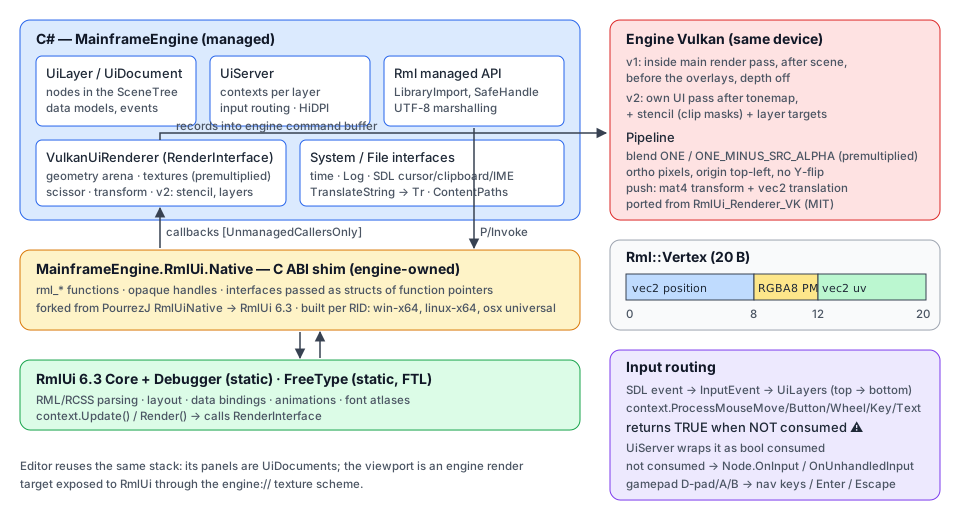
6.3, bound to C# state, fed the engine’s input and rendered on the engine’s Vulkan device after the tonemap. The
same stack is the editor’s UI. Milestone M8 (Milestones).
| Layer | Where | What |
|---|---|---|
| Native shim | Native/RmlUi/ | mfrmlui: flat C ABI (121 functions, ABI 1.0) over RmlUi + FreeType — Native libraries, ADR 0002 |
| Managed binding | Src/UI/Rml/ | RmlCore, RmlContext, RmlDocument, RmlElement, RmlEvent, RmlDataModel, RmlRenderInterface, … |
| Renderer | Src/UI/Rendering/ | VulkanUiRenderer (Vulkan), NullUiRenderer (headless) |
| Engine | Src/UI/ | UiServer, UiLayer, UiDocument, UiElement, input map, hot reload |
| Content | Content/UI/ | bundled fonts, the widget library (widgets/) |
Quick start
Section titled “Quick start”public sealed class Hud : UiDocument{ private Player _player = null!; private RmlDataModel _model = null!;
public Hud() => Source = "Content/UI/hud.rml";
protected override void OnReady() { _player = GetNode<Player>("../../Player"); _model = CreateDataModel("hud") .Bind("health", _player, static p => p.Health) // owner as state: no closure .Event("pause", () => Tree!.Paused = true); // data-event-click="pause" GetElementById("quit")!.Click += _ => Tree!.Root.QueueFree(); // loads the document }
protected override void OnProcess(in GameTime t) => _model.Dirty("health"); // or only when it changes}
// Scene: a UiLayer (one RmlUi context) with documents below it.var layer = new UiLayer { Name = "Hud", Layer = 0 };layer.AddChild(new Hud());Root.AddChild(layer);<!-- Content/UI/hud.rml --><rml><head> <link type="text/rcss" href="/Content/UI/widgets/widgets.rcss"/></head><body class="hud" data-model="hud"> <div class="panel">Health {{ health }}</div> <progress class="health" data-attr-value="health / 100"/> <button data-event-click="pause">Pause</button> <button id="quit">Quit</button></body></rml>The engine registers the UiServer when EngineOptions.EnableUi is on (default). Author sizes in dp (they follow
the game’s UI scale — Scaling: new projects author for 1920×1080 and the UI grows with the window); px
are framebuffer pixels.
Managed binding (MainframeEngine.UI.Rml)
Section titled “Managed binding (MainframeEngine.UI.Rml)”| Type | Role |
|---|---|
RmlNative | Every export as [LibraryImport("mfrmlui")] with blittable signatures only (handles nint, strings NUL-terminated UTF-8 byte*, callbacks delegate* unmanaged[Cdecl]): source-generated direct calls, no marshalling stubs or allocations |
RmlCore | EnsureLibrary (loads the library, checks the ABI: equal major, minor ≥ 0; clear RmlException when missing or incompatible), Initialise(system, file), Shutdown, fonts, cache clearing, ProcessPendingReleases |
RmlHandle (+ RmlContextHandle, RmlDataModelHandle, RmlRenderInterfaceHandle) | SafeHandles over the owned objects, tracked weakly. Released exactly once on the RmlUi thread; a handle whose owner was collected undisposed is queued and released by the UI server (RmlUi is never called from the finalizer thread). Contexts and data models RmlUi destroys itself (shutdown, context destroy) are invalidated, not released twice. Disposing a context or data model from inside an RmlUi callback (a click handler freeing its layer, a data event removing its document) is deferred until the dispatch returns (RmlCore.IsInCallback; drained at the start of the next UI frame) |
RmlContext | Size, dp ratio, Update/Render, documents, root/hover/focus elements, input methods returning true = consumed (RmlUi’s raw Process* returns the opposite; the shim resolves it once), data models (DataModels). Code reload: when a game assembly unloads, UiServer.ReleaseCodeOf disposes models whose bindings still call or hold its code (recorded at bind time, collectible assemblies only), updates each context so documents closed since the last frame are destroyed, and releases queued handles (projects) |
RmlDocument, RmlElement | Borrowed handles as readonly structs: tree, query selectors (span overloads write into caller buffers), attributes, classes, properties, inner RML, form values, focus/click, bounds, listeners |
RmlEvent, RmlVariant, RmlDictionary, RmlDataEvent | Callback-scoped borrowed objects as ref structs, so they cannot outlive the callback |
RmlEventListener | An attached listener; Detached fires exactly once (removed, or element destroyed) |
RmlDataModel | Typed bindings (below) |
RmlRenderInterface, RmlSystemInterface, RmlFileInterface | Abstract/virtual C# interfaces; the static [UnmanagedCallersOnly] trampolines find the object through a GCHandle in user_data, and catch and log every exception — nothing unwinds into RmlUi |
RmlDebugger | The RmlUi visual debugger |
Strings without allocation. RmlUtf8Arg encodes arguments into a 256-byte stack buffer (pooled array above that);
outputs use the caller-buffer pattern into stack memory, and only the final string allocates. Hot paths have span
overloads (RmlEvent.IsType("click"u8), RmlElement.GetValue(Span<char>), RmlVariant.Set(ReadOnlySpan<char>)).
Data binding
Section titled “Data binding”model.Bind("health", () => player.Health); // getter (closure)model.Bind("volume", settings, static s => s.Volume, static (s, v) => s.Volume = v); // two-way, no closuremodel.Event("buy", e => Buy(e.GetArgument(0).GetInt32())); // data-event-click="buy(item.id)"model.BindList("items", inventory, ItemType); // data-for="it : items"model.BindStruct("player", () => player, PlayerType); // {{ player.hp }}model.Dirty("health"); // views update on the next Update- Scalars:
bool,int,uint,long,float,double,string, 32-bit enums. Conversion goes throughRmlValue<T>withtypeof(T)checks the JIT folds, so value types never box. - Lists and structs use the shim’s dynamic variables (
mfrmlui_data_model_bind_variable): every value is a 64-bit node token (element index + 1in bits 16..47,member index + 1in bits 0..15).RmlStructType<T>describes members once (.Member("name", static i => i.Name)); lists may hold scalars or structs of scalars (deeper nesting is not supported yet). Lists are read live: change them and callDirty. A list may shrink between updates: rows past the new end resolve to “none” while RmlUi drops their elements, without warnings. - The
Bind(name, owner, static getter, static setter)overloads are what a future[UiBindable]source generator can emit without closures. BindVariable(name, kind, RmlVariableSource)binds a variable whose structure is decided as RmlUi walks it: every node is a token (0 = root) that reports its kind (Scalar,Array,Struct) fromChild, its value fromRead/Writeand its length fromSize— for tools that do not know the data’s shape in advance (the editor’s UI preview stand-ins).- Every binding holds a
GCHandlefreed by the shim’s release callback, exactly once, when the model is removed, its context destroyed or RmlUi shut down.
UiServer, UiLayer, UiDocument
Section titled “UiServer, UiLayer, UiDocument”| Type | Role |
|---|---|
UiServer (UiServer.cs) | IFrameServer + IInputServer registered by Engine. Owns RmlUi (init, shutdown), the render interface, fonts (every .ttf/.otf in Content/UI/fonts), the system and file interfaces, one context per layer, input routing, hot reload, the debugger (F8), engine:// textures (RegisterTexture), the Translator hook (Localization) |
UiLayer : Node (UiLayer.cs) | One RmlUi context sized to the framebuffer, or to its Region (below). [Export] Layer (draw/input order), Visible, ScaleMode (Project default: the game’s UI scale, UiServer.Scaling — Scaling; Dpi: 1 dp = UiServer.ContentScale — the display’s pixels per point, or the fixed EngineOptions.ContentScale; Pixels; ReferenceResolution: framebuffer ÷ ReferenceResolution, smaller axis), Scaling (a per-layer replacement for the server’s, not serialized). Games typically use HUD (0), menus (10), overlay (100). In the editor (SceneTree.EditMode), a layer of an edited scene (below a sub-viewport, not the tree’s root viewport) that is not a [Tool] type is inert: it has a context so OnReady code works, but the server never updates, draws or routes input to it, so a game HUD cannot cover the editor’s panels |
UiDocument : Node (UiDocument.cs) | [Export] Source (or inline Rml), Visible, Modal, AutoFocus; [Signal] Loaded, Reloaded; CreateDataModel, GetElementById, QuerySelector, Show/Hide, Reload. Must be below a UiLayer |
UiElement (UiElement.cs) | A cached element wrapper with C# events (Click, DoubleClick, MouseDown/Up/Over/Out, Change, Submit, Focused, Blurred, KeyDown/Up, On(type, …)); native listeners attach only for subscribed types. Every access looks the element up again by id, so a wrapper follows elements the DOM replaces (inner RML, data-for, data-if) and reports invalid — never dangling — once removed |
Lazy loading. A document loads on first element access or, at the latest, when the server prepares the next frame.
So CreateDataModel in OnReady (children are ready before parents, documents enter after their layer) runs before
the document binds data-model. A model created after loading reloads the document at the next frame. The document
closes when the node leaves the tree; its models are removed.
Regions. UiLayer.Region (a System.Drawing.Rectangle? in framebuffer pixels, not serialized; null = the whole
window) confines a layer to a rectangle of the window: its context is laid out at the region’s size (the dp ratio of
ReferenceResolution layers, and of Project layers scaling with the screen, follows it), every draw is offset to the region’s origin and clipped to it, and the mouse
reaches it only inside the region (or while it drags) in region coordinates — leaving the region sends it a
mouse-leave. The renderer records the region with every command (an index into a per-frame region table), so
transforms, clip masks, filters and saved layers work unchanged inside it. Uses: split-screen HUDs, the editor’s UI
preview tab (Editor). The region may change every frame. UiServer.Reload(document, kind)
applies file changes to one document only (the preview’s own file watcher), where Reload(kind) reloads them all.
Scaling
Section titled “Scaling”ADR 0181 (decision): Unity’s CanvasScaler for every
game UI at once. UiServer.Scaling (a UiScaling record; initially UiServerOptions.Scaling, which GameHost fills
from project.mfproj’s ui section — Projects) sets the dp ratio of every
UiScaleMode.Project layer (the default), the developer overlay (an ordinary Project layer) and the RmlUi debugger.
Mode | 1 dp = |
|---|---|
ConstantPixelSize (UiScaling.ConstantPixelSize: the engine default, the editor, tests, projects older than format 3) | UiServer.ContentScale (2 on Retina, or the fixed EngineOptions.ContentScale) — the UI keeps its size whatever the window |
ScaleWithScreenSize (UiScaling.ScaleWithScreenSize: new projects, the Forest, the template) | 2^lerp(log2(w / refW), log2(h / refH), MatchWidthOrHeight) of the layer’s pixel size, clamped by MinScale/MaxScale (0 = none) |
- With the 1920×1080 reference and
MatchWidthOrHeight1 (height, the default): 1280×720 → 0.667, 1920×1080 → 1, 2560×1440 → 1.333, 3840×2160 → 2, ultrawide 3440×1440 → 1.333 (the layout is always 1080 dp tall and 2580 dp wide). Height is the default because games are landscape and authored for a design height: vertical stacks (menus, HUD columns) always fit and wider screens give more room at the sides, as Unreal’s default “shortest side” DPI rule does. 0 matches the width; 0.5 is the geometric mean (Unity’s suggestion for mixed aspects). - HiDPI. The scale comes from framebuffer pixels, not window points: a 1920×1080-point window on a 2× display is
3840×2160 pixels and draws the UI at 2×, the same physical size as 1080p on a 1× display. A project with
window.contentScale1 (the Forest) sizes its window in pixels, so a Retina display changes nothing. - Resize. The ratio is recomputed from the layer’s size (the framebuffer, or its
Region) every frame; RmlUi re-lays out when it changes, on the frame after a resize or a newScaling. No allocation. - Input needs nothing: contexts are laid out in pixels and the mouse arrives in pixels, so elements are hit where they are drawn at any scale.
- Authoring. Write sizes in
dpfor the reference resolution;pxstay framebuffer pixels. Use%,right/bottomanchoring andmax-widthfor anything that must adapt to other aspects. - The editor is a desktop tool: its server keeps
ConstantPixelSizeand its layers are pinned toDpi, so panels never scale with the window. Its UI preview tab lays the previewed document out with the open project’s scale at the preview’s size (UiLayer.Scaling). Games started with Play are their own processes and use their project’s setting. - Player scale.
UiServer.UserScale(default 1, clamped to 0.25–4, NaN = 1) multiplies the dp ratio of everyProject,DpiandReferenceResolutionlayer on top ofScaling, re-laying out on the next frame like a newScaling.Pixelslayers (1 dp is one pixel by definition), layers withUiLayer.IgnoreUserScaleand the RmlUi debugger keep their size; the developer overlay setsIgnoreUserScale(a developer tool, not the player’s UI).UserSettings.UiScale(0.75–2,display.uiScaleinsettings.json) sets it at start and live from the settings menu (project and GameHost).
Frame. UiServer.Process (after the tree’s process step): release queued handles, advance UI time by the frame
delta (deterministic with FixedDeltaTime), publish IME composition, repeat held gamepad navigation, apply hot
reloads, size every visible layer’s context to the framebuffer (or its region) and set its dp ratio, prepare
documents, Update each context, then — unless the engine will skip the frame — Render each context (lowest layer
first, the debugger last) into the renderer’s command list.
Tooltips (ADR 0121)
Section titled “Tooltips (ADR 0121)”Godot’s tooltip_text: any element with a title attribute (static or data-attr-title) shows it after the mouse
rests on it (or on a child) for UiServer.TooltipDelaySeconds (0.5 s, Godot’s gui/timers/tooltip_delay_sec), at
the mouse + UiServer.TooltipOffset (10, 10) px, kept inside the document. Motion before it shows restarts the
timer; a press or leaving the element hides it. The text goes into the document’s own #tooltip element (the
binding cannot create elements), which the document styles (position: absolute; display: none; pointer-events: none;): the engine sets its inner RML (escaped), left/top and display. No #tooltip, no tooltips.
UiDocument.ShownTooltip is the text on screen (tests).
Rendering (VulkanUiRenderer)
Section titled “Rendering (VulkanUiRenderer)”flowchart LR
P["UiServer.Process<br/>context.Render()"] -->|callbacks| R["CPU command list<br/>(structs, grow-only)"]
R --> O["BeginOverlayPass:<br/>scene pass ends"]
O --> L["UI passes on an offscreen layer<br/>RGBA8 premultiplied sRGB + stencil"]
L --> T["tonemap → swapchain"]
T --> C["composite UI layer<br/>(premultiplied over)"]
C --> I["dev overlay<br/>(an RmlUi layer, on top)"]
- Recording. RmlUi’s callbacks, issued during
UiServer.Process, appendUiCommandstructs (geometry draw, shader draw, clip mask, push/pop layer, composite, save layer); state (scissor, transform, stencil test value) is captured per command and resources are resolved to buffers/descriptor sets at record time, so a release before the replay cannot redirect a draw. Filters and gradient parameters are copied into the frame’s list. - Replay happens inside
IVulkanContext.BeginOverlayPassthrough the newIOverlayRendererhook (IOverlayRenderer.cs):RecordOffscreenafter the scene pass ends (UI passes),RecordOverlayafter the tonemap, after the canvas and the screen gizmos (OverlayOrder.Ui; one fullscreen premultiplied composite). Frames with no UI commands record nothing. - Colour. Documents are authored in sRGB and blended in sRGB space, like a browser: layers are
R8G8B8A8_UNORMholding premultiplied sRGB-encoded values, and the composite writes them unchanged into the UNORM swapchain view, so exposure and ACES never touch the UI (#3366cclands as#3366cc, checked by a render test). On an sRGB-only swapchain the composite linearises (OverlayEncodesSrgb). See Color pipeline. - Geometry lives in
UiGeometryArena: persistently mapped host-visible chunk buffers (1 MiB, larger meshes get their own) sub-allocated with the allocator’sFreeListBlock; each allocation is vertices (aligned to a whole 20-byteRml::Vertex) then 32-bit indices, so a draw is onevkCmdDrawIndexed(count, 1, firstIndex, vertexOffset, 0)and buffers rebind only on a chunk change. RmlUi compiles geometry once and re-renders it by handle (geometry caching); ranges are freed only after the frames that may read them complete. - Textures. Images load through the UI file interface (StbImageSharp). An
srcthat is an absolute path to an existing file (<img src="/home/me/Game/Content/icon.png">,C:\…) loads as written (theJoinPathcallback keeps it instead of joining it onto the document’s folder; the editor’s Project Manager shows project icons this way). Textures are cached by source:RmlCore.ReleaseTextures()drops them so a changed file is re-read. Preloading (ADR 0140): when a document loads, its<img src>images (hidden ones included) are decoded and uploaded at once, keyed by the source RmlUi will request (RmlPaths.Join), so a menu or phone shown later does not decode on the main thread;data-attr-srcsources and RCSS image decorators still load on first use. Images are premultiplied on load and get a mip chain; generated textures (font atlases) arrive premultiplied. Both areGpuTextures (R8G8B8A8_UNORM) through the upload queue — created duringProcess, between frames, so nothing waits on the GPU. Untextured geometry binds a 1×1 white texture.engine://nameresolves to a registeredGpuTextureorRenderTargetcolour attachment (UiServer.RegisterTexture); the shader encodes sRGB-format and float sources and premultiplies straight alpha (UiTextureConversion), and render targets are followed across resizes. - Transforms. RCSS transforms (3D included) multiply a pixel projection (y down, no flip; z mapped into [0, 1]
for RmlUi’s ±10 000 range), pushed as a
mat4with avec2translation. - Clip masks (
overflow: hiddenwithborder-radius, clipping under transforms): a shared stencil attachment (S8_UINTwhen supported, else a packed depth/stencil format) and RmlUi’s GL3 scheme —Setclears the scissored region to 0 and writes 1,SetInverseclears to 1 and writes 0,Intersectincrements; geometry testsEQUALagainst the current value. - Layers, filters and shaders, ported from RmlUi’s GL3 backend:
PushLayerclears a new layer (the stencil is shared and kept),CompositeLayerscopies the source into a filter target, runs the filters, then draws it onto the destination (blend or replace, scissor and clip mask honoured). Filters:opacity,blur(repeated half-resolution downscale + separable 7-tap Gaussian + upscale, sampling limited to the region),drop-shadow, colour matrices (brightness,contrast,invert,grayscale,sepia,hue-rotate,saturate),mask-image(SaveLayerAsMaskImage).SaveLayerAsTexture(box-shadow) renders the region into a new texture. Shaders: linear, radial, conic gradients and their repeating forms (≤ 16 stops; parameters in a dynamic-offset uniform ring per frame slot). Shaders:Content/Shaders/UI/. - Passes. Layer passes (colour + stencil: clear-all at frame start, clear-colour for a pushed layer, load to
resume) and filter passes (colour only: discard on first use, then load) all end in
SHADER_READ_ONLY_OPTIMAL; 17 pipelines are built once against them and the overlay pass. Targets are swapchain-sized and rebuilt on resize. - Synchronisation. Every UI pass starts with a pipeline barrier (colour/stencil writes → reads/writes, sampling),
and one more orders the last UI pass before the overlay composite. The passes’ external subpass dependencies say the
same, but MoltenVK does not turn them into Metal synchronisation for sub-allocated images: without the barriers a
layer resumed after a filter pass read stale data and later draws vanished.
vkCmdClearAttachmentsis a driver draw on MoltenVK that changes the encoder’s stencil reference, so cached dynamic state is invalidated after it (ADR 0050). - Lifetime. Releases (geometry ranges, descriptor sets) are tagged with the frame that may still use them and
collected once its fence has been waited on;
GpuTexture/GpuImage/framebuffers go through the deletion queue. Texture descriptor sets come from growable pools withFREE_DESCRIPTOR_SET. A command list is replayed at most once: a render without a new update (frame-rate cap) re-composites the base layer it already produced instead of replaying references to resources released since. A hidden UI (Visible = false) still replays lists that save layers into textures (box-shadows), and if a frame is skipped after RmlUi saved a layer, the renderer asks RmlUi to regenerate its textures. NullUiRendererhands out handles without a GPU, so layout, data binding and input work headless (unit tests).
Input routing
Section titled “Input routing”flowchart LR
SDL["SDL event → InputEvent"] --> D{"F8?"}
D -- yes --> Dbg["toggle debugger (consumed)"]
D -- no --> L{"UiLayer top → bottom<br/>(debugger context first)"}
L -- "consumed" --> Stop["stop"]
L -- "modal document" --> Stop
L -- "not consumed" --> N["Node.OnInput → OnUnhandledInput"]
SceneTree.PushInput offers every event to the registered IInputServers first (new in M8; the UI server is the
only one); a consumed event never reaches OnInput/OnUnhandledInput (ADR 0051).
Exception (ADR 0138): nodes with InputBeforeUi = true get OnInput before
the input servers, which is Godot’s _input placement. They see keys the UI would take (Tab = focus next, Return on a
focused button); handling the event stops it, otherwise the UI and the remaining nodes get it as usual.
| Input | Behaviour |
|---|---|
| Mouse move/buttons/wheel | Window points × pixels-per-point → context pixels; wheel -y (RmlUi scrolls down for positive). Consumed only over interactive elements (pointer-events: none on a HUD body lets the game keep the mouse elsewhere). A press keeps the mouse with whoever took it until release: one the game took crosses the HUD (camera drags), one the UI took (a slider drag) stays with the UI even when released over the world. Raw/disabled cursor mode skips the UI. Lower layers get a mouse-leave when a higher one takes the pointer |
| Keys | Silk keys → Rml::Input::KeyIdentifier (UiInputMap), modifiers tracked from key events. Unhandled keys propagate; a focused text field takes every key; the release of a key the UI consumed is consumed too |
| Text | Silk’s KeyChar (UTF-16; surrogate pairs joined) → ProcessTextInput (UTF-8 on the stack). Control characters arrive as keys |
| IME | ActivateKeyboard places SDL’s text-input rectangle at the caret (the OS draws the candidate window); an SDL event watch publishes SDL_TEXTEDITING as UiServer.Composition/CompositionChanged; committed text arrives as text input. Inline composition rendering needs TextInputContext in the shim (ABI 1.1) |
| Clipboard, cursor | SDL clipboard; RCSS cursor names → SDL system cursors |
| Gamepad | D-pad and left stick (press 0.6, release 0.4, repeat after 0.4 s every 0.1 s) → arrow keys, A/Start → Return (clicks the focused element), B → Escape. RmlUi 6.3’s nav-* properties (nav: auto spatial navigation) work; when nothing is focused, the first direction focuses the first tab-able element |
| Modal | A visible modal document consumes all input for its layer and everything below, including the game |
Development tools
Section titled “Development tools”- Hot reload (
UiServerOptions.HotReload, default on in Debug): aFileSystemWatcheronContent/UIand every source content folder; changes are debounced (150 ms) and applied on the main thread —.rcssre-reads style sheets keeping the DOM,.rmlreloads documents (data models are C# state and survive;UiElementsubscriptions are re-attached by id), images and fonts release textures. A document that failed to load is retried.UiServer.HotReloadEnabledreports whether the watcher is on, andUiServer.HotReloaded(Action<UiReloadKind, string?>) is raised on the main thread after every reload with its kind and the last changed file (null for a manualReload(kind)); unlikeUiDocument.Reloadedit also fires for style-sheet-only reloads, so a game can show a reload counter. - Source content folders. Debug builds record their project’s
Contentfolder ([AssemblyMetadata("MainframeContentSource", …)]);UiServerOptions.SourceDirectoriesOf(assembly)returns those that exist, andUiFileInterfacechecks them before the output’sContent/, so edits apply without a rebuild. The engine adds its own (widgets) automatically. - Debugger: F8 (
UiServerOptions.DebuggerKey,UiServer.DebuggerVisible) shows RmlUi’s visual debugger in its own context on top, inspecting the top visible layer. - Developer overlay: an RmlUi layer on top of every other layer:
Engine.DevOverlayVisible, toggled with F12 (EngineOptions.DevOverlayVisible); see Developer overlay.
Loading screen (ADR 0183)
Section titled “Loading screen (ADR 0183)”LoadingScreen : UiLayer (layer 10 000, ProcessMode.Always) shows a document over everything while a SceneLoad
runs, then fades out (FadeSeconds, 0.45 s) and frees itself; GameHost shows one for the start scene
(Async loading), games call
LoadingScreen.Show(tree, load, source, title) for their own ChangeSceneToFileAsync, or set Progress/Stage
themselves and call FadeOut(). The document is modal while loading (the game gets no input) and not while fading.
- The
loadingdata model:title(string),stage(string),progress(0–1, eased towards the load’s value so the bar glides; it never goes back) andpercent(0–100). For example<div id="fill" data-style-width="percent + '%'"/>and{{ stage }}. - RCSS animations (
@keyframes,animation:) run on the UI clock, so the screen moves while the load works on other threads, and is deterministic under--fixed-fps. - The engine’s document,
Content/UI/loading/loading.rml(LoadingScreen.DefaultSource): the Mainframe brand (navy, sky blue, amber), the logo breathing, the game’s name, a bar with a sweeping highlight, the stage and the percentage. A project picks its own withloading.screen(the Forest’s matches its pause menu). Golden:loading-screen(UiRenderTests). - Engine and game
Content/merge in the output folder: give a game’s document a path the engine does not use (the Forest’s isContent/UI/loading.rml).
Settings menu (G4)
Section titled “Settings menu (G4)”SettingsMenu : UiDocument (Src/UI/Settings/) is the engine’s
drop-in options screen over UserSettings, laid out by
Content/UI/settings/settings.rml with the widget library only
(.panel, .tabs, sliders, checkboxes, dropdowns, buttons).
SettingsMenu.Open(Tree, new SettingsMenuOptions{ PauseTree = true, // Tree.Paused while open (the menu's layer is ProcessMode.Always) Tabs = SettingsTabs.All, // or Audio | Controls HiddenBuses = ["Voice"], BusLabels = { ["SFX"] = "Effects" }, // shown through Atr (the game's catalog)}).Closed += () => { /* resume */ };Openadds aUiLayernamedSettingsMenu(layer 90, under the developer overlay) below the root, or returns the open one (SettingsMenu.Find). The document is modal andInputBeforeUi: LB/RB switch tabs, Escape or gamepad B closes it (or reverts a pending display change).- Audio: one row per
AudioServerbus (Master always): a slider forAudioBus.UserVolumeand a mute button. - Controls: every action of the tree’s
InputMap, two keyboard/mouse slots and one gamepad slot (InputMap.GetBinding), labelled withInputAction.Label(throughAtr) andInputBinding.DisplayName(). A click starts anInputRebinderchild (Esc cancels, Backspace clears); the binding goes throughInputMap.Rebind(Swap), conflicts are reported (“F was swapped with Jump”, “Esc is used by Pause”), locked actions cannot be changed, andUserSettings.StoreInputrecords the overrides. “Reset controls” restoresUserSettings.DefaultInput. - Display: window mode and size (desktop only; common 16:9/16:10 sizes that fit the screen), VSync, max FPS
(disabled while VSync is on), UI scale (
UiServer.UserScale), shadows (“applies after a restart” for a switch to or from Off:UserSettings.ShadowsNeedRestart) and the language (each in its own name). A mode or size change starts a 15 s revert prompt (“Keep this display mode?”): Keep confirms, Revert, Escape or the timeout restores the old one. - Every change applies at once; closing saves
settings.jsononly if something changed. Without loaded settings (tests, tools) the menu edits in-memory defaults and saves nothing. - Restyling: copy
settings.rmlinto the game’sContent/and passSource. Thesettingsdata model (documented at the top of the file) is the contract:tab,buses,actions, the display scalars,locales, and the eventstab,toggleMute,rebind(action, class, slot),reset(section),keep,revert,close. - Selects write back: RmlUi sets a
<select>’s bound value to its first option when the current value is not one of its options, so the menu keeps every current value (language, window size) among the options; opening it never changes a setting. - Strings are text nodes (the game’s catalog) and
Tr.P("settings", …)in C#; the engine’ssettings.potcarries both. Golden:ui-settings-menu(the Controls tab capturing a key); unit tests:SettingsMenuTests(SerialRmlUi).
Widget library
Section titled “Widget library”Content/UI/widgets/: link /Content/UI/widgets/widgets.rcss.
| Widget | Markup |
|---|---|
| Button | <button>, .primary, .disabled |
| Slider | <input type="range" min max step value> |
| Checkbox / radio | <input type="checkbox">, <input type="radio" name> |
| Dropdown | <select><option>…</select> |
| Text field | <input type="text">, type="password", <textarea> |
| Progress bar | <progress value="0..1">, .health |
| Tabs | <div class="tabs"> of buttons; the open one carries .active (pair with data-if pages; the settings menu) |
| Panel | .panel, .panel-title; window template mf-panel (<link type="text/template" href="/Content/UI/widgets/panel.rml"/>, <body template="mf-panel">; the document <title> fills the draggable title bar) |
| HUD helpers | body.hud (pointer-events: none, full screen), .stat (monospace), .row/label.caption |
Interactive controls set pointer-events: auto, tab-index: auto and nav: auto. demo.rml shows them all
(the Demo’s UI scene; the ui-widgets golden).
Fonts (OFL 1.1, ADR 0052): Lato Latin regular/bold/italic
(font-family: LatoLatin) and Roboto Mono ("Roboto Mono"), in Content/UI/fonts/ with their licences.
Localization
Section titled “Localization”Documents are translated through the engine’s gettext catalogs (UiServerOptions.TextTranslator, default Tr; M9):
every .rml source passes RmlLocalization.PrepareDocument (translated title/placeholder/button value
attributes, class="no-tr" opt-out), text nodes go through UiServer.Translator (RmlUi’s TranslateString), data-view
templates are translated once so bound values never are, and on a locale change the server loads the locale’s
fallback fonts (FontFallbackTable) and reloads every loaded document at the start of its next Process — never
inside an RmlUi callback, so a language dropdown can switch the language it lives in. Strings are extracted with
mf-l10n extract --rml. See Localization.
Every Demo scene has a small RmlUi panel (UiDocument + CreateDataModel, two-way bindings to live scene
state, translated into Spanish and the qps pseudo-locale), plus the autoloaded nav bar (tabs, FPS, language picker, the settings menu’s gear). The
UI scene is the reference: the widget gallery, a data-bound form, and a live counter of UI hot reloads
(UiServer.HotReloaded).
Testing
Section titled “Testing”- Binding (
Tests/MainframeEngine.Tests/UI/RmlBindingTests.cs, serial collection — RmlUi is process-global): ABI check and rule, init/shutdown/reinit, contexts, documents from memory, element queries/attributes/classes/values, listeners and detach, exceptions swallowed at the boundary, consumed vs propagated input,nav-*focus navigation, scalar/list/struct/event bindings, GCHandle release, the translate hook, document reload, the debugger, 0 B over 200 frames with dirtied bindings. - Server (
UiServerTests.cs, headless): lazy loading withOnReadymodels, layers, routing (mouse capture, modal, text fields, gamepad), F8, hot reload (documents, style sheets, recovery), the widget template, 0 B over 200 HUD frames;UiHelperTests.cs: key/gamepad/stick maps, reload batching and the watcher, premultiplication, blur parameters, source-folder overrides, dp ratios, cursors. - Scaling (
UiScalingTests.cs): the scale math (width/height/blend, clamps, HiDPI, validation),Projectlayers and overrides, re-layout on a new scale or size, the dev overlay’s layer, mouse hits on scaled elements, 0 B per scaled frame; project settings round trip and the 2 → 3 migration inProjectSettingsTests. - Render (
Tests/MainframeEngine.RenderTests/UiRenderTests.cs, goldens):ui-scaling(a 640×360-reference document before and after a resize to twice the size: the same fractions of the frame, checked on the pixels),ui-hud(HUD over the lit scene; the opaque swatch is checked to be exactly#3366cc),ui-effects(clip masks, rotated clip, gradients, box-shadow, blur, drop-shadow, grayscale, opacity, mask-image, backdrop blur),ui-text,ui-widgets, determinism and swapchain recreation. Theshowcaseallocation gate carries the HUD (bindings dirtied every frame): 0 B per frame. - Localization (
UiLocalizationTests.cs, headless): translation at load and after a locale switch,no-tr, bound values untranslated, deferred switching from a click handler, fallback fonts, 0 B over 200 translated HUD frames. - Benchmarks (
UiBenchmarks): update of a 500-element document idle (~9 µs) and with 500 dirtied bindings (~260 µs), full relayout (~190 µs), one render’s ~1 000 callbacks into C# (~43 µs); all 0 B.
Known issues
Section titled “Known issues”- Inline IME composition (underlined preedit inside the field) needs the shim to expose RmlUi’s
TextInputContext(ABI 1.1); today the OS shows the composition in its candidate window. - Box-shadow textures larger than the window are clipped by RmlUi and then stretched over the shadow quad (RmlUi logs “Results may be clipped”).
- Data-bound lists hold scalars or one level of struct; nested lists/structs need a richer token scheme.
- No MSAA on UI layers (RmlUi’s GL3 backend uses 2×); edges rely on RmlUi’s own antialiased geometry.
- The
shaderdecorator’s custom shaders (e.g. RmlUi’s “creation” sample) are not supported; unknown filters and shaders log a warning and are skipped. - World-space UI panels, a custom font engine/HarfBuzz shaping and RTL text are non-goals for M8.
Related docs
Section titled “Related docs”Milestones · Native libraries · Color pipeline · GPU resources · Scene graph & nodes · Developer overlay · Editor · Localization