
Proposal: Keyframe animation (Animation, AnimationPlayer, skinning)
Milestone: Gameplay toolkit (G1: G1a animation + timeline, G1b skinning) ·
Status: ⬜ planned · Depends on: Scene serialization (resources, generator),
Editor, the song tab’s timeline (merged to main with the music editor;
shared timeline, extracted by G17b) · Related: 2D skeletal animation
(G17: builds compute skinning first), Animation graph (state machines for both),
Animation authoring (G1c–G1f:
Claude-made clips, mfe, posing tools, root motion), 2D content (G2: AnimatedSprite2D uses
the same player ideas), Rendering features (G6: PBR shaders skinned meshes must still feed),
Editor viewport tools (G7: Save as .mres / Make unique for imported libraries),
Mobile (AOT), Rendering backend abstraction (compute in M11)
Problem
Section titled “Problem”The engine can move things over time only from code, or with Spine:
Tween(MainframeEngine/Src/Scene/Tween.cs) is a port of Godot’s:TweenProperty(object target, string property, object finalValue, double duration)(Tween.cs:102-109). It is code-only (nothing is authored or saved), and it reaches properties by reflection:TweenPropertyPath.ParsecallsType.GetPropertyandPropertyInfo.GetValue/SetValue(Tween.cs:836-883). Values are boxed and split into newfloat[]s on every step (TweenValues,Tween.cs:887-967), so each step allocates, and the reflection is not trimming-safe.SpineNode(MainframeEngine/Src/Nodes/SpineNode.cs:14) plays animations of a Spine skeleton by name (Animation,SpineNode.cs:64-65). It animates nothing else.- There is no keyed animation data: no resource with keys, no player node, no editor timeline. Doors, lifts, light flickers, UI motion and cutscenes are hand-written per game.
- Imported models are static. Asset pipeline says skinning and animations are not imported
(
asset-pipeline.md:117; alsoModelImporter.cs:100), and Materials & meshes lists no skinning (materials-and-meshes.md:373). The importer’s Assimp flags have no bone handling (ModelImporter.cs:213-219).MeshVertexis position, normal and UV only (MeshVertex.cs:13-21), the mesh and shadow vertex layouts have no joints or weights (MeshVertex.cs:51-91,Content/Shaders/Mesh/Mesh.vk.vert:8-16), andMeshSurfacestores positions, normals, UVs and indices only (Rendering/Resources/Mesh.cs:108-120).
What exists and helps:
- The generator already emits typed accessors for every
[Export]member:ExportPropertyInfo<TOwner, TValue>withGet(TOwner)/Set(TOwner, TValue)delegates (Serialization/ExportPropertyInfo.cs:51-90), found by name withNodeTypeInfo.FindProperty(NodeTypeInfo.cs:184). Only the inspector uses the boxedGetValue/SetValue. - Vector-like values already have float-array codecs (
FloatArrayCodec<T>,Serialization/Codecs.cs:229-256): vectors, quaternions, both colour types, transforms,Rect2, and game[SerializableValue]structs (Codecs.FloatArray,Codecs.cs:121-128). Mathfhas Godot’sCubicInterpolateInTime,BezierInterpolateandEase(Math/Mathf.cs:542,:658,:786).- A kinematic
RigidBody3Dturns node moves into velocity, so it pushes what it touches (RigidBodyMode.Kinematic,Physics/PhysicsTypes.cs:9-13). Moving aStaticBody3Dteleports it (CollisionObject3D.cs:198). - The song tab on
main(merged with the music editor) has a timeline with ruler, grid, playhead, snapping, zoom and drag gestures (MainframeEngine.Editor/Src/Music/SongCanvases.cs,SongCanvasController.cs,SongGrid.cs,SongView.cs,Content/Editor/song.rml).
- G1a. An
Animationresource (.mresor inline) with value, 3D transform, bezier, method and audio tracks; anAnimationLibrary; anAnimationPlayernode with Godot’s playback API (play, play backwards, pause, stop, seek, queue, speed, crossfade on switch, signals, idle or physics processing). - Applying animated values allocates nothing and uses no reflection: typed setters reached through the generated registration, AOT- and trimming-safe.
- An editor Animation panel in the bottom dock: tracks list, keys on a timeline, ruler, scrubbing, preview on the edited scene, key buttons in the inspector, everything undoable. Its timeline is the song tab’s, extracted into a shared editor component.
- G1b. glTF (and FBX via Assimp) skeletons, skins and animation clips import into
Skeleton3D, skinnedMeshInstance3Ds and anAnimationLibrary, played by the sameAnimationPlayer. Skinning runs on the GPU and works in shadows, picking and sub-viewports.
Non-goals
Section titled “Non-goals”AnimationTree, state machines, blend spaces and blend trees, layered or additive animation. The player crossfades between two animations on switch, nothing more. Animation graph (G17f) adds state machines, blend spaces and masked layers for skeletons;Skeleton3Dadopts it with G1b.- IK, retargeting between skeletons, ragdolls, morph targets (blend shapes), animation compression.
- 2D skeletal animation (2D skeletal animation, G17) and sprite-frame animation (2D content, G2).
- Per-frame animation of RmlUi styles. In-document UI motion uses RmlUi’s own RCSS
transitionand@keyframes;UiElement.SetPropertytakes strings (UI/UiElement.cs:116), which would allocate every frame. Animations reach UI by method keys (toggle a class, show a document) and by animating node properties such asCanvasItem.Modulate. - Replacing
Tween. It stays the code API; it can adopt the new bindings later (G1.7).
Design
Section titled “Design”flowchart LR
A["Animation (.mres / inline)<br/>tracks: value · position/rotation/scale 3D · bezier · method · audio"] --> L[AnimationLibrary]
L --> P["AnimationPlayer (node)<br/>play · queue · seek · crossfade"]
P -->|bind once| B["Bindings<br/>PropertyBinding<TOwner,TValue> · Node3D TRS · bone · method invoker"]
B -->|typed set, no boxing| N["Node properties"]
B -->|bone pose| S["Skeleton3D (G1b)"]
S --> R["RenderServer: joint palettes → compute skinning → MeshVertex buffers"]
New code lives in MainframeEngine/Src/Animation/ (engine) and MainframeEngine.Editor/Src/Animation/ +
MainframeEngine.Editor/Src/Timeline/ (editor).
Animation resource
Section titled “Animation resource”All new types. Names follow Godot 4 (Animation, TYPE_POSITION_3D, LOOP_PINGPONG, INTERPOLATION_CUBIC, …).
public enum AnimationLoopMode : byte { None, Linear, PingPong }public enum AnimationInterpolation : byte { Nearest, Linear, Cubic }public enum AnimationUpdateMode : byte { Continuous, Discrete }
[EditorIcon("movie")]public sealed class Animation : Resource{    [Export(Range = "0.001,3600,0.001")] public float Length { get; set; } = 1f;     // seconds    [Export] public AnimationLoopMode LoopMode { get; set; }    [Export(Range = "0.001,1,0.001")] public float Step { get; set; } = 1f / 30;     // editor snap (Godot's step)    [Export] public List<AnimationTrack> Tracks { get; set; } = [];    public int Version { get; }        // bumped by edits; players re-bind when it changes    public void NotifyChanged();       // after editing arrays in place (like MeshSurface)}
public abstract class AnimationTrack : Resource{    [Export] public NodePath Path { get; set; }       // relative to AnimationPlayer.RootNode    [Export] public bool Enabled { get; set; } = true;    [Export] public float[] Times { get; set; } = []; // seconds, ascending}
/// Any animatable [Export] property: "Energy", "Position", "Position:y", "Modulate:a".public sealed class ValueTrack : AnimationTrack{    [Export] public string Property { get; set; } = "";    [Export] public int Components { get; set; } = 1;            // floats per key    [Export] public float[] Values { get; set; } = [];           // Times.Length * Components    [Export] public float[] Transitions { get; set; } = [];      // per key, Godot's ease curve (empty: all 1 = linear)    [Export] public AnimationInterpolation Interpolation { get; set; } = AnimationInterpolation.Linear;    [Export] public AnimationUpdateMode Update { get; set; }    [Export] public bool LoopWrap { get; set; } = true;          // interpolate last → first across the loop}
/// Node3D (or Skeleton3D bone) channels, Godot's TYPE_POSITION_3D / ROTATION_3D / SCALE_3D.public sealed class Position3DTrack : AnimationTrack { [Export] public string Bone { get; set; } = ""; [Export] public Vector3[] Values { get; set; } = []; /* + Transitions, Interpolation, LoopWrap */ }public sealed class Rotation3DTrack : AnimationTrack { [Export] public string Bone { get; set; } = ""; [Export] public Quaternion[] Values { get; set; } = []; }public sealed class Scale3DTrack    : AnimationTrack { [Export] public string Bone { get; set; } = ""; [Export] public Vector3[] Values { get; set; } = []; }
/// One float with per-key handles (Godot's TYPE_BEZIER): (time offset, value offset) pairs.public sealed class BezierTrack : AnimationTrack{    [Export] public string Property { get; set; } = "";    [Export] public float[] Values { get; set; } = [];    [Export] public Vector2[] InHandles { get; set; } = [];    [Export] public Vector2[] OutHandles { get; set; } = [];}
public sealed class MethodTrack : AnimationTrack{    [Export] public string[] Methods { get; set; } = [];    [Export] public string[] Arguments { get; set; } = [];       // per key: a JSON array, e.g. "[2, \"open\"]"}
public sealed class AudioTrack : AnimationTrack // Path points at an AudioPlayer/2D/3D{ [Export] public AudioStream?[] Streams { get; set; } = []; [Export] public float[] StartOffsets { get; set; } = [];}- Why flat arrays. Keys are parallel arrays like
MeshSurface(Mesh.cs:108-120) andGradient(Rendering/Resources/Gradient.cs:19-22). They serialize with the existing codecs (no new codec, no format change), read fast, and stay compact in JSON. Tracks are inline sub-resources in a list, likeAudioBusLayout.Buses(Examples/Demo/Content/Settings/AudioBusLayout.mres). The generator skips generic types, so tracks are concrete classes;ValueTrackflattens any value to floats instead of one class per value type. - Transform tracks have
Transitionstoo (per key, asValueTrack), so eases authored in Animation authoring pose scripts and its curve view survive.Animationalso has[Export] string BakedHash(empty unlessmfe anim bakewrote the clip; see Edits). - Deviation: path and property are separate. Godot writes
"Lift:position:y"in oneNodePath. The engine’sNodePathhas no sub-names (Scene/NodePath.cs:9-28), so a track hasPath+Property(orBone). Property names are the C#[Export]names (as in.mscenefiles), not Godot’s snake_case, so they match the inspector and the scene file. Sub-components use Tween’s suffixes (:x/:y/:z/:w,:r/:g/:b/:a,Tween.cs:854-862). - No 2D transform tracks.
Node2D.Position,RotationDegreesandScaleare already[Export](Scene/Node2D.cs:33-64), so value tracks set them through typed setters at the same cost. Godot 4 does the same. 3D gets dedicated tracks becauseNode3D.Rotation(a quaternion) is not exported (Scene/Node3D.cs:64) and must slerp, and because bones use the same tracks.
Example .mres (format 2, as ResourceSaver writes it):
{ "format": 2, "uid": "res_4c1e0a77d2b9", "type": "Animation", "resources": { "Position3DTrack_h2k9a": { "type": "Position3DTrack", "props": { "Path": "Lift", "Times": [0, 1, 2.5, 3], "Values": [[0, 0, 0], [0, 1, 0], [0, 4, 0], [0, 4, 0]] } }, "ValueTrack_p0x1c": { "type": "ValueTrack", "props": { "Path": "Lift/Lamp", "Property": "LightEnergy", "Components": 1, "Times": [0, 0.5, 1.5, 3], "Values": [0.2, 1.4, 0.6, 1], "Interpolation": "Cubic" } }, "MethodTrack_9w3mq": { "type": "MethodTrack", "props": { "Path": "Lift", "Times": [2.5], "Methods": ["Unlock"], "Arguments": ["[]"] } } }, "props": { "ResourceName": "lift_up", "Length": 3, "Tracks": [ { "res": "Position3DTrack_h2k9a" }, { "res": "ValueTrack_p0x1c" }, { "res": "MethodTrack_9w3mq" } ] }}Evaluation
Section titled “Evaluation”- Interpolation.
Nearestholds the previous key.Linearlerps per component (quaternions: slerp, shortest arc).CubicusesMathf.CubicInterpolateInTimewith the neighbouring keys (Godot’s cubic; quaternions: a port of Godot’sspherical_cubic_interpolate_in_time). A key’sTransitionsvalue bends the segment after it withMathf.Ease(1 = linear, <1 ease out, >1 ease in, negative = in-out), like Godot’s key transition. Bezier tracks evaluateMathf.BezierInterpolateand solve time from the handles (Godot’s bezier track). - Discrete values.
bool, integers, enums andVector2I/Rect2IforceDiscrete(Godot’sUPDATE_DISCRETE): the value changes when the playhead reaches a key, never in between. - Loops.
Noneclamps to[0, Length];Linearwraps;PingPongreflects. WithLoopWrap, the segment from the last key to the end interpolates towards the first key. - Key lookup keeps a cursor per bound track (the last segment): normal playback moves it forward one segment at most; seeks binary-search. No allocation.
- Method and audio keys fire when the playhead passes them, in play direction, including across a loop boundary.
Seekdoes not fire them unlessupdateis true (Godot). Ping-pong fires each key once per pass.
Binding properties without boxing or reflection
Section titled “Binding properties without boxing or reflection”A player turns each track into a binding once, when an animation starts or its Version changes, and reuses it
every frame. Binding resolves the target node from RootNode + Path, finds the property in the generated type
info, and creates a typed applier.
// New: per value type, how to turn it into floats and back (no allocation; Pack reads a span).public interface IAnimationValueOps<T>{    int Components { get; }    bool Discrete { get; }    void Unpack(in T value, Span<float> destination);    T Pack(ReadOnlySpan<float> source);}
// New in ExportPropertyInfo<TOwner, TValue>: the generator already instantiates this class with concrete types,// so the generic applier below is compiled ahead of time (no MakeGenericType, no Reflection.Emit).internal override PropertyBinding? Bind(object owner, int component) =>    AnimationValueOps.Get<TValue>() is { } ops ? new PropertyBinding<TOwner, TValue>((TOwner)owner, this, ops, component) : null;
internal sealed class PropertyBinding<TOwner, TValue>(TOwner owner, ExportPropertyInfo<TOwner, TValue> property, IAnimationValueOps<TValue> ops, int component) : PropertyBinding where TOwner : class{ public override void Write(ReadOnlySpan<float> value) { if (component < 0) { property.Set(owner, ops.Pack(value)); return; } Span<float> all = stackalloc float[ops.Components]; // read-modify-write one component ops.Unpack(property.Get(owner), all); all[component] = value[0]; property.Set(owner, ops.Pack(all)); }}AnimationValueOps.Get<T>()is a static generic cache (likeCodecs.Cache<T>): built-in ops forfloat,double, integers,bool, enums (discrete), and for every type whose codec is aFloatArrayCodec<T>— vectors,Quaternion,Color,System.Drawing.Color,Transform3D/2D,Rect2,Vector2I, and game[SerializableValue]structs registered withCodecs.FloatArray(resolved throughCodecs.Deferred<T>at bind time).FloatArrayCodecgains an internalIFloatVectorCodec<T>interface for this. Its publicpacktakes afloat[], so ops for game types copy into one scratch array allocated with the binding.- A property whose type has no ops (strings, resources,
NodePath) is reported once per bind (Log.Warning, and a track warning icon in the editor) and skipped. - Transform tracks bind straight to
Node3D.Position,Rotation,Scale(or a bone index on aSkeleton3D): typed calls, no property lookup. - Per-frame cost: find the segment, interpolate into a
stackallocspan, call one delegate. The only allocations are bindings (when an animation first plays) and the binding table, which is kept per animation and reused. - Stale targets. A binding holds its node; if the node is freed (
Node.IsInstanceValid) or the tree underRootNodechanges, the binding is re-resolved lazily on the next evaluation. Missing nodes are skipped with one warning.
Method tracks: generated invokers
Section titled “Method tracks: generated invokers”Godot calls any method by name. That needs reflection, so method keys call only methods marked with a new
[AnimationMethod] attribute. The generator (new CallableModel + emitter beside RpcModel,
MainframeEngine.Generators/Models.cs:112) emits, per method, its name, parameter types, a codec per parameter, and
static (object o, object?[] a) => ((Lift)o).Unlock()-style invokers. Parameters may be any [Export]-supported type.
- Arguments are stored as JSON text per key and parsed once at bind time with the parameters’ codecs
(
ValueCodec<T>.Read(JsonElement, …)), boxed once into an argument array kept by the binding. Calling unboxes; nothing allocates per call. - New diagnostics: an
[AnimationMethod]on a generic, static or inaccessible method, or with unsupported parameters, is an error (next freeMFG0xxids). CallbackModeMethod(Godot’s):Deferred(default) queues calls in the player’s own pre-sized list, run after all of the player’s tracks are applied;Immediatecalls during evaluation.
Audio tracks
Section titled “Audio tracks”An audio key sets Stream on the target AudioPlayer/AudioPlayer2D/AudioPlayer3D and calls Play(fromSeconds)
(Audio/Nodes/AudioPlayer.cs:66); seeking into the middle of a clip starts it at the right offset when update is
true. Stopping the animation stops the players it started. Audio in the editor is disabled today
(Editor → edit mode); previewing audio tracks in the panel needs the editor
audio preview from the sound-designer branch, else the panel shows waveforms only.
AnimationLibrary
Section titled “AnimationLibrary”[EditorIcon("books")]public sealed class AnimationLibrary : Resource{ [Export] public List<Animation> Animations { get; set; } = []; // names: Animation.ResourceName, unique public Animation? Get(string name);}There is no dictionary codec (Codecs.cs has lists and arrays only), so a library is a list and the name is the
animation’s ResourceName. A player has several libraries; a library’s ResourceName is its prefix, Godot style
("" for the default library, "imported/run" for an animation of the library named imported).
AnimationPlayer node
Section titled “AnimationPlayer node”public enum AnimationCallbackMode : byte { Physics, Idle, Manual } // Godot's callback_mode_processpublic enum AnimationMethodCallMode : byte { Deferred, Immediate } // Godot's callback_mode_method
[EditorIcon("player-play")]public class AnimationPlayer : Node{ [Export] public List<AnimationLibrary> Libraries { get; set; } = []; [Export(NodeType = "Node")] public NodePath RootNode { get; set; } = ".."; [Export] public string Autoplay { get; set; } = ""; [Export] public AnimationCallbackMode CallbackModeProcess { get; set; } = AnimationCallbackMode.Idle; [Export] public AnimationMethodCallMode CallbackModeMethod { get; set; } = AnimationMethodCallMode.Deferred; [Export(Range = "0,10,0.01")] public float PlaybackDefaultBlendTime { get; set; } [Export] public List<AnimationBlendTime> BlendTimes { get; set; } = []; // From, To, Seconds (like SpineAnimationMix) [Export] public float SpeedScale { get; set; } = 1f; [Export] public bool Active { get; set; } = true;
public string CurrentAnimation { get; } // "" when stopped public string AssignedAnimation { get; } public double CurrentAnimationPosition { get; } public double CurrentAnimationLength { get; } public bool IsPlaying { get; }
public void Play(string name = "", double customBlend = -1, float customSpeed = 1f, bool fromEnd = false); public void PlayBackwards(string name = "", double customBlend = -1); public void Pause(); public void Stop(bool keepState = false); public void Seek(double seconds, bool update = false, bool updateOnly = false); public void Queue(string name); public void ClearQueue(); public void Advance(double delta); // Manual mode, tests, the editor preview public Animation? GetAnimation(string name); public void GetAnimationNames(List<string> into);
[Signal] public event Action<string>? AnimationStarted; [Signal] public event Action<string>? AnimationFinished; // not for looping animations (Godot) [Signal] public event Action<string, string>? AnimationChanged; // a queued animation took over}- Constructor does nothing (cheap and side-effect free); libraries are bound when an animation plays.
Autoplaystarts inOnReady, outside the editor. - Processing.
Idleadvances inOnProcess,PhysicsinOnPhysicsProcess(fixed step),Manualonly throughAdvance. AnimatedNode3Ds that are physics bodies should usePhysics: a kinematicRigidBody3Dthen moves by velocity and renders interpolated (CollisionObject3D.cs:14-20). The editor’s node warnings (NodeWarnings.For,MainframeEngine.Editor/Src/SceneTree/NodeWarnings.cs:11) warn when anIdleplayer animates a body’s transform, and when a track moves aStaticBody3D(it teleports; use a kinematicRigidBody3D). Doors and lifts are kinematic rigid bodies animated in physics mode; no new body type is needed. - Queue.
Queueappends; when a non-looping animation ends, the next starts (with its blend time) andAnimationChanged(old, new)fires. - Crossfade on switch.
Playduring playback blends from the old animation to the new one overcustomBlend, else theBlendTimesentry for the pair, elsePlaybackDefaultBlendTime. During a blend the player evaluates both and mixes per binding: floats lerp, quaternions slerp, discrete values switch at half time. A target only the old animation animates keeps its value from the blend start (Godot’s “capture”); one only the new animation animates is set as is. Only the incoming animation fires method and audio keys. A thirdPlayduring a blend restarts the blend from the current mix. Accumulation buffers are part of the binding table (pre-sized), so blending does not allocate. - Signals pass animation names that already exist as strings; raising them allocates nothing.
- Ordering. Animations apply in the player’s own process callback, ordered by
ProcessPrioritylike any node. Code that reads animated values in the same frame sets a higher priority. - Threading. Everything runs on the main thread, inside the tree tick.
Networking
Section titled “Networking”There is no built-in replication of player state in G1. Deterministic playback makes the simple pattern work: the game
replicates the gameplay state that starts an animation (a door’s [Replicated] bool IsOpen,
Networking → replication) and each peer calls Play locally. For late joiners,
AnimationPlayer.GetSyncState()/ApplySyncState(name, position) (new) let a game send the current animation and
position in its own spawn data. Do not also mark animated properties [Replicated]: snapshots and the player would fight.
Server-side physics (a lift’s collision) runs from the server’s player; clients’ lifts are only visual.
Editor: the Animation panel
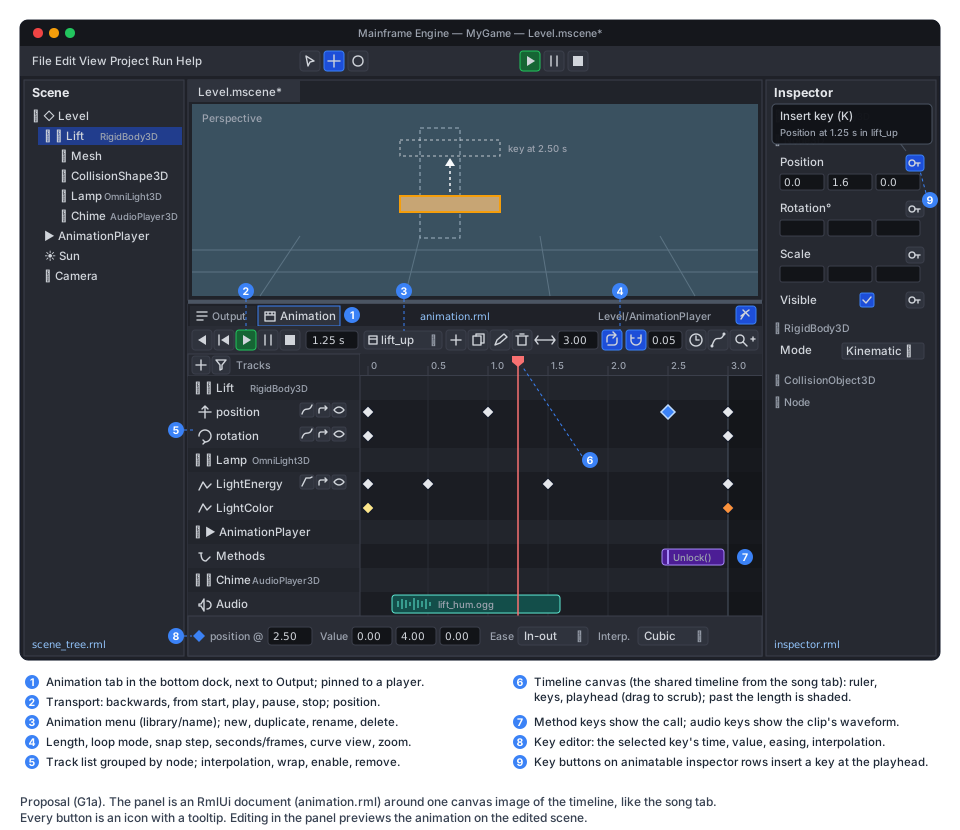
Section titled “Editor: the Animation panel”The panel sits in the bottom dock (the Output rectangle of EditorLayout, MainframeEngine.Editor/Src/Layout/EditorLayout.cs:101),
which gains a tab strip: Output | Animation. Selecting an AnimationPlayer opens the Animation tab; a pin icon
keeps the panel on that player while other nodes are selected for keying (Godot’s behaviour). The tab choice and pin
persist in editor_layout.json.
Layout (see the mockup): animation.rml (new) holds the chrome; the timeline is one canvas image, like the song tab.
- Transport (icon buttons with tooltips): play backwards, play from start, play, pause, stop; the playhead position
(seconds, or frames at
1/Step). - Animation menu: library/name dropdown, then new, duplicate, rename, delete. New animations go into the player’s default library (created inline when missing).
- Length, loop mode (one icon that cycles none / linear / ping-pong), snap (magnet + step), seconds/frames, curve view (bezier tracks and the selected value track as curves with handles), zoom.
- Track list (RmlUi, data-bound): tracks grouped by target node with the node’s type icon and colour family; per
track an icon for its kind, the property or bone name, and icon buttons for interpolation (nearest / linear / cubic),
loop wrap, enable and remove. A header
+adds a track (pick node, then property or kind); a filter shows only the selected nodes’ tracks. A warning icon marks tracks whose node or property is missing. - Timeline canvas: ruler (seconds with adaptive steps), grid, keys as diamonds (selected keys blue, colour keys show
their colour), method keys as labelled markers, audio keys as clips with waveforms, the playhead (drag on the ruler to
scrub), the area past
Lengthshaded. Mouse: click selects, Shift/Cmd add, drag moves (snapped; Alt duplicates), rubber-band selects, double-click on a lane inserts a key, wheel scrolls, Cmd/Ctrl+wheel zooms around the mouse. Keys: Delete, Cmd/Ctrl+D duplicate, Cmd/Ctrl+C/V copy/paste at the playhead, K insert keys for the selected node. - Key editor row: the selected key’s time, value (per component, coloured X/Y/Z), easing and interpolation. The inspector is not used for keys: editor types are not registered with the generator (Editor → structure), so a transient “key object” could not be inspected.
- Inspector key buttons. While the panel edits an animation, every inspector row whose value type is animatable gets a
keyicon button (tooltip “Insert key (K) — Position at 1.25 s in lift_up”). Clicking it inserts a key with the current value at the playhead, creating the track if needed:Position/RotationDegrees/Scaleof aNode3Dcreate transform tracks, other rows value tracks. In the 3D view, K keys the selectedNode3Ds’ transforms. - Preview. The edited scene is in
SceneTree.EditMode(Scene/SceneTree.cs:84), so the player does not process. The editor’s newAnimationEditor(a[Tool]node, likeViewportController) drives it: scrubbing callsSeek(t, update: true), play callsAdvance(delta)each frame. Before the first preview it captures the current values of every property the animation binds (boxedExportPropertyInfo.GetValue— editor-only, not per frame) and restores them when the panel closes, the pin moves to another player, the tab switches, or the scene is saved (save restores, writes, then re-applies the preview). Saved scenes always hold authored values, not a preview frame. Godot needs aRESETanimation for this; the capture makes it unnecessary. - Undo. Animation edits go into the scene tab’s
UndoRedo(Undo/UndoRedo.cs:9) as new actions:AddTrackAction/RemoveTrackAction,SetTrackKeysAction(old and new key arrays of one track; small, so whole arrays are kept),SetAnimationPropertyAction(length, loop, step),AddAnimationAction/RemoveAnimationAction,RenameAnimationAction. Key drags merge by key until release (EndMerge), like gizmo drags. Preview writes are not history entries. An animation in an external.mreslibrary is edited the same way and saved with the scene (open question 5). Imported libraries (G1b) are read-only until saved as.mres(Editor viewport tools, G7). - Icons to add to
MainframeEngine.Editor/Content/icons/icons.txt:keyframe,keyframes,player-skip-back,player-track-prev,repeat-off,vector-bezier,timeline,zoom-in,zoom-out,pin,books(theAnimationLibrarytype icon). Present already:key,movie,player-play,player-pause,player-stop,repeat,magnet,plus,trash,filter,bone.
Shared timeline component
Section titled “Shared timeline component”Built by G17b. Skeleton editor extracts this component for the Skeleton tab, with the names and split below; G1.5 then only builds the Animation panel on it.
The song tab’s timeline is the starting point. It is split as:
| Branch file | What is reusable | What is song-only |
|---|---|---|
Music/SongCanvases.cs | SongCanvas : Node2D [Tool] base: dp drawing helpers (Box, Outline, Line, Text at PixelScale), cached UI font, palette colours, ruler and grid drawing, playhead | bar/beat labels, clips, waveforms, piano roll |
Music/SongCanvasController.cs | Press/Drag/Release/CancelGesture with DragThreshold, Wheel scroll and zoom around the mouse, x ↔ time (ArrangeX/ArrangeTickAt), lane hit testing, merge-key history per gesture | clip/note gestures, audition |
Music/SongGrid.cs | Round/Floor/Ceiling snapping, position formatting into a span | musical snaps, note names |
Music/SongView.cs | [Tool] driver: sizes a canvas SubViewport to a panel rect (Place), publishes it as an engine:// texture (Publish), routes mouse input and double-clicks to the controller (OnInput) | renders, audio drops |
Music/SongTab.cs | scroll/zoom state (ArrangeScrollTick, ArrangePixelsPerTick, ArrangeScrollY) | the song document |
Extraction into MainframeEngine.Editor/Src/Timeline/ (new):
TimelineViewState— scroll position, pixels per unit, vertical scroll, zoom limits,X(time),TimeAt(x),ZoomAround(x, factor). Time isdouble(seconds for animation; songs pass ticks).ITimelineScale— ruler steps and labels for a zoom level:MusicalScale(bars/beats from a PPQ and time signature) andSecondsScale(0.1/0.5/1/5 s steps, or frames). Labels format into cached strings or spans, so drawing allocates nothing (the song canvas’s rule).TimelineCanvas : Node2D[Tool]— the dp drawing helpers,DrawRuler(scale),DrawGrid,DrawPlayhead,DrawRegion(loop band / past-length shading).TimelineGestures— the press/drag/release state machine with threshold, double-click and rubber band; the owner implementsITimelineGestureTarget(hit test, begin, update, commit, cancel).TimelineHost— the viewport sizing,engine://publishing and input routing fromSongView.TimelineSnap— the generic parts ofSongGridoverdouble.
Dependency. The song tab is on main; the extraction moves it onto the shared component in the same PR, with its
tests (Tests/MainframeEngine.Editor.Tests/Music/) kept green. Whichever of G17b and G1.5 starts first does it; only one
timeline exists afterwards.
G1b: skeletons and skinning
Section titled “G1b: skeletons and skinning”Nodes and resources (new, Godot 4 names):
[EditorIcon("bone", Family = EditorIconFamily.Space3D)]public class Skeleton3D : Node3D{    [Export] public string[] BoneNames { get; set; } = [];    [Export] public int[] BoneParents { get; set; } = [];           // -1 for roots; parents before children    [Export] public Transform3D[] BoneRests { get; set; } = [];    public int BoneCount { get; }    public int FindBone(string name);    public void SetBonePosePosition(int bone, Vector3 p);  public Vector3 GetBonePosePosition(int bone);    public void SetBonePoseRotation(int bone, Quaternion r); public Quaternion GetBonePoseRotation(int bone);    public void SetBonePoseScale(int bone, Vector3 s);     public Vector3 GetBonePoseScale(int bone);    public Transform3D GetBoneGlobalPose(int bone);    public void ResetBonePoses();}
[EditorIcon("bone")]public sealed class Skin : Resource{ [Export] public string[] BindNames { get; set; } = []; // bone per joint, matched by name when bound [Export] public Transform3D[] BindPoses { get; set; } = []; // inverse bind matrices}MeshSurfacegains[Export] int[] Joints(4 per vertex) and[Export] Vector4[] Weights(one per vertex, sum 1); both empty for static meshes.MeshInstance3D(Scene/Nodes3D/GeometryInstance3D.cs:67) gains[Export] NodePath Skeletonand[Export] Skin? Skin.- Bones are data, not nodes (Godot 4’s model): a 60-bone character is one node, and bone tracks address
Path = "Armature/Skeleton3D",Bone = "Hips". Pose arrays are allocated whenBoneNamesis set (load time). Global poses are recomputed once per frame when dirty, parents first. BoneAttachment3D(Godot’s) follows a bone’s global pose, for weapons and props (G1.11).
GPU skinning: a compute pre-pass. Each skinned MeshInstance3D gets, per FrameSlot, its own vertex buffer in the
MeshVertex layout, written by a compute shader from the bind-pose vertices, a joints/weights buffer and the instance’s
joint palette. After that the instance is an ordinary mesh: the existing mesh, shadow (Shadow2DInstanced,
ShadowPointInstanced), picking (MeshId) and outline pipelines draw it unchanged, because shadows read only location 0
with a 32-byte stride (MeshVertex.cs:7-10). One new shader replaces a skinned variant of every vertex shader, and the
G6 PBR shaders need no skinning code. This is also how Godot 4 skins.
- Frame order.
RenderServer.SkinMeshes(Root)(new) runs right afterRenderer.BeginFrame()and beforeOnShadowPass(Core/Engine.cs:513-522), with no render pass active: it writes the palettes (skeleton global pose × inverse bind, 3×4 floats per joint) into a host-visible ring keyed byIVulkanContext.FrameSlotand sizedMaxFramesInFlight(Rendering/Vulkan/IVulkanContext.cs:18,:51), dispatches one compute per skinned surface range, then one barrier (compute write → vertex attribute read). Skipped frames (FrameStartedfalse) skip it. - Buffers. The joints/weights buffer is uploaded with the mesh (
IVulkanContext.Uploads); output buffers come fromIVulkanContext.Allocatorand go toDeletionson free, like every other GPU object (GPU resources). Memory per instance: vertices × 32 B ×MaxFramesInFlight. - Batching. Skinned instances are not instanced together (each has its own vertex buffer); each is one draw per surface. Many identical skinned characters are a later optimisation.
- Limits. New entries in
MainframeEngine/Content/Shaders/limits.json:MAX_SKIN_JOINTS(256, joints per skin; importer andSkinvalidation reject more) andMAX_JOINT_INFLUENCES(4, Assimp’sLimitBoneWeightsdefault). - Bounds. Culling uses per-bone bind-space boxes (computed once from the vertices each joint moves), transformed by the current pose and merged: O(bones) per skinned instance, no allocation, tight enough for shadow-caster culling.
- Pipelines. The renderer has no compute pipelines yet (
PipelineCache.cs:74only mentionsvkCreateComputePipelines); G1.9 adds compute pipeline creation toIVulkanContext.Pipelines, unless G17a (2D skeletal animation) has already added it withRenderServer.SkinMeshes. MoltenVK supports compute. - Allocation. Palette writes and dispatches are per-frame code: no allocation (allocation gate), no validation warnings (validation gate).
Import (MainframeEngine/Src/Resources/Import/ModelImporter.cs, the Builder):
- Add
PostProcessSteps.LimitBoneWeightswhen any mesh has bones. - Bones are the nodes named by any mesh’s
MBones. Their lowest common ancestor’s parent becomes aSkeleton3D(named after the armature node); bone nodes become bones (name, parent, rest = node transform) and leave the node tree. Non-bone children of bones becomeBoneAttachment3Ds (G1.11; before that, a warning and they are kept under the skeleton). - Each skinned mesh’s weights become
Joints/Weights(top 4, normalised); its bones’ offset matrices become aSkin. TheMeshInstance3Dpoints at the skeleton. - Each
aiAnimationbecomes anAnimation: length = duration ÷ ticks per second (25 when the file says 0), onePosition3DTrack/Rotation3DTrack/Scale3DTrackper channel (bones byBone, other nodes by path), keys in seconds. Channels that never change are dropped; withoptimizeAnimations, keys that linear interpolation reproduces within a tolerance are removed. - The clips go into an inline
AnimationLibraryon a newAnimationPlayerchild namedAnimationPlayer(RootNode = ".."). Instances share it: the importer’s clone copies exported values and shares resources (ModelImporter.cs:244-268).
New .meta settings (ModelImportSettings, ModelImporter.cs:20-36, FromMeta/ToMetaSettings):
{ "importer": "model", "settings": { "scale": 1, "importAnimations": true, "optimizeAnimations": true, "clips": [ { "name": "Run", "loop": "Linear" }, { "name": "Jump", "loop": "None", "rename": "jump_start" } ] }}glTF has no loop flag, so clips sets loop modes and names. Clip entries need types in the AssetJsonContext
source-generated JSON context (AOT). Nothing is written to disk: imports stay in memory
(ADR 0011).
Root motion is designed in Animation authoring → G1e.
Testing
Section titled “Testing”- Unit (
Tests/MainframeEngine.Tests/Animation/, new): interpolation per mode and value type (float, vectors, quaternion slerp/cubic, both colour types, discrete bool/enum/int), transitions, bezier; loop none/linear/ping-pong and loop wrap; sub-component tracks (Position:y,Modulate:a); seek with and withoutupdate; method keys across loop boundaries, backwards and ping-pong, deferred vs immediate; queue andAnimationChanged; crossfade weights and capture;Idle/Physics/Manual; freed targets re-bind; game[SerializableValue]structs animate; unsupported types warn once..mresround trip throughResourceSaver/ResourceLoader, andMissingResourcefor unknown track types. - Generator (
Tests/MainframeEngine.Tests/Scene/GeneratorTests.cs):[AnimationMethod]invokers and diagnostics. - Allocation gate (
Tests/MainframeEngine.Tests/AllocationGate.cs): 1 000 nodes with position, rotation, a colour and a sub-component track, idle and physics, during a crossfade, with method keys firing: zero bytes per frame. - Benchmark:
AnimationEvaluate1kinTests/MainframeEngine.Benchmarks(+baseline.json). - Editor (
Tests/MainframeEngine.Editor.Tests/Animation/,…/Timeline/): timeline math (time ↔ x, zoom around the mouse, snapping, ruler steps), gestures (threshold, rubber band, Alt-duplicate), every undo action, inspector key button creates the right track kind, preview capture/restore, saving while previewing writes authored values. The song tab tests stay green after the extraction. - Import (G1b): extend the generated CC0 test model (
Tests/MainframeEngine.Tests/TestAssets/TestModel.cs) with a two-bone skinned box and a two-key clip; tests for skeleton shape, weights, skin, clip tracks,.metaclip settings. - Render tests (G1b): a
skinnedgolden (the test model posed at a fixed time, with a shadow, also picked through the ID pass) formoltenvkandlavapipe; the validation gate (compute barrier) and allocation gate scenes include a skinned mesh. - QA:
Tests/QA/animation-walkthrough.qa(new): select anAnimationPlayer, create an animation, keyPositionat 0 s and 1 s from the inspector, scrub, play, undo, save, reopen; a screenshot of the panel fordocs/images. - Demo: an
animation_3dscene inExamples/Demo(a lift as a kinematic body in physics mode, a door with a method key, a flickering lamp, a chime audio track); with G1b a CC0 skinned character with idle/walk clips and crossfades.
Acceptance
Section titled “Acceptance”- A lift, a door and a light flicker are authored in the editor’s Animation panel, saved in the scene (or a
.mres), and play in the game withPlay/Queue/crossfades; characters ride the lift. - Evaluating 1 000 animated nodes allocates nothing per frame and uses no reflection; the engine still has no
Reflection.Emit. - Every panel action is undoable; saving never writes previewed values; every button is an icon with a tooltip.
- After G1.5, the song tab and the Animation panel share one timeline component.
- (G1b) A skinned glTF character imports with its clips, plays and crossfades through
AnimationPlayer, casts correct shadows, can be picked, and passes the render, validation and allocation gates on MoltenVK and lavapipe. - Docs updated when this ships: a new current-state
docs/design/animation.md;editor.md(bottom dock tabs, Animation panel, inspector key buttons, undo actions);scene-serialization.md([AnimationMethod], diagnostics);asset-pipeline.md(bones, skins, clips,.metasettings; the “Not imported” list);materials-and-meshes.md(skinning, known issues);gpu-resources.mdandvulkan-renderer.md(compute pipelines, skinning pass);physics.md(animating kinematic bodies);demo.md; andCLAUDE.md(project structure, frame order).
Task list
Section titled “Task list”Order (with Animation authoring): G1.1–G1.4, then G1b (G1.8–G1.10), then G1c and G1e (G1.12–G1.20), then the panel (G1.5–G1.6), then G1d and G1f. Claude-made clips come before the panel.
G1a
- G1.1 Bindings.
IAnimationValueOps<T>,AnimationValueOps.Get<T>(),IFloatVectorCodec<T>onFloatArrayCodec,ExportPropertyInfo.Bind, sub-component parsing; unit tests. - G1.2 Animation resource. Track types, evaluation (nearest/linear/cubic, slerp, transitions, bezier, discrete),
loop modes, key cursor;
.mresround trip. - G1.3 AnimationLibrary + AnimationPlayer. Play/backwards/pause/stop/seek/queue/speed/autoplay, signals, process
modes,
Advance, crossfade, node warnings; allocation gate; benchmark. - G1.4 Method and audio tracks.
[AnimationMethod]model, emitter and diagnostics; argument parsing; audio keys. - G1.5 Shared timeline. Extract
Src/Timeline/from the song tab and move the song tab onto it, unless G17b already did (above). - G1.6 Animation panel. Bottom dock tabs,
animation.rml, track list, timeline canvas, transport, key editor, preview capture/restore, undo actions, inspector key buttons, K in the 3D view, new icons; editor tests; QA script. - G1.7 Demo and docs.
animation_3dDemo scene,animation.md,editor.md,physics.md. Optional: moveTween’sTweenPropertyPathonto the bindings (removes its reflection and per-step allocation).
G1b
- G1.8 Skeleton and skin.
Skeleton3D,Skin,MeshSurface.Joints/Weights,MeshInstance3D.Skeleton/Skin, bone tracks; unit tests. - G1.9 GPU skinning. Compute pipelines,
Content/Shaders/Skinning/Skin.vk.comp(+.spv,shaders.lock), palette ring perFrameSlot, per-instance output buffers,RenderServer.SkinMeshesin the frame, bone-box bounds,limits.json; render golden, validation and allocation gates. - G1.10 Import. Bones →
Skeleton3D, weights, skins, clips →AnimationLibrary+AnimationPlayer,.metasettings; test model;asset-pipeline.md,materials-and-meshes.md. - G1.11 Follow-ups.
BoneAttachment3D; Demo skinned character; “Save animations as .mres” with G7.
Open questions
Section titled “Open questions”- Compute pre-skinning or vertex-shader skinning? Compute (proposed) keeps one skinning shader for every pipeline but costs a vertex buffer per instance per frame in flight and a barrier; vertex-shader skinning costs no memory but needs a skinned variant of the mesh, shadow, point-shadow, ID and outline shaders (and of G6’s PBR shaders). On mobile TBDR GPUs compute writes are extra bandwidth. M11’s backend API must expose compute either way (WebGPU has it).
- Assimp or a glTF reader for animation? Assimp is already the importer, but its FBX importer inserts
$AssimpFbx$pivot nodes unless itsPRESERVE_PIVOTSoption is off (the importer passes no options today), and morph targets and sparse accessors are uneven. A managed glTF reader would be exact for glTF. Candidate if needed: SharpGLTF (MIT, actively maintained). New dependency: discuss first. Root motion.Resolved: G1e in Animation authoring (RootMotionTrack/RootMotionBoneon the player,CharacterBody3D.ApplyRootMotion).- Large clips in JSON. Imported clips are never written, but a clip saved as
.mres(G7) can be megabytes of JSON. A binary sidecar would revisit ADR 0011. - Editing external libraries. Saving a scene could also save the dirty external
.mresanimations it edited (Godot), or the panel could use the.mresfile’s own history (EditedResource, Editor → resource files). The first is simpler for users; it needs dirty tracking for external resources the editor does not have yet. - Built-in replication of
AnimationPlayerstate (current animation and position on spawn), instead of the game-side pattern above. - Auto-key (record) mode: gizmo drags and inspector edits insert keys while recording. Godot 4 has no such mode; Blender users expect it.
- Generalise
[AnimationMethod]into an attribute other systems use (UI bindings, editor buttons). - Discrete string/resource tracks (swap a texture or mesh on a key). Method keys and G2’s sprite frames may be enough.
- Morph targets (blend shapes) for faces: a later item with its own GPU path.
Related
Section titled “Related”Scene serialization · Asset pipeline · Materials & meshes · GPU resources · Physics · Networking · Editor · Music editor · 2D content · Rendering features · Editor viewport tools · Mobile · Animation authoring