
Proposal: 2D skeletal animation (Skeleton2D)
Milestone: Gameplay toolkit (G17a–G17g) · Status: ⬜ planned ·
Depends on: Canvas, Scene serialization,
Asset pipeline, Editor · Related:
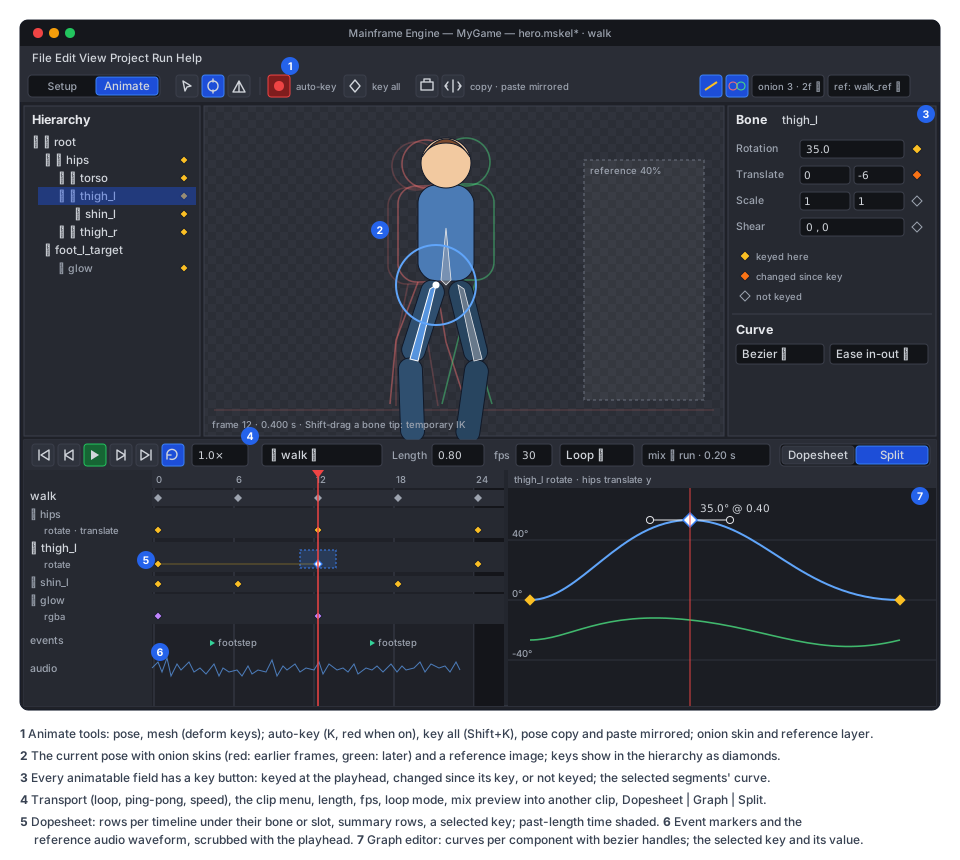
Skeleton editor (the Skeleton tab: Setup and Animate modes),
Animation graph (the state machine shared with 3D), Keyframe animation
(G1a AnimationPlayer, G1b compute skinning and Skeleton3D), Animation authoring (mfe),
Spine (the vendored runtime, which stays), 2D content (G2 sprite frames) ·
ADR: 0184
Problem
Section titled “Problem”Today the engine’s only skeletal animation is Spine (Spine). The vendored spine-csharp 4.3 runtime
(Plugins/Spine) is drawn by SpineNode (3D, lit, MainframeEngine/Src/Nodes/SpineNode.cs:14) and SpineSprite
(2D canvas, MainframeEngine/Src/Nodes/SpineSprite.cs:122). That has four costs:
- Licence. The runtime is under the Spine Runtimes License: every game that ships it needs its own Spine Editor
licence, and so does every artist who authors for it (
README.md:563-567,THIRD_PARTY_NOTICES.md). An engine that wants indie users cannot make that the default 2D animation path. - Workflow. Artists animate in an external tool, export JSON and an atlas, and only see the result in the engine after the round trip. They never animate against the real scene, lighting or gameplay.
- Integration. The engine cannot reach inside the runtime:
- Spine has no bounds, so it is drawn into every shadow pass (
Servers/RenderServer.cs:344). - It is not in the depth prepass, object-ID picking or motion vectors.
- Its shadows are whole quads, because there is no alpha test (Spine → Known issues).
- Per-slot blend modes and two-colour tint are ignored.
- In 2D, the canvas takes the blend mode from the item’s material (
Rendering/Canvas/CanvasFrame.cs:179), soSpineSpritewarns and draws normal (SpineSprite.cs:186-193).
- Spine has no bounds, so it is drawn into every shadow pass (
- Control. The runtime must not be modified (
docs/design/architecture-overview.md:27). It allocates in places the engine’s allocation gate would reject, skins on the CPU, and changes its API between minor versions (ADR 0116).
The engine has no replacement pieces either:
- no keyframe animation (G1a is planned, not built: Keyframe animation);
- no 2D bones or deformable 2D meshes, and no atlas packer;
- no PSD reader;
- no compute pipelines (
Rendering/Vulkan/PipelineCache.csonly mentionsvkCreateComputePipelines).
- An engine-owned 2D skeletal system, heavily inspired by Spine, under the engine’s MIT licence:
- bones;
- slots;
- region, mesh, bounding-box, clipping, point and path attachments;
- weighted meshes and deform keys;
- image sequences;
- skins (with runtime composition);
- draw-order keys;
- slot colour and two-colour tint;
- blend modes (normal, additive, multiply, screen);
- normal maps lit by 2D and 3D lights;
- IK, transform, path and physics constraints;
- events carrying int, float and string payloads and audio.
- Playback like Spine’s
AnimationState: layered tracks, crossfade mix durations, queueing, per-track alpha, additive tracks. On top of that, a state machine (Animation graph) with parameters, transitions, 1D/2D blend spaces and masked layers. The graph is designed so that 3D skeletons can use the same asset later. - Two nodes, one runtime:
Skeleton2Don the canvas.SkeletonSprite3Din 3D worlds: lit, shadow casting (alpha-tested), in the prepass, pickable, motion vectors.
- Authoring in the editor (Skeleton editor):
- a Skeleton tab with Spine’s Setup and Animate modes;
- PSD or PNG folder import, with atlases packed automatically;
- mesh and weight tools;
- a dopesheet and a graph editor;
- onion skinning, auto-key and IK posing.
- Assets:
- a diff- and merge-friendly JSON source:
.mskelfor the rig and skins, one.manimper clip; - a compact binary build plus packed atlas pages, built automatically and cached;
- export ships only the build.
- a diff- and merge-friendly JSON source:
- Performance. About 200 mid-complexity skeletons (40 bones, 30 slots, 800 skinned vertices each) at 60 fps on a
mid-range laptop:
- zero per-frame allocation;
- structure-of-arrays pose evaluation;
- GPU skinning;
- batching by atlas page;
- culling by pose bounds;
- off-screen skeletons that only advance time.
- Gameplay integration:
BoneAttachment2D/3D;- bone overrides from code;
- bounding-box attachments as
Area2D/Area3Dshapes; - replication of animation state over the network;
- keys for G1a’s
AnimationPlayer.
- A one-way Spine 4.x JSON importer, so existing rigs, and spineboy for tests, move over.
- Agent tooling:
mfe skel describe/check/renderand a Claude Code skill, so Claude can inspect, check and render rigs and clips and make small clips from text.
Non-goals
Section titled “Non-goals”- Removing Spine.
SpineNode,SpineSpriteand the vendored runtime stay for teams that own Spine licences. The two systems share nothing at run time. - Exporting to Spine’s format, or round-tripping with the Spine Editor.
- Bit-exact parity with Spine’s mixing and constraint maths. The behaviour follows Spine’s documented semantics; imported rigs look the same to the eye, not to the last bit (see Clean-room rule).
- Godot’s
Bone2Dnode model. Bones are data inside a skeleton, as in Spine and Godot 4’sSkeleton3D. A Godot scene that usesSkeleton2D+Bone2Dnodes does not import as such (see open question 5). - Free-form deformation outside a mesh, such as lattices, bones that bend images without a mesh, or Spine’s
“bone scaling inherits” variants beyond the documented
inheritmodes. - Crowds of thousands. That needs baked, instanced playback, which is a later optimisation.
- Stencil clipping. Clipping attachments clip on the CPU in v1 (see Canvas).
- Aseprite or Krita import. PSD and PNG only. Both tools export PSD.
Overview
Section titled “Overview”flowchart LR
subgraph Source["Project files (JSON, git)"]
PSD[".psd / .png images"]
SK[".mskel<br/>bones · slots · skins · constraints"]
AN[".manim × N<br/>one clip each"]
AG[".mres AnimationGraph"]
end
PSD --> IMP
SK --> IMP["SkeletonImporter<br/>atlas pack · meshes · build"]
AN --> IMP
IMP -->|"SHA-256 keyed"| CACHE["skeleton-bakes cache<br/>(binary + PNG pages)"]
CACHE --> DATA["SkeletonData<br/>(runtime arrays)"]
DATA --> N2["Skeleton2D (canvas)"]
DATA --> N3["SkeletonSprite3D (3D)"]
AG --> GP["AnimationGraphPlayer"]
GP -->|"ClipSample[]"| PB["IPoseBackend<br/>(Skeleton2DPoseBackend)"]
TR["AnimationTracks<br/>(code tracks)"] -->|"ClipSample[]"| PB
PB --> POSE["SkeletonPose (SoA)<br/>constraints · deform"]
POSE --> SKIN["RenderServer.SkinMeshes<br/>(compute)"]
SKIN --> CV["Canvas: GpuSkinned commands"]
SKIN --> MR["MeshRenderer: shadows · prepass · ID · main"]
The code goes in these places:
- Shared animation playback, used by 2D now and by G1a/G1b 3D later:
MainframeEngine/Src/Animation/. - The skeleton system:
MainframeEngine/Src/Skeleton2D/. - Compute skinning:
MainframeEngine/Src/Rendering/Skinning/. This is also G1b’s skinning step. - The PSD reader:
MainframeEngine/Src/Imaging/Psd/. - Editor code:
MainframeEngine.Editor/Src/Skeleton/and the sharedMainframeEngine.Editor/Src/Timeline/(see Skeleton editor).
MainframeEngine/Src/Animation/ Core/ ClipSample, LayerInfo, ClipBlend, IPoseBackend, AnimationCurve (bezier sampling) Tracks/ AnimationTracks, TrackEntry (Spine-style tracks, mixing, queueing) Graph/ AnimationGraph (+ states, transitions, blend spaces, layers, masks), AnimationGraphPlayerMainframeEngine/Src/Skeleton2D/ Data/ SkeletonData, SkeletonClip, SkinData, SkeletonBuild (runtime arrays), SkeletonFormat (JSON reader/writer) Runtime/ SkeletonPose, ClipSampler, SkinComposer, Deform, Constraints/{Ik,Transform,Path,Physics} Import/ SkeletonImporter, AtlasPacker (MaxRects), AutoMesh, Triangulator, SpineJsonImporter, SkeletonBakeCache Nodes/ Skeleton2D, SkeletonSprite3D, BoneAttachment2D, BoneAttachment3D, SkeletonAnimationSynchronizerMainframeEngine/Src/Rendering/Skinning/ SkinningPass, SkinJob, skinning shadersMainframeEngine/Src/Imaging/Psd/ PsdReaderClean-room rule
Section titled “Clean-room rule”The Spine Runtimes License covers derivative works of spine-csharp (Plugins/Spine/spine-csharp/LICENSE). The engine
code in this proposal must not be ported from it, and must not be written by reading it side by side. That includes:
AnimationState;- the constraint solvers;
SkeletonJson;Triangulator;SkeletonClipping.
The rules:
- Sources. Spine’s public user guide (concepts and behaviour), the published JSON format reference (the importer), and general literature: FABRIK, two-bone IK, Verlet and spring integrators, constrained Delaunay, marching squares.
- Reviews. A PR in G17 that touches the runtime states in its description that it was written without reference to spine-csharp. Reviews reject code whose structure mirrors it.
- Tests compare pictures, not code paths. The Spine importer’s acceptance test renders spineboy with both systems and compares the frames with a tolerance (see Testing).
- Names stay neutral. Spine’s vocabulary (bone, slot, skin, attachment, constraint, mix) describes ideas, which are free to use. Class layouts and method sets are ours.
Coordinates and units
Section titled “Coordinates and units”- Y-down, pixels, as everywhere in 2D (ADR 0110). A bone’s local
transform is
x, y, rotation (degrees, clockwise on screen), scaleX, scaleY, shearX, shearY. A world transform is aTransform2D, so it maps 1:1 ontoNode2D,BoneAttachment2Dand bone overrides.SpineSprite’s mirror-around-the-draw dance (SpineSprite.cs:237-244) is not needed. - The Spine importer flips once at import: y, rotation and shear signs, and the vertical order of mesh UVs.
SkeletonSprite3Dmaps pixels to metres withPixelSize(default 0.01, likeSprite3D) and applies one Y mirror in its model matrix.MeshRendereralready handles mirrored determinants.- Time is in seconds. The editor snaps to
fps(default 30), which is stored per clip.
Data model
Section titled “Data model”Skeleton (.mskel)
Section titled “Skeleton (.mskel)”A .mskel file is self-describing JSON with an embedded UID (prefix skl_), like .mres and .msong
(Resources/AssetDatabase.cs:270-272). It holds the rig: bones, slots, skins with their attachments, constraints,
event definitions, the image list and import settings. It holds no clips. It is written by a dedicated
SkeletonFormat (like SongFormat), not the generic resource saver:
- the data is mostly flat arrays;
- the order of keys is fixed for diffs;
- the generator skips generic types.
{ "format": 1, "uid": "skl_7d1c40e2a9b3", "type": "Skeleton", "fps": 30, "import": { "images": "Images/", "pageSize": 2048, "padding": 2, "scale": 1, "filter": "Linear", "mipmaps": false, "normalSuffix": "_n" }, "bones": [ { "name": "root" }, { "name": "hips", "parent": "root", "y": -96, "length": 24 }, { "name": "torso", "parent": "hips", "rot": -90, "length": 64, "color": "#ffcc00" }, { "name": "thigh_l", "parent": "hips", "rot": 95, "length": 42 }, { "name": "shin_l", "parent": "thigh_l", "x": 42, "length": 40 }, { "name": "foot_l_target", "parent": "root", "x": 8, "y": -2 } ], "slots": [ { "name": "leg_l", "bone": "thigh_l", "attachment": "leg_l" }, { "name": "body", "bone": "torso", "attachment": "body", "blend": "Normal" }, { "name": "glow", "bone": "torso", "attachment": "glow", "blend": "Additive", "color": "#ffffffaa" } ], "ik": [ { "name": "leg_l_ik", "bones": ["thigh_l", "shin_l"], "target": "foot_l_target", "bend": 1, "mix": 1 } ], "transform": [], "path": [], "physics": [ { "name": "hair", "bone": "hair_1", "inertia": 0.5, "strength": 100, "damping": 0.85, "mass": 1, "gravity": 0, "wind": 0, "mix": 1, "rotate": 1 } ], "events": [ { "name": "footstep", "audio": "Content/Audio/step.ogg", "volume": 0.8 } ], "skins": [ { "name": "default", "attachments": [ { "slot": "body", "name": "body", "type": "Mesh", "image": "body", "uvs": [0, 0, 1, 0, 1, 1, 0, 1, 0.5, 0.5], "triangles": [0, 1, 4, 1, 2, 4, 2, 3, 4, 3, 0, 4], "hull": 4, "edges": [0, 1, 1, 2, 2, 3, 3, 0], "weights": { "bones": ["hips", "torso"], "v": [[0, 1.0, -40, 32], [0, 1.0, 40, 32], [1, 1.0, 40, -60], [1, 1.0, -40, -60], [0, 0.5, 0, -10, 1, 0.5, 0, 50]] } }, { "slot": "leg_l", "name": "leg_l", "type": "Region", "image": "leg_l", "x": 20, "rot": 90 }, { "slot": "hitbox", "name": "hitbox", "type": "BoundingBox", "vertices": [-30, -90, 30, -90, 30, 0, -30, 0] } ] }, { "name": "armor", "attachments": [ { "slot": "body", "name": "body", "type": "LinkedMesh", "parent": "body", "skin": "default", "image": "body_armor" } ] } ]}Each part:
-
Bones are ordered so that parents come before children, by name. They carry:
- the setup pose:
x, y, rot, sx, sy, shx, shy; length;inherit:Normal,OnlyTranslation,NoRotationOrReflection,NoScaleorNoScaleOrReflection, as in Spine’s guide;- an editor
color; skinRequired, for bones that only exist when a skin adds them.
- the setup pose:
-
Slots come in setup draw order. They carry a bone, a setup attachment, a
color, an optionaldarkcolour (two-colour tint) and ablend(Normal,Additive,MultiplyorScreen). -
Attachments belong to a skin, keyed by (slot, name). There are these types:
Type Data Regionimage, offset, rotation, scale, size, colour Meshimage, UVs, triangles, hull count, edges (editor only), and either unweighted vertices or weights LinkedMeshshares a parent mesh’s geometry and weights with another image; deform: truealso shares its deform keysBoundingBoxpolygon, optionally weighted Clippingpolygon plus an end slot Pointposition plus rotation (spawn points) Pathbezier control points, closed flag, constant-speed flag, lengths Weights are written per vertex as
[bone, weight, x, y] × influences, in bone space. That is the layout the skinning shader reads (see Compute skinning), capped atMAX_SKELETON_INFLUENCES(8) by the importer. -
Sequences. A
RegionorMeshwith"sequence": { "count": 8, "start": 1, "digits": 2, "setup": 0 }takes imagesname01…name08. Sequence timelines pick the frame. -
Constraints run in an
orderthat the editor maintains (Spine’s model), mixed in with the bone updates. Each hasskinRequired. -
Images are found by name under
import.images, relative to the.mskel’s folder, as.pngfiles. A PSD import writes those PNGs and remembers its source (see PSD import).<name>_n.pngnext to an image is its normal map. -
Units. Pixels in image space at
import.scale1. Changingscalerescales the setup pose at build time, which is used when the art was drawn at 2× and ships at 1×.
Clips (.manim)
Section titled “Clips (.manim)”Each clip is its own self-describing file (UID prefix anm_) that references its skeleton by UID. This means:
- two artists can animate two clips without merge conflicts;
- clips load on demand (
SkeletonData.LoadClip); - a game can ship a character’s combat clips in a separate pack later.
A skeleton finds its clips in two ways: the clips folder named in the .mskel (default <name>.clips/ next to it),
plus any .manim registered in the AssetDatabase whose skeleton UID matches. A clip has no name field: its name
is its file name without the extension.
{ "format": 1, "uid": "anm_1f07c3a9e5d2", "type": "SkeletonClip", "skeleton": { "uid": "skl_7d1c40e2a9b3", "path": "Content/Characters/Hero/hero.mskel" }, "length": 0.8, "fps": 30, "loop": "Linear", "bones": { "thigh_l": { "rotate": { "t": [0, 0.4, 0.8], "v": [0, 35, 0], "curve": [[0.25, 0, 0.75, 1], [0.25, 0, 0.75, 1]] }, "translate": { "t": [0, 0.4], "v": [[0, 0], [0, -6]], "curve": ["linear"] } } }, "slots": { "glow": { "rgba": { "t": [0, 0.4], "v": ["#ffffffff", "#ffffff00"] } }, "body": { "attachment": { "t": [0.6], "v": ["body_hurt"] } } }, "ik": { "leg_l_ik": { "t": [0, 0.3], "mix": [1, 0], "bend": [1, -1] } }, "physics": { "hair": { "reset": { "t": [0] } } }, "deform": { "default": { "body": { "body": { "t": [0, 0.4], "offset": [0, 4], "v": [[0, 0, 1, -2], [3, 1]] } } } }, "drawOrder": { "t": [0.5], "v": [[ ["glow", -1] ]] }, "events": { "t": [0.2, 0.6], "v": [ { "name": "footstep" }, { "name": "footstep", "float": 0.5 } ] }}The layout rules:
-
One object per timeline, with parallel arrays. Times go in
t[], values inv[](a scalar, or an array when the value has several components) and interpolation incurve[], one entry per segment. That is Keyframe animation’s flat-array rule. A changed key changes one or two lines in a diff. Agents can read and write it. -
Curves. A segment is
"linear","stepped", or a cubic bezier[cx1, cy1, cx2, cy2]in normalised segment space, with x the time fraction and y the value fraction, as in Spine. A multi-component value has either one shared curve or one per component ([[...], [...]]). -
Deform keys are sparse: an
offset(the first float index) and the changed floats, relative to the setup or weighted local positions.drawOrderkeys are slot moves relative to the setup order (["glow", -1]). -
Timeline kinds:
Group Timelines Bones rotate,translate,translateX,translateY,scale,scaleX,scaleY,shear,shearX,shearY,inheritSlots attachment,rgba,rgb,alpha,rgba2(two-colour),sequence(mode, index, delay)Constraints ik(mix, softness, bend, compress, stretch);transform(mixRotate/X/Y/Scale/Shear);path(position, spacing, mixes);physics(inertia, strength, damping, mass, wind, gravity, mix,reset)Other deform,drawOrder,events
The runtime build
Section titled “The runtime build”SkeletonImporter turns the .mskel, its clips and its images into a SkeletonBuild, which is what the runtime uses:
- Arrays. Typed arrays sized from the data, with names resolved to indices: bone and slot arrays, the update order
as
(kind, index)pairs, skins as(slot, name) → attachmenttables, the influence buffer for skinning, and attachment index ranges. - Atlas pages. One RGBA8 page set with straight alpha in sRGB, premultiplied by the shader (see Canvas), plus a normal page set in the same layout when any image has a normal map.
- Clips. One blob per clip:
Kinds[],Targets[],KeyStart[],Times[],Values[], andCurveSamples[]with every bezier pre-sampled into 10 linear pieces. That is the same approach Spine documents: evaluation does a lookup, never a solve. - Bounds. Per clip, a conservative local box sampled at the clip’s keys and midpoints. Off-screen skeletons are culled with it (see Performance).
Caching. Building a build packs atlases, triangulates meshes and samples curves, which can take hundreds of
milliseconds for a big rig. Builds are cached on disk the way tree bakes are (Trees/Baking/TreeBakeCache.cs,
ADR 0172):
- Where:
skeleton-bakes/under the pipeline cache root (Rendering/Vulkan/PipelineCache.cs:348, for example~/Library/Caches/MainframeEngine/skeleton-bakeson macOS).MAINFRAME_SKELETON_BAKE_CACHE_DIRoverrides it;offdisables it. - Key: the SHA-256 of the
.mskel, every image’s bytes, the import settings andSkeletonBakeCache.Version. Clips are cached separately, keyed by their own file and the skeleton’s key. - Content: zlib-compressed. A missing, short or corrupt entry is a miss; write failures only log.
- What it changes: the source in the project stays JSON and PNG, as ADR 0011 requires. The cache lives outside the project and can be deleted.
- Exports:
mf-cook(ADR 0100, Game export) ships the build files instead of the JSON and images. An exported game loads the cooked build directly.
SkeletonData : Resource is what ResourceLoader.Load<SkeletonData>("…/hero.mskel") returns. It wraps the build:
[EditorIcon("bone")]public sealed class SkeletonData : Resource{ public int BoneCount { get; } public int SlotCount { get; } public IReadOnlyList<string> BoneNames { get; } public IReadOnlyList<string> SlotNames { get; } public IReadOnlyList<string> SkinNames { get; } public IReadOnlyList<string> ClipNames { get; } // every clip found (loaded or not) public int FindBone(string name); // -1 when missing public int FindSlot(string name); public int FindClip(string name); public SkeletonClip LoadClip(int clip); // loads and caches; Skeleton2D preloads its graph's clips public float ClipLength(int clip); internal SkeletonBuild Build { get; } internal int Version { get; } // bumped when the editor or a reload replaces the build}ResourceLoader.ReadFile (Resources/ResourceLoader.cs:288) today sends only files that are not self-describing to an
importer. It is changed to: a self-describing file whose extension has a registered importer goes to that importer,
with the UID read by ReadEmbeddedUid. .mscene and .mres keep their direct path. The skl_ and anm_ prefixes
join AssetUid.PrefixForExtension.
Runtime
Section titled “Runtime”Each skeleton instance owns one SkeletonPose. It is allocated when the node loads its data and never grows:
internal sealed class SkeletonPose{ // bones, structure of arrays (index = bone) public readonly float[] X, Y, Rot, ScaleX, ScaleY, ShearX, ShearY; // local pose (animated) public readonly float[] A, B, C, D, WorldX, WorldY; // world 2×3, skeleton space, Y-down public readonly byte[] Inherit; public readonly bool[] Active; // skinRequired bones of the current skin // slots public readonly uint[] Color, Dark; // RGBA8, straight public readonly short[] Attachment; // into the composed skin, -1 none public readonly short[] SequenceIndex; public readonly ushort[] DrawOrder; // constraints (animated mixes) and physics state public readonly float[] IkMix, IkSoftness; public readonly sbyte[] IkBend; /* … */ public readonly PhysicsState[] Physics; // deform: per slot, a range into one float pool (only for slots with a deformed mesh) public readonly float[] DeformPool; public readonly int[] DeformStart;}The cost is about 100 B per bone and 24 B per slot. Hot loops walk these arrays in update order with no virtual calls or per-bone objects.
Applying clips
Section titled “Applying clips”AnimationTracks (playback, below) and the graph player (Animation graph) produce a span of ClipSamples each frame. Each one holds a
clip index, time, previous time, weight, layer, blend mode (Replace or Additive) and an optional bone mask.
Skeleton2DPoseBackend.Apply (the IPoseBackend from Animation graph) then:
- Resets the local pose to the setup pose: bones, slot colours, attachments, draw order, constraint mixes.
- Samples each clip with
ClipSampler. Each timeline keeps a cursor, so the key search is amortised O(1) during forward playback, with a binary search after a seek. The sampler blends into the pose:- Replace samples lerp from the current value by
weight. Rotation takes the shortest path; Spine’s “first mix holds the angle” behaviour is replaced by a documented rule (see Mixing). - Additive samples add
(value − setup) × weight. - Discrete timelines (attachment, draw order, sequence mode, inherit, IK bend) take the value of the highest-weight sample above 0.5 on each layer. A layer whose weight is below its threshold leaves them alone.
- Bone masks zero the weight for bones and slots outside the mask.
- Replace samples lerp from the current value by
- Collects events whose time lies in
(prevTime, time]per sample, including loop wraps. Each sample’s weight must be at least the track’sEventThreshold(default 0.5 for mixing-out tracks, as in Spine). - Applies bone overrides from code (below).
Update order and constraints
Section titled “Update order and constraints”SkeletonBuild.UpdateOrder interleaves bones and constraints. A bone’s world transform is computed just before the
first constraint that reads it, and again after constraints that change it:
-
Bones. Parent world × local, honouring
inheritand reflection. When a bone and every ancestor are unchanged from the last frame, the bone’s world transform is copied instead of recomputed: that skips idle sub-trees such as hair in a still pose. -
IK, one bone. Rotate towards the target, with
mix. -
IK, two bones. Analytic law-of-cosines solve with:
benddirection (±1);softness(pixels of softening near full extension);compress,stretchanduniform;mix.
Parent scale and shear are handled as Spine’s guide describes: non-uniform parent scale is supported, while shear on the IK chain gives an approximate solve with a warning in the editor.
-
Transform constraints. Copy or offset rotation, translation, scale and shear from a target bone in world or local space, absolute or relative, with per-channel mixes.
-
Path constraints. Bones are placed along a
Pathattachment’s world-space bezier with:- position mode (fixed or percent);
- spacing (length, fixed, percent or proportional);
- rotate mode (tangent, chain or chain-scale);
mixRotate,mixXandmixY.
Arc lengths are computed once per frame per path into a scratch array owned by the constraint, with
PathCurveSegments(default 10) samples per curve. -
Physics constraints. Secondary motion for hair, cloth and tails:
- Model: a damped spring per constrained bone on translation, rotation, scale and shear. Each channel is enabled separately and has inertia, strength, damping, mass, gravity and wind.
- Integration: semi-implicit Euler at a fixed step (
PhysicsStep, default 1/60 s), consuming the frame’s delta. The steps are capped at 4 per frame, after which the remaining time is dropped. - Movement: the skeleton node’s world movement feeds inertia (teleports above
PhysicsTeleportDistancereset the state). - Reset:
resetkeys andSkeleton2D.ResetPhysics()restore the setup state. - Mixing: global and per-constraint
mix.
The skeleton-wide gravity and wind are exported on the node and come from the
World2Ddefaults.PhysicsModeisUpdate(default),Pose(solve without stepping, used by the editor while scrubbing) orNone.
Constraints never allocate. Each keeps fixed scratch arrays sized at load.
-
A
SkinComposerbuilds the active skin: one or more skins merged in order, with later entries winning per (slot, name). That is runtime composition:skeleton.SetSkins("base", "hair/long", "armor/plate");The composed table is cached per unique list in the
SkeletonData, so 100 orcs with the same outfit share one table. Building a new combination allocates once, at the time of the call, not per frame. -
Bones and constraints marked
skinRequiredare active only when an active skin lists them. -
Changing skins re-resolves slot attachments that match by name, as in Spine. Slots whose attachment doesn’t exist in the new skin go back to the setup attachment if it exists there, otherwise they go empty.
Slots, deform and sequences
Section titled “Slots, deform and sequences”- Two-colour tint. Slot colour × attachment colour × node modulate is the light colour;
darkis the dark colour. The shader appliesrgb = (1 − tex.rgb) × dark × tex.a + tex.rgb × lightwith premultiplied texels. - Deform keys add per-vertex offsets in each vertex’s own space (bone space for weighted vertices). They are
sampled into
DeformPool, and the skinning job reads them (see Compute skinning). - Sequences pick a frame from
SequenceIndex, set by sequence timelines with these modes: hold, once, loop, ping-pong, the reverse of each, and a per-key delay. Each frame is its own atlas region, and all of an attachment’s frames share one mesh.
Events and audio
Section titled “Events and audio”Events are defined in the .mskel (name, default int/float/string, optional audio stream, volume and balance) and keyed
in clips. After each frame’s evaluation, Skeleton2D raises:
[Signal] public event Action<Skeleton2D, SkeletonEvent>? AnimationEvent; // SkeletonEvent: readonly struct (name id, int, float, string?, track)- An event with an audio stream plays through the node’s
AudioPlayer2D(orAudioPlayer3DforSkeletonSprite3D). The engine creates that player as an internal child on first use, routed toEventAudioBus(an exported string, default"SFX"). - Events fire on the main thread after the skeleton updates, never mid-evaluation.
- Allocation: nothing per event.
SkeletonEventis a struct, and its string values are interned at load.
Tracks and mixing
Section titled “Tracks and mixing”AnimationTracks is Spine’s AnimationState idea, written to the engine’s rules. It is shared with 3D (see
Animation graph → Tracks):
public sealed class AnimationTracks{    public TrackEntry SetClip(int track, int clip, bool loop);              // replace (mixes from current)    public TrackEntry AddClip(int track, int clip, bool loop, float delay); // queue after current (delay ≤ 0: relative to end)    public TrackEntry SetEmpty(int track, float mixDuration);               // mix out to setup pose    public TrackEntry AddEmpty(int track, float mixDuration, float delay);    public void ClearTrack(int track);    public float DefaultMix { get; set; }    public void SetMix(int from, int to, float duration);                  // pair table; built once, no per-frame allocation    public float TimeScale { get; set; }}
public sealed class TrackEntry // pooled; valid until it ends (Ended signal){ public int Clip { get; } public bool Loop { get; set; } public float TrackTime { get; set; } public float TimeScale { get; set; } public float Alpha { get; set; } public float MixDuration { get; set; } public float MixTime { get; } public ClipBlend Blend { get; set; } // Replace | Additive public float EventThreshold { get; set; } public float AlphaAttachmentThreshold { get; set; } public float MixAttachmentThreshold { get; set; } public float MixDrawOrderThreshold { get; set; } public bool HoldPrevious { get; set; } public bool Reverse { get; set; } public float AnimationStart { get; set; } public float AnimationEnd { get; set; } public BoneMask? Mask { get; set; }}- Mixing. A track that switches clips keeps the previous entry as a mixing-from entry. Its weight goes
1 − mixTime/mixDurationwhile the new one goes up. The chain is capped atMaxMixChain(4): when a fifth switch happens mid-mix, the oldest entry is dropped and its weight folded into the next. - The rotation rule. Each mixing pair interpolates rotation along the shortest arc, computed from the two clips’ sampled angles, not from the previous frame’s pose. The direction is latched when the mix starts, so a 179°/−179° pair never flips mid-mix. Spine’s guide describes an equivalent behaviour; ours is defined by this rule.
HoldPreviouskeeps the outgoing entry at full weight during the mix, for poses that should not dip.- Layers. Track 0 is the base. Higher tracks layer over it with
Alpha,BlendandMask. An empty track withSetEmpty(track, 0.2)fades a layer out. - Signals:
TrackStarted,TrackInterrupted,TrackEnded,TrackCompleted(each loop) andTrackDisposed, with(Skeleton2D, TrackEntry)arguments. - Pooling.
TrackEntryobjects come from a per-node pool with a fixed initial size (8). The pool grows only when a game queues more than that, and growing is a load-time cost. A disposed entry must not be kept, as in Spine.TrackEntry.Generationlets code check for a stale reference.
Animation graph is the second producer of samples. Without a graph, the tracks are the whole animation. With a graph, code tracks layer above the graph’s layers, for one-off emotes and hit reactions (Animation graph → Tracks).
Skeleton2D
Section titled “Skeleton2D”[EditorIcon("bone", Family = EditorIconFamily.Canvas)]public class Skeleton2D : Node2D{ [Export] public SkeletonData? Data { get; set; } [Export] public AnimationGraph? Graph { get; set; } // optional [Export] public string[] Skins { get; set; } = ["default"]; // composed in order [Export] public string Clip { get; set; } = ""; // without a graph: track 0 plays this, looping [Export] public SkeletonUpdateMode UpdateMode { get; set; } // Process | Physics | Manual [Export] public OffscreenUpdate Offscreen { get; set; } // Full | TimeOnly (default) | Pause [Export(Range = "0,4,0.01")] public float TimeScale { get; set; } = 1f; [Export] public SkeletonPhysicsMode PhysicsMode { get; set; } [Export] public Vector2 PhysicsGravity { get; set; } // added to the world's [Export] public Vector2 PhysicsWind { get; set; } [Export] public bool FlipH { get; set; } // mirrors the skeleton (not the node) [Export] public bool FlipV { get; set; } [Export] public string EventAudioBus { get; set; } = "SFX";
public AnimationTracks Tracks { get; } public AnimationGraphPlayer? GraphPlayer { get; } public void SetSkins(params ReadOnlySpan<string> skins); public int FindBone(string name); public Transform2D GetBoneTransform(int bone); // skeleton space public Transform2D GetBoneGlobalTransform(int bone); // canvas space public void SetBoneOverride(int bone, in BoneOverride value); // see below; cleared with ClearBoneOverride public void ClearBoneOverride(int bone); public void SetSlotAttachment(int slot, string? attachment); // until the next clip key or skin change public void ResetPhysics(); public void Advance(float delta); // Manual mode public Rect2 GetPoseBounds();
[Signal] public event Action<Skeleton2D, SkeletonEvent>? AnimationEvent; [Signal] public event Action<Skeleton2D, TrackEntry>? TrackStarted; // + Interrupted, Ended, Completed, Disposed [Signal] public event Action<Skeleton2D>? PoseUpdated; // after constraints, before draw}-
The per-tick update runs in
OnProcess, orOnPhysicsProcesswhenUpdateMode = Physics. The order is:- graph or tracks;
Apply;- overrides;
- the update order;
- slots and deform;
- events;
PoseUpdated;- attachments sync;
QueueRedraw().
-
Off-screen. When last frame’s cull did not draw the item (it has a
WasCulledflag fromCanvasCuller), the behaviour depends onOffscreen:TimeOnlyadvances tracks, graph and events but skips steps 2–5 and the redraw;Pausestops time entirely;Fullalways evaluates, for gameplay that reads bones off screen.
Culling then uses the union of the playing clips’ conservative bounds, so a skeleton walking back on screen is drawn on the first frame it would be visible.
-
In the editor’s edit mode a
Skeleton2Dis a[Tool]node: it shows its setup pose, orClip’s pose atEditorPreviewTime. That way scenes look right without running, which fixes the gap ADR 0127 notes for Spine rigs. -
Constructors are cheap. Data binds when
Datais set and the node enters the tree, asCLAUDE.mdrequires.
SkeletonSprite3D
Section titled “SkeletonSprite3D”SkeletonSprite3D : GeometryInstance3D is the 3D variant, named after Sprite3D (GeometryInstance3D.cs:177). It has
the same exports and API, plus:
[Export(Range = "0.0001,1,0.0001")] public float PixelSize { get; set; } = 0.01f; // metres per pixel[Export] public SkeletonBillboard Billboard { get; set; } // None | Y | Full[Export] public bool Shaded { get; set; } = true; // lit by the scene's lights[Export] public bool DoubleSided { get; set; } = true;[Export(Range = "0,1,0.01")] public float AlphaCutoff { get; set; } = 0.5f; // shadows and prepass[Export] public float SlotDepthOffset { get; set; } = 0; // optional 3D layering (SpineNode's ZSpacing)It replaces SpineNode’s ZSpacing hack: draw order is kept by draw ordering (see 3D), and SlotDepthOffset
is opt-in for rigs that want physical layering.
Bone overrides and attachments
Section titled “Bone overrides and attachments”public readonly record struct BoneOverride(BoneOverrideSpace Space, Transform2D Transform, float Mix, BoneOverrideChannels Channels);-
Overrides apply after clips and before constraints, in local or world space, with a mix and a set of channels (rotation, translation, scale). Typical uses: aim the arm at the mouse, look at a target, ragdoll a limb. Constraints still run after, so an IK target can be overridden too.
-
BoneAttachment2Dis aNode2Dchild of aSkeleton2D:[Export] string Bone;[Export] bool OverridePose(false: follow the bone; true: this node’s transform drives the bone, Godot’sBoneAttachment3Dmode);[Export] bool FollowScale.
It syncs right after the pose updates, before
PoseUpdated. Children such as weapons, particles, lights and collision shapes follow. -
BoneAttachment3Ddoes the same forSkeletonSprite3D, in the sprite’s plane. It is shared in name with G1b’sBoneAttachment3D, which followsSkeleton3Dbones: one node type whoseSkeletonpath accepts either.
Physics hitboxes
Section titled “Physics hitboxes”BoundingBox attachments become physics shapes through an opt-in child node:
public class SkeletonHitboxes2D : Node2D // creates one Area2D per bounding-box slot (or a body: Mode){ [Export] public HitboxMode Mode { get; set; } // Area | KinematicBody [Export] public uint CollisionLayer { get; set; } = 1; [Export] public uint CollisionMask { get; set; } = 1; [Export] public string[] Slots { get; set; } = []; // empty: all bounding-box slots [Signal] public event Action<SkeletonHitboxes2D, string, Node2D>? HitboxEntered; // slot name, other}- Shapes. Each polygon is decomposed into convex pieces with Hertel–Mehlhorn at build time. The pieces are capped
at 8 points because
ConvexPolygonShape2Dtakes no more (Physics/2D/Shapes2D.cs:229). Each piece becomes aCollisionShape2Dunder the slot’sArea2D. - Following the pose. A rigid polygon on one bone moves with the bone’s transform. A weighted polygon is skinned on the CPU, a few points per box, and its shape points are updated.
- Timing. The shapes update in
OnPhysicsProcessfrom the latest pose. WithUpdateMode = Processthey lag the drawn pose by up to one physics tick, which is documented. Games that need exact hitboxes useUpdateMode = Physics. - 3D.
SkeletonHitboxes3DbuildsArea3Ds with thin convex prisms (HitboxDepth, default 0.1 m) in the sprite’s plane.
Networking
Section titled “Networking”SkeletonAnimationSynchronizer is an opt-in child node, following MultiplayerSynchronizer
(Networking/Replication/MultiplayerSynchronizer.cs:11). It replicates the animation state, not the pose:
public struct SkeletonNetState : INetworkTransferable, IEquatable<SkeletonNetState>{ public ushort GraphState; public uint StateTick; // graph: current state and when it was entered public ushort TransitionTo; public uint TransitionTick; // in-flight transition (0xFFFF: none) public ulong BoolParams; // up to 64 bool/trigger params, by index public TrackNet Track0, Track1, Track2, Track3; // without a graph: clip, start tick, speed, flags public ushort SkinSet; // index into the synchronizer's Skins table}- Sent only on change. Times derive from ticks, so the struct changes only when the state changes, and delta snapshots stay idle while a character runs.
- Continuous parameters, such as a blend space’s
speed, are separate[Replicated(Interpolate = true)] floatmembers listed inFloatParams. - Remote peers reconstruct track times from
(serverTick − startTick) × speedand let mixing smooth the jumps. - Events fire locally on every peer from the reconstructed times. Gameplay-relevant events stay on the authority, through RPCs.
- Physics constraints run locally and are not replicated.
AnimationPlayer bridge
Section titled “AnimationPlayer bridge”G1a’s AnimationPlayer (Keyframe animation) is for cutscenes and props.
It reaches skeletons without a new track type:
ValueTracks onSkeleton2Dexports (Clip,Skins,TimeScale) and on the graph player’s parameters, throughAnimationGraphPlayer’s generated property accessors forParameters/<name>;MethodTracks callingTracks.SetClip-style wrappers (PlayClip(string, bool),QueueClip), which are exported methods onSkeleton2D;- scrubbing: a
SkeletonClipTrack(new, in G17g) holds clip keys. Seeking the player poses the skeleton at the right clip time, so cutscene editors can scrub character animation in the Animation panel. This needs G1a.
Rendering
Section titled “Rendering”Compute skinning
Section titled “Compute skinning”Every visible skeleton’s vertices are skinned on the GPU by one compute pass. That is G1b’s planned step (Keyframe animation → G1b), built here first:
- Frame order.
RenderServer.SkinMeshes(Root)(new) runs afterRenderer.BeginFrame()and beforeOnShadowPass, with no render pass active. - CPU side. For each skeleton drawn this frame, it writes into rings keyed by
IVulkanContext.FrameSlotand sizedMaxFramesInFlight:- a bone palette (world 2×3, 6 floats per bone);
- slot data (light and dark colour, active attachment range);
- the deform floats that changed.
- Dispatch. One compute dispatch per skeleton batch, then one barrier: compute write → vertex attribute read.
- Static input per
SkeletonData, uploaded once:- the influence buffer (
bone, weight, x, yper influence); - per-vertex
(firstInfluence, count, uv, attachment); - region quads as four vertices with one influence each.
- the influence buffer (
- Output per skeleton and frame slot: positions, UVs and colours in the canvas vertex layout (
CanvasVertex, 32 B), plus an 8 B extension (dark colour RGBA8, tangenthalf2for normal maps). The 3D path writesMeshVertex(32 B) plus the same extension. - Memory. 200 × 800 vertices × 40 B × 2 frame slots ≈ 13 MB.
- First compute and storage-buffer user. This lands compute pipeline creation in
IVulkanContext.Pipelines(G1b’s task G1.9) and storage-buffer descriptors. MoltenVK and lavapipe both support compute. The backend abstraction (M11) must add compute to its encoder API, which it does not mention today. - Fallback. Slots inside a clipping range are skinned and clipped on the CPU (see below). Everything else goes through compute.
Canvas
Section titled “Canvas”The canvas renders into an RGBA8 UNORM layer composited after the tonemap, so it works in gamma space
(Rendering/Canvas/VulkanCanvasRenderer.cs:11-18, Canvas). It takes CPU vertices only today:
CanvasDrawCommand is texture + primitive + index range (Scene/Canvas/CanvasDrawList.cs:37), and CanvasFrame.Append
transforms every vertex on the CPU (CanvasFrame.cs:163-177). The changes:
-
A GPU-skinned command kind.
CanvasDrawCommandgains:Kind(Cpu,LinesorGpuSkinned);- a source (
ICanvasGpuGeometry, the skeleton); - a run index;
- an optional per-command
Blend; - an optional
NormalMap.
Skeleton2D.OnDrawrecords oneGpuSkinnedcommand per run of slots that share page, blend and clip state. The runs are cached and rebuilt only when draw order, attachments or skins change. A frame where only the pose changes records no commands at all: the item just reports new pose bounds to the culler. -
Per-command blend.
CanvasFrame.Appendtakes a command’sBlendover the item’s material when it is set (CanvasFrame.cs:179). This also letsSpineSpritehonour slot blend modes, closing the known issue in Spine. -
Batching. Skinned runs from different skeletons on the same page, with the same blend and lights, merge into one batch, by the existing merge rule (
CanvasFrame.cs:198-208). Their indices are rebased into the frame’s skinned vertex ring. -
Premultiplied blending. Pages are sampled straight. The skeleton fragment variant (
Canvas.vk.fragwith aSKELETONdefine) premultiplies after two-colour tint, lights and canvas modulate, then blends with the new premultiplied modes.CanvasBlendMode(Rendering/Canvas/CanvasItemMaterial.cs:4-29) gains:Mode Colour blend PremultAlpha(exists)ONE, 1 − SRC_ALPHA, used for NormalPremultAddONE, ONEPremultMulDST_COLOR, 1 − SRC_ALPHAScreenONE, 1 − SRC_COLORThe canvas works in gamma space, so these match how 2D tools, including Spine’s editor, show blend modes.
CanvasItemMaterialexposes the new modes to other items too. -
Normal maps. These are new for the whole canvas:
CanvasTexture : Texture2D(Godot’s: diffuse plusNormalTexture,Shininess);PointLight2D.Height(Godot’s), and the light’s pixel position in the light block (CanvasFrame.cs:40-47);- Godot’s N·L term in
canvas_apply_lights(Content/Shaders/include/canvas_lights.slang, which today says “without normals”), with N rotated by the vertex tangent the skinning pass writes.
Sprite2DandPolygon2Dget normal maps with the same change. -
Clipping attachments. The canvas pass has no stencil. Slots between a clipping attachment and its end slot are skinned on the CPU (
Skeleton2Dkeeps a CPU skinning path for this), clipped against the convex pieces of the clip polygon with Sutherland–Hodgman, and recorded as ordinaryCpucommands in draw order. That costs CPU per clipped slot, which is documented. Stencil clipping is a later step. -
Validation. Every pipeline variant is prebuilt through
IVulkanContext.Pipelineswhen a skeleton first draws, so there is no mid-frame creation hitch. Render tests run with validation.
SkeletonSprite3D draws through MeshRenderer as a skinned mesh whose vertex buffer is replaced each frame by the
skinning output. That makes it an ordinary mesh for every pass:
| Pass | Today (SpineNode) | SkeletonSprite3D |
|---|---|---|
| Culling | none, drawn everywhere (RenderServer.cs:26) | frustum culling with pose bounds |
| Shadows | whole quads, no alpha test | cutout casters (ShadowSystem.cs:1151-1152) with AlphaCutoff |
| Depth prepass | not drawn | cutout depth |
| Object-ID picking | not pickable | picks Node.Id |
| Motion vectors | none (TAA smears) | previous frame slot’s skinned positions |
| Draw order | z offset per slot (ZSpacing) | run order within the node, plus an optional SlotDepthOffset |
MeshRenderer (Rendering/Meshes/MeshRenderer.cs) gains:
- A per-
FrameSlotvertex buffer override for an instance. G1b needs this too. - Dynamic draw runs in place of fixed surfaces. Each run has a page material, a blend mode and an index range. Runs are rebuilt on draw-order changes.
- A transparent-sort tie-break by run index, so runs of one node keep their order. Today the sort key is priority, depth, pipeline, material.
- Premultiplied
Additive,MultiplyandScreenin the material blend state.AlphaModetoday is Opaque, Cutout or Blend (Rendering/Resources/Material.cs:9).
Lighting is the mesh shader’s lighting, so skeletons are lit like every other surface: Blinn-Phong now, PBR with G6. With a normal page, the skinned tangent frame feeds the normal map. Without one, the normal is the sprite plane’s normal.
Asset pipeline
Section titled “Asset pipeline”Images and the atlas packer
Section titled “Images and the atlas packer”- Input. Artists never author atlases. A skeleton’s images are its PNG folder (
import.images). Each image is trimmed to its alpha bounds (the trim offset is kept, so attachments don’t move), padded, and edge-extruded byimport.paddingpixels. - Alpha bleed. Fully transparent pixels take their nearest opaque neighbour’s colour, so filtering at silhouettes doesn’t darken them.
- Packing.
AtlasPackeris a MaxRects packer (best short-side fit, with rotation off so UVs stay simple) into pages ofimport.pageSize. Pages are written as PNG (Imaging/Png.cs:111) into the bake cache. Normal maps pack into a second page set with the same rectangles. - Reuse. The packer is a general engine type. G2’s sprite frames and the font atlas can adopt it later. The font’s
shelf packer (
Text/Font.cs:163-186) stays as it is for now. - Sharing. Several skeletons can share images through
import.imagespointing at a common folder. Each skeleton still packs its own pages, and cross-skeleton page sharing is an open question.
PSD import
Section titled “PSD import”PsdReader (MainframeEngine/Src/Imaging/Psd/, in house, no new package) reads what 2D artists’ tools write:
- Formats: RGB, 8 and 16 bits per channel (16 is reduced to 8).
- Layers: layer records with Unicode names (
luni), groups (lsct), visibility, opacity, blend mode name, and the layer bounds within the canvas. - Channel data: raw and RLE. ZIP-compressed channels (rare in practice) are reported as unsupported, with the layer name.
- Out of scope: adjustment layers, smart objects and layer effects. The importer warns and skips them.
The editor’s Import PSD (Skeleton editor → Importing art) runs it:
- Each visible pixel layer becomes a PNG in
import.imagesand a slot with aRegionattachment at the layer’s canvas position. - Groups become bones, or a group named
[skin] namebecomes a skin. - Tags in layer names follow Spine’s PSD script conventions, so artists’ habits carry over:
[ignore],[mesh],[slot],[bone],[merge],[normal](pair with the layer of the same name). - Re-import. The rig keeps a map of layer → image. Changed layers update their PNGs and keep rig, meshes and weights. A layer whose bounds changed shifts its attachment by the bounds delta. New layers become new slots. Removed layers are listed in a dialog, never deleted silently.
Auto mesh and triangulation
Section titled “Auto mesh and triangulation”AutoMesh. Traces an image’s alpha with marching squares at analphaThreshold, then simplifies the outline with Douglas–Peucker at a tolerance derived fromdensity. It places interior points on a grid, also fromdensity, and triangulates.Triangulator. A new constrained Delaunay triangulation, where the hull and edges are constraints. The canvas ear clipper (Scene/Canvas/CanvasPrimitives.cs:582-689) is for simple polygons and gives slivers. This one gives well-shaped triangles for deformation.- Auto weights. Computed in the editor, not at build time, through heat diffusion over the mesh (see Skeleton editor → Weights). The data stores the results.
Spine 4.x JSON importer
Section titled “Spine 4.x JSON importer”SpineJsonImporter reads Spine 4.0–4.3 JSON exports plus their .atlas. It is written from Spine’s published JSON
format reference, under the clean-room rule. It writes a .mskel, one .manim per animation into
<name>.clips/, and PNGs:
- Images. Atlas regions are unpacked into individual PNGs (rotated regions unrotated, trimmed offsets restored, premultiplied pages un-premultiplied), so the result is editable like native art.
- Data. Bones, slots, skins, attachments (including linked meshes and sequences), constraints, events and all timelines map 1:1 onto the data model. Y, rotation and shear are flipped (see Coordinates). Bezier curves keep their control points.
- Gaps. Anything the runtime doesn’t support is listed in an import report beside the output (
import-report.txt) and in the editor’s Output panel. One case: the binary.skelformat is not read, so the importer says “export JSON from Spine”. - Entry points. In the editor, Import Spine… in the FileSystem panel’s context menu on a
.jsonfile. On the command line,mfe skel import-spine <json> --out <dir>.
The importer is how the test corpus starts. Spineboy (Examples/Demo/Content/Models/Spine/SpineBoy/) is imported once
and the result is committed as a test fixture under Tests/Content/Skeletons/SpineBoy/. That copy is under the same
“demos and tests only” terms as the original, which THIRD_PARTY_NOTICES.md records. An in-house rig, Tests/Content/ Skeletons/Mannequin/ (an MIT puppet made in the editor during G17d), becomes the main fixture once it exists.
Agent tooling
Section titled “Agent tooling”mfe (Tools/MainframeEngine.Cli/, the CLI planned in Animation authoring) gets a skel
command group. Whichever of G1c and G17g lands first creates the tool.
| Command | What it does |
|---|---|
mfe skel describe <mskel> [--clip name] | Prints the rig (bones with setup transforms, slots, skins, constraints, events) and clip summaries (length, keyed timelines, key times) as compact text or --json. Agents read this instead of the raw JSON |
mfe skel check <mskel> [--clip name] | Validates: unknown bone, slot or attachment names; weights that don’t sum to 1; influences over the cap; IK chains with shear; keys past the clip’s length; curve values out of range; unreachable IK targets; joint flips (rotation jumping > 180° between keys); attachments missing images. Exit code 1 on errors |
mfe skel render <mskel> --clip name [--frames 8] [--out sheet.png] | Renders a contact sheet headless (--headless uses lavapipe or the GPU): N frames, onion overlay, bone overlay, bounds, and a timeline strip with events |
mfe skel import-spine <json> --out <dir> | The Spine importer |
mfe skel key <manim> --bone b --timeline rotate --t 0.4 --v 35 [--curve ease] | Adds or edits one key. Agents then never hand-write arrays, and the file stays formatted by SkeletonFormat |
The skeleton Claude Code skill (.claude/skills/skeleton/) teaches the loop: describe → plan keys → key →
check → render → look at the sheet → adjust. It covers:
- the data model;
- Y-down angles (clockwise is positive);
- how to make a walk cycle from contact, passing and up poses, with IK feet;
- how to keep loops seamless.
Keys are the truth, as in Animation authoring: the skill edits
existing clips and never regenerates over an artist’s work. The editor reloads .manim and .mskel files changed on
disk. That reload uses the resource reloader planned in G1c; G17b builds it if G1c has not
(Skeleton editor → Saving and live update).
Performance
Section titled “Performance”The budget for 200 skeletons on a mid-range laptop (M1-class or a Ryzen 5 with integrated graphics) at 60 fps:
| Stage | Budget | How |
|---|---|---|
| Tracks + graph + sampling | 1.0 ms | cursors, pre-sampled curves, SoA, no virtual calls per bone |
| Update order + constraints | 1.2 ms | dirty sub-tree skip; analytic IK; physics at a fixed step |
| Palette and slot uploads | 0.3 ms | ~40 × 24 B + 30 × 12 B per skeleton into the FrameSlot ring |
| Compute skinning | 0.3 ms GPU | one dispatch per batch |
| Canvas append | 0.2 ms | no per-vertex CPU work; cached runs |
The rules:
- Allocation gate. A render test scene with 200 animated skeletons (tracks, a graph, IK, physics, events and audio) runs under the allocation gate (Testing): no managed allocation per frame after warm-up.
- A benchmark (
Tests/MainframeEngine.Benchmarks/Skeleton2DBenchmarks) measures evaluation per skeleton and joinsbaseline.json. - Off-screen.
Offscreen = TimeOnly(the default) costs a few hundred nanoseconds per skeleton. - Load time. A first build packs and triangulates. Later loads come from the bake cache, which
mf-cookreplaces for shipped games.
Error handling
Section titled “Error handling”- Load errors throw
ResourceLoadExceptionwith the file and the JSON path (skins[1].attachments[3].weights), as the scene loader does. The editor shows the message in its Output panel and opens nothing. - Missing images load as a magenta checker region with a warning once per image. The rig still plays, so a missing file never blocks an artist.
- A clip that names an unknown bone, slot or constraint loads with that timeline dropped and one warning per name. This happens when a bone is renamed outside the editor; inside the editor, renames rewrite clips (see Skeleton editor → Renames).
- Runtime misuse, such as an unknown clip name in
PlayClipor a skin that doesn’t exist, logs a warning once per name and does nothing. Gameplay never throws per frame. - Physics instability (NaN, or a speed above a limit) resets that constraint’s state and logs once.
- The bake cache is best effort: a corrupt entry is a miss, write failures log, and nothing fails a load.
Testing
Section titled “Testing”-
Unit tests (
Tests/MainframeEngine.Tests/Skeleton2D/):- format round-trips (JSON → model → JSON is stable, byte for byte);
- bone world transforms for every
inheritmode; - IK (reach, unreachable, bend, softness, stretch);
- transform, path and physics constraints against reference numbers worked out by hand or in a spreadsheet;
- skins and composition;
- the track mixing rules (weights over time, the rotation rule,
HoldPrevious, queue timing, events on loop wraps, thresholds); - the atlas packer (no overlaps, padding, bleed);
- the triangulator (Delaunay property, constraints kept);
- the PSD reader (fixture PSDs from Krita and Photopea: RLE, groups, Unicode names);
- the Spine importer (field mapping on small hand-written JSON files);
- networking (state struct round-trip, time reconstruction).
-
Render tests (
Tests/MainframeEngine.RenderTests), with goldens per driver:skeleton-2d: spineboy walk at frames 0, 10 and 20 on the canvas;skeleton-2d-blend: slot blend modes and two-colour tint;skeleton-2d-normals: normal map plusPointLight2D.Height;skeleton-2d-clip: a clipping attachment;skeleton-3d:SkeletonSprite3Dlit, shadow (cutout), in a SubViewport;skeleton-3d-prepass: with TAA, no smear.
Plus the allocation-gate scene above. Every render test runs under the validation gate.
-
The Spine comparison. The
spine-vs-skeletonrender test draws spineboy withSpineSpriteand withSkeleton2D(the imported copy) side by side at the same clip times. It passes when the two halves differ by less than a perceptual threshold (the render tests’ tolerance, at 2× the usual). That checks the importer and the runtime against the reference without sharing code. -
Editor tests (
Tests/MainframeEngine.Editor.Tests/Skeleton/): see Skeleton editor → Testing. -
mfetests:describeandcheckagainst fixtures with known errors;renderproduces a PNG of the expected size. -
Demo. A
skeletonDemo scene: spineboy and the mannequin on the canvas and in 3D, with a graph-driven character the player moves (walk/run blend space, jump, aim layer), hitboxes, and events with footstep audio. It appears injust demo-screenshots.
Delivery
Section titled “Delivery”Runtime first: every phase ships something playable, and the editor builds on a runtime that already passes its tests.
-
G17a — Runtime and Spine import.
- Data model,
SkeletonFormat,SkeletonDataand the build; - bake cache;
SkeletonPose, sampler and update order (bones only);- region and mesh attachments, weighted meshes, deform, slots, skins and composition, sequences;
AnimationTracksand mixing;- events and audio;
Skeleton2D, compute skinning, canvasGpuSkinnedcommands, per-command blend and the premultiplied modes, two-colour tint;SpineJsonImporter.
Done when spineboy plays on
Skeleton2Dand the comparison test passes. - Data model,
-
G17b — Editor: Skeleton tab and Setup mode.
- The common document-tab interface;
- shared
Timeline/extraction with the song tab moved onto it; SkeletonTab,SkeletonDocument, hierarchy, the bone, slot and attachment tools;- PNG folder import;
- skins panel;
- New Skeleton, FileSystem integration, renames.
-
G17c — Editor: Animate mode.
- Clip list;
- dopesheet and graph editor on the shared timeline;
- auto-key, pose copy/paste/mirror;
- onion skin;
- preview modes, mix preview;
- audio scrubbing with event audio;
- IK posing (with the IK constraints from G17e, when G17e lands first; otherwise FK only until G17e).
-
G17d — Meshes, weights and PSD.
- Mesh edit mode: auto mesh, vertices, edges;
- weights: auto, brush, table;
PsdReader, Import PSD and re-import;- normal maps,
CanvasTexture,PointLight2D.Height.
-
G17e — Constraints and physics.
- IK, transform, path and physics constraints in the runtime and the editor;
- clipping attachments (CPU path);
- path attachments.
-
G17f — Animation graph. Animation graph: resource, player, editor graph view, blend spaces, layers and masks.
-
G17g — 3D and integrations.
SkeletonSprite3Dwith theMeshRendererchanges;BoneAttachment2D/3D, bone overrides, hitboxes;SkeletonAnimationSynchronizer;- AnimationPlayer bridge (after G1a);
mfe skeland theskeletonskill;- the Demo scene.
G17b–G17d need G17a. G17e can run in parallel with G17c and G17d. G17f needs G17a and G17c (its preview). G17g’s 3D part needs only G17a.
Docs to update as each phase lands:
- a new
docs/design/skeleton-2d.md(this proposal, folded in); - Canvas: command kinds, blend modes, normal maps;
- Asset pipeline: self-describing importers, the bake cache;
- Editor: the Skeleton tab;
- Spine: points to the new system for new work;
- Testing: the new gates;
README.md: features and the showcase image;CLAUDE.md: project structure;- ADR 0184 records the decisions.
Open questions
Section titled “Open questions”- Shared atlas pages across skeletons. Ten enemies with different rigs but common FX images each pack their own pages today. A project-level “atlas group” setting could share pages and cut draw calls. Decide after measuring the Demo.
- Clip-set packs. Should clips be loadable from a separate pack, such as DLC or on-demand combat clips, through the asset database? The format allows it (clips find their skeleton by UID); the loader doesn’t do it yet.
- Stencil clipping. Is CPU clipping enough? It is fine for a few clipped slots. A UI with many masked skeletons would need stencil in the canvas pass.
- Binary
.skelimport. It is skipped because it is versioned and undocumented across minors. Add it if users ask; JSON export is always available in Spine. - Godot
Bone2Dscenes. A port of a Godot 2D game that usesSkeleton2D+Bone2D+Polygon2Dcollides by name with ours. An importer could convert such a scene into a.mskel, or the engine could rename ours. The current choice keeps the name and documents the difference. - Mesh attachments without a skeleton. Should
Polygon2D(planned in 2D content) share the mesh tools, as a “single-image skeleton”? It would reuse the editor’s mesh mode.
Related
Section titled “Related”- Skeleton editor — the Skeleton tab.
- Animation graph — state machine, blend spaces, layers; shared with 3D.
- Keyframe animation — G1a/G1b, compute skinning, the shared timeline.
- Spine — the existing runtime, kept.
- Canvas — the 2D renderer this extends.