
Getting started
How to install the editor, build the engine from source, make a game and find your way around the code. Each section links to the design doc that covers its subject in full; the overview lists them all.
Install the editor
Section titled “Install the editor”Download the editor for your platform from GitHub Releases (or the website’s download section): macOS (Apple Silicon), Windows x64 or Linux x64. Creating and playing game projects needs the .NET 10 SDK. The editor updates itself from later releases (Editor updates).
macOS: the app is not signed or notarized yet, so macOS quarantines the download and says “Mainframe Engine.app” is damaged and can’t be opened. The app is fine: choose Cancel (not Move to Trash), move it to Applications and clear the quarantine flag:
xattr -dr com.apple.quarantine /Applications/"Mainframe Engine.app"Build from source
Section titled “Build from source”Requirements: the .NET 10 SDK, Git LFS (images,
audio, goldens) and just. The Vulkan SDK is
recommended for development (validation layers, slangc); nothing needs installing to run on macOS (MoltenVK is
bundled).
git clone --recurse-submodules <this repo> mainframe-engine # Plugins/Spine is a submodulecd mainframe-enginejust build # dotnet build MainframeEngine.slnx (warnings are errors)just demo # the Demo game: one scene per featurejust editor # the editor's Project Managerjust test # engine + editor unit testsOr open MainframeEngine.slnx in Rider or Visual Studio and run MainframeEngine.Editor (the Demo has its own
solution, Examples/Demo/Demo.slnx). just lists every recipe (render tests, QA screenshots, benchmarks, shaders,
localization, packaging).
macOS: Vulkan runs through MoltenVK. A copy is bundled via Silk.NET.MoltenVK.Native, so nothing needs to be
installed to run. Installing the Vulkan SDK is still recommended for development — it
provides the validation layers and slangc. VulkanLoaderBootstrap hands the Vulkan library to SDL
(SDL_Vulkan_LoadLibrary) and Silk.NET explicitly, because modern macOS dyld no longer finds /usr/local/lib when the
loader is dlopened by name.
Project configuration: every project targets net10.0 with nullable reference types, implicit usings and unsafe
code enabled (required for Vulkan buffer/matrix operations); content files (shaders, textures) are copied to the build
output. See Build & platforms.
Make a game
Section titled “Make a game”With the .NET SDK
Section titled “With the .NET SDK”Games are their own projects; the engine runs them with GameHost from a project.mfproj (no Engine subclass).
The engine is the MainframeEngine NuGet package (engine, source
generator, natives, engine content and build integration), so a game needs neither this repo nor the editor:
dotnet add package MainframeEngine # in any .NET 10 projectThe mfgame template sets up a whole game project (the
editor’s New Project uses the same template):
dotnet new install MainframeEngine.Templatesdotnet new mfgame -n MyGame # references MainframeEngine of the template's versiondotnet run --project MyGame/MyGame.DesktopTo build a game against a checkout of this repo instead (engine work):
git clone --recurse-submodules <this repo> mainframe-engine # Plugins/Spine is a submoduledotnet new install mainframe-engine/Templates/MainframeEngine.Templates/content/mfgamedotnet new mfgame -n MyGame --engine-source project --engine-path "$PWD/mainframe-engine"This creates MyGame/ (your node types — start from Src/Spinner.cs), MyGame.Desktop/
(GameHost.Run(args, ...)), project.mfproj (main scene, window, physics, input actions, autoloads, …) and
Content/Scenes/Main.mscene. Read input through actions (Input.IsActionPressed("spin_faster")), and see
Projects & GameHost for the project file, GameHost flags
(--scene, --max-frames, --hidden, --editor-port) and the editor link, and
Distribution via NuGet for the packages.
In the editor
Section titled “In the editor”just editor(or the installed editor) opens the Project Manager (it checks for a .NET 10 SDK and links to the download if missing).- New Project: a name (a C# identifier, e.g.
MyGame) and a parent folder; the game references theMainframeEnginepackage of the editor’s version (or, for engine work, an engine checkout). Create runsdotnet new mfgame, builds the game and opens it —Content/Scenes/Main.mscenewith the template’sSpinnernode. - Edit the scene: Add Node (Cmd/Ctrl+A), drag files from the FileSystem panel onto the scene tree or the viewport, change properties in the inspector, connect signals in its Signals tab. Cmd/Ctrl+S saves.
- Play with F5 (F6 plays the open scene, Shift+F5 starts another instance, F7 pauses, F8 stops). The editor saves,
builds, and runs the game in its own window; its log streams into Output (category
game), and build errors there open in your code editor. - Write code: double-click a
.csfile (or an Output link) to open it in your code editor (Project › Editor Settings picks one). Add an[Export]property, then Build & Reload (Cmd/Ctrl+Shift+B) — the open scenes are re-created with the new code and the property shows up in the inspector. Builds from your IDE reload too. - Project › Project Settings edits
project.mfproj: window, input actions (press a key to bind it), physics, audio, localization, rendering, autoloads.
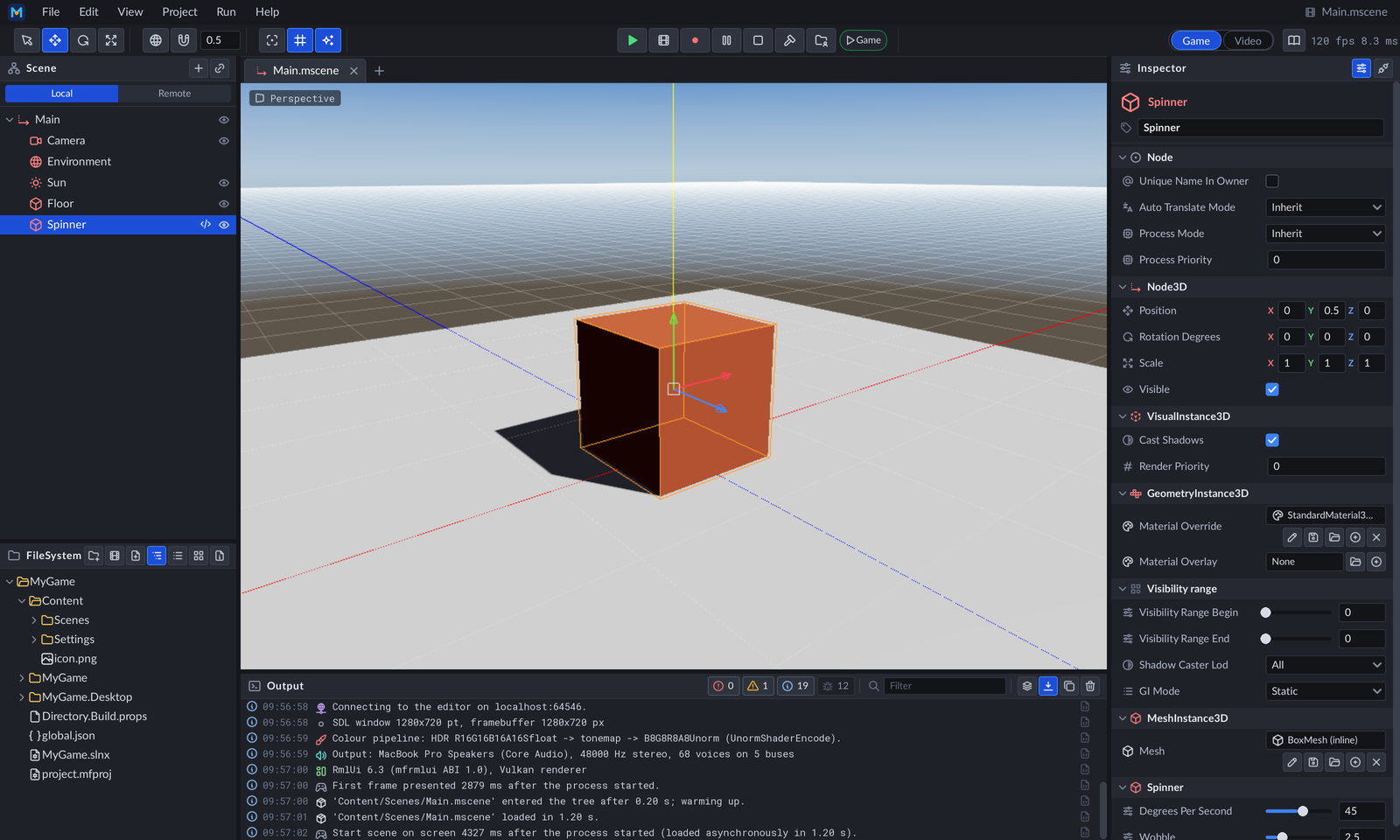
Run › Play and Record (F10) records the game to MP4, and the editor’s Game|Video toggle trims the recording (Gameplay recording, Video editing mode). The whole editor is described in Editor.
Opening projects and scenes
Section titled “Opening projects and scenes”just editor # Project Managerjust editor path/to/MyGame # open a projectjust editor Examples/Demo # the Demo project from the screenshotsjust editor Examples/Demo/Content/Scenes/basic_3d.mscene # open one sceneThe Demo
Section titled “The Demo”Examples/Demo is a standalone game project (project.mfproj, a node library and its desktop
project) with one scene per feature: Basic 3D and 2D, Audio 2D and 3D, Sound FX, UI, Physics 2D and 3D, and Spine. A
navigation bar switches scenes and every scene has a small RmlUi panel with its controls. Press F12 in the Demo (or in
any game) to open the developer overlay: frame, renderer, shadow-map, GPU, audio, physics and network panels, plus
light and axis gizmo toggles (Developer overlay). Its scenes, localization catalogs and tests
live in the project, so it is also the reference for how a game is laid out. Its Spine example is Esoteric Software’s,
not MIT (and the sky panorama is CC0): see its NOTICE.md. The editor’s Project Manager
has Demo… (Download Demo Project): it fetches the Demo of the running editor version from GitHub Releases into a
folder you choose, points it at your engine checkout and opens it.
just demo # the Basic 3D scenejust demo --scene Content/Scenes/physics_2d.mscene # any scene (--max-frames, --screenshot, ... are GameHost flags)just editor Examples/Demo # open it in the editorThe Forest is a first-person walk through a generated valley (just forest; Esc opens a pause
menu with live graphics, audio and control settings and its cameras: a fly-over, the reference shots R1–R8 and a free
camera). See Demo and Forest.
A tour of the code
Section titled “A tour of the code”Game loop
Section titled “Game loop”Games made from the template use GameHost (above). Tools and tests subclass Engine, load a scene into the
engine-owned scene tree, and let it run the frame:
public sealed class Game(in EngineOptions options) : Engine(options){    protected override void OnLoad()    {        base.OnLoad();                                      // window, renderer, servers        Tree.ChangeSceneToFile("Content/Scenes/Main.mscene");    }
    // Optional legacy hooks: OnUpdate, OnShadowPass, OnRenderMainPass.}
Engine manages the SDL window, Vulkan renderer, input context and the SceneTree, and drives the game loop.
GameTime provides per-frame timing (DeltaTime, FPS, FrameTimeMs, FrameCount). EngineOptions configures startup:
new EngineOptions{ GameName = "My Game", RenderingBackend = RenderingBackend.Vulkan, WindowSize = new Vector2D<int>(1280, 720), IconPath = "Content/icon.png"}The frame loop order is:
OnUpdate— game logic (legacy hook)- Scene tree tick — fixed-step
OnPhysicsProcess+ physics,OnProcess, deferred calls andQueueFree, transform sync, UI update - Frame preparation — the render server culls, sorts and uploads meshes
- Shadow pass —
OnShadowPass, then the render server’s shadow casters; then sub-viewports and picking passes - Main pass — the render server draws the sky and visuals into the HDR target, then
OnRenderMainPass - Overlay — tonemap, 2D canvas, screen gizmos, game UI, then the dev overlay on top
See Engine lifecycle.
Nodes and scenes
Section titled “Nodes and scenes”Everything in a game is a node in a Godot-style tree: Node (name, parent, children, owner, groups, signals,
ProcessMode), Node3D / Node2D (cached, dirty-flagged transforms; quaternion rotation), and front-ends for the
renderer: Camera3D, DirectionalLight3D / OmniLight3D / SpotLight3D, WorldEnvironment (sky),
MeshInstance3D, Sprite3D, SpineNode, Grid3D, SubViewport. The SceneTree runs OnEnterTree / OnReady /
OnPhysicsProcess / OnProcess / OnExitTree, input (OnInput), groups, CallDeferred and QueueFree; servers
(RenderServer, …) own the GPU objects behind the nodes.
public sealed class Spinner : Node3D{    [Export] public float DegreesPerSecond { get; set; } = 45;    [Signal] public event Action? Spun;
    protected override void OnProcess(in GameTime time) =>        RotationDegrees += new Vector3(0, DegreesPerSecond * time.DeltaTime, 0);}
var level = ResourceLoader.Load<PackedScene>("Content/Scenes/Level.mscene").Instantiate();Tree.Root.AddChild(level);level.GetNode<SpineNode>("Player/Body").SetAnimation("walk");SceneSaver.Save(level, "Content/Scenes/Level.mscene");
Scenes (.mscene) and resources (.mres) are JSON with stable UIDs, nested scene instances with overrides, and only
non-default values. [Export] members are registered by the MainframeEngine.Generators source generator (no runtime
reflection). NetworkNode manages the ENet library lifecycle and wraps the server and client message buses as a
node; it polls them every frame in OnProcess (or call Poll()). NodeId is a runtime-unique node identifier
(starts at 1; 0 = invalid); SceneTree.Find(id) looks a node up. See
Scene graph & nodes and Scene serialization.
Multiplayer
Section titled “Multiplayer”Server-authoritative multiplayer over ENet (UDP) or in-process loopback: [Replicated] members are sent as delta
snapshots and interpolated on clients, [Rpc] methods are checked against per-node authority, and the generator writes
the change detection, serialization and RPC dispatch (0 bytes allocated per network tick). See
Networking.
public sealed class Ship : Node3D{    [Replicated(Interpolate = true)] public Vector3 NetPosition { get => Position; set => Position = value; }    [Replicated] public int Hull { get; set; } = 100;
    [Rpc(RpcMode.Authority)] public void Thrust(Vector3 input) => NetPosition += input; // owner → server}
var mp = engine.Multiplayer;var shipScene = mp.RegisterScene("Content/Scenes/Ship.mscene"); // same scenes, same order, on both ends
// Servermp.Host(7777, maxClients: 8);mp.PeerJoined += peer => mp.Spawn<Ship>(shipScene, authority: peer);
// Clientmp.Connect("127.0.0.1", 7777);myShip.RpcThrust(Vector3.UnitZ); // generated senderAudioServer (registered by Engine at startup; a silent null device when there is no audio device) mixes
Godot-style audio nodes through a bus tree (Master → Music, SFX, UI, Voice: volume, mute, solo, effects):
var hum = new AudioPlayer3D{ Stream = AudioStream.Load("Content/Audio/engine.ogg"), // WAV, OGG, MP3, FLAC; memory or streamed Bus = "SFX", VolumeDb = -6, Loop = true, Autoplay = true, UnitSize = 3, MaxDistance = 50, AttenuationModel = AttenuationModel.Inverse,};car.AddChild(hum); // attenuated and panned around the listenerServers.Get<AudioServer>()!.PlayOneShot(click, bus: "UI"); // fire and forgetZzfxStream is a sound made from a ZzFX line (ZzfxStream.FromLine("zzfx(...[…])"), ZzfxPresets for coins,
lasers, explosions…) and synthesised on first play; the editor’s sound designer edits it, and its music editor renders
songs (just render-song <path.msong> does it headless). See Audio.
Localization
Section titled “Localization”label = Tr._("Settings"); // allocation-free lookupstatus = Tr.N("{0} enemy left", "{0} enemies left", n); // plural rules per language; n is {0}open = Tr.P("menu", "Open"); // contextTr.SetLocale("es"); // runtime switch: nodes re-translate (OnLocaleChanged)
[Export(Translatable = true)] public string Title { get; set; } = ""; // scene text, shown with Atr(Title)- Catalogs:
Content/locale/<locale>/LC_MESSAGES/messages.mo, fallback chainpt_BR → pt → en; compiled from.poat build time by the in-housemf-l10n(byte-identical to GNUmsgfmt, so no gettext install is needed). just l10n-extract(C# via the GetText.NET extractor, RML documents and[Export(Translatable)]scene strings →messages.pot→ every.po+ theqpspseudo-locale),just l10n-compile,just l10n-check,just l10n-stats.
See Localization.
Logging
Section titled “Logging”Log — severity levels (Debug, Info, Warning, Error, Fatal); every message becomes a structured LogEntry (UTC time,
[Category], message, call site) routed to ILogSinks: colored console (default), a rotating FileLogSink in the
per-user data folder, a MemoryLogSink ring for tools, and the editor link. Filtered-out messages — including
interpolated $"..." ones — allocate nothing. See Projects & GameHost.
Repository layout
Section titled “Repository layout”mainframe-engine/├── MainframeEngine/ # Core engine library│ ├── Src/│ │ ├── Core/ # Engine base class, EngineOptions, timing│ │ ├── Scene/ # Node, SceneTree, Node2D/Node3D, transforms, camera/light/sky/mesh nodes, input│ │ ├── Resources/ # Resource, PackedScene, ResourceLoader/Saver, AssetDatabase, UIDs, importers│ │ ├── Serialization/ # [Export]/[Signal] attributes, TypeRegistry, JSON scene reader/writer│ │ ├── Servers/ # ServerRegistry, RenderServer│ │ ├── Rendering/ # Vulkan renderer, GPU memory, meshes/materials/textures, sky, shadows, post, Spine│ │ ├── Lighting/ # LightEnvironment and the lights behind the light nodes│ │ ├── UI/ # RmlUi binding, VulkanUiRenderer, UiServer/UiLayer/UiDocument│ │ ├── Physics/ # PhysicsServer3D (Jitter2) / PhysicsServer2D (Box2D.NET), bodies, shapes, queries│ │ ├── Audio/ # AudioServer, buses, audio nodes, streams, decoders (SoundFlow)│ │ ├── Recording/ # GameRecorder: gameplay recording through an ffmpeg child process│ │ ├── Networking/ # MultiplayerApi replication, messages, transports, pooled buffers│ │ ├── Localization/ # Tr (gettext catalogs, locale switching), RML text, font fallback│ │ ├── Saves/ # SaveServer, SaveSchema<T>, save storage│ │ ├── Project/, EditorLink/ # project.mfproj, GameHost, game-assembly loading; game <-> editor protocol│ │ ├── Steamworks/ # Steam API wrappers (over the MainframeEngine.Steamworks shim)│ │ ├── Debugging/ # Log + ILogSink sinks, the F12 dev overlay (DevOverlay)│ │ └── Imaging/, Utils/ # PNG codec, helpers│ ├── Content/ # Shaders (Slang + committed SPIR-V), UI widgets and fonts, brand icons│ └── runtimes/ # Native libraries per RID (mfrmlui, ENet, Valve's steam_api)├── MainframeEngine.Generators/ # Roslyn source generator: node/resource registration, replication, editor icons├── MainframeEngine.Editor/ # The editor (RmlUi UI in Content/Editor)├── MainframeEngine.Video/ # The editor's video mode (segments, detection, ffmpeg media, Whisper transcription)├── Examples/ # Demo (one scene per feature; README screenshots) and Forest├── Templates/ # `dotnet new mfgame` game template├── Tools/MainframeEngine.L10n/ # mf-l10n: extract (RML, scenes), update, pseudo-locale, .po -> .mo compiler├── Native/ # Native shim sources (mfrmlui over RmlUi + FreeType, ENet), built by natives.yml├── Tests/ # Unit, editor, video, render (+ host) tests, benchmarks, editor QA scripts├── build/ # Scripts shared by the justfile and CI (shaders, template smoke, packaging, Linux Docker)├── docs/ # Design docs and the roadmap (the docs site's pages)├── docs-site/ # The website: landing page + docs (Astro Starlight)└── Plugins/Spine/ # Spine C# runtime (vendored submodule)The layers, assemblies and who owns what are in Architecture overview.
Shaders are Slang sources in MainframeEngine/Content/Shaders/ (mesh instances and the object-ID pass, lit Spine,
the skies, shadow depth passes, the scene grid, screen gizmos and the post-processing stack), compiled to SPIR-V by
dotnet build (slangc, with shared includes in include/; the committed .spv files are the fallback when the
Vulkan SDK is missing) and loaded at run time through ContentPaths. Light/shadow limits come from limits.json. After
editing one, just shaders refreshes the committed SPIR-V. See Shaders.
Spine: Plugins/Spine is the Spine C# runtime (skeleton data in JSON or binary, skeletal transforms and IK,
region and mesh attachments, the animation state machine, skins and slots); SpineNode draws it
(Spine). It is under the Spine Runtimes License, not MIT (see the README’s licence section).
Testing and CI
Section titled “Testing and CI”just test # engine + editor unit tests (no GPU)just test-render # render tests: golden images, Vulkan validation gate, 0-bytes-per-frame allocation gatejust render-tests-linux # the same on lavapipe in an x86_64 Docker container, like CIjust qa # one screenshot per Demo scene (docs/images/demo); just qa-editor / just qa-projects: scripted editor walkthroughsjust readme-screenshots # regenerate the editor screenshots in docs/images (needs ImageMagick)just forest-screenshots # the Forest's reference shots (docs/images/forest)just bench # benchmarks against Tests/MainframeEngine.Benchmarks/baseline.jsonThe editor screenshots come from just readme-screenshots (Tests/QA/readme-screenshots.qa
and the Demo project); the Demo’s from just demo-screenshots (alias just qa), scaled to
1280 × 720 so the README’s grid shows them at one size.
CI (ci.yml) builds with warnings as errors and runs the unit and editor tests on
Linux, Windows and macOS, dotnet format, a shader check (committed SPIR-V matches its sources), the render tests on
Mesa’s lavapipe under Xvfb, and a template smoke test (dotnet new mfgame, build, run headless). Docs-only pull
requests skip all of that (build/ci-changes.sh). ci-success is the single required check on main. See
Testing and Build & platforms.
Releases and versioning
Section titled “Releases and versioning”The version lives only in git tags (vX.Y.Z, SemVer, first release v1.0.0); engine, generator and editor share
it. publish.yml (manual, main only) re-runs CI, bumps the patch of the latest
tag, attaches self-contained editor builds for osx-arm64 (Mainframe Engine.app), win-x64 and linux-x64 to a GitHub
Release, and pushes the MainframeEngine and MainframeEngine.Templates packages to nuget.org. just publish-local
builds the same archive locally. Creating and playing game projects needs the .NET 10 SDK. See
Release & versioning.
The docs site
Section titled “The docs site”These pages are the repository’s Markdown in docs/, published with the landing page at
mainframe-games.github.io/mainframe-engine. just docs serves it
locally with live reload; see Docs site.